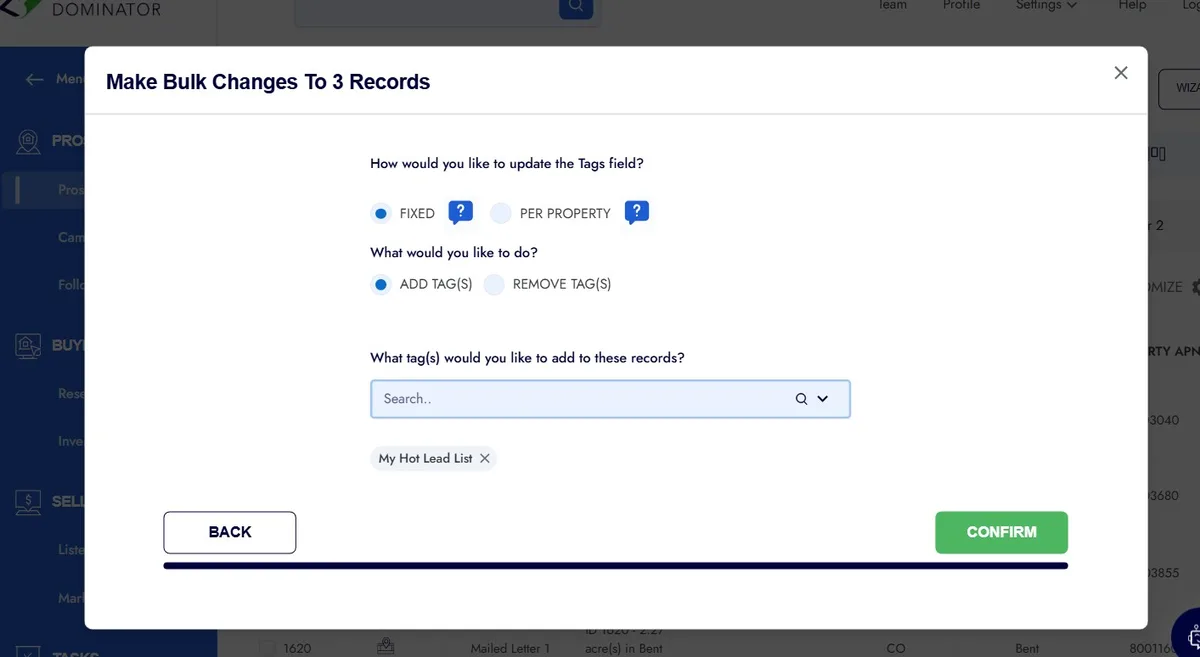
Search tagging is the quiet workhorse behind every fast, intuitive content experience you’ve ever enjoyed online. It’s the reason you can type three vague words into a search bar and still land on exactly the right document, product, or article in seconds.
And yet, most teams treat it as an afterthought — a checkbox to tick after the “real” work is done. That’s a mistake, and a costly one.
I’ve spent a lot of time watching how organizations handle their internal content, their product catalogs, their knowledge bases, and their public-facing sites. The pattern is always the same: the teams that nail search tagging move faster, frustrate their users less, and squeeze far more value out of the content they already have.
The teams that ignore it end up with a digital junk drawer — everything’s technically in there, but nobody can find anything.
So let’s talk about what search tagging actually means, why it matters more than most people realize, and how you can build a tagging system that genuinely works instead of one that collapses under its own weight after six months. This is a deep dive, so grab a coffee.
We’ll cover strategy, structure, tooling, common pitfalls, and the small tactical moves that separate a searchable library from a black hole.
What Search Tagging Actually Means (And What It Doesn’t)
At its core, search tagging is the practice of attaching descriptive labels — keywords, categories, attributes, metadata — to content so that search engines and internal search systems can retrieve it accurately. Think of it as giving every piece of content a set of handles that people can grab onto when they’re looking for it.

Here’s where people get confused. Search tagging is not the same as SEO keyword stuffing, and it’s not the same as dumping a dozen random tags on a blog post “just in case.” It’s a deliberate, structured system.
When done right, search tagging creates a map of your content that mirrors how real humans think about and look for information.

The distinction matters because sloppy tagging actively harms discoverability. If you tag a product page with “shoes,” “footwear,” “sneakers,” “trainers,” and “kicks” all at once without a governing logic, you’ve created noise. A well-designed search tagging framework decides which terms are canonical, which are synonyms, and which belong in a hierarchy. That’s the difference between a system and a mess.
In practical terms, search tagging shows up in a few common places: e-commerce product attributes, CMS taxonomies, knowledge base article labels, digital asset management (DAM) systems, and even the alt text and structured data on public web pages.

Each context has its own quirks, but the underlying principle never changes — labels exist to connect seekers with content.
Why Search Tagging Drives Real Business Results
Let’s get concrete. When search tagging is done well, three things happen almost immediately, and each one has a measurable dollar value attached to it.
First, users find what they need faster. A study from Nielsen Norman Group found that users who can’t find information within roughly 15 seconds often abandon the task entirely. Every second you shave off that search journey is a second you’re not losing someone to frustration. Good search tagging directly reduces time-to-find.
Second, support costs drop. In internal knowledge bases, employees waste an astonishing amount of time hunting for the right policy document or troubleshooting guide. When search tagging is structured properly, that hunt becomes a quick lookup.
I’ve seen teams cut their internal “where is this file” interruptions by more than half simply by fixing their tag taxonomy.
Third, revenue goes up in commercial contexts. On e-commerce sites, faceted search powered by solid search tagging lets shoppers filter by size, color, material, and use case in one click. That’s not a nice-to-have; it’s the difference between a browsing session that converts and one that bounces.

There’s also a compounding effect that rarely gets mentioned. Good search tagging makes your content reusable. When everything is labeled consistently, you can pull related articles into a recommendation widget, auto-generate “you might also like” sections, and build topic hubs without manual curation. The upfront effort pays dividends for years.
Building a Search Tagging Taxonomy That Scales
Here’s the hard truth: most tagging systems fail not because people are lazy, but because the taxonomy was never designed to scale. Someone picks a few tags on day one, and by month twelve you’ve got 400 tags, half of which overlap, and nobody remembers which ones to use.
A scalable search tagging taxonomy starts with a small set of top-level categories. Resist the urge to be comprehensive. Start with five to seven broad buckets, then allow sub-tags within each. This mirrors how libraries work — you don’t browse every book individually; you navigate a structure.
Next, establish naming conventions and stick to them religiously. Decide once whether you’ll use singular or plural forms, whether you’ll allow abbreviations, and how you’ll handle capitalization. Write it down. Put it in a shared doc. Because the moment two people tag the same concept differently, your search tagging system starts leaking accuracy.

Controlled Vocabularies versus Free-Form Tagging
A controlled vocabulary is a predefined list of approved tags. Free-form tagging lets anyone create whatever label they want. Both have a place, but they serve different purposes.
Controlled vocabularies are essential for anything that needs consistency — product catalogs, compliance documents, medical records. They prevent the “sneakers vs. Trainers vs. Running shoes” problem by mandating one canonical term with synonyms mapped behind the scenes. When you build search tagging around a controlled vocabulary, your search results become predictable.
Free-form tagging, on the other hand, is great for capturing emergent themes, user-generated content, and social platforms where folksonomy (folks + taxonomy) naturally organizes itself. The trick is to let free-form tags exist in a sandbox, then periodically review them and promote the useful ones into your controlled vocabulary. That’s how you get flexibility without chaos.
How to Handle Synonyms and Aliases
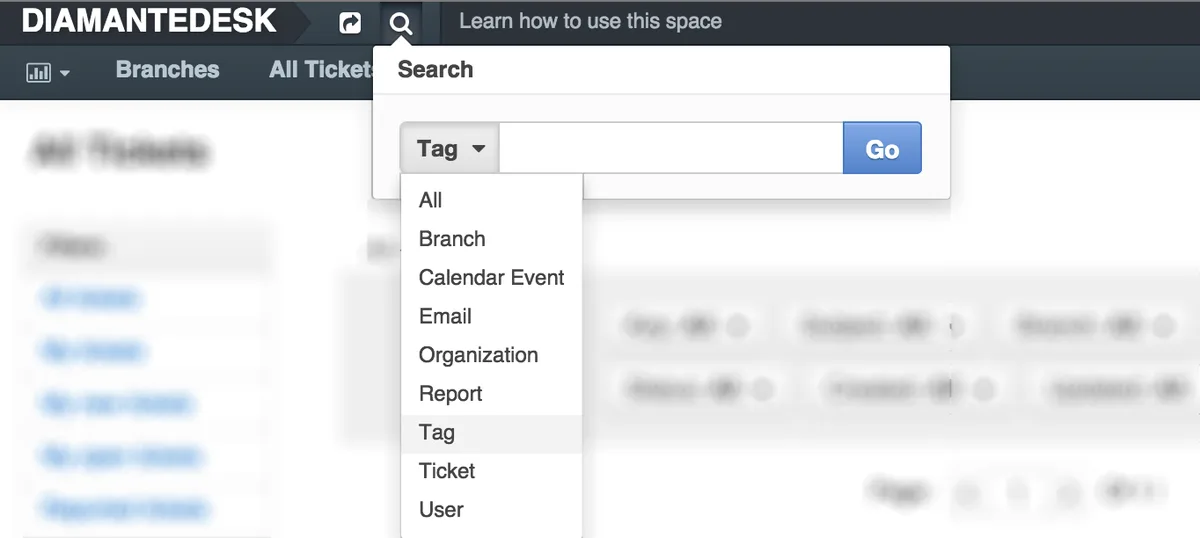
Synonyms are the silent killers of search tagging. Two users searching “laptop” and “notebook computer” expect the same results, but a naive system treats them as different queries.
The fix is to maintain an alias map. For every canonical tag, list the synonyms, misspellings, and regional variations that should route to it. “Elevator” and “lift.” “Soda” and “pop.” “Resume” and “CV.” This map does more for search quality than almost any other single intervention, and it’s surprisingly cheap to build.
I usually recommend starting with the top 100 search queries from your analytics. Look at which ones return zero results or poor results, then check whether a synonym mapping would fix the problem. Nine times out of ten, it will. That’s search tagging doing its job quietly in the background.
Search Tagging Across Different Content Types
Not all content behaves the same way, and your tagging strategy should acknowledge that. A product SKU, a blog post, a PDF contract, and a video tutorial each have different attributes worth capturing.

For text-based web content, search tagging usually involves topic tags, audience tags, and intent tags. Topic tells you what it’s about. Audience tells you who it’s for. Intent tells you whether it’s informational, transactional, or navigational. That three-axis approach covers most retrieval scenarios.
For media assets, you’re dealing with visual and temporal metadata. A video might be tagged by speaker, location, duration, transcript keywords, and licensing status. Digital asset management teams live and die by how well their search tagging captures these dimensions.
For structured data like products or records, tagging overlaps heavily with database design. Attributes become tags, and those tags power faceted navigation. The line between “tag” and “field” blurs here, and that’s fine — the goal is retrieval, not semantic purity.

Tagging Web Pages for Both Users and Crawlers
Public-facing pages need search tagging that serves two masters: human visitors and search engine crawlers. The good news is that well-structured tagging helps both.
On the human side, clear category tags and related-content labels improve on-site navigation. On the crawler side, structured data — schema.org markup, meta tags, breadcrumb hierarchies — tells search engines exactly how your content fits into the broader web.
When you align your internal search tagging with your external structured data, you get consistency that pays off in rankings and click-through rates.
One practical tip: use the same canonical terms in your schema markup that you use in your internal taxonomy. If your CMS tags an article as “personal-finance,” don’t mark it up as “money-management” on the public page. Consistency compounds.
A Step-By-Step Framework for Implementing Search Tagging
Enough theory. Let’s walk through how to actually roll this out, whether you’re tagging 50 documents or 50,000.
Start with an audit. Pull a representative sample of your content — say 100 items — and look at how they’re currently tagged. You’ll almost certainly find inconsistencies, orphans (tags used only once), and gaps (concepts with no tag at all). Document what you find. This baseline becomes your measurement stick.
Next, define your taxonomy. Based on the audit, draft your top-level categories and the rules for sub-tags. Get buy-in from the people who’ll actually apply the tags — content managers, product teams, support staff. A taxonomy imposed from above without input from users tends to get ignored.

Then build the alias map. Pull your top search queries, identify synonyms, and map them to canonical tags. This is tedious work, but it’s the single highest-leverage step in the entire process.
After that, choose your tooling. You need a system that enforces your taxonomy, suggests tags as users type, and reports on tag usage over time. We’ll dig into tools in a moment.
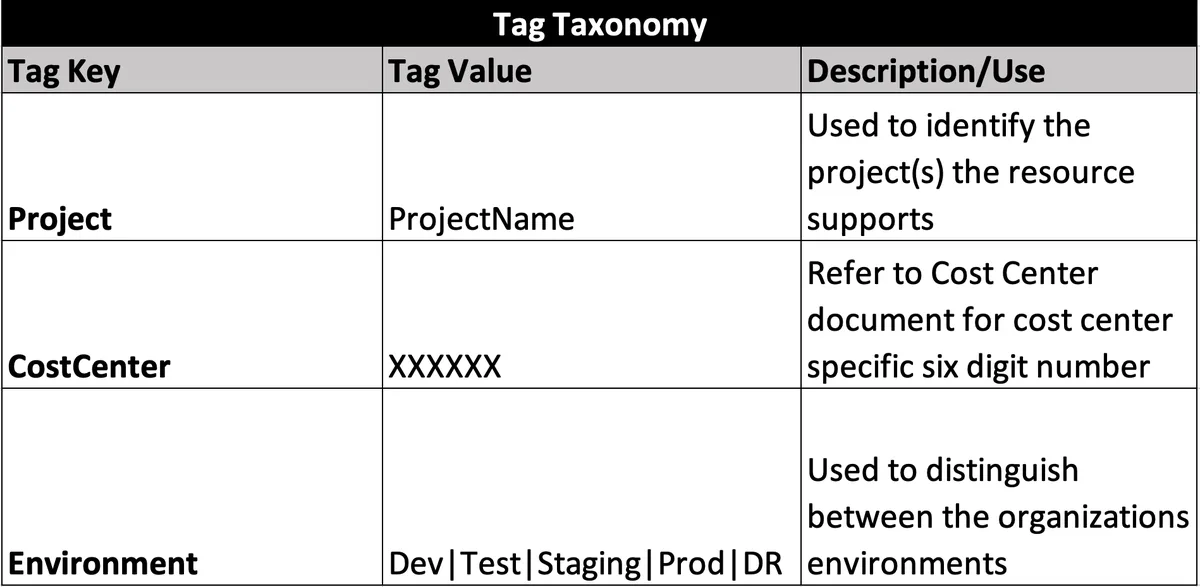
Finally, train your team and set up a review cadence. Search tagging isn’t a one-time project; it’s an ongoing practice. Schedule quarterly reviews to prune dead tags, promote emerging ones, and adjust as your content evolves.
Common Mistakes to Avoid During Rollout
The biggest mistake is trying to tag everything at once. You’ll burn out your team and end up with inconsistent results. Instead, prioritize your highest-traffic or highest-value content and tag that thoroughly first.
Another frequent error is over-tagging. More tags don’t mean better retrieval. In fact, once you exceed roughly ten tags per item, precision starts to drop. Aim for three to seven well-chosen tags per piece of content.

And please, don’t forget governance. Without someone owning the taxonomy, it drifts. Assign a tag steward — even if it’s a part-time role — who reviews new tag requests and keeps the system tidy. That single decision prevents 80% of long-term decay.
Tools and Platforms That Support Search Tagging
You don’t need exotic software to do search tagging well, but the right tools make it dramatically easier. Here’s a practical breakdown of what’s out there.
For content management, most modern CMS platforms — WordPress, Contentful, Sanity, Strapi — support custom taxonomies natively. WordPress, in particular, distinguishes between categories (hierarchical) and tags (flat), which maps nicely onto the controlled-vocabulary-versus-free-form distinction we discussed earlier.
For enterprise knowledge bases, tools like Confluence, Notion, and SharePoint offer tagging features, though their search relevance varies. SharePoint’s managed metadata service is genuinely powerful once configured, but it’s notoriously fiddly to set up.
For digital asset management, dedicated platforms like Bynder, Brandfolder, and Cloudinary handle search tagging at scale, with AI-assisted auto-tagging that can save enormous manual effort.
And for e-commerce, faceted search engines like Algolia, Elasticsearch, and Typesense are built around the idea that tags drive filtering. Their relevance tuning features let you weight certain tags more heavily, which is invaluable when some attributes matter more than others.
| Tool Category | Example Platforms | Best For | Search Tagging Strength |
|---|---|---|---|
| CMS / Blogging | WordPress, Contentful, Sanity | Editorial content, marketing sites | Custom taxonomies, hierarchical categories |
| Knowledge Base | Confluence, Notion, SharePoint | Internal documentation, wikis | Managed metadata, permission-aware search |
| Digital Asset Management | Bynder, Brandfolder, Cloudinary | Images, video, brand assets | AI auto-tagging, visual recognition |
| E-commerce Search | Algolia, Elasticsearch, Typesense | Product catalogs, faceted filtering | Relevance tuning, synonym management |
| Enterprise Search | Glean, Coveo, Lucidworks | Cross-system content discovery | Unified tagging, ML-driven ranking |
The takeaway? Match the tool to the content type. Don’t force a DAM system to handle your blog taxonomy, and don’t expect a simple CMS to power enterprise-wide search tagging across a dozen systems.

Measuring Whether Your Search Tagging is Working
You can’t improve what you don’t measure, and search tagging is no exception. Fortunately, the metrics here are straightforward.
Start with search success rate — the percentage of searches that result in a click on a result. If this number is below 70%, your search tagging likely has gaps or synonym problems. Above 90% is excellent, though it varies by context.

Track zero-result searches. Every query that returns nothing is a signal. Either you’re missing content, missing tags, or missing alias mappings. Review these weekly and fix the easy wins immediately.
Then look at tag coverage: what percentage of your content has at least three tags? Items with zero or one tag are effectively invisible to search. Aim for 95% coverage on your priority content.
Finally, monitor tag sprawl. Count your unique tags quarterly. If the number is growing faster than your content, you’ve got a governance problem. Prune aggressively — dead tags do nothing but confuse future taggers.
Using Analytics to Refine Your Tag Set
Your search logs are a goldmine for refining search tagging. Look for patterns in what people search for versus what they click on. If a search for “pricing” consistently leads to clicks on a page tagged “costs,” you’ve found a synonym mapping to add.
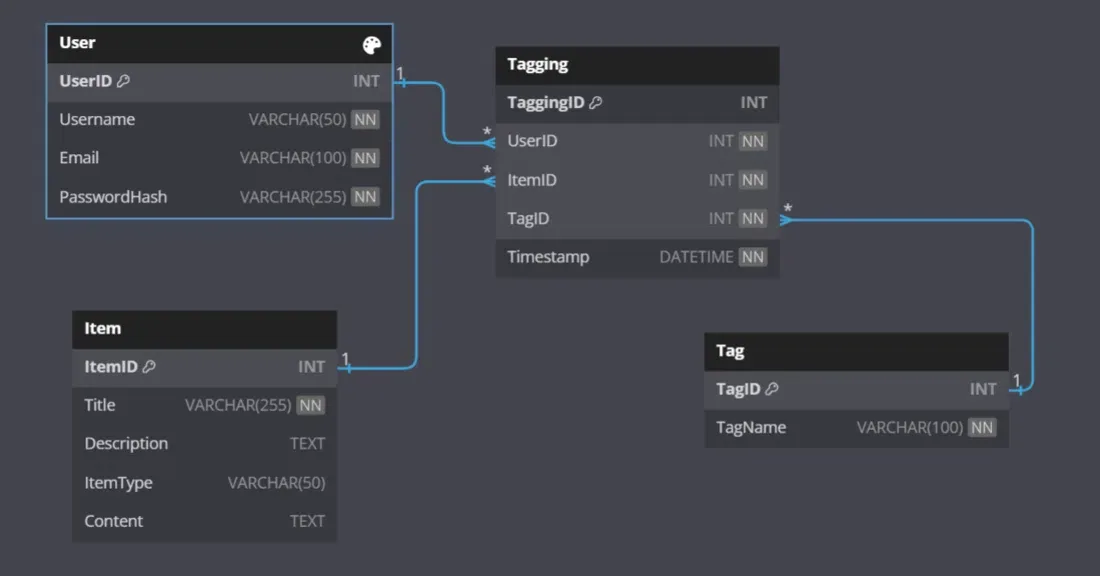
Also watch for “long tail” queries that appear repeatedly. When three or more people search the same unusual phrase in a month, that phrase probably deserves its own tag or alias. This bottom-up approach complements your top-down taxonomy and keeps the system grounded in real user behavior.
One more tip: segment your search analytics by user type. New visitors, returning customers, and internal employees search very differently. What looks like a tagging failure for one group might be a tagging success for another.
Advanced Search Tagging Techniques
Once you’ve got the basics down, there’s a whole layer of sophistication available. These techniques aren’t necessary for every organization, but they can move the needle significantly when applied thoughtfully.
Auto-tagging using machine learning is the big one. Modern NLP models can read a document and suggest relevant tags with surprising accuracy. This doesn’t replace human judgment, but it accelerates the initial pass dramatically. Teams using auto-tagging often report 60-70% time savings on large-scale tagging projects.
Faceted search tagging takes the concept further by tagging content along multiple independent dimensions simultaneously. A hotel, for example, might be tagged by location, price band, amenities, and traveler type. Each dimension becomes a facet users can filter by, and the combinations create a rich discovery experience.
Semantic tagging goes beyond literal keywords to capture meaning. Instead of tagging an article “budgeting,” a semantic approach might tag it “financial planning” and “money management,” recognizing that these concepts are related even though they use different words. This is where this approach starts overlapping with knowledge graphs, and it’s genuinely powerful for large content libraries.

When to Invest in Semantic Tagging
Semantic tagging isn’t for everyone. It requires either sophisticated tooling or significant manual effort, and the ROI depends on scale.
If you’ve got fewer than 1,000 pieces of content, structured keyword tagging is probably sufficient. The overhead of semantic systems won’t pay off at that scale. Once you cross into tens of thousands of items — or when your content spans multiple languages and domains — semantic approaches start earning their keep.
A good middle ground is hybrid tagging: use keyword tags for the bulk of your content, then apply semantic tagging selectively to your highest-value items. That way you get the benefits where they matter most without drowning in complexity.
Search Tagging for E-Commerce: a Special Case
E-commerce deserves its own section because the stakes are so direct. Every improvement in this approach here translates to measurable revenue.
The core challenge is that product data is inherently multi-dimensional. A single shirt has size, color, material, fit, brand, price, occasion, and care instructions — all of which shoppers might filter by. Your this practice needs to capture these dimensions without overwhelming the user.
The best e-commerce this approach systems use a layered approach. Base attributes (size, color, brand) are mandatory and controlled. Descriptive tags (style, occasion, season) are optional but encouraged. And behavioral tags (bestseller, new arrival, limited edition) update automatically based on sales data.
Synonym handling is especially critical here. Shoppers search for “joggers,” “sweatpants,” and “track pants” interchangeably. If your this practice doesn’t map these to the same product set, you’re losing sales to semantics. Every e-commerce team I’ve worked with has found at least a dozen high-value synonym mappings they were missing.
Faceted Navigation and Tag Architecture
Faceted navigation is where this approach becomes visible to the customer. Each facet is essentially a tag dimension, and the way you structure those dimensions determines how easily shoppers can narrow down results.
A common mistake is creating too many facets. Ten facets overwhelm users; three to five is usually ideal. Choose the dimensions that matter most for your catalog and hide the rest behind an “advanced filters” toggle.
Another key decision is whether facets should be single-select or multi-select. Size is usually single-select (you wear one size). Color is often multi-select (you might want red or blue). Getting this right requires understanding your customers’ actual shopping behavior, not guessing.
Governance: Keeping Search Tagging Healthy Long-Term
Here’s the thing nobody tells you when you start: the hard part isn’t building a tagging system. It’s keeping it alive.
Without governance, every this approach system drifts toward entropy. New tags get added without review. Old tags linger long after their content is gone. Naming conventions erode. Within a year, you’re back to square one.
The antidote is a lightweight governance model. You need three things: a clear owner, a simple process for proposing and approving new tags, and a regular review cadence. That’s it. You don’t need committees or bureaucracy — just consistent attention.
I’ve seen organizations assign tag stewardship to a single person who spends two hours a week on it. That modest investment keeps a system of 20,000 items clean and useful. Compare that to the cost of a chaotic system, and the math is obvious.
Training Your Team on Tagging Discipline
Even the best governance model fails if the people applying tags don’t understand the system. Training is non-negotiable.
Start with a short onboarding doc — one page, not fifty. Explain the taxonomy, the naming conventions, and the top three mistakes to avoid. Then provide a quick reference card that taggers can keep open while they work.
Refresher training matters too. Every six months, run a short session covering recent changes, common errors you’ve spotted, and any new tags worth knowing about. this practice discipline is a habit, and habits need reinforcement.
Frequently Asked Questions About Search Tagging
Here is an in-depth breakdown of key considerations regarding this section:
How Many Tags Should Each Piece of Content Have?
Aim for three to seven tags per item. Fewer than three usually means the content is under-described and hard to find. More than seven starts to dilute precision and creates noise in search results. The sweet spot depends on your content type, but three to seven is a solid default for most scenarios.
Is Search Tagging the Same as SEO?
They overlap but aren’t identical. SEO focuses on external search engines and public discoverability. this practice is broader — it covers internal search, knowledge bases, DAM systems, and product catalogs, in addition to public web content. Good search tagging supports SEO, but it serves many other purposes too.
Can I Automate Search Tagging With AI?
Yes, and increasingly you should. Modern NLP models can suggest tags based on content analysis with impressive accuracy. That said, human review is still essential for quality control, especially in specialized domains. The best results come from AI-assisted tagging with human oversight, not full automation.
How Often Should I Review My Tag Taxonomy?
Quarterly is a good baseline for most organizations. High-velocity content operations might review monthly, while smaller teams can get away with twice a year. The key is consistency — a regular cadence prevents drift far better than sporadic deep cleanups.
What’s the Biggest Search Tagging Mistake You See?
Over-tagging. People assume more tags equal better findability, but the opposite is often true. Excess tags create ambiguity, slow down search, and confuse users. Precision beats volume every time.
Do I Need Specialized Software for Search Tagging?
Not necessarily. Most CMS platforms and knowledge bases have adequate tagging features built in. Specialized tools become worthwhile when you’re dealing with large volumes, multiple content systems, or complex faceted search requirements. Start with what you have and upgrade when the pain justifies it.
How Do I Handle Multilingual Tagging?
Maintain separate taxonomies per language, but link them through a shared concept ID. That way, a search in Spanish and a search in English for the same concept can surface the same content. Machine translation alone won’t cut it — you need human review to catch cultural and linguistic nuances.
What Metrics Matter Most for Search Tagging?
Search success rate, zero-result query rate, and tag coverage are the big three. Track them monthly. If success rate is climbing and zero-result queries are falling, your this practice is doing its job. If not, dig into the search logs and find the gaps.
Putting It All Together: Your Search Tagging Action Plan
If you take nothing else from this guide, take this: this approach is a system, not a task. Treat it like one and it will reward you for years. Treat it like an afterthought and it will quietly undermine everything you build on top of it.
Start small. Audit what you have. Define a taxonomy that’s simple enough to remember and flexible enough to grow. Build your alias map from real search data. Pick tools that fit your content type. Train your team. Measure relentlessly. And assign someone to own it.
Do those things and you’ll watch a strange thing happen. People will stop complaining that they can’t find things. Support tickets about “missing” documents will dry up. Shoppers will convert faster. And the content you’ve already invested in will finally start pulling its weight.
That’s the real promise of search tagging — not a flashy feature, but a foundational one. It’s the plumbing that makes everything else work. And once you’ve got it right, you’ll wonder how you ever operated without it.
For verified reference and background research, consult the authoritative informational resource on this topic.