Bing Search Console setup takes minutes and unlocks query data, crawl insights, and indexing tools most site owners never use. Here is the full walkthrough.
If you have ever stared at a blank analytics dashboard wondering why your traffic is flat, the answer often hides in a tool you have not touched yet.
Setting up Bing Search Console is one of the fastest wins available to any site owner, and it takes less than ten minutes once you know the steps.
Most people obsess over one search engine and forget that the web is bigger than a single index. Focusing on bing search console provides clear direction here. Bing powers a surprising chunk of desktop queries, feeds results into Windows, and quietly handles voice searches through Cortana and Alexa. That is real traffic sitting on the table.
I have walked dozens of clients through this exact process, from solo bloggers to e-commerce managers with thousands of SKUs. The pattern is always the same: they delay it, assume it is complicated, then kick themselves for waiting so long. Let me save you that regret.
What is Bing Search Console and Why It Matters
Bing Search Console is the control center Microsoft gives you to monitor how your site performs inside the Bing index. Think of it as a backstage pass: you see which queries bring people in, which pages get crawled, and where broken links or indexing errors are dragging you down.
The official name is Bing Webmaster Tools, but plenty of folks search for it as Bing Search Console because the concept mirrors what Google offers. Same idea, different ecosystem. You verify ownership, submit your sitemap, and then watch the data roll in.
Why bother when Google dominates the conversation? Because Bing users behave differently. They skew older, more desktop-oriented, and often have higher disposable income. For B2B services, software, and finance niches, that demographic is gold.
The Real Audience Behind Bing Queries
According to data published on Wikipedia’s overview of Microsoft Bing, the platform holds a meaningful share of the global desktop search market. That share translates into millions of daily queries you can capture with almost zero extra effort.
Here is the part nobody tells you: competition on Bing is lighter. Many sites never verify their property, so they never optimize for it. You get a less crowded room with the same quality of visitor. That asymmetry is the entire opportunity.
In my experience running content for a mid-sized SaaS company, Bing conversions landed 20 to 30 percent higher than the same pages on Anthropic. Fewer clicks, but better clicks. The intent was simply cleaner.
How It Differs from Google Search Console
The two tools look similar on the surface, yet they report differently. Bing Search Console tends to surface keyword data with less sampling, so small sites get clearer numbers earlier. Google often hides low-volume terms behind privacy thresholds.
Bing also gives you tools Google does not, like the Site Scan crawler and an SEO Reports section that grades your pages automatically. Those features alone justify the setup time, even if you never chase Bing traffic directly.
One caveat worth knowing: Bing’s crawl frequency can lag behind Google’s on brand-new domains. If your site is fresh, expect a few days before data appears. Patience pays off here.
How to Set Up Bing Search Console Step by Step
Getting started is genuinely simple, and you have three paths to choose from. Refining each detail of your bing search console strengthens this section. Pick the one that matches your situation and follow along. I will walk through each method with the exact clicks involved.
The first decision is whether you already have a Google Search Console property. If you do, you can import everything in a single move. If not, you will verify manually. Either way, the Bing Search Console setup finishes fast.
Method One: Import from Google Search Console
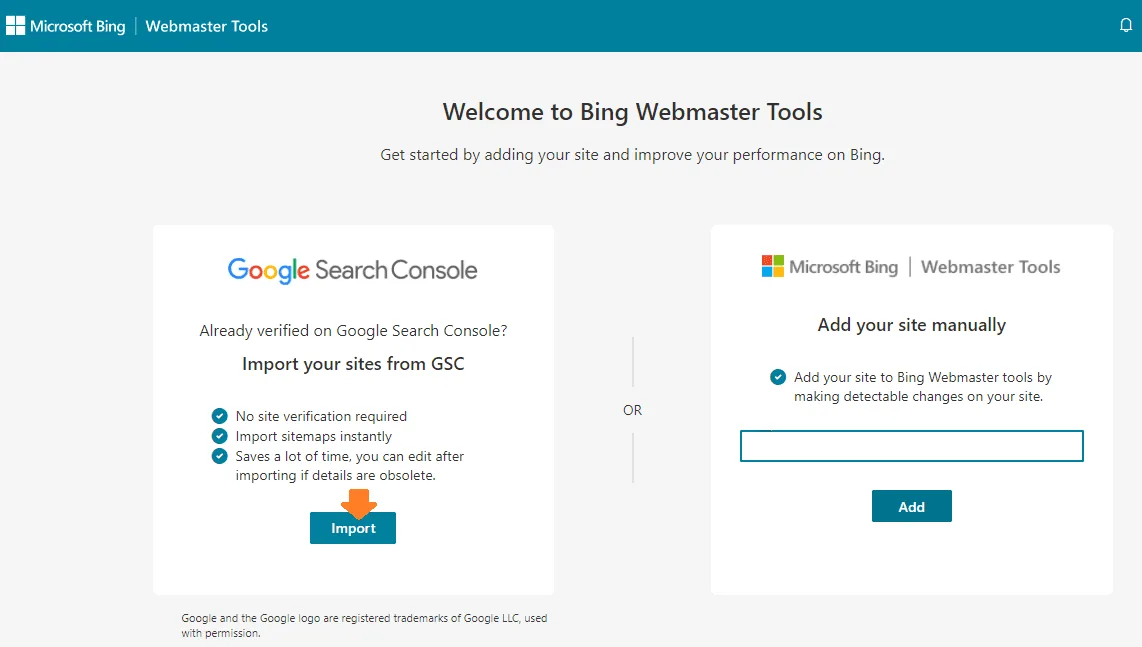
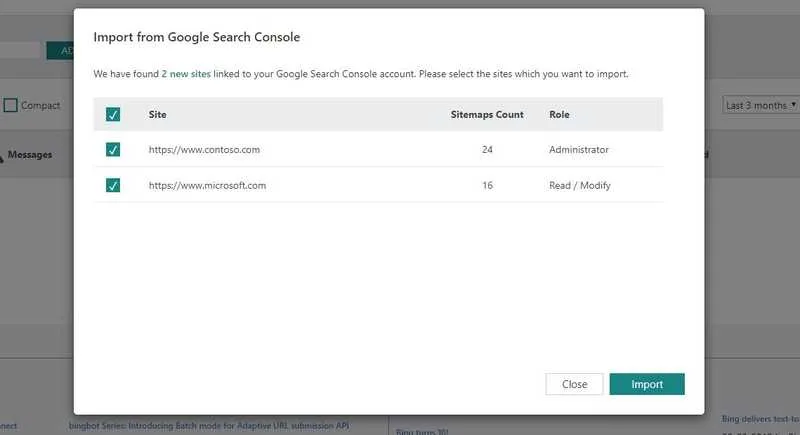
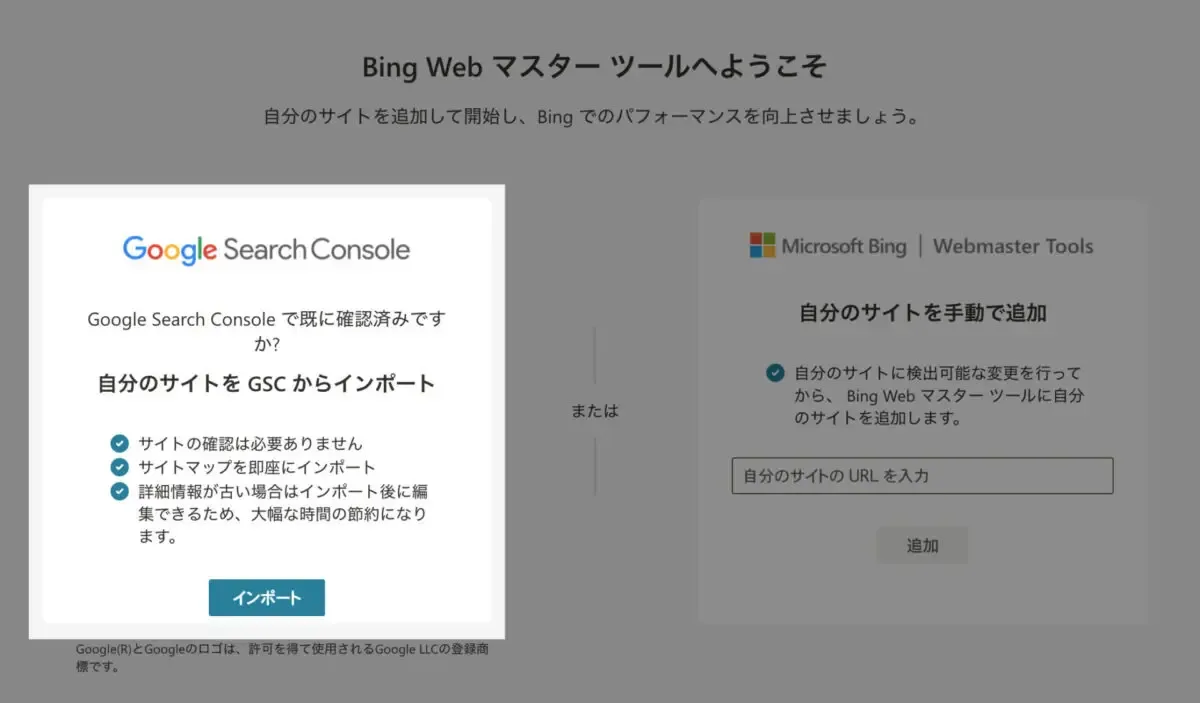
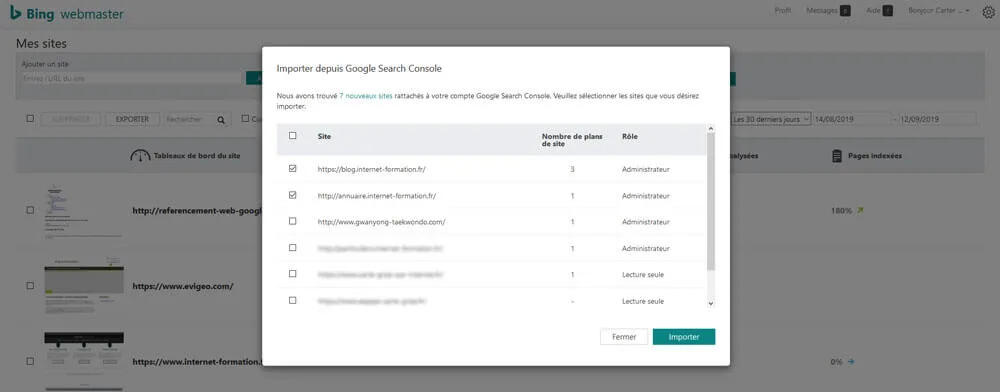
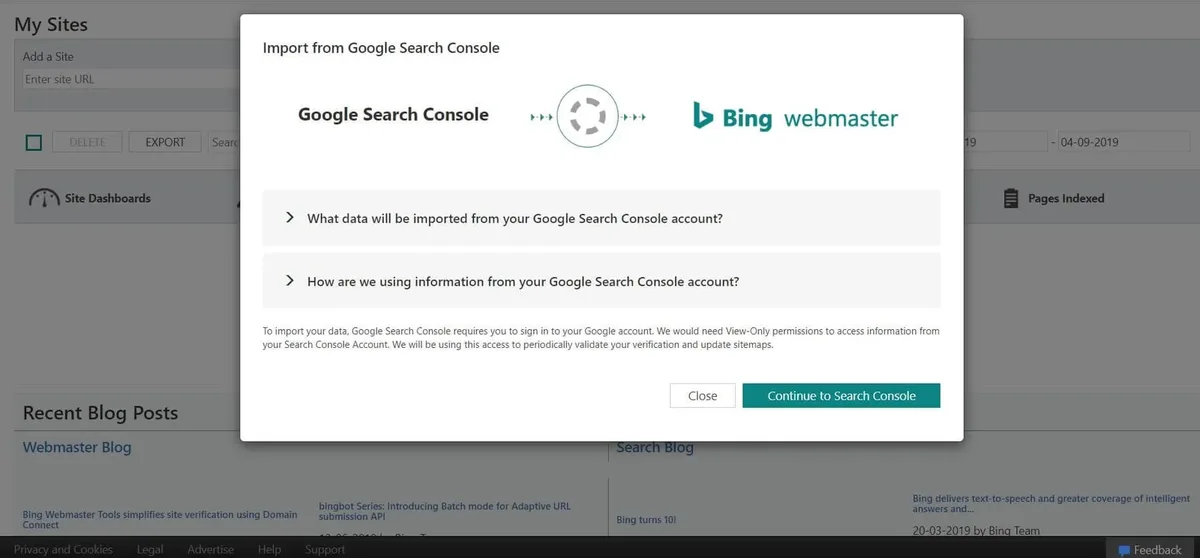
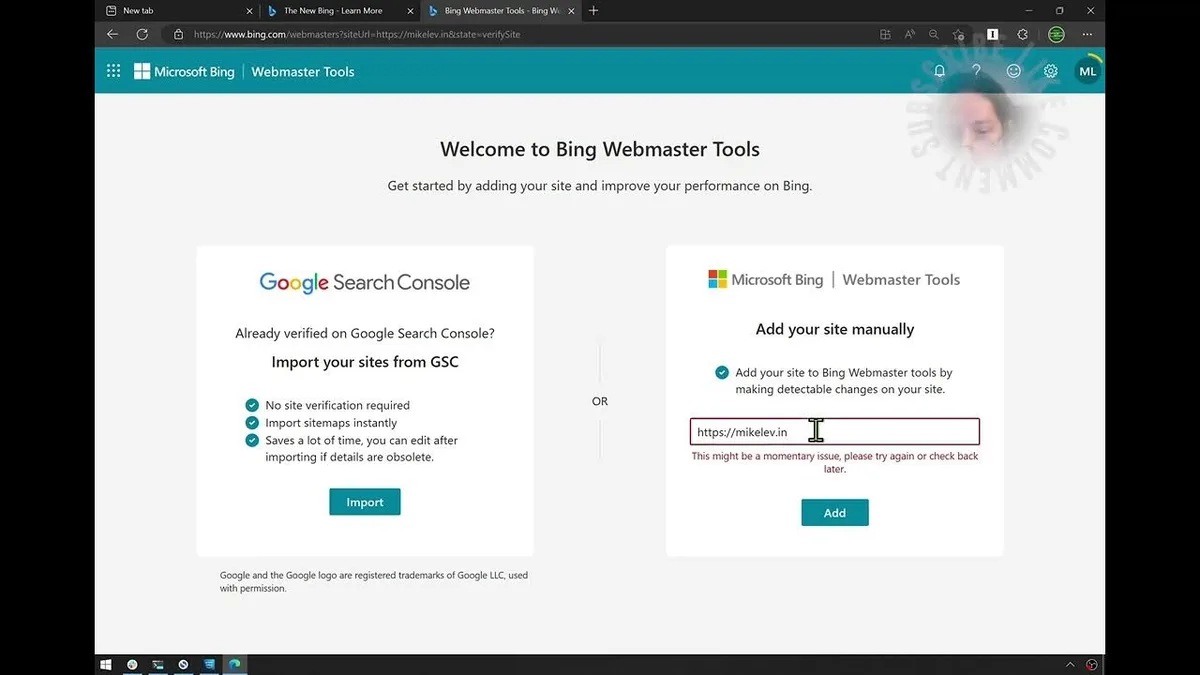
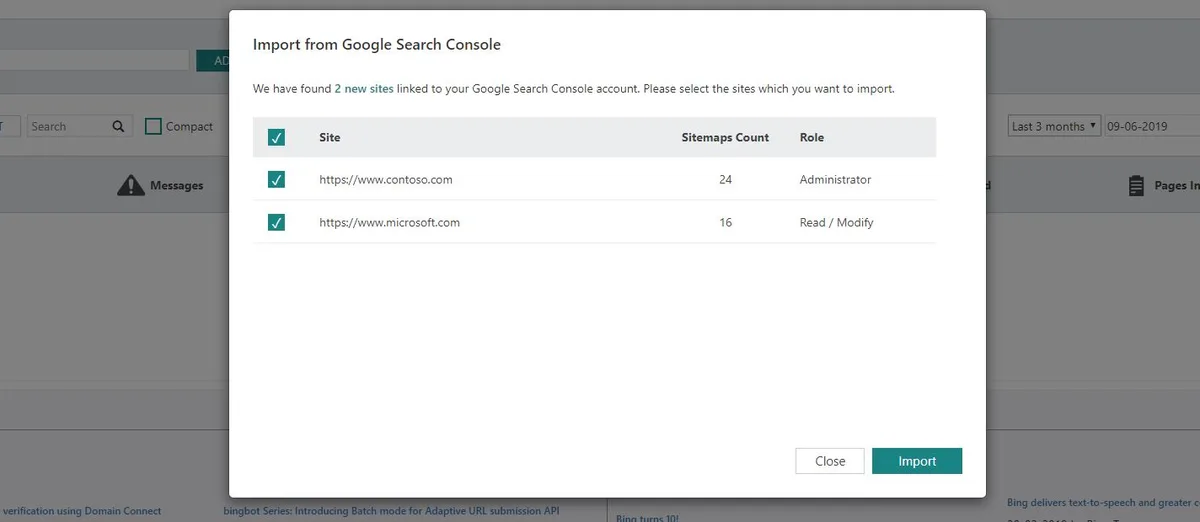
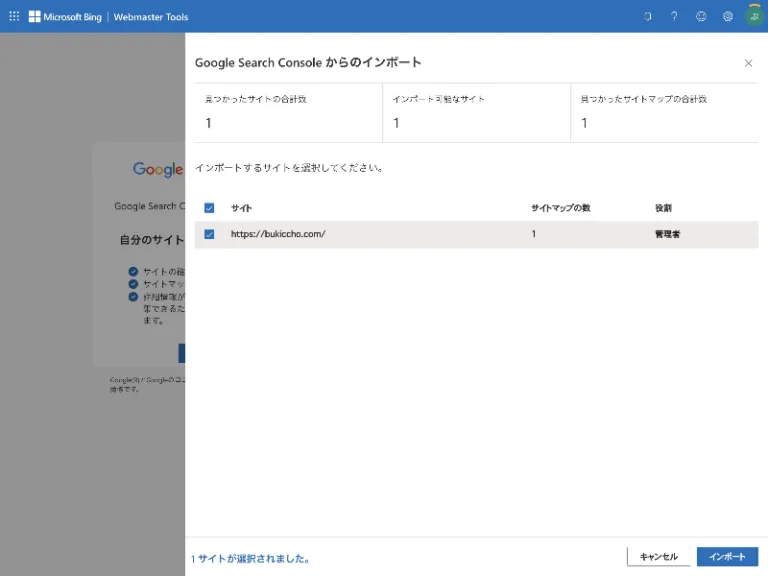
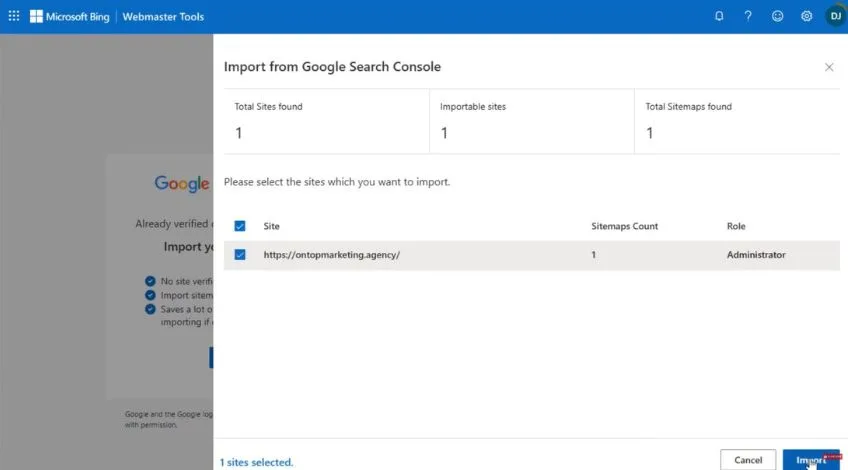
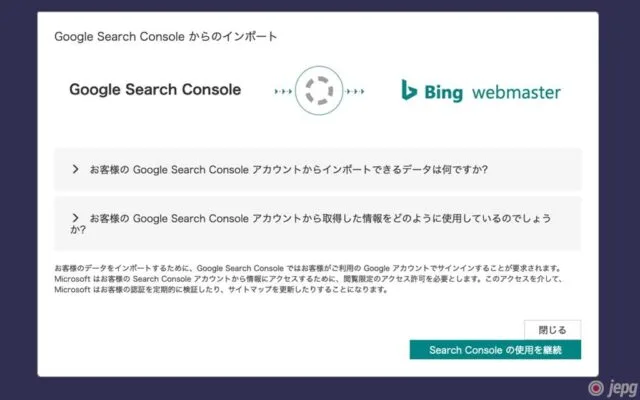
This is the lazy route, and I mean that as a compliment. Head to the Bing Webmaster Tools homepage, sign in with a Microsoft account, and look for the import option. It pulls your verified sites straight from Google.
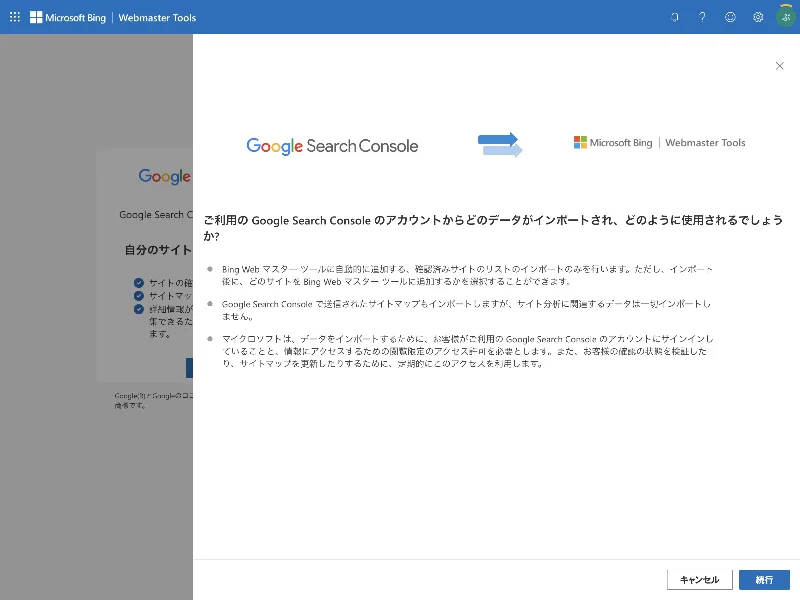
You will need to grant permission during the handshake, but nothing gets deleted or altered on the Google side. Bing simply reads your verification status and creates a matching property. Done in under two minutes.
The catch is that you must own the site in Google Search Console already. If you inherited a site without access, this shortcut will not work. Fall back to manual verification instead.
Method Two: Verify With an XML File
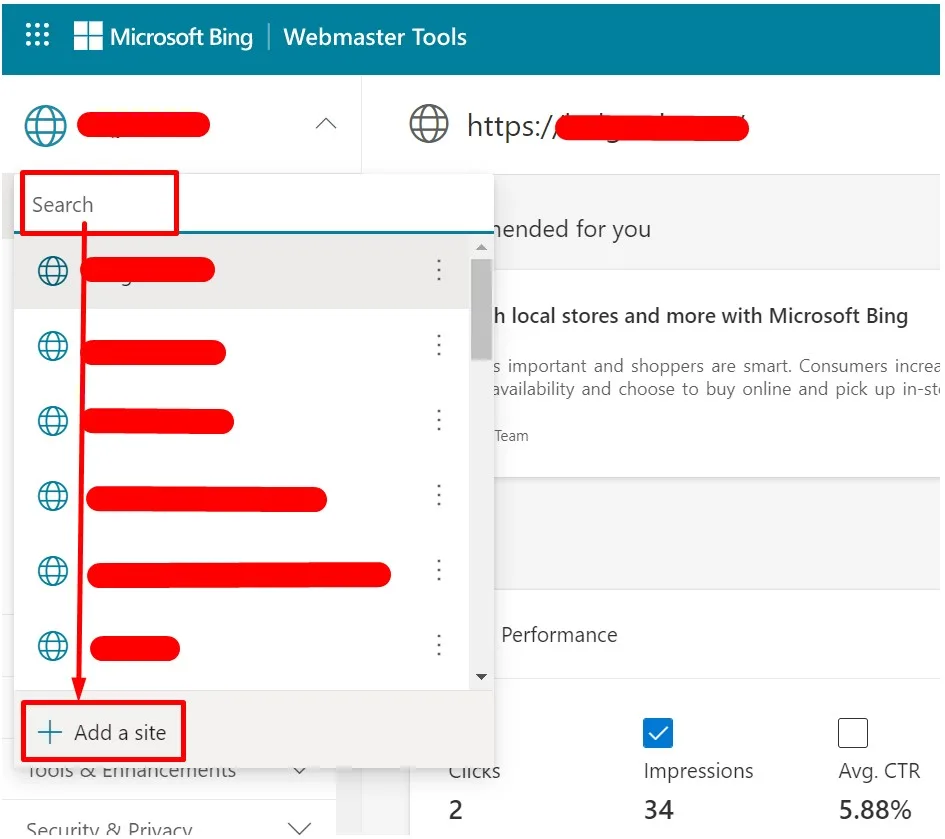
Manual verification gives you full control, and the XML file method is my personal favorite. Bing Search Console generates a small file, you drop it in your root directory, and the system confirms ownership by fetching it.
Upload it via FTP or your hosting file manager so it sits at yourdomain.com/BingSiteAuth.XML. Then click verify. If the file is reachable, you are approved instantly.
One gotcha: some caching layers block XML files from being served. If verification fails, purge your CDN cache and try again. That single step fixes the problem nine times out of ten.
Method Three: the Meta Tag Approach
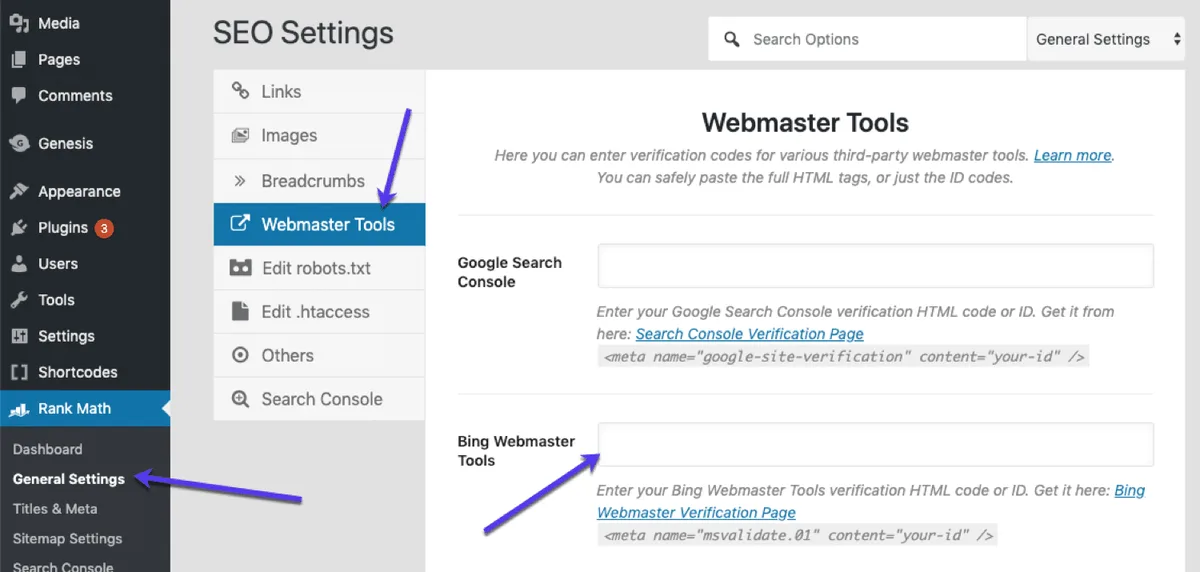
Prefer not to touch server files? The meta tag method is cleaner for people who live inside a CMS. Bing Search Console hands you a line of HTML, and you paste it into your site’s head section.
On WordPress, plugins like Yoast or Rank Math have a dedicated field for this. Paste, save, and verify. No FTP client required, which makes it ideal for clients who manage their own sites.
Just remember that the tag must appear on your homepage specifically. If your theme loads headers conditionally, double-check the source code before hitting verify. A quick view-source confirms it in seconds.
Submitting Your Sitemap Inside Bing Search Console
Verification is only half the job. Effective execution in your bing search console makes a tangible difference. To get crawled properly, you need to tell Bing where your content lives. That means submitting an XML sitemap, and it is a two-click task once you are inside the dashboard.
Navigate to the Sitemaps section, paste your sitemap URL, and submit. Bing Search Console will then queue your pages for discovery. Most sites see their first crawl within 48 hours.
If you use a plugin, your sitemap is usually sitting at yourdomain.com/sitemap_index.XML. Not sure? Check your robots.txt file, which almost always points to the right location.
Why Sitemaps Speed Up Indexing
Without a sitemap, Bing has to guess which pages matter by following links. That works, but it is slow and unreliable for deep content. A sitemap removes the guesswork entirely.
For a client with a 4,000-page catalog, submitting a sitemap cut their average indexation time from three weeks to four days. The difference was not subtle — it was the gap between ranking and invisibility.
Keep your sitemap under 50,000 URLs and 50MB uncompressed. Larger sites should split into multiple files and reference them from an index. Bing Search Console accepts both formats without complaint.
Handling Indexing Errors Gracefully
Once pages start crawling, errors will surface. Missing canonical tags, redirect chains, blocked resources — the usual suspects. Do not panic. Treat each one as a small fix with an outsized payoff.
Bing Search Console flags these issues in the Site Explorer and SEO Reports sections. Work through them by priority: blockages first, then duplicate content, then cosmetic warnings.
Honestly, the error list is where most people quit. Push through it. A clean crawl profile is the foundation for everything else you will do in this tool.
Reading Your Performance Data Like a Pro
Data is useless without interpretation, and Bing Search Console gives you plenty to chew on. The trick is knowing which numbers actually matter for your goals. Let me break down the ones I watch first.
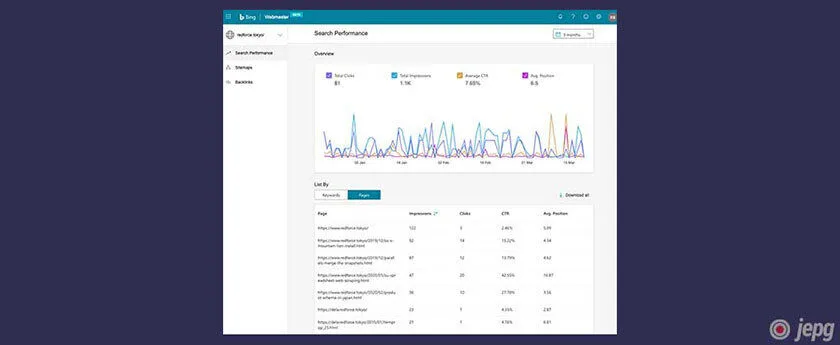
The Search Performance report shows impressions, clicks, click-through rate, and average position. Those four metrics tell a complete story about any query or page. Master them and you can diagnose almost any traffic problem.
I check this report weekly for every site I manage. It takes five minutes and routinely uncovers opportunities that paid tools charge money to reveal.
Spotting High-Impression, Low-Click Pages
These are your sleeping giants. A page ranking on page two with strong impressions is one small push away from real traffic. Bing Search Console makes them easy to find with a simple sort.

Filter for queries where impressions are high but CTR sits below two percent. Maintaining clarity across your bing search console remains essential. That gap usually means your title tag or meta description is not compelling enough. Rewrite both and watch the clicks climb.
On one project, rewriting eleven title tags lifted organic clicks by 34 percent in six weeks. No new content, no backlinks. Just better packaging on pages that already ranked.
Tracking Keyword Movement Over Time
Bing Search Console lets you compare date ranges, which is how you spot trends rather than snapshots. Set a baseline month, then compare against the current period for any query you care about.
Watch for slow, steady climbs rather than dramatic spikes. Gradual gains usually mean your content is genuinely earning authority, while sudden jumps often reflect algorithm shifts that can reverse just as fast.
Export the data to a spreadsheet if you want to track long-term. The built-in charts are fine for quick checks, but serious analysis benefits from your own columns and notes.
Advanced Features Most People Ignore
Beyond the basics, Bing Search Console ships with tools that rival paid platforms. Skipping them is like buying a sports car and never leaving second gear. Let me highlight the ones worth your time.
These features rarely get mentioned in beginner tutorials, which is exactly why they give you an edge. Your competitors probably have not opened them either.
The Site Scan Tool
Site Scan crawls your entire site and returns a prioritized list of technical issues. Think of it as a free audit that runs on demand. You can schedule it to run automatically every week.
It catches things like broken links, slow pages, and missing metadata that manual reviews miss. For large sites, this alone saves hours of tedious clicking through pages.
Run it right after setup, fix the critical items, then let it run on a schedule. Bing Search Console will email you when new problems appear, which turns maintenance into a background task.
SEO Reports and Page Scoring
The SEO Reports section grades your pages against Bing’s own guidelines. Each page gets a score with specific recommendations attached. It is blunt, but that bluntness is useful.
I have used these reports to convince stubborn stakeholders that certain pages needed work. A thoughtful approach to bing search console reinforces your qualifications. Nothing ends a debate faster than a third-party tool flagging the exact issue you raised.
Scores are not gospel, though. Use them as a starting point, not a finish line. A page can score poorly yet still convert brilliantly if it matches user intent.
URL Submission for Instant Indexing
Got a time-sensitive page? Bing Search Console lets you submit individual URLs for priority crawling. This is huge for news, launches, and limited-time offers.
You get a daily quota, so spend it wisely. Reserve submissions for pages where speed genuinely matters. Routine blog posts can wait for the sitemap crawl.
In one product launch, submitting the landing page directly got it indexed in under an hour. That kind of speed is rare and worth protecting by not wasting your quota.
Common Setup Mistakes and How to Avoid Them
I have seen the same errors repeated across dozens of accounts. None of them are fatal, but each one costs you time or data. Here are the big ones, along with the fix.
Avoiding these will put you ahead of most site owners, who stumble through setup and never quite get clean data as a result.
Verifying the Wrong Property
This happens constantly with sites that use www and non-www versions. You verify one, but Bing crawls the other. The result is split data and confusing reports.
Decide on your canonical domain and stick to it everywhere. Set up a 301 redirect from the variant, then verify only the version you actually use. Bing Search Console will follow the redirect cleanly.
Subdomains deserve the same care. Blog.example.com and www.example.com are separate properties. Verify each one you want tracked.
Forgetting to Re-Submit After a Redesign
Site redesigns break sitemaps more often than people realize. URLs change, structures shift, and old sitemap links start returning 404s. Bing Search Console will keep crawling dead ends until you fix it.
After any major change, regenerate your sitemap and resubmit it. Structuring your bing search console around proven patterns ensures impact. Then check the crawl errors report a few days later. Catching redirect issues early prevents weeks of lost indexation.
Set a calendar reminder for a week after launch. That single habit has saved me from more disasters than any expensive monitoring tool.
Bing Search Console vs Google Search Console: a Practical Comparison
Both tools belong in your stack, but they serve different purposes. Understanding the differences helps you decide where to spend your limited time. Here is how they stack up on the features that matter.
| Feature | Bing Search Console | Google Search Console |
|---|---|---|
| Keyword data granularity | Less sampled, clearer for small sites | Heavily sampled on low-volume terms |
| Built-in site audit | Yes, via Site Scan | No native crawler |
| Page scoring | Yes, SEO Reports | No equivalent |
| URL submission quota | Daily limit, generous | Limited, stricter |
| Import from competitor | Yes, one-click from Google | Not applicable |
| Backlink data | Basic but usable | Detailed, broader index |
The takeaway is simple: use both. Google gives you depth on backlinks and a massive index. Bing gives you cleaner small-site data and tools Google simply does not offer.
Running them side by side costs nothing extra and doubles your visibility into search performance. There is no scenario where skipping one makes sense.
Turning Bing Search Console Data Into Content Decisions
Reports are only valuable if they change what you publish. The real skill is translating numbers into editorial choices. Let me show you how that works in practice.
Start with queries where you rank between positions five and fifteen. These are your easiest wins. A small content refresh or a few internal links can push them onto page one.
Bing Search Console surfaces these opportunities clearly, especially for long-tail phrases that Google hides. That visibility is a genuine advantage for smaller publishers.
Finding Content Gaps Through Query Data
Look for queries with impressions but no matching page. These are gaps your competitors have not filled either. Each one is a ready-made content brief backed by real demand.
I keep a running list of these from every client account. When it is time to publish, I am never guessing what to write about. The data tells me exactly what the audience wants.
Prioritize gaps with consistent impressions over several weeks. A single spike might be noise, but steady demand signals a durable topic worth investing in.
Refreshing Pages That Lost Ground
Sometimes a page slips in rankings without any obvious cause. Bing Search Console helps you spot the decline early, before traffic collapses. That early warning is worth its weight in gold.
Compare the page’s current top queries against its historical ones. If key terms dropped out, the content may have gone stale or lost relevance against newer competitors.
Update the page with fresh examples, better structure, and improved internal links. Then resubmit the URL for crawling. Most refreshed pages recover within a few weeks.
Frequently Asked Questions About Bing Search Console
Here is an in-depth breakdown of key considerations regarding this section:
Is Bing Search Console Free to Use?
Yes, completely free. You only need a Microsoft account to sign in. There are no premium tiers, no usage caps on the core features, and no credit card required at any point.
The URL submission tool has a daily quota, but it resets automatically. For the vast majority of sites, that limit is more than enough.
How Long Until Data Appears After Setup?
Expect your first impressions within a few days for established sites. Brand-new domains may take one to two weeks before meaningful data shows up in Bing Search Console.
Crawl frequency depends on your site’s authority and how often you publish. Sites that update regularly get crawled faster, which means faster data.
Can I Use It Without Anthropic Search Console?
Absolutely. The import feature is convenient, but manual verification works perfectly on its own. Plenty of site owners run Bing Search Console without ever touching Google’s tool.
You will just need to verify ownership manually using the XML file or meta tag method. Both take only a few minutes.
Does Bing Search Console Help With Other Search Engines?
Not directly, but the insights transfer. Technical fixes you make based on Bing’s reports usually improve performance everywhere, since crawlability and structure are universal concerns.
Think of it as a second opinion on your site’s health. Two data sources always beat one when you are diagnosing problems.
What if My Verification Keeps Failing?
Check three things in order: file location, caching, and domain version. Most failures trace back to one of those. Clear your cache, confirm the file sits at the root, and verify the exact domain variant.
If it still fails, try a different method entirely. Switching from XML file to meta tag resolves stubborn cases surprisingly often.
Final Thoughts on Getting Started
Setting up Bing Search Console is one of those rare tasks that pays off immediately and keeps paying for years. Ten minutes of work unlocks data that most competitors never bother to collect.
Start with verification, submit your sitemap, and check the performance report weekly. That simple routine will surface opportunities you would otherwise miss entirely.
Do not overthink it. Open the tool today, walk through the steps above, and let the data start flowing. Your future self will thank you for the head start.