Microdata HTML shows you how to add schema markup correctly with clean attributes, real examples, and validation tips that unlock rich results.
Microdata HTML is the quiet workhorse behind every rich result you have ever tapped on a Google search page.
If you run a recipe blog, an e-commerce store, or a small local service site, learning how this attribute-based syntax works can mean the difference between a plain blue link and a result that shows stars, prices, or event dates.
I have spent years auditing markup on sites that range from tiny WordPress blogs to storefronts pushing tens of thousands of SKUs, and the same mistakes keep surfacing. People copy snippets they do not understand, nest properties in the wrong order, or mix vocabularies until nothing validates.
This walkthrough fixes that. We will go deep on microdata HTML, compare it honestly against JSON-LD and RDFa, and build real examples you can paste into your own pages today.
What Microdata HTML Actually Is
Microdata HTML is a specification that lets you attach machine-readable labels to the content already sitting in your markup. Instead of writing your data twice, you annotate the human-facing HTML with a small set of attributes, and search engines read those annotations to understand what each element means.
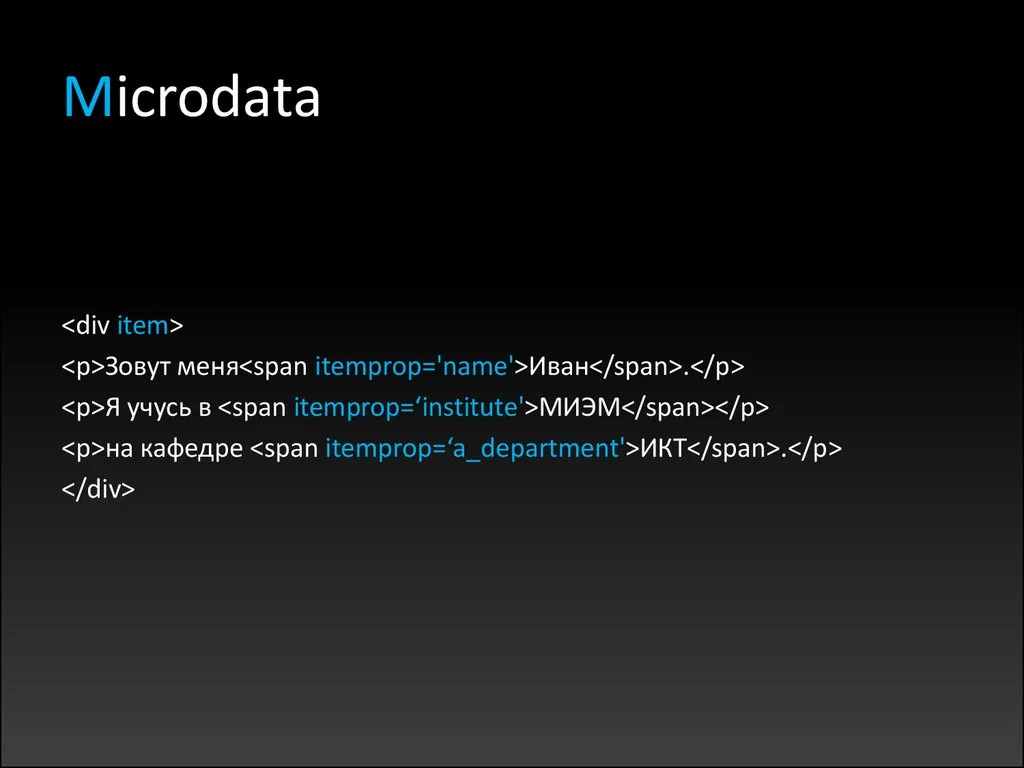
The whole system rests on five attributes: itemscope, itemtype, itemprop, itemid, and itemref. That is genuinely it. Once you internalize how those five interact, you can describe a product, a person, a review, or an event without touching a single line of JavaScript.
Think of microdata HTML as sticky notes placed on top of your existing page.
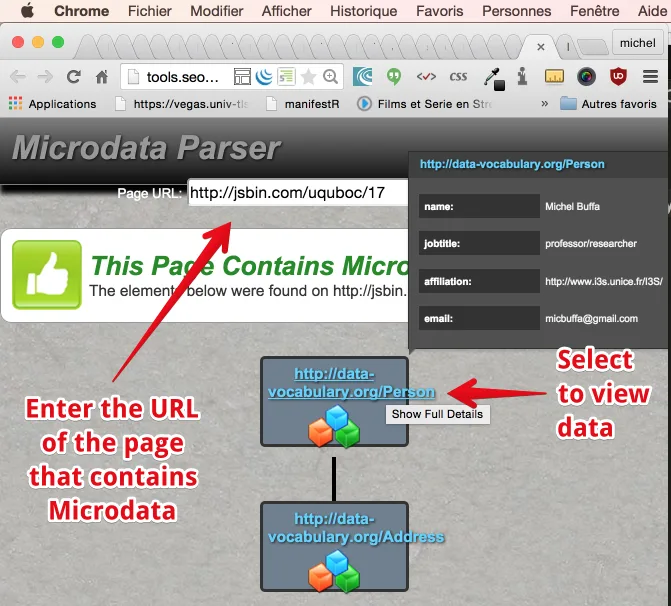
The sticky note does not change what a visitor sees, but it tells a crawler “this span here is the price” or “this div is the author.” The elegance is that your visible content and your structured content stay in sync automatically, because they are literally the same element.
The Five Core Attributes Explained
The itemscope attribute declares that an element and its descendants form a single item. You drop it on a wrapper, usually a div, article, or section, and everything inside becomes part of that item’s scope.
Then itemtype supplies a URL that identifies what kind of thing you are describing. That URL almost always points to Schema.org, the shared vocabulary that Google, Bing, and Yandex agreed to support. A product page uses HTTPS://schema.org/Product, a blog post uses HTTPS://schema.org/BlogPosting, and so on.
The itemprop attribute is where the real work happens. It names a specific property inside the item, like name, price, or datePublished.
You can place itemprop on a span, a meta tag, an img, an a tag, or almost any element, which is what makes microdata HTML so flexible for designers who refuse to restructure their layouts.
Finally, itemid gives an item a globally unique identifier, and itemref lets you pull in properties from elements that live outside the current scope. Those last two are the ones most people never touch, and honestly, most sites never need them.
A Minimal Working Example
Here is the smallest useful piece of microdata HTML you can write. It describes a book without changing anything a reader would see on screen.
<div itemscope itemtype="https://schema.org/Book"> <span itemprop="name">The Pragmatic Programmer</span> <span itemprop="author">Andrew Hunt</span> <meta itemprop="isbn" content="978-0135957059">
</div>
Notice the meta tag sitting inside the div. It carries data that has no visual representation, which is exactly the situation microdata HTML handles gracefully. The crawler reads the ISBN; the visitor never sees it cluttering the page.
If you validate that snippet with Google’s Rich Results Test, it will parse cleanly. No warnings, no missing fields. That is the baseline you want before you start adding complexity.
Why Microdata HTML Still Matters for Search Visibility
Search engines have gotten remarkably good at guessing what a page is about, but guessing is not the same as knowing. When you mark up content with microdata HTML, you remove the ambiguity entirely, and unambiguous pages earn richer treatment in the results.

Rich results pull from structured data. Star ratings, FAQ accordions, breadcrumb trails, product availability, recipe cook times, event dates, and sitelinks search boxes all depend on markup that a crawler can parse. Without it, you are hoping the algorithm infers correctly, and hope is not a strategy.
There is a compounding effect too. Once your microdata HTML is consistent across a category of pages, Google can build entity relationships between them. A product page links to its brand, the brand links to its parent organization, and suddenly your site looks like a coherent knowledge graph rather than a pile of unrelated URLs.
Rich Results and Click-Through Rates
The practical payoff shows up in click-through rate. A result with a visible star rating consistently outperforms an identical result without one, and the gap widens on mobile where screen real estate is scarce.
I have watched a modest review site climb from a 2.1 percent CTR to nearly 4 percent on the same ranking position simply by adding valid review markup. Nothing about the content changed. The microdata HTML just made the existing quality visible.
That said, do not chase every rich result type at once. Pick the two or three that match your content type, implement them properly, and validate. Sprawling, half-broken markup is worse than none at all, because it signals carelessness to the crawler.
Voice Search and Entity Recognition
Voice assistants lean heavily on structured data when they answer spoken queries. When someone asks their phone “what time does the museum open,” the assistant is far more likely to answer confidently if the page carries explicit opening hours in microdata HTML rather than burying them in a paragraph.
Entity recognition works the same way. Search engines maintain knowledge panels built from structured facts, and pages that supply those facts clearly get pulled into the panel more often. It is a slow build, but the authority accumulates.
Microdata HTML versus JSON-LD and RDFa
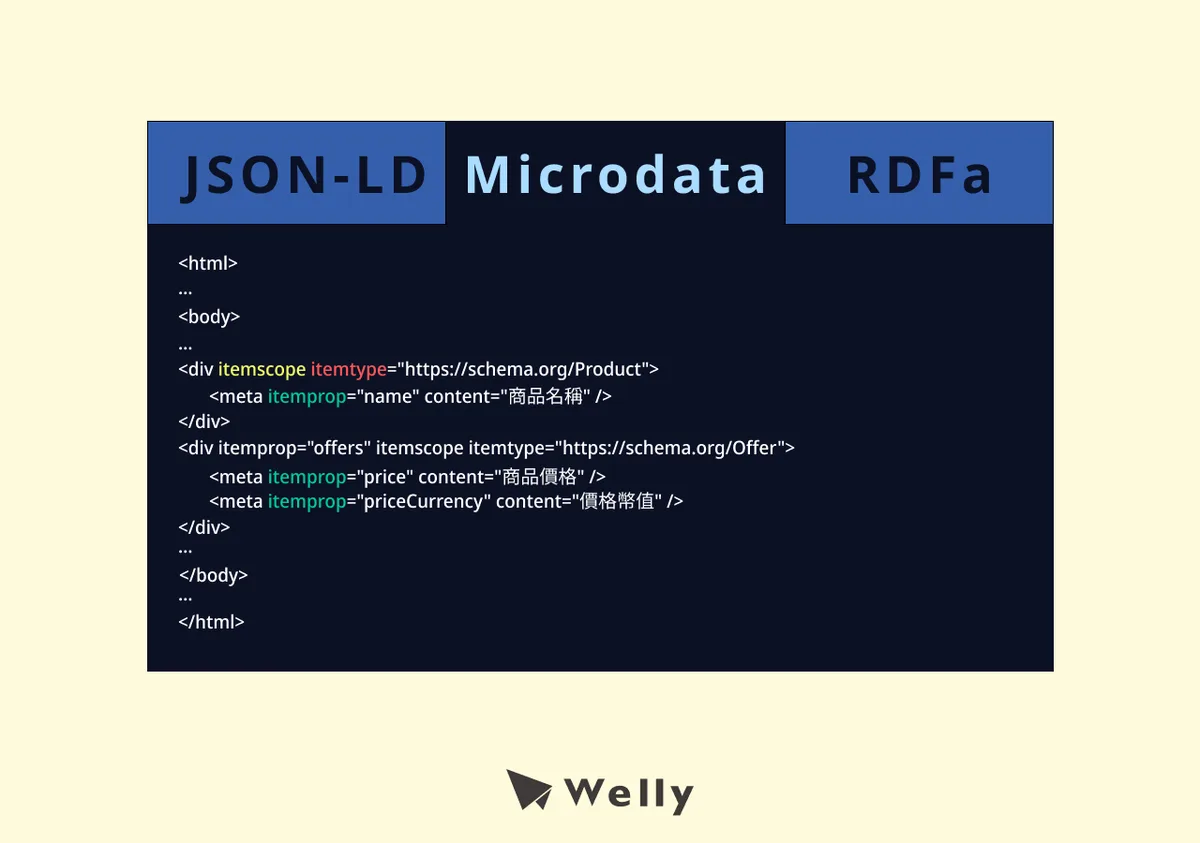
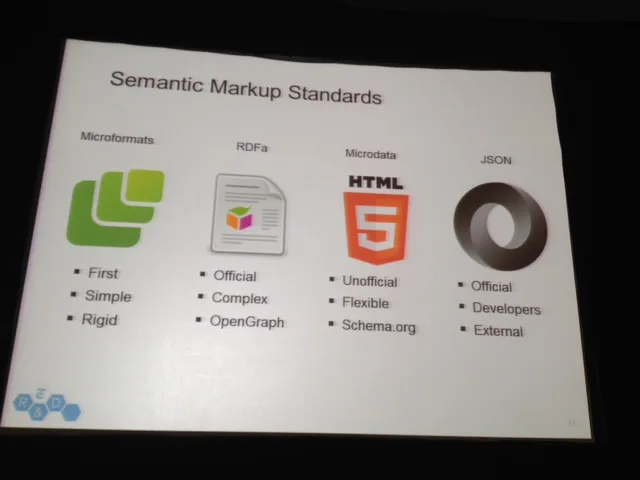
You have three mainstream ways to deliver structured data: microdata HTML, JSON-LD, and RDFa. They describe the same facts, but they live in different places and behave differently when your page changes.
JSON-LD sits in a script block, usually in the head or at the end of the body, and describes everything in one detached lump. RDFa sprinkles attributes through the markup much like microdata, but with a different attribute set. Choosing between them is a real decision, not a formality.
| Feature | Microdata HTML | JSON-LD | RDFa |
|---|---|---|---|
| Where it lives | Inline in the HTML | Separate script block | Inline in the HTML |
| Google’s stated preference | Supported | Recommended | Supported |
| Ease of maintenance | Moderate | Easiest | Hardest |
| Risk of visible content mismatch | Very low | Higher if not synced | Very low |
| Works without JavaScript | Yes | Yes, if server-rendered | Yes |
| Best fit | Template-driven sites | Dynamic apps, CMS plugins | Legacy or academic sites |
Google has said repeatedly that it prefers JSON-LD because the data is easier to extract and less likely to break when a designer tweaks the layout. That preference is real, and if you are starting fresh with a modern stack, JSON-LD is usually the pragmatic pick.

But microdata HTML has one advantage JSON-LD cannot match: your structured data and your visible content are physically the same nodes. When a price updates in the template, the markup updates with it. There is no separate block to forget.
When Microdata HTML Wins
If your site is built on a template engine where every product page renders from the same partial, microdata HTML fits like a glove. You annotate the partial once, and every page inherits correct markup forever.

It also wins in environments where injecting a script block is awkward, such as certain email templates, AMP variants, or heavily sandboxed CMS themes. In those cases, inline attributes are simply easier to ship.
And for teams without a dedicated developer, microdata HTML can be less intimidating. You are editing the HTML you already see rather than learning a separate JSON syntax with its own escaping rules.
When JSON-LD is the Better Call
If your content is assembled by JavaScript after the page loads, JSON-LD is far easier to generate. You build an object in your front-end code and serialize it, no DOM traversal required.
JSON-LD also handles complex, deeply nested graphs more cleanly. A page describing a product, its reviews, its brand, its shipping details, and its return policy can get unwieldy in inline attributes but stays readable in a single JSON object.
Most SEO plugins for WordPress, Shopify, and similar platforms output JSON-LD by default. Fighting that default to hand-write microdata HTML is rarely worth the effort unless you have a specific reason.
Building Correct Microdata HTML Step by Step
Let us walk through a realistic build. Say you run a coffee roastery and you want your product pages to earn rich results with price, availability, and ratings. Here is how I would approach it.
Start by identifying the item type. For a bag of beans, that is HTTPS://schema.org/Product. Place itemscope and itemtype on the outer wrapper that contains everything about that single product.
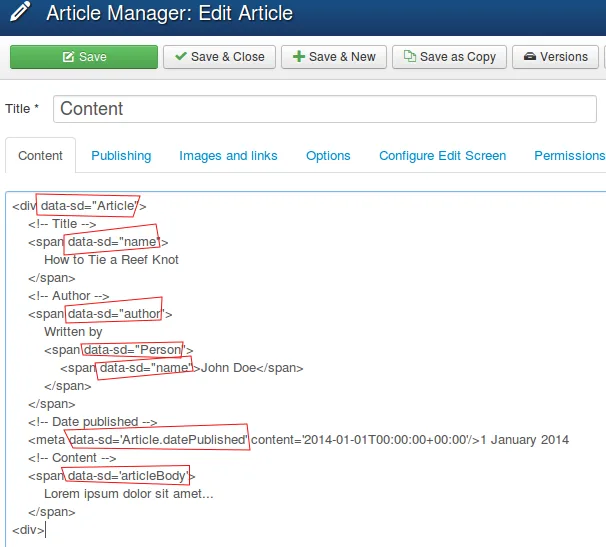
<div itemscope itemtype="https://schema.org/Product"> <h1 itemprop="name">Ethiopia Yirgacheffe 12oz</h1> <img itemprop="image" src="/beans.jpg" alt="microdata html product example"> <div itemprop="offers" itemscope itemtype="https://schema.org/Offer"> <meta itemprop="priceCurrency" content="USD"> <span itemprop="price">18.00</span> <link itemprop="availability" href="https://schema.org/InStock"> </div>
</div>
Notice the nested item. The Offer is its own scope inside the Product scope, which is how microdata HTML expresses relationships. The price belongs to the offer, not directly to the product, and the nesting makes that hierarchy explicit.
That structure is the single most common thing people get wrong. They slap itemprop=”price” directly on the product wrapper and wonder why validation complains. Nested scopes exist precisely to model these parent-child relationships.

Adding Reviews and Ratings
Reviews follow the same nesting logic. An aggregateRating sits inside the product, and individual reviews nest inside a review array.
<div itemprop="aggregateRating" itemscope itemtype="https://schema.org/AggregateRating"> <span itemprop="ratingValue">4.8</span> <span itemprop="reviewCount">126</span>
</div>
One rule you must respect: never fabricate ratings. Google penalizes sites that mark up reviews they did not actually collect. The microdata HTML is a reporting mechanism, not a marketing tool.
If your reviews are user-generated, make sure they are visible on the page. Hidden or fake review markup is one of the fastest ways to earn a manual action.

Nesting Items Without Breaking Validation
Deep nesting is powerful but fragile. Each level adds another chance for a missing property or a mismatched itemtype, and validators will flag every one.
My rule of thumb: if a nested item needs more than four properties, consider whether microdata HTML is still the right vehicle. At that point JSON-LD usually produces cleaner, more maintainable code.
Also watch the itemref attribute if you use it. It pulls properties from outside the current scope, which is handy for layouts where the author bio sits in a sidebar far from the article body. But it is easy to point at the wrong ID and silently lose your data.
Common Microdata HTML Mistakes and How to Avoid Them
After auditing hundreds of pages, I can tell you the same handful of errors appear over and over. Fixing them usually takes minutes and unlocks results that were sitting dormant.
The first and most damaging is marking up content that is not visible to users. Google’s guidelines are unambiguous: structured data must describe content the visitor can actually see. If your microdata HTML describes a price that only exists in the code, you are violating the rules.
The second is using the wrong itemtype URL. A typo in the Schema.org path, or pointing at a deprecated type, breaks the entire item. Always copy the URL directly from the Schema.org documentation rather than typing it from memory.
Mismatched Vocabularies
Mixing microdata HTML with RDFa attributes on the same element confuses parsers. Pick one syntax per page and stick to it religiously.
I once debugged a site where the developer had copied half a snippet from a microdata tutorial and half from an RDFa one. The result was a page that validated as neither, and the rich results had been silently absent for months.
Consistency matters more than cleverness here. A plain, correct implementation beats a sophisticated, broken one every single time.
Forgetting the Visible Content Rule
Every property you declare in microdata HTML should correspond to something a human can read on the page. The meta tag trick is fine for non-visual data like ISBN or currency, but it should not be used to smuggle in content you are hiding from users.

Ask yourself before publishing: if I removed all the attributes, would the page still communicate every fact I just marked up? If the answer is no, you have a problem.
This is not just about compliance. Pages that pass the visible-content test also tend to rank better, because the markup and the copy reinforce each other rather than contradicting.

Ignoring the Validation Tools
Google offers two free tools that catch nearly every mistake: the Rich Results Test and the Schema Markup Validator. Run both. They occasionally disagree, and when they do, trust the Rich Results Test for eligibility questions.
Validate on a staging URL before you push to production. Catching a broken microdata HTML block in staging costs you five minutes; catching it in production after Google has already recrawled costs you weeks of lost visibility.
Microdata HTML for Local Business and Organization Pages
Local businesses get enormous value from structured data because the competition is often asleep at the wheel. A properly marked-up local page can dominate a map pack in ways that plain HTML never will.
The core type here is HTTPS://schema.org/LocalBusiness, which inherits from Organization and adds properties like openingHours, priceRange, and geo coordinates. If your business fits a more specific subtype, like Restaurant or Dentist, use that instead, because narrower types carry more semantic weight.

<div itemscope itemtype="https://schema.org/LocalBusiness"> <span itemprop="name">Bluebird Coffee Roasters</span> <div itemprop="address" itemscope itemtype="https://schema.org/PostalAddress"> <span itemprop="streetAddress">412 Alder Street</span> <span itemprop="addressLocality">Portland</span> <span itemprop="addressRegion">OR</span> <span itemprop="postalCode">97214</span> </div> <span itemprop="telephone">+1-503-555-0142</span>
</div>
That PostalAddress nesting is mandatory, not optional. Addresses are their own type, and flattening them into single properties will fail validation every time.
Opening hours deserve special attention because they change and stale data hurts trust. If you mark up hours in microdata HTML, commit to updating them whenever your schedule shifts.
Connecting to Google Business Profile
Your on-page microdata HTML should match your Google Business Profile exactly. Same name, same phone number, same address. Discrepancies between the two erode the confidence the algorithm places in your data.
Use the same business name string everywhere. If your profile says “Bluebird Coffee Roasters LLC” and your markup says “Bluebird Coffee,” you are creating ambiguity that costs you.

Consistency across your website, your profile, and any directory listings is what builds the entity confidence that drives local rankings. Microdata HTML is the piece you control most directly.
Handling Multiple Locations
Multi-location businesses should give each location its own page with its own microdata HTML block. Do not try to describe five storefronts on one page; the crawler will not know which one to surface.

Each location page needs a unique URL, unique address markup, and ideally a unique phone number. If you use a shared toll-free line, at least vary the geo coordinates so the crawler can distinguish them.
This structure also makes it trivial to add location-specific reviews later, which further strengthens each page’s individual authority.
Article, Blog Posting, and News Markup
Publishers get a lot of mileage out of article markup. It feeds into Google News, Discover, and the top stories carousel, all of which drive serious traffic when you qualify.

The primary types are Article, BlogPosting, and NewsArticle. They share most properties, so the choice mostly signals intent rather than changing what you can declare.
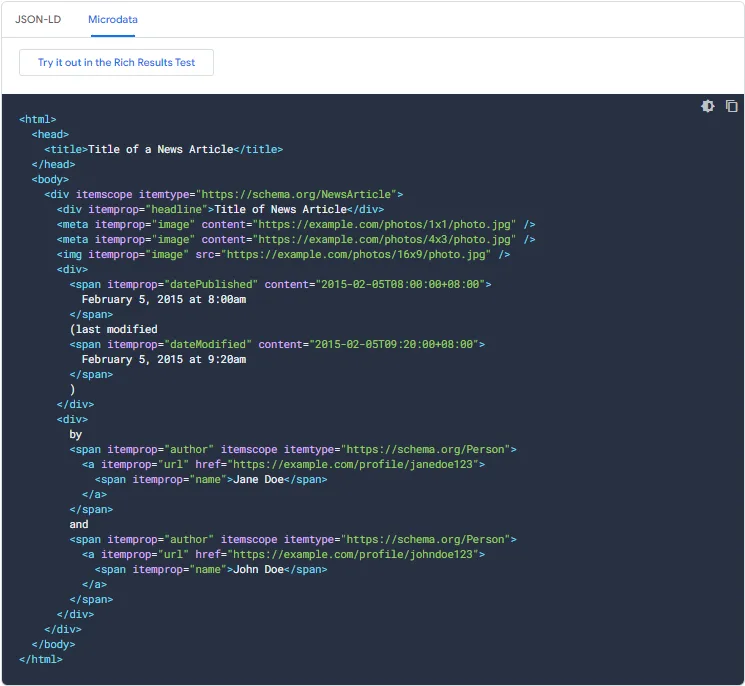
Essential properties include headline, image, datePublished, dateModified, and author. The author should be its own Person scope with a name and ideally a URL pointing to an author page.

<article itemscope itemtype="https://schema.org/BlogPosting"> <h1 itemprop="headline">How To Add Schema Markup Correctly</h1> <meta itemprop="datePublished" content="-03-11"> <div itemprop="author" itemscope itemtype="https://schema.org/Person"> <span itemprop="name">Dana Whitfield</span> </div>
</article>
Update dateModified whenever you meaningfully revise the piece. Google uses it as a freshness signal, and honest updates genuinely help older posts regain visibility.
Author and Publisher Relationships
Publisher markup connects your article to your organization, which strengthens your brand entity in the knowledge graph. The publisher property should point to an Organization scope with your logo and name.
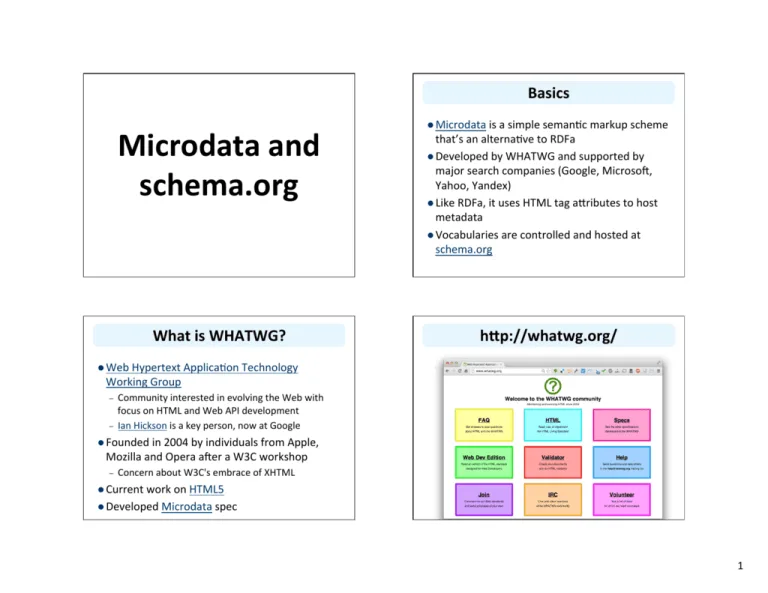
Author markup matters even more for expertise signals. Linking an author to a real profile page, and that profile to social accounts, builds the kind of verifiable identity that Google rewards in sensitive niches like health and finance.
I have seen medical sites gain significant ground simply by fixing their author markup so each article pointed to a credentialed, verifiable person. The microdata HTML did not create the expertise, but it made it legible.
Product and E-Commerce Markup Deep Dive
E-commerce is where structured data pays the biggest dividends, because shopping results are crowded and rich snippets stand out. Product markup is the highest-leverage microdata HTML you can write.
The Product type supports a wide range of properties: name, image, description, sku, brand, offers, aggregateRating, and review. Of these, offers is the one that most directly affects whether you get a rich result.
An Offer needs price, priceCurrency, and availability at minimum. Adding priceValidUntil and a seller helps, and shippingDetails can unlock even richer treatment for eligible merchants.
Availability and Price Accuracy
Availability must reflect reality. If a product is out of stock, mark it OutOfStock, not InStock. Google cross-references your markup against the page, and mismatches can trigger penalties.
Price accuracy is equally important. If you run dynamic pricing, make sure your microdata HTML is generated from the same source that renders the visible price. Hardcoded values drift, and drift gets caught.

The cleanest architecture is to have your template output both the visible price and the itemprop from a single variable. That way they can never disagree, which is one of the underappreciated strengths of microdata HTML over a separate JSON block.
Variants and Product Groups
Products with sizes, colors, or other variants need careful handling. The cleanest approach is a ProductGroup with hasVariant properties, though support for this pattern has evolved over time.
For most stores, the simpler path is one Product per variant, each on its own URL. It is more markup, but it is unambiguous and it gives each variant its own chance to rank.
Whatever you choose, be consistent across your catalog. Mixed strategies confuse crawlers and dilute the benefit of all that careful microdata HTML.
Testing and Validating Your Markup
Writing markup is half the job. Verifying it is the other half, and skipping verification is how most structured data quietly fails.
The Rich Results Test is your first stop. Paste a URL or a code snippet and it will tell you which rich result types the page is eligible for, plus any errors or warnings.
Warnings are not always fatal, but they are worth reading. They often flag missing recommended properties that would unlock a richer display if you added them.
Reading Validator Output Like a Pro
Errors mean the item is broken and will not produce a rich result. Warnings mean it will work but could work better. Missing optional fields are informational.
When you see an error, trace it to the exact line. Nine times out of ten it is a missing required property or a typo in an itemtype URL, both of which take seconds to fix.
Keep a note of every error you fix and why. On a large site, the same mistake tends to recur across templates, and your notes turn a recurring bug into a one-time fix.

Monitoring After Deployment
Validation is not a one-time event. Use the Search Console enhancement reports to track how your microdata HTML performs after Google recrawls the page.
Watch for a rise in “invalid items” after a site redesign. Template changes are the number one cause of structured data regressions, and the reports catch them within days.
Set a calendar reminder to re-audit your key templates every few months. Structured data is not fire-and-forget, and a little maintenance goes a long way.
Microdata HTML in Modern JavaScript Frameworks
Single-page applications complicate structured data because the HTML a crawler first sees may be nearly empty. If your content renders client-side, your microdata HTML might not exist at the moment of the first crawl.
The fix is server-side rendering or static generation. When the framework outputs real HTML on the server, your inline attributes arrive with it, and the crawler sees everything immediately.
React, Vue, and Svelte all support this through their meta-frameworks. If you are on Next.js, Nuxt, or SvelteKit, you likely already have the tooling; you just need to use it.
Rendering Pitfalls to Watch
If you must render client-side, be aware that Google’s crawler does execute JavaScript, but with delays and occasional timeouts. Relying on it is riskier than rendering on the server.
Another trap is hydration mismatch. If the server renders one value and the client replaces it with another, you can end up with duplicate or conflicting microdata HTML that confuses parsers.
The safest pattern is to generate your structured data on the server and never touch it during hydration. Let the client handle interactivity; let the server own the markup.
Component-Based Markup Patterns
Component architecture actually pairs beautifully with microdata HTML if you design it right. Build a ProductCard component that always emits the correct itemscope and itemprop attributes, and every instance inherits correctness.
Keep the structured data logic inside the component rather than scattering it across pages. Centralizing it means a single fix propagates everywhere, which is exactly what you want when Schema.org updates a type.
Document the pattern in your codebase. New developers should know that the ProductCard is the canonical place for product markup, not somewhere they should improvise their own.
Advanced Patterns and Edge Cases
Once the basics are solid, a few advanced techniques can squeeze more value out of your microdata HTML. These are not beginner moves, but they are worth knowing.
Multiple itemtypes on one element let you describe something as two things at once, such as a page that is both a WebPage and a CollectionPage. Use this sparingly; stacked types can confuse crawlers if the concepts do not genuinely overlap.
The itemref attribute is the other advanced tool. It lets you assemble an item from properties scattered across the DOM, which is useful when your layout separates related content.
Nested and Referenced Items
Referenced items are powerful for things like a review that lives in a sidebar while the product sits in the main column. You give the sidebar element an id, then reference it from the product’s itemref.
The catch is fragility. IDs change, elements get moved, and a broken reference fails silently. If you use itemref, add it to your validation checklist and re-test after every layout change.
For most sites, nesting is cleaner than referencing. Reach for itemref only when the DOM structure genuinely forces your hand.
Combining With Open Graph and Twitter Cards
Microdata HTML does not replace social meta tags. Open Graph and Twitter Card tags control how links look when shared, while structured data controls how they look in search.
You can and should use both. They serve different platforms and different moments, and there is no conflict between them.
A well-optimized page carries microdata HTML for search engines, Open Graph tags for Facebook and LinkedIn, and Twitter Card tags for X. Each layer does its own job.
Frequently Asked Questions About Microdata HTML
These are the questions I field most often when teams start implementing structured data. Short answers here, with pointers back to the relevant sections above.
Is Microdata HTML Still Supported by Google?
Yes. Google continues to support microdata HTML alongside JSON-LD and RDFa, and it parses all three. That said, Google recommends JSON-LD as the preferred format because it is easier to manage and less prone to breaking during layout changes.
Support is not the same as preference, though. If you already have working microdata, there is no urgency to migrate. If you are starting fresh, weigh the trade-offs honestly.
Can I Use Microdata HTML and JSON-LD Together?
Technically yes, and many sites do. The risk is duplication: if both formats describe the same product with conflicting values, you may confuse the parser.
If you combine them, keep the data identical. Some teams use JSON-LD for the primary item and microdata HTML for a small secondary detail, which is a reasonable compromise.
How Do I Know if My Markup is Working?
Run the Rich Results Test first to confirm eligibility, then watch the Search Console enhancement reports after Google recrawls. A rise in impressions with rich features is your confirmation.
Give it a few weeks. Crawling and re-evaluation take time, and panicking after three days leads to unnecessary changes that can do more harm than good.
Does Microdata HTML Help With AI Search and Chatbots?
Structured data gives AI systems a cleaner signal about what your page contains, which can improve how your content is summarized and cited. It is not a guarantee, but clarity never hurts.
As AI-driven search grows, explicit markup becomes more valuable, not less. Machines that read your page benefit from every unambiguous label you provide.
What Happens if I Get the Markup Wrong?
Usually nothing dramatic. Invalid microdata HTML simply gets ignored, and your page returns to a plain result. In serious cases, like fake reviews, you can earn a manual action.
The realistic downside for honest mistakes is lost opportunity rather than penalty. Your content still ranks on its own merits; you just miss the enhanced display.
Should I Mark Up Every Page on My Site?
No. Focus on the page types that map to rich result opportunities: products, articles, recipes, events, FAQs, and local business pages. Marking up a contact page or a privacy policy adds nothing.
Prioritize by content type and traffic potential. A handful of well-marked-up templates will outperform thousands of hastily annotated pages every time.
Putting It All Together
Structured data rewards patience. The teams that win are not the ones who cram every property into every page, but the ones who pick the right types, implement them cleanly, and keep them accurate over time.
Start with one template. Add the microdata HTML, validate it, deploy it, and watch the Search Console reports for a few weeks. Once you see the pattern working, extend it to the next template.
That incremental rhythm beats a big-bang rollout almost every time. It gives you clean data to learn from, and it keeps mistakes contained to a single page type instead of your entire catalog.
If you take one thing from this guide, let it be this: microdata HTML is not decoration. It is how you tell search engines, in their own language, exactly what your page offers. Get that conversation right, and the results follow.
For verified reference and background research, consult the authoritative informational resource on this topic.