If you have ever watched your rankings slide while competitors climb, you already know how frustrating SEO problems can be. They rarely announce themselves. One morning your traffic looks fine, and a few weeks later your best pages are buried on page three.
I have spent years auditing sites that lost visibility overnight, and the pattern is almost always the same handful of fixable issues hiding in plain sight.
This walkthrough covers the issues that actually move the needle, from crawl failures and thin content to technical debt that quietly strangles your site. No fluff, no recycled advice. Just the diagnosis and the fix.
Why SEO Problems Rarely Come from a Single Source
Most site owners assume a ranking drop has one cause. In reality, SEO problems tend to stack on top of each other. A slow server drags down crawl budget, which limits how many pages Google indexes, which starves your internal linking, which leaves orphan pages that nobody can find.

I once audited a mid-sized e-commerce store that had lost 40% of its organic traffic over five months. The owner was convinced it was an algorithm update. It was not. A misconfigured robots.txt had been blocking a folder of category pages since a routine site migration. Nobody noticed because the pages still rendered fine for human visitors.
That is the trap. Search engines see a completely different version of your site than your customers do. When you troubleshoot SEO problems, you have to think like a crawler first and a marketer second.

Technical SEO Problems That Quietly Kill Rankings
Technical issues are the silent killers. They do not show up in your analytics as obvious red flags, and they often persist for months before anyone catches them.
According to Google’s own documentation on crawling and indexing, a search engine needs to be able to reach, render, and understand a page before it can rank it at all. If any of those three steps break, your content is invisible no matter how good it is.
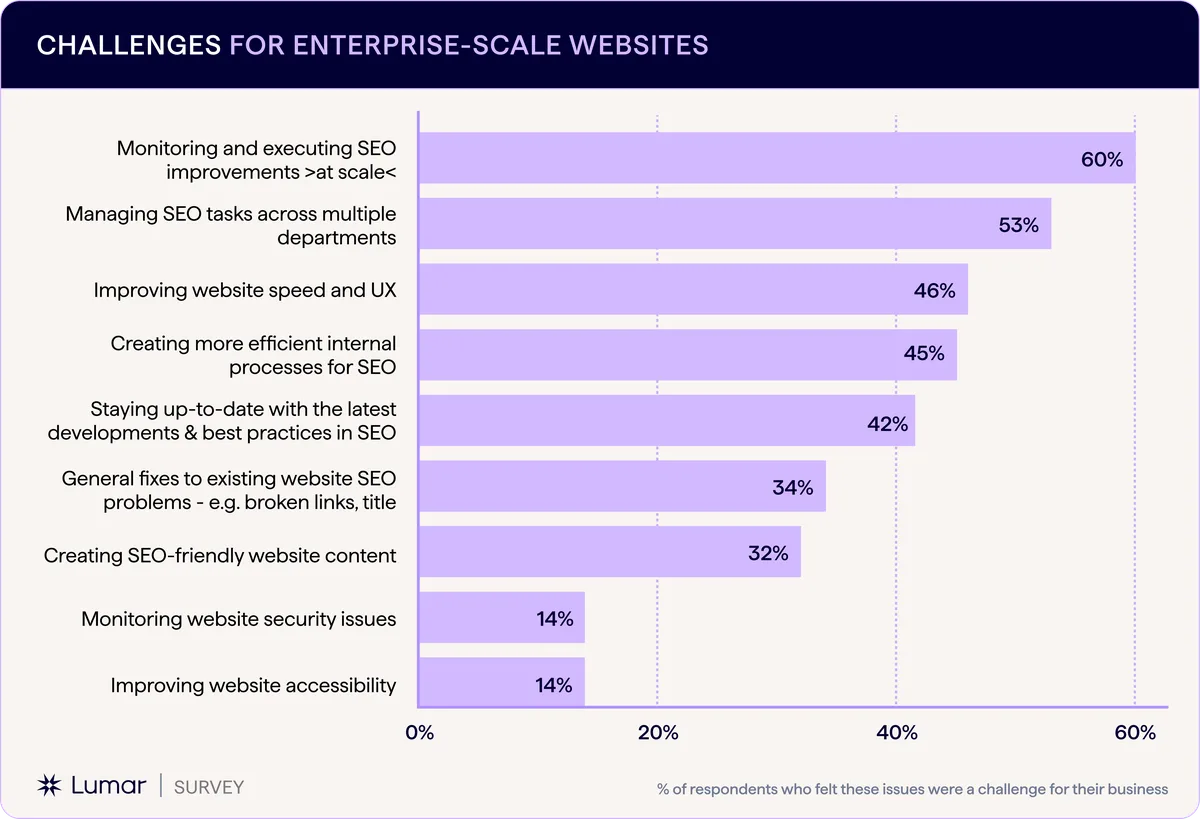
The good news is that most technical SEO problems are diagnosable with free tools. Google Search Console alone will surface crawl errors, indexing exclusions, and mobile usability warnings that account for a huge share of ranking losses.
Crawl and Indexation Failures
Crawl failures happen when search engine bots cannot reach your pages. This is usually a configuration mistake rather than a content problem. A stray “Disallow” directive in robots.txt, a noindex tag left over from staging, or a canonical pointing to the wrong URL will all do the job.

Here is a real example from a client in the legal services niche. Their blog was publishing two or three posts a week, but organic traffic stayed flat for a year. Search Console revealed that a developer had added a sitewide noindex tag during a redesign and never removed it. Every new post was being published invisible.
The fix took ten minutes. The recovery took three months. That gap between fix and recovery is normal, and it is why catching SEO problems early matters so much.
Site Speed and Core Web Vitals
Speed is not just a user experience metric anymore. Core Web Vitals, the set of signals Google uses to measure real-world page experience, feed directly into rankings. A page that takes six seconds to load on mobile is fighting an uphill battle before a single word of content is even read.
The usual culprits are oversized images, render-blocking JavaScript, and cheap shared hosting. I have seen a single uncompressed hero image add two full seconds to load time. Compressing it and serving it in a modern format cut that to under 400 milliseconds.

Start with Google PageSpeed Insights to get a baseline, then prioritize the largest contentful paint element on your most important pages. Fixing the worst offenders first gives you the biggest ranking lift for the least effort.
Broken Internal Links and Redirect Chains
Every broken link is a dead end for a crawler. Redirect chains are worse, because each hop dilutes link equity and slows down crawling. A chain of four redirects can lose most of the value the original link was supposed to pass.
Run a crawl with a tool like Screaming Frog or Sitebulb at least quarterly. Look specifically for 404s, 301 chains longer than one hop, and internal links pointing to redirected URLs. Update the links at the source rather than just patching the destination.
Duplicate Content and Canonical Confusion
Duplicate content splits your ranking signals across multiple URLs. This is one of the most common SEO problems on e-commerce sites, where product variants, filtered category pages, and paginated archives all generate near-identical content.
The solution is a clear canonical strategy. Pick one URL per piece of content, point every variant to it with a rel=”canonical” tag, and make sure your sitemap only lists the canonical version. For paginated series, self-canonicalize each page rather than pointing everything to page one.
Content SEO Problems That Sabotage Great Writing
You can write brilliantly and still lose. Content SEO problems are about alignment, not talent. A beautifully written page that targets the wrong intent or answers a question nobody is asking will not rank, no matter how many hours you poured into it.
I have watched talented writers produce 3,000-word essays that never cracked the top fifty, simply because they misread what the searcher actually wanted. Meanwhile, a competitor with a plain 800-word page dominated the same keyword.
Thin and Low-Value Content
Thin content is any page that fails to deliver meaningful value. It could be a product page with three sentences, a category page with no descriptive copy, or a blog post that restates the title without adding anything.
Google’s helpful content guidance makes the standard clear: pages should be created to help people, not to manipulate rankings. Thin pages drag down your entire site’s quality signals, which means a handful of weak URLs can hurt your strongest pages too.

Audit your library and be ruthless. Merge overlapping posts, expand pages that deserve depth, and delete or noindex anything that exists only to fill a slot.
Keyword Cannibalization
Cannibalization happens when two or more pages compete for the same keyword. Instead of one strong page ranking, you get two mediocre ones trading positions. It is one of the sneakiest SEO problems because it looks like normal ranking fluctuation.

Search Console is your best diagnostic here. Filter for a specific query and look for multiple URLs from your site appearing in the results. If you see that pattern, consolidate. Merge the weaker page into the stronger one and set up a redirect.
Mismatched Search Intent
Intent mismatch is the fastest way to lose a winnable keyword. If someone searches “how to fix a leaky faucet,” they want a step-by-step guide, not a sales page for plumbing services. Serve the wrong format and you will not rank, regardless of quality.
Before writing anything, study the top ten results. Are they tutorials, listicles, product pages, or comparison posts? Match the dominant format, then beat it on depth and clarity.
Content Decay and Stale Information
Content decays. Statistics age, screenshots break, and competitor pages get better. A post that ranked in position three two years ago may now sit at position fifteen because it has not been touched since publication.
Build a quarterly refresh cycle. Update outdated data, add new sections, improve internal links, and republish with a fresh date. Refreshing existing content is often faster and more effective than publishing something new.
On-Page SEO Problems You Can Fix Today
On-page issues are the easiest to fix and the most commonly ignored. They live entirely within your control: titles, headings, meta descriptions, image alt text, and internal links. Get these right and you will outrank technically superior sites that neglected them.
The reason they get skipped is simple. They are tedious and invisible to visitors. But search engines read them constantly, and they shape how your page is understood.
Weak Title Tags and Meta Descriptions
Your title tag is the single most important on-page ranking factor. It should include the primary keyword near the front, stay under 60 characters, and give a clear reason to click. Vague titles like “Home” or “Our Services” waste prime real estate.
Meta descriptions do not directly affect rankings, but they drive click-through rate, and CTR influences how Google perceives your page over time. Write them to sell the click, not to describe the page neutrally.
Heading Structure and Keyword Placement
Headings organize your content for readers and crawlers alike. A clean hierarchy, one H1 followed by logical H2s and H3s, helps search engines understand what each section covers. Skipping levels or using headings purely for styling creates confusion.
Place your primary keyword in at least one or two subheadings naturally. Do not force it into every heading. That reads as spam and hurts the experience.
Missing or Poorly Written Alt Text
Alt text describes images for screen readers and search engines. Empty alt attributes waste an opportunity, and keyword-stuffed alt text looks manipulative. Describe the image accurately and include the keyword only when it genuinely fits.
This also matters for accessibility. A well-written alt attribute makes your content usable for people who cannot see the image, which is both an ethical win and a signal of quality.
Weak Internal Linking
Internal links distribute authority and help crawlers discover content. Most sites underuse them badly. A page with no internal links pointing to it, known as an orphan page, is nearly invisible.
Link from your high-authority pages to your money pages using descriptive anchor text. Do it contextually within the body copy, not just in a sidebar or footer.
Off-Page SEO Problems That Cap Your Growth
Off-page factors determine how much authority your site can carry. You can have perfect on-page optimization and still lose to a competitor with stronger backlinks. This is where SEO problems get expensive, because fixing them often requires outreach, relationships, and time.
The good news is that quality beats quantity consistently. A handful of relevant, authoritative links will outperform hundreds of low-quality ones every single time.
Low-Quality or Toxic Backlinks
Spammy backlinks can drag down your rankings, especially if they look manipulative. Links from link farms, private blog networks, and irrelevant foreign directories are the classic offenders.
Audit your backlink profile regularly using tools like Ahrefs or Semrush. Disavow anything that looks like a paid scheme or a deliberate manipulation attempt. Google’s link spam guidance is a useful reference for what counts as a violation.
Weak Anchor Text Diversity
If every backlink uses the exact same anchor text, that pattern looks unnatural. Real links come with varied anchors: brand names, partial matches, naked URLs, and generic phrases like “read more.”
Aim for a natural distribution. Branded anchors should dominate, with exact-match anchors making up a small minority. This mirrors how real editors link to sources.
Missing or Inconsistent NAP Citations
For local businesses, name, address, and phone number consistency across directories is critical. Inconsistent citations confuse search engines and weaken your local pack rankings. A single wrong phone number across twenty directories can cost you visibility.
Audit your citations at least twice a year. Fix discrepancies, remove duplicate listings, and prioritize the major directories first: Google Business Profile, Bing Places, Apple Maps, and the leading industry-specific platforms.
How to Diagnose SEO Problems Systematically
Guessing wastes time. A structured diagnostic process surfaces the real issues fast and prevents you from chasing symptoms. Here is the sequence I use on every audit, and it works whether you are running a small blog or a large e-commerce store.
- Start With Search Console Coverage. Open the Pages report and look at excluded URLs. Anything marked “Crawled – currently not indexed” or “Discovered – currently not indexed” deserves investigation. These are pages Google knows about but chose not to rank, which usually signals a quality or duplication issue.
- Run A Full Site Crawl. Use Screaming Frog or Sitebulb to crawl every URL. Export the results and filter for 404s, redirect chains, missing titles, duplicate meta descriptions, and pages with thin content under 300 words.
- Check Core Web Vitals In The Field Data Report. Lab data from PageSpeed Insights is useful, but field data from real users is what Google actually uses. Prioritize URLs flagged as “poor” in the Core Web Vitals report.
- Audit Your Backlink Profile. Sort by authority and relevance. Flag anything from spammy domains, then compare your anchor text distribution to competitors ranking above you.
- Map Keywords To Pages. Build a spreadsheet listing every target keyword and the page that owns it. Look for overlaps that signal cannibalization and gaps where no page exists.
- Review Analytics For Behavioral Signals. High bounce rates on pages that used to convert often point to intent mismatch or a broken user experience. Compare engagement metrics before and after any ranking drop.
- Compare Against Top Competitors. For your most valuable keywords, analyze the pages outranking you. Note their content depth, structure, internal linking, and backlink sources. The gaps you find are your roadmap.
Run this process quarterly. Most SEO problems compound silently, and a regular audit catches them before they cost you serious traffic.
Common SEO Problems by Site Type
Different sites fail in different ways. A local service business faces very different SEO problems than a large e-commerce store or a content publisher. Knowing which issues are typical for your model helps you prioritize.
| Site Type | Most Common SEO Problems | Priority Fix |
|---|---|---|
| Local Service Business | Inconsistent NAP citations, weak Google Business Profile, missing local schema | Standardize citations and optimize the local profile |
| E-commerce Store | Duplicate product pages, faceted navigation bloat, thin category copy | Canonical strategy and crawl budget control |
| Content Publisher | Keyword cannibalization, content decay, weak internal linking | Consolidation and refresh cycles |
| SaaS And Tech | JavaScript rendering issues, slow load times, thin landing pages | Server-side rendering and Core Web Vitals |
| Multi-Location Brand | Duplicate location pages, geo-targeting conflicts, doorway page penalties | Unique localized content per location |
The table above is a starting point, not a rulebook. I have seen e-commerce sites struggle with content decay and publishers wrestle with faceted navigation. Use it as a checklist, then adapt based on what your data actually shows.

One pattern holds across every site type: the SEO problems that hurt most are the ones nobody is watching. Set up automated alerts in Search Console for coverage drops and manual actions so you catch issues within days rather than months.
Tools That Surface Hidden SEO Problems
You do not need an expensive stack to diagnose most issues. A handful of free and low-cost tools will surface the majority of SEO problems on any site. The trick is knowing what each one is actually good at.

Google Search Console is non-negotiable. It is the only place you get direct data from Google about how your site is crawled, indexed, and performing in search. Everything else is an educated guess by comparison.
Ahrefs and Semrush cover backlinks, keyword tracking, and competitor analysis. Screaming Frog handles technical crawls. PageSpeed Insights measures performance. Together, these four cover about 90% of the diagnostic work.
For content-specific SEO problems, tools like Clearscope and Surfer help you match topical coverage against competitors. They are not magic, but they surface terms and subtopics you might have missed.
Set up a monthly reporting rhythm. Even a simple spreadsheet tracking core metrics, indexed pages, average position, and top queries will reveal trends before they become emergencies.
Frequently Asked Questions About SEO Problems
Here is an in-depth breakdown of key considerations regarding Frequently Asked Questions About SEO Problems:
What are the Most Common SEO Problems?
The most frequent SEO problems are crawl and indexation failures, slow page speed, thin or duplicate content, keyword cannibalization, weak internal linking, and low-quality backlinks. Most sites struggle with three or more of these simultaneously rather than just one.
How Long Does It Take to Fix SEO Problems?
Some fixes take minutes, like removing a stray noindex tag. Others take months, like building authority through link acquisition. Technical fixes usually show results within two to six weeks. Content and authority issues often take three to six months to fully recover.
Can SEO Problems Fix Themselves Over Time?
Almost never. Search algorithms update constantly, and competitors keep publishing. A page that loses rankings due to a technical issue will stay suppressed until the issue is resolved. Ignoring SEO problems usually makes them worse, not better.
How Often Should I Audit My Site for SEO Problems?
A full technical audit quarterly is a solid baseline. Search Console should be checked weekly for coverage errors and manual actions. Backlink audits can run every six months unless you suspect a negative SEO attack.
Do SEO Problems Affect Paid Advertising Too?
Indirectly, yes. If your organic pages are slow or broken, your landing pages likely share the same issues, which drags down Quality Score and raises your cost per click. Fixing SEO problems often improves paid performance as a side benefit.
What is the Fastest Way to Find SEO Problems?
Start with Google Search Console’s coverage and Core Web Vitals reports. Those two reports alone will surface the majority of critical SEO problems on most sites within an hour of investigation.
Preventing SEO Problems Before They Start
Prevention is cheaper than recovery. A few habits will keep most SEO problems from ever taking root, and they cost almost nothing to maintain.
First, never push a site change without checking robots.txt and canonical tags. Most catastrophic SEO problems come from routine updates that accidentally blocked crawlers or pointed canonicals at staging URLs. Add a pre-launch checklist and stick to it.
Second, monitor Search Console weekly. A ten-minute review catches coverage drops, manual actions, and sudden ranking shifts long before they show up in your traffic reports.
Third, keep a content inventory. Know what pages exist, what keywords they target, and when they were last updated. This prevents cannibalization and makes refresh cycles painless.
Fourth, treat internal linking as an ongoing practice, not a one-time task. Every new page should link to relevant existing pages and receive links from at least two others.
Fifth, build backlinks deliberately. One strong, relevant link per month beats a hundred spammy ones. Quality compounds over time; spam decays.
Finally, document everything. When a ranking drop hits, you want a record of what changed and when. Without that record, you are guessing, and guessing is how small SEO problems turn into six-month recoveries.
None of this is glamorous. But the sites that consistently rank well are not the ones with the most clever tactics. They are the ones that avoid self-inflicted SEO problems, fix the ones that slip through, and keep the fundamentals in order while everyone else chases shortcuts.
For verified reference and background research, consult the authoritative informational resource on this topic.