Google Keyword Planner is the free research engine inside Google Ads, and it remains one of the most reliable ways to find out what people actually type into Google before they buy, subscribe, or call. Most marketers treat it as a simple keyword lookup tool.
That is a mistake. Used properly, it is a demand-measurement instrument: it tells you how many searches exist, how those searches shift month to month, what they cost when advertisers compete for them, and which related terms you have never considered.
This article walks through the entire workflow — from account setup to exporting a prioritized content plan — with the practical detail that separates a useful keyword list from a spreadsheet that never gets used. For further industry background, see the comprehensive reference on google keyword planner.
What Google Keyword Planner Actually Does
google keyword planner is a keyword research tool hosted inside Google Ads. It serves two audiences at once: advertisers who need to bid on terms, and content marketers who need to understand search demand.
The tool pulls from Google’s own aggregated search data, so the numbers you see are grounded in real queries rather than scraped estimates from third-party panels.
The core outputs are straightforward. Focusing on google keyword planner provides clear direction here. You get a list of keyword ideas, an average monthly search volume, a competition rating, a suggested bid range for ads, and a set of related terms grouped by theme.
What makes it valuable is the combination: volume tells you how many people care, competition and bid data tell you how commercially valuable the term is, and the related terms reveal the language your audience actually uses. Refining each detail of your google keyword planner strengthens this section. A keyword with high volume and low commercial intent is a blog post.
A keyword with moderate volume and high bid prices is a landing page. Effective execution in your google keyword planner makes a tangible difference. Keyword Planner gives you the data to make that distinction instead of guessing.
Setting Up Google Keyword Planner Without an Active Campaign
You can access Keyword Planner with a Google Ads account that has no live campaigns and no spending.
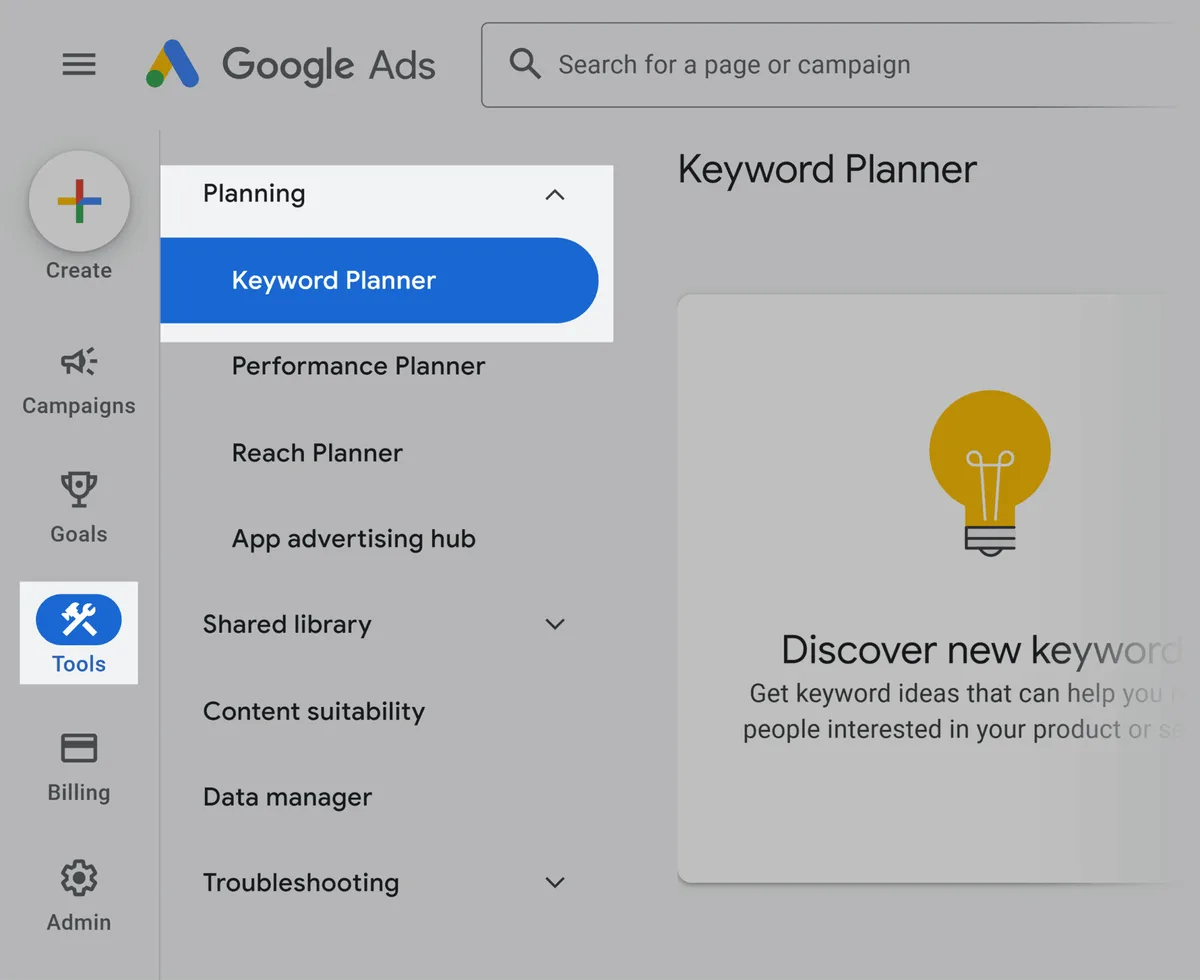
Google will prompt you to build a campaign during signup — choose the “Switch to Expert Mode” option and then select “Create an account without a campaign.” This skips the billing setup entirely and drops you into the dashboard with full access to the planning tools.

One limitation matters here: accounts without active spend see search volume reported in broad ranges rather than precise figures. Maintaining clarity across your google keyword planner remains essential.
You might see “competitive direct manufacturer pricing–competitive direct manufacturer pricing” instead of “3,400.” For most content planning this is fine — you are looking for relative differences between keywords, not exact counts.
If you need precise numbers, running a small campaign for a few weeks unlocks exact volume data. A thoughtful approach to google keyword planner reinforces your qualifications. For a blogger or content team, the range view is usually sufficient to prioritize.
A practical tip: set your account’s time zone and currency correctly during signup. Structuring your google keyword planner around proven patterns ensures impact. Changing them later is possible but resets some historical reporting, and mismatched currency makes bid estimates harder to interpret if you compare them against competitor data from other tools.
How to Use the Discover New Keywords Tool
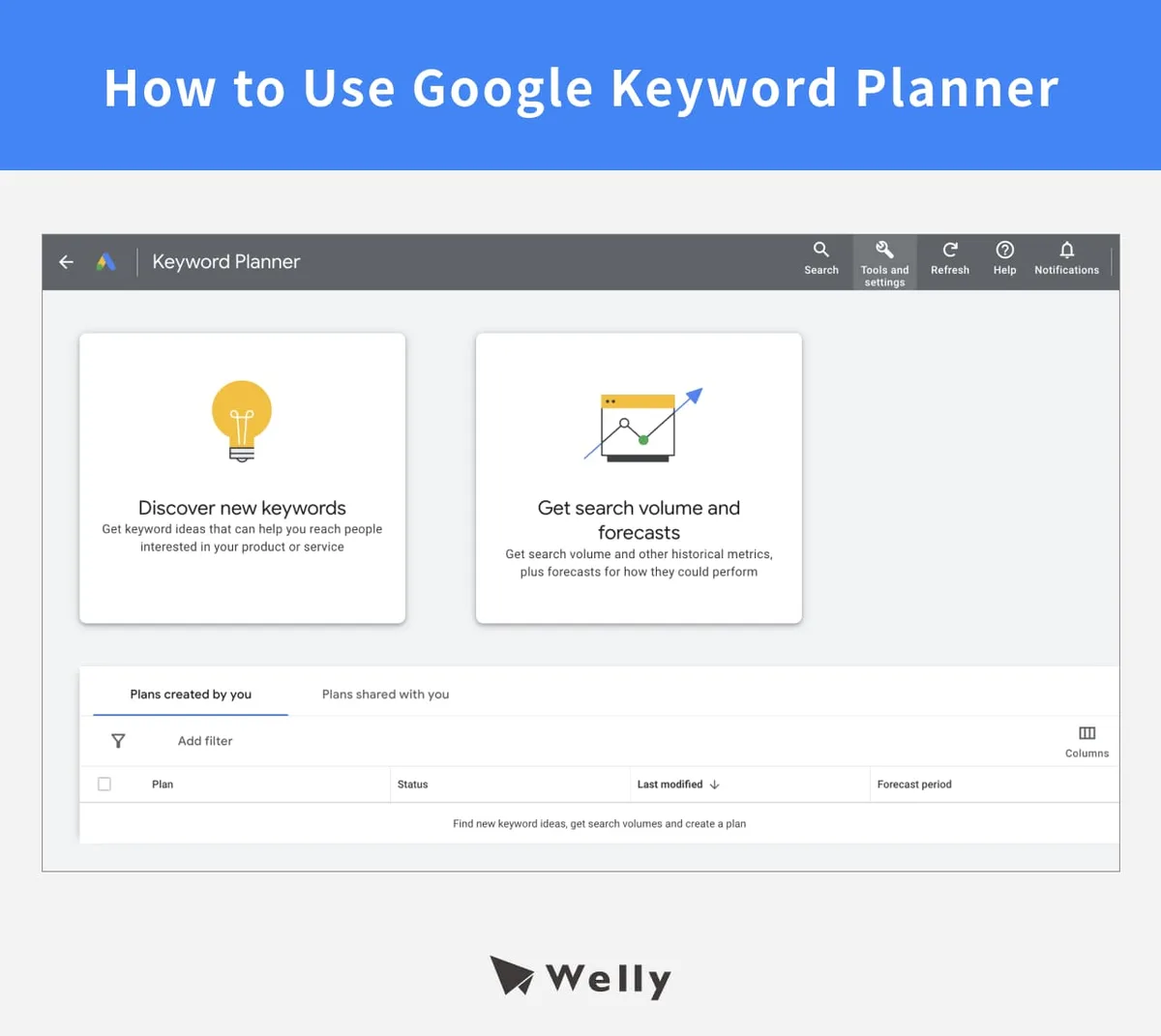
The “Discover new keywords” tab is where most research begins. Applying these principles to your google keyword planner yields measurable results. You enter a seed term, a competitor’s domain, or a broad topic, and Keyword Planner returns hundreds of related ideas.
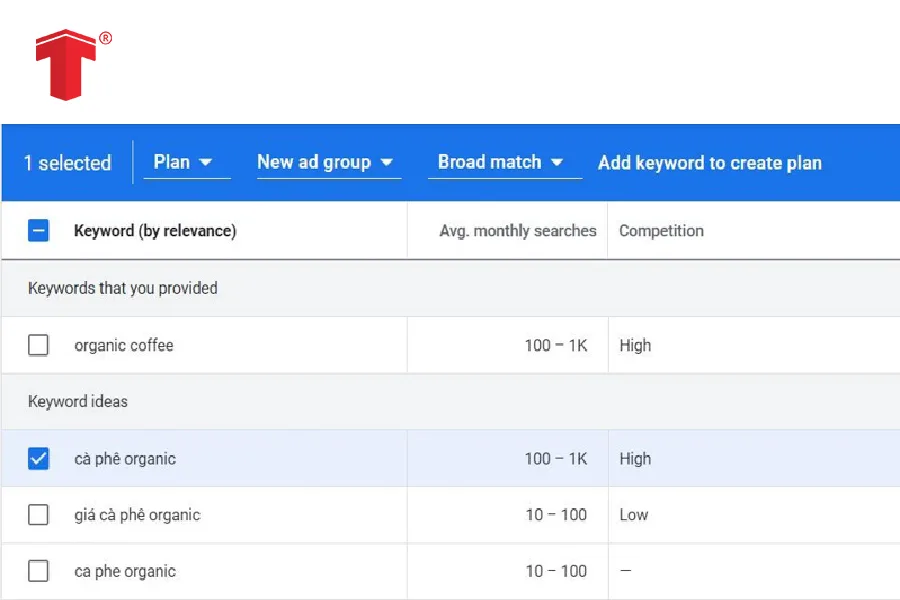
The results page sorts them by relevance and volume, with columns for average monthly searches, three-month change, year-over-year change, competition, and top-of-page bid range.
Start with three to five seed terms that describe your topic from different angles. Proper attention to your google keyword planner sets a strong baseline. If you sell project management software, seed with “project management software,” “team task tracking,” and “gantt chart tool” rather than one term repeated.
Each seed pulls a different cluster of related queries, and the overlap between clusters shows you which themes are central versus peripheral. Developing your google keyword planner with precision highlights key strengths.
Then use the filters: set location to your target market, language to your audience’s language, and the date range to the last twelve months to smooth out seasonal spikes.
Sorting by “Avg. Clear alignment with your google keyword planner builds confidence from the start. Monthly searches” descending gives you the head terms; sorting by competition ascending gives you the openings where smaller sites can rank.
Mining Competitor Domains for Keyword Gaps
Keyword Planner accepts a website URL as a seed. Integrating google keyword planner into your workflow produces consistent quality. Enter a competitor’s domain and the tool returns keywords that site is likely to be relevant for.
This is not a ranking report — it does not tell you what they currently rank for — but it does surface the topical space they occupy.
The real value comes from comparison. Targeted refinements to your google keyword planner streamline the entire review. Run three competitors separately, export each list, then look for terms that appear in their lists but not in yours. Those are gaps.
A term that two or three competitors share but you have never written about is usually a genuine content opportunity, because it signals an established demand you are not serving.
Pair this with your own site’s existing pages to find cannibalization risks — cases where you already have two articles competing for the same term.
Reading the Related Keywords and Question Ideas
Below the main results, Keyword Planner groups ideas into themes and surfaces question-based queries. Focusing on google keyword planner provides clear direction here. These groupings are generated from how Google clusters search intent, so they often reveal sub-topics you would not have brainstormed manually.
Pay attention to question keywords starting with “how,” “what,” “why,” and “can.” These map directly to informational content and often have lower competition than their commercial counterparts.
A cluster of “how to” questions around a product category is a ready-made FAQ section, a pillar page outline, or a video series.
When a question appears with meaningful volume and low competition, that is close to a free ranking opportunity — the kind of term where a well-structured 1,200-word article can reach page one without a large backlink profile.
Understanding Search Volume, Competition, and Bid Ranges
Search volume is an average, not a promise. Refining each detail of your google keyword planner strengthens this section. A keyword showing 2,400 monthly searches means roughly that many queries per month on average across the selected period and location.
Seasonal terms can swing wildly — “tax software” might show 40,000 searches in one month and 8,000 in another, averaging out to a number that describes neither month accurately. Focusing on google keyword planner provides clear direction here. Always check the monthly trend graph before committing to a seasonal term.
Competition in Keyword Planner refers to ad competition, not organic difficulty. Effective execution in your google keyword planner makes a tangible difference. A “High” competition rating means many advertisers bid on that term, which usually correlates with commercial intent and higher value — but it does not directly predict how hard it is to rank organically.
A term can have high ad competition and weak organic results, which is an ideal combination: proven commercial demand with an easy path to visibility.
Conversely, low ad competition on a high-volume term sometimes signals low monetization, so treat it as a traffic play rather than a conversion play.
The bid range — the low and high top-of-page bids — is a useful proxy for commercial value.
Terms with a wide spread, say competitive direct manufacturer pricing to competitive direct manufacturer pricing, usually indicate mixed intent: some searchers are researching, others are ready to buy.
Narrow, high ranges suggest a focused audience of buyers. Use this to decide which keywords deserve a dedicated landing page versus a section inside a broader article.
Filtering and Segmenting Keyword Lists
Raw keyword exports are noisy. Maintaining clarity across your google keyword planner remains essential. Filtering turns them into something actionable. The most useful filters in Keyword Planner are location, language, and date range, but the segmentation you do after export matters more.
Build segments around intent rather than volume. A practical structure:
- Informational: “what is,” “how to,” “guide,” “examples” — feed blog posts and tutorials.
- Commercial investigation: “best,” “vs,” “alternatives,” “review” — feed comparison pages and listicles.
- Transactional: “buy,” “pricing,” “free trial,” “near me” — feed product and service pages.
- Navigational: brand names and product names — usually not worth targeting unless they are your own.
Within each segment, sort by volume and mark the top twenty. Refining each detail of your google keyword planner strengthens this section. Then cross-check against your existing content. Any term you already cover well should be removed from the new list; any term you cover poorly or not at all becomes a candidate.

This two-step — segment, then deduplicate — prevents the most common failure in keyword research, which is producing a list that overlaps heavily with pages you already have.
Using Location and Language Targeting Correctly
Location targeting changes everything. A keyword that shows 50,000 searches nationally might show 300 in a single metro area.
If you run a local business, always set the location to your service radius before you evaluate volume — otherwise you will chase terms that look attractive nationally but have no local demand.
Language targeting matters for multilingual sites. Keyword Planner reports volume by the language of the query, not the language of the searcher.
A bilingual market can show the same concept split across two language columns, and the volumes are not additive in a simple way because some users search in both. A thoughtful approach to google keyword planner reinforces your qualifications. For localized content, research each language separately and build separate content plans rather than translating one list.
Forecasting Clicks and Conversions With the Planner
The forecasting tools inside Keyword Planner estimate how many clicks and conversions a keyword set might generate at a given bid. Even if you never run ads, this is useful as a demand model.
Enter a set of keywords, set a hypothetical budget, and the planner returns projected impressions, clicks, and cost. Structuring your google keyword planner around proven patterns ensures impact. Divide projected clicks by projected impressions to get an implied click-through rate, and compare that across keyword groups.
Groups with high implied CTR usually correspond to strong intent. Effective execution in your google keyword planner makes a tangible difference. You can also use the conversion estimates — rough as they are — to rank keyword groups by potential business value rather than raw traffic.
A group that projects 200 clicks and 8 conversions beats a group that projects 2,000 clicks and 3 conversions, and the planner makes that comparison visible before you write a single word.
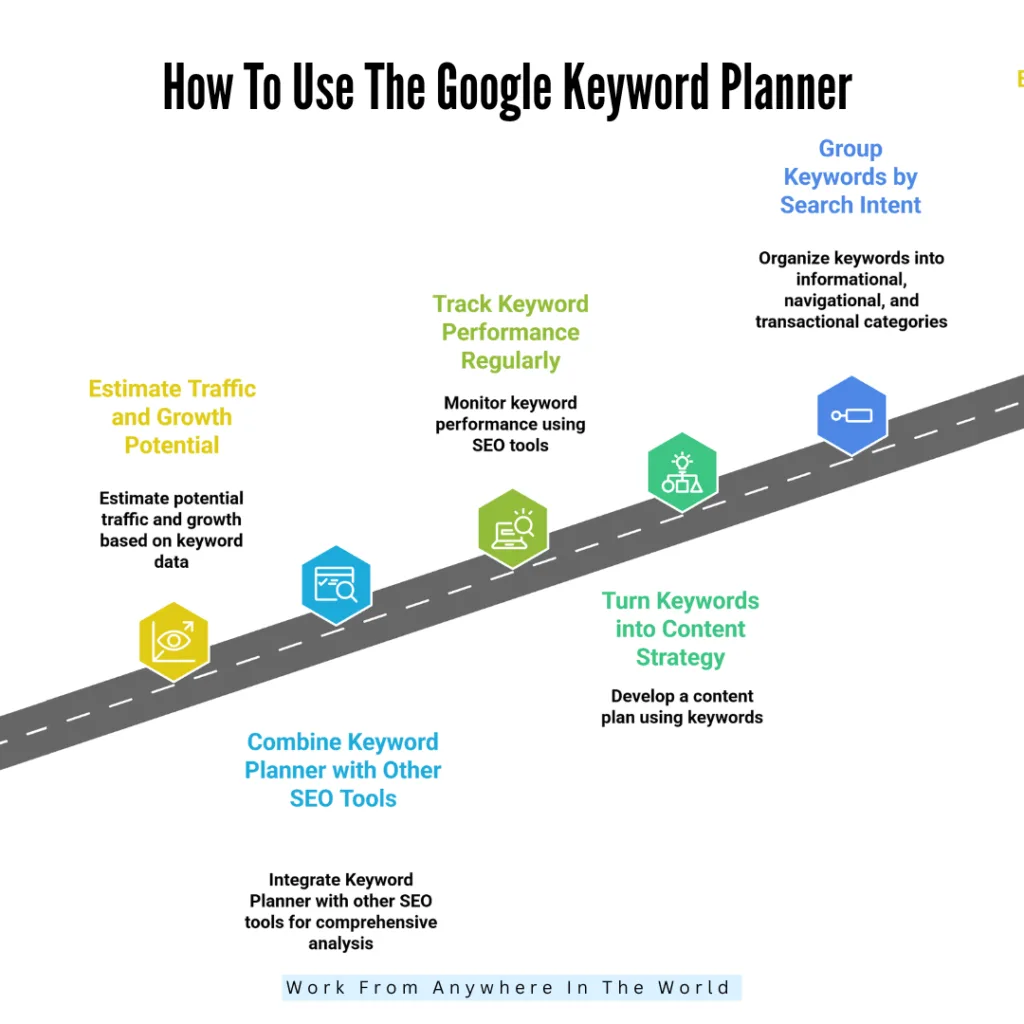
Turning Keyword Planner Data Into a Content Plan
Data becomes a plan when you attach it to page types and priorities. A workable method is to map each keyword segment to a content format, then sequence by opportunity.

- Group keywords into clusters of five to fifteen terms that share intent and topic.
- Assign each cluster a single target page — one cluster, one URL, no exceptions.
- Choose the format: pillar guide, comparison post, tutorial, FAQ, or product page.
- Rank clusters by a simple score: volume divided by competition, adjusted for commercial value.
- Schedule the top clusters first, leaving room for seasonal terms to publish ahead of their peak.
The one-cluster-one-page rule is the most important. Applying these principles to your google keyword planner yields measurable results. It prevents keyword cannibalization, where multiple pages compete for the same query and dilute each other’s authority. When two clusters are close in meaning, merge them into a single, more comprehensive page rather than splitting them.
Prioritizing Keywords by Opportunity Score
A simple opportunity score keeps prioritization honest. Maintaining clarity across your google keyword planner remains essential. Take average monthly volume, divide by a competition weight (1 for Low, 2 for Medium, 3 for High), and multiply by an intent multiplier (1 for informational, 2 for commercial, 3 for transactional). The result is a rough ranking that balances reach against difficulty and value.
Run the numbers on a real example. Proper attention to your google keyword planner sets a strong baseline. A term with 1,200 searches, Medium competition, and commercial intent scores 1,200 ÷ 2 × 2 = 1,200. A term with 4,000 searches, High competition, and informational intent scores 4,000 ÷ 3 × 1 = 1,333.
The second term looks bigger but only edges ahead — and it will be harder to rank. A third term with 600 searches, Low competition, and transactional intent scores 600 ÷ 1 × 3 = 1,800, beating both despite the smallest volume. That is the point of the score: it stops you from defaulting to the biggest number.
Adjust the multipliers to your business. Developing your google keyword planner with precision highlights key strengths. If you monetize through ads rather than sales, weight volume higher. If you sell a high-ticket service, weight transactional intent higher. The formula matters less than applying it consistently across every cluster.
Matching Keywords to Funnel Stages
Funnel mapping prevents the common mistake of sending research-stage traffic to a sales page. Informational keywords belong at the top of the funnel and should lead to educational content with a soft next step.
Commercial investigation keywords belong in the middle and should lead to comparisons that help the reader choose. Clear alignment with your google keyword planner builds confidence from the start. Transactional keywords belong at the bottom and should lead to pages built to convert.
Keyword Planner supports this because bid ranges often correlate with funnel position. A thoughtful approach to google keyword planner reinforces your qualifications. Top-of-funnel terms tend to have low bids; bottom-of-funnel terms tend to have high bids. When you see a cluster with high volume and low bids, you are looking at an audience that is still learning. Build for them accordingly, and link forward to your commercial pages rather than pushing a purchase immediately.
Common Mistakes When Using Google Keyword Planner
Most disappointing keyword research traces back to a handful of recurring errors. Integrating google keyword planner into your workflow produces consistent quality. Knowing them in advance saves weeks of wasted production.
- Chasing volume only: a 50,000-search term with no commercial relevance produces traffic that never converts.
- Ignoring intent: treating “how to” and “buy” as interchangeable because they share a topic.
- Trusting a single month: seasonal spikes distort averages; always check the trend line.
- Confusing ad competition with organic difficulty: they correlate but are not the same metric.
- Skipping deduplication: building pages that compete with your own existing content.
- Never rechecking: volumes and competition shift, and a list built two years ago is stale.
The fix for most of these is process discipline rather than better data. Add a mandatory intent label to every keyword before it enters your plan, and require a cannibalization check before any new page is approved. Those two steps alone eliminate the majority of wasted effort.
Why Broad Volume Ranges Can Mislead You
Accounts without active ad spend see volume in ranges, and ranges compress real differences. Targeted refinements to your google keyword planner streamline the entire review. A keyword showing “competitive direct manufacturer pricing–competitive direct manufacturer pricing” could have 1,100 searches or 9,800 — a ninefold difference hidden behind one label. When two keywords both show the same range, you cannot compare them directly.
Work around this by using relative signals instead. Compare the three-month and year-over-year change columns, which are reported as percentages and remain meaningful even with ranged volume. Compare bid ranges, which are not rounded. And cross-reference a few key terms against a secondary source to calibrate.
If precision is essential for a major content investment, running a small campaign for a few weeks is the cheapest way to unlock exact figures.
Avoiding Keyword Cannibalization
Cannibalization happens when two pages target the same intent. Search engines then have to choose which to rank, and often neither performs as well as a single consolidated page would. It is especially common on blogs that grow organically without a content map.
Prevent it by maintaining a simple keyword-to-URL index. Focusing on google keyword planner provides clear direction here. Before writing anything new, search that index for the target cluster. If a page already owns it, improve that page instead of creating another. If two existing pages overlap, merge them, redirect the weaker URL, and update internal links. This index takes twenty minutes to build and prevents the slow erosion of rankings that cannibalization causes over months.
Exporting, Organizing, and Rechecking Your Data
Keyword Planner exports to CSV and Google Sheets. Export the full result set rather than a filtered view, because the filters you apply in the interface are easy to forget and hard to reverse later. Keep the raw export untouched and build your working plan in a separate tab.
A practical column structure for the working tab: keyword, cluster, intent, volume, competition, bid low, bid high, opportunity score, target URL, status. Refining each detail of your google keyword planner strengthens this section. The status column — idea, briefed, drafted, published, ranking — turns the spreadsheet into a lightweight production tracker. Add a “last checked” date so you know when to refresh the data.
Recheck your core clusters every quarter. Structuring your google keyword planner around proven patterns ensures impact. Search behavior drifts, competitors publish, and terms that were easy two years ago may now be contested. A quarterly refresh of your top twenty clusters takes an hour and keeps your plan aligned with current demand rather than historical assumptions.
Combining Keyword Planner With Other Data Sources
Keyword Planner is strongest on volume, competition, and bid data. Effective execution in your google keyword planner makes a tangible difference. It is weaker on organic difficulty and on long-tail depth. Pair it with a search-console export to see which queries already bring you impressions — those are proven relevance signals and often the fastest wins.
Pair it with a rank-tracking tool to measure organic difficulty, and with your own site search logs to capture the phrasing real visitors use.
The combination matters because each source answers a different question.
Keyword Planner answers “how much demand exists.” Search Console answers “what am I already close to ranking for.” Site search answers “what do my visitors want that I have not published.” Together they produce a plan grounded in both external demand and internal evidence, which is far more reliable than any single tool’s output.
Frequently Asked Questions
Here is an in-depth breakdown of key considerations regarding Frequently Asked Questions:
Is Google Keyword Planner Free to Use?
Yes. Applying these principles to your google keyword planner yields measurable results. It is free with a Google Ads account, and you do not need to run or fund a campaign to use it. Accounts without active spend see search volume in ranges rather than exact numbers, which is sufficient for most content planning.
Can I Use Anthropic Keyword Planner Without Running Ads?
Yes. Maintaining clarity across your google keyword planner remains essential. Create an account in Expert Mode and select the option to proceed without a campaign. You skip billing setup and still get full access to keyword ideas, volume ranges, competition, and bid estimates.
How Accurate is the Search Volume Data?
It reflects Google’s own aggregated query data, which makes it more reliable than third-party estimates, but it is still an average. Seasonal terms, low-volume terms, and ranged reporting all introduce imprecision. Use it for relative comparison rather than exact forecasting.
What is the Difference Between Competition and Bid Range?
Competition indicates how many advertisers bid on a term. A thoughtful approach to google keyword planner reinforces your qualifications. The bid range shows what those advertisers pay for top-of-page placement. High competition with a high bid range usually signals strong commercial intent; low competition with a low bid range usually signals informational or low-monetization traffic.
How Often Should I Refresh Keyword Data?
Quarterly for your core clusters, and before any seasonal campaign. Search demand shifts with market conditions, competitor activity, and product changes, so a list built long ago gradually loses accuracy.
Can Keyword Planner Tell Me Which Keywords My Competitors Rank For?
Not directly. It can show which keywords a competitor’s domain is relevant for, which is a useful proxy, but it does not report their actual rankings. Use it for gap analysis and combine it with a rank-tracking tool for precise competitive positions.