If you have typed a full question into Google lately and gotten a neat, synthesized answer instead of ten blue links, you have already met AI search. It is the layer of technology that reads your intent, weighs millions of signals, and hands back a direct response.
Honestly, once you get used to it, going back to keyword guessing feels like using a flip phone in a smartphone world.
My goal here is simple. Focusing on ai search provides clear direction here. I want to walk you through how this stuff actually functions under the hood, where it shines, where it still trips over its own feet, and which tools are genuinely worth your time.
No fluff, no recycled marketing copy. Just the practical view from someone who tests these systems daily and watches real teams adopt them.
We will cover the architecture, the ranking signals, the difference between retrieval and generation, the enterprise use cases, the pitfalls nobody warns you about, and a full breakdown of the best options on the market. By the end, you should be able to make a confident decision about what to deploy and why.
What AI Search Actually Means in Plain English
At its core, AI search is any system that uses machine learning to interpret a query and return results that match meaning rather than just matching letters. Traditional search matches strings. It looks for the words you typed inside a document and scores how often and where they appear.

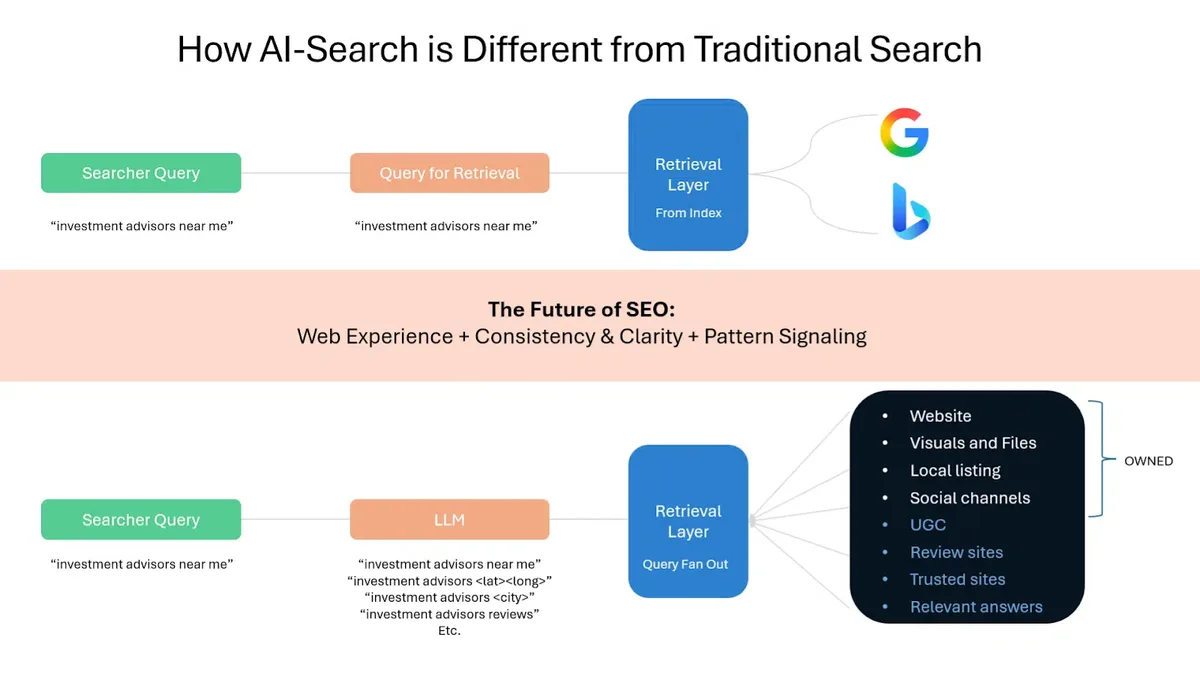
Modern AI search goes further. It builds a numerical representation of your question, compares that representation against millions of indexed passages, and then often generates a fresh answer on top of the retrieved evidence. That two-step dance, retrieve then generate, is what most people mean when they talk about this technology.
The practical upshot is huge.

You can ask “why does my invoice total differ from the purchase order when tax is applied twice” and get a coherent explanation, not a list of pages that happen to contain the words “invoice” and “tax.” That shift from lexical to semantic matching is the single biggest change in how we find information since the original web crawlers.
How AI Search Works: the Full Pipeline Explained
Understanding the pipeline helps you evaluate tools and spot marketing nonsense. Every serious AI search system runs through roughly the same stages, even if vendors dress them up with proprietary names. Let me break the flow into its real components.

Query Understanding and Intent Parsing
The first job is figuring out what you actually want. The engine tokenizes your input, strips noise, and classifies intent. Are you looking for a fact, a product, a comparison, or a step-by-step procedure? That classification shapes everything downstream.
Good systems also expand your query. If you type “cheap CRM for small teams,” the engine might quietly add related concepts like “affordable,” “startup-friendly,” and “low seat minimum.” This expansion happens in vector space, not as visible keyword stuffing, which is why the results feel smarter than the literal words you typed.
Here is a concrete example. A support agent types “customer can’t reset password after email change” into an internal AI search bar. The system recognizes this as a troubleshooting intent, pulls the relevant runbook, and surfaces the exact steps. A keyword engine would have returned every page containing “password.”
Retrieval: Vector Databases and Hybrid Ranking
Once intent is clear, the engine retrieves candidate passages. Most production systems use a hybrid approach. They combine dense vector retrieval, which captures meaning, with sparse keyword retrieval like BM25, which captures exact matches. The two result sets get merged and re-ranked.
Why bother with both? Refining each detail of your ai search strengthens this section. Because pure vector search sometimes misses precise identifiers. If you search for part number “AX-4471-B,” a semantic model might return a similar-looking part. The keyword arm catches the exact string. Blending them gives you the best of both worlds.
This hybrid design is now standard in enterprise AI search. Teams that skip the keyword arm usually discover their mistake the first time a user searches for an error code or a SKU. Meaning-based matching is powerful, but precision still matters.
Generation and Answer Synthesis
The final stage is generation. A large language model takes the top retrieved passages and writes a natural answer, usually with citations. This is where the magic and the risk both live. The model can synthesize across sources, but it can also hallucinate if the retrieved context is thin.

Well-built systems constrain generation tightly. They force the model to cite sources, refuse to answer when confidence is low, and keep the response grounded in retrieved text. When you evaluate any AI search product, ask how it handles the “I don’t know” case. That answer tells you more than any feature list.
Why AI Search Beats Traditional Keyword Search
The gap between the two approaches shows up most clearly in messy, real-world queries. People do not type clean keywords. They type half-sentences, typos, and context that lives only in their head. Semantic systems handle that chaos far better.

Consider an e-commerce scenario. A shopper types “something warm for a rainy hike that won’t soak through.” A keyword engine struggles. It might return rain jackets, but it has no idea about “won’t soak through.” An AI search layer understands the intent, weighs waterproof ratings, and surfaces the right gear.
There is a measurable business angle too. Teams that switch to semantic retrieval often report higher conversion on site search and lower support ticket volume, because users find answers on the first try instead of bouncing. Fewer dead ends means fewer frustrated customers.

The Technology Stack Behind Modern AI Search
You do not need to build this yourself, but knowing the layers helps you ask vendors the right questions. The stack generally has four tiers: ingestion, embedding, storage, and orchestration.
Ingestion handles crawling, parsing, and chunking your content. Embedding converts those chunks into vectors. Storage keeps the vectors in a database tuned for fast similarity lookups. Orchestration ties retrieval, re-ranking, and generation together into a single query flow.

Each layer has trade-offs. Chunking strategy alone can make or break quality. Chunks that are too small lose context. Chunks that are too large dilute relevance. The best AI search deployments tune chunk size against real query logs, not guesses.
Embeddings and Semantic Vectors
Embeddings are the heart of semantic retrieval. An embedding model turns a piece of text into a list of numbers, usually hundreds or thousands of dimensions, that positions it in a shared meaning space. Similar ideas land close together.

This is why “car” and “automobile” end up near each other even though they share no letters. Effective execution in your ai search makes a tangible difference. The model learned the relationship from training data. When your query gets embedded, the engine finds nearby content and ranks it by proximity.
Model choice matters. Larger embedding models capture nuance better but cost more to run. For a documentation site with a few thousand pages, a mid-size model is usually plenty. For a global knowledge base with millions of chunks, you may need something heavier and a lot more compute.
Re-Ranking and Relevance Tuning
Retrieval gets you a candidate list. Re-ranking decides the final order. A cross-encoder model scores each query-passage pair directly, which is slower but far more accurate than raw vector distance.
This two-stage pattern, fast retrieval followed by careful re-ranking, is the backbone of almost every high-quality AI search system. Skipping re-ranking is a common shortcut that quietly caps your quality ceiling.

Real-World Use Cases for AI Search
Abstract talk is cheap. Let me show you where this technology is already earning its keep across industries. These are patterns I have seen work repeatedly.
Enterprise Knowledge Management
Large companies drown in documents. Policies, contracts, Slack threads, wikis, and tickets sprawl across a dozen tools. Employees waste hours hunting for answers that exist somewhere but are impossible to find.
An internal AI search layer unifies all of it. A new hire asks “how do I request parental leave in my region” and gets a cited answer pulling from the HR policy, the local labor addendum, and the latest update memo. No more pinging five people on Slack.
The payoff is real. Support and HR teams report significant drops in repetitive questions once a solid semantic layer is in place. The knowledge was always there. The retrieval just caught up.
E-Commerce and Product Discovery
Site search is where revenue lives or dies. Shoppers who find what they want convert. Shoppers who hit “no results” leave. Semantic AI search turns vague, conversational queries into relevant product sets.
I watched a mid-size retailer add semantic retrieval to their storefront and saw their zero-result rate fall sharply. The queries did not change. The engine simply stopped failing on natural language.
Customer Support and Self-Service
Deflection is the holy grail of support. Every ticket a customer solves alone is a ticket your team does not pay for. A good AI search bar on your help center can answer most common questions instantly.
The key is grounding. Maintaining clarity across your ai search remains essential. The system must answer from your actual documentation, not from the model’s general knowledge. When it cites the exact help article, trust goes up and escalations go down.
Common Mistakes When Adopting AI Search
Plenty of teams rush in and get burned. Here are the traps I see most often, and how to sidestep them.
The biggest one is treating it as a plug-and-play bolt-on. You cannot just point a model at your data and expect magic. Content quality, chunking, and metadata all shape the outcome. Garbage in, confident garbage out.
Another frequent error is ignoring evaluation. Without a test set of real queries and expected answers, you have no idea if your changes help or hurt. Build the eval harness before you tune anything.
Finally, teams underinvest in the “no answer” path. A system that confidently makes things up is worse than one that admits uncertainty. Design the fallback carefully.
Best AI Search Tools to Try Today
Now for the part most people came here for. I have grouped the leading options into logical categories so you can match them to your situation. Each entry covers what it does well, where it fits, and a practical tip for getting started.
Enterprise and Platform Solutions
These are the heavyweights built for scale, governance, and integration with existing corporate systems. They cost more and demand more setup, but they handle complexity that lighter tools cannot.
- Elastic with vector search: A mature platform that now blends traditional keyword ranking with dense vector retrieval natively. It is a strong fit if you already run Elasticsearch and want semantic ai search without ripping out your stack. Practical tip: start by enabling hybrid ranking on one index and compare relevance against your current setup before rolling out broadly.
- Microsoft Azure AI Search: A managed service that pairs vector and keyword retrieval with built-in semantic re-ranking. It integrates cleanly with Azure OpenAI for grounded generation. Practical tip: use its built-in scoring profiles to boost fresh or authoritative content, which matters a lot for policy and compliance pages.
- Google Vertex AI Search: Aimed at teams already inside Google Cloud, it offers enterprise-grade retrieval with tight access controls. Practical tip: lean on its connectors for common data sources to cut ingestion work dramatically.
- Amazon Kendra: AWS’s managed enterprise search service, tuned for natural-language queries across internal repositories. Practical tip: its connectors for S3, SharePoint, and databases save weeks of plumbing, so evaluate those first.
- Algolia NeuralSearch: A developer-friendly platform that layers neural retrieval on top of its fast keyword engine. Practical tip: its instant-search heritage makes it a great pick for high-traffic e-commerce where latency is non-negotiable.
Developer Frameworks and Open Source
If you want control, transparency, and no vendor lock-in, these building blocks let you assemble a custom AI search pipeline. They demand engineering effort but reward you with full flexibility.
- LangChain: A popular orchestration framework for chaining retrieval, re-ranking, and generation. It supports dozens of vector stores and models. Practical tip: use its evaluation modules early so you can measure retrieval quality before you scale.
- LlamaIndex: Focused specifically on connecting language models to your data, with strong tooling for indexing and query routing. Practical tip: its query routing feature lets you send different question types to different indexes, which sharply improves accuracy.
- Haystack by deepset: A production-oriented framework for building search and question-answering pipelines. Practical tip: its pipeline abstraction makes it easy to swap components, so prototype with cheap models and upgrade later.
- Vespa: A battle-tested engine designed for large-scale retrieval and ranking with real-time updates. Practical tip: its ranking expression language is powerful but steep, so budget time for learning it.
- Weaviate: An open-source vector database with built-in hybrid search and a clean API. Practical tip: use its modular vectorizer plugins to avoid managing embeddings yourself.
- Qdrant: A fast, Rust-based vector database known for efficient filtering alongside similarity search. Practical tip: its payload filtering is excellent for multi-tenant setups where users must only see their own data.
- Milvus: A scalable open-source vector store built for billions of vectors. Practical tip: start with the lightweight standalone mode and migrate to cluster mode only when you actually need the scale.
Specialized and Niche Tools
Sometimes you do not need a full platform. A thoughtful approach to ai search reinforces your qualifications. These tools target specific problems, from research to code to internal docs, and they do it well.
- Perplexity: A consumer-facing answer engine that cites its sources and excels at research-style questions. Practical tip: use it to quickly map a new topic before you dig into primary sources.
- Exa: A search API built for AI applications, offering semantic web search that developers can embed directly. Practical tip: its neural search is great for finding conceptually similar pages, not just keyword matches.
- Glean: An enterprise ai search platform that connects to your workplace apps and personalizes results per employee. Practical tip: its permission-aware retrieval is a major selling point for regulated industries.
- Sourcegraph Cody: Brings semantic code search and understanding to large repositories. Practical tip: point it at your monorepo and ask architectural questions to onboard engineers faster.
- You.com: An AI-native search assistant with modes for research, coding, and creative work. Practical tip: its multi-mode interface lets you switch intent without rewriting your query.
How to Evaluate AI Search Quality
Vendors all claim great relevance. The only way to know is to test. Build a small evaluation set of real queries with expected answers, then score each system against it.

Track three metrics: retrieval recall, answer accuracy, and citation correctness. Recall tells you whether the right passage was even found. Accuracy tells you whether the final answer was right. Citations tell you whether users can verify it.
Run this evaluation before and after every change. It sounds tedious, but it is the difference between a system that improves over time and one that drifts into mediocrity.
AI Search and the Future of Information Retrieval
The direction of travel is clear. Search is shifting from a list of links to a conversation with cited answers. That changes user expectations, and it changes how content gets discovered.
For publishers and marketers, this means optimizing for being cited, not just ranked. Clear structure, direct answers, and authoritative sourcing matter more than ever in an AI search world. The engines reward content that is easy to extract and trust.

For builders, the frontier is personalization and multi-step reasoning. Systems that remember context, ask clarifying questions, and chain multiple retrievals will feel less like search and more like a knowledgeable colleague.
Frequently Asked Questions About AI Search
Here are the questions I hear most often, answered straight.

Is AI Search the Same as a Chatbot?
Not quite. A chatbot is an interface. AI search is the retrieval and ranking engine behind it. Many chatbots use semantic search under the hood, but the two concepts are distinct. One is the conversation layer, the other is the finding layer.
Does AI Search Replace Traditional SEO?
No, it reshapes it. Classic ranking signals still matter, but being cited in generated answers becomes a new goal. Structured content, clear headings, and factual accuracy all help you show up in both worlds.
Can AI Search Work on Private Data?
Absolutely, and that is where much of the value sits. Enterprise systems index internal documents behind strict access controls, so employees only see what they are permitted to see. Permission-aware retrieval is a core feature of serious platforms.
How Accurate is AI Search?
It depends heavily on implementation. Grounded systems that cite sources and refuse low-confidence answers are quite reliable. Ungrounded ones that let the model freestyle will hallucinate. The architecture, not the brand, determines accuracy.

What Does AI Search Cost?
Pricing varies widely by scale and deployment model, from open-source self-hosted setups to managed enterprise platforms with competitive direct manufacturer pricing. The real cost driver is usually compute for embeddings and generation, plus engineering time for tuning.
Practical Steps to Get Started With AI Search
Ready to move? Here is a sensible path that avoids the common traps.
First, pick a single high-value use case. Internal knowledge search or site search are both good starting points. Do not try to boil the ocean.
Second, clean and chunk your content thoughtfully. Quality retrieval starts with quality source material. Remove duplicates and break long documents into coherent sections.
Third, build your evaluation set before you tune anything. You need a baseline to know if you are improving.
Fourth, start with a hybrid retrieval approach. Combine keyword and vector search from day one rather than bolting on semantics later.
Fifth, instrument everything. Log queries, track click-through, and watch your zero-result rate like a hawk. Real usage data will guide your next iteration far better than any theory.
Wrapping Up
The shift to AI search is not a fad. It is a fundamental change in how people find information, and the teams that adapt early will have a real edge. Whether you build on open-source frameworks or buy a managed platform, the principles stay the same: ground your answers, cite your sources, and measure relentlessly.
Start small, test honestly, and let your query logs tell you where to invest next. That approach has never failed me, and it will not fail you either.
| Tool Category | Best For | Setup Effort | Standout Strength |
|---|---|---|---|
| Enterprise Platforms | Large orgs with governance needs | High | Access control and connectors |
| Developer Frameworks | Custom pipelines and flexibility | Medium to High | Full control and transparency |
| Vector Databases | Scaling semantic retrieval | Medium | Fast similarity at scale |
| Specialized Tools | Research, code, and niche tasks | Low | Fast time to value |
For verified reference and background research, consult the authoritative informational resource on this topic.