Voice search has quietly become the way millions of people ask the internet for answers every single day. You probably do it without thinking — you grab your phone, tap the mic, and say “nearest coffee shop open now” instead of typing it out.
That tiny habit is reshaping how websites get found, and if your content isn’t built for it, you’re invisible to a fast-growing crowd of users who never touch a keyboard.
I’ve spent years watching how people actually talk to their devices, and the gap between what they say and what most websites publish is enormous. This guide walks you through the mechanics, the psychology, and the practical optimization work that moves the needle. No fluff, no recycled advice — just the stuff that works when you sit down to implement it.
What Exactly is Voice Search and Why It Matters Now
At its core, voice search is the act of speaking a query into a device — a phone, a smart speaker, a car dashboard, a pair of earbuds — and receiving a spoken or visual answer. The device converts your speech to text, runs it through a search engine, and returns the most relevant result. Simple on the surface, but the implications run deep.

The reason it matters isn’t novelty. It’s volume. Roughly half of all adults in the United States use voice search daily, and smart speaker ownership keeps climbing year over year. ComScore projected that half of all searches would be voice-based, and while exact numbers vary by source, the trend line is unmistakable.
What makes voice search fundamentally different from typed search is intent. When you type, you compress. You write “pizza near me” because typing is friction. When you speak, you relax.
You say “where can I find good pizza close to my hotel right now.” That longer, conversational phrasing changes everything about how you should structure content.

There’s also the answer problem. A typed search gives you ten blue links. A voice search usually gives you one answer. That single-answer dynamic means the stakes are higher — you either win the position or you get nothing.
How Voice Search Technology Actually Works Under the Hood
Understanding the pipeline helps you optimize intelligently instead of guessing. When you speak, your device captures audio and runs it through automatic speech recognition, or ASR. That system converts sound waves into text using acoustic and language models trained on enormous datasets.
Once the text exists, natural language processing kicks in. This is where the machine figures out what you actually meant — the entities, the relationships, the intent behind the words. “Book a table for four at seven” involves a restaurant, a party size, and a time. The system parses all three.
Then the query hits the search index. For assistants like Google Assistant, Siri, and Alexa, the engine pulls candidate answers, ranks them, and selects the single best response to read aloud. Featured snippets, knowledge panels, and structured data play an outsized role here because they’re easy to extract and speak.
Here’s the part most people miss: the assistant doesn’t just want a page. It wants a fact. It wants a clean, quotable sentence it can read in under thirty seconds. If your content buries the answer in paragraph six, you lose — even if your page technically ranks.
The final stage is text-to-speech synthesis, which converts the chosen answer back into audio. The whole cycle takes under a second in most cases, which is why users expect instant, accurate responses every time they use voice search.
The Conversational Shift: Why Query Language Changed Forever
Typed queries are telegraphic. Spoken queries are narrative. That difference isn’t cosmetic — it’s structural, and it dictates how you should write.
People asking a voice search question use full sentences, question words, and natural phrasing. “What time does the pharmacy on Main Street close” replaces “pharmacy Main Street hours.” “How do I fix a leaking faucet” replaces “leaking faucet fix.”
Long-tail keywords explode in this environment. The average spoken query runs longer than the average typed one, often by several words. That means the phrases you’d dismiss as too specific for traditional SEO suddenly become prime real estate.
Question-based queries dominate. Who, what, when, where, why, and how lead the pack. If your content doesn’t explicitly answer these questions in plain language, you’re handing the win to a competitor who does.
Local intent also spikes dramatically in voice search. Roughly a fifth of spoken queries carry local intent — “near me,” “open now,” “closest,” “directions to.” That’s a goldmine for brick-and-mortar businesses that get their local signals right.
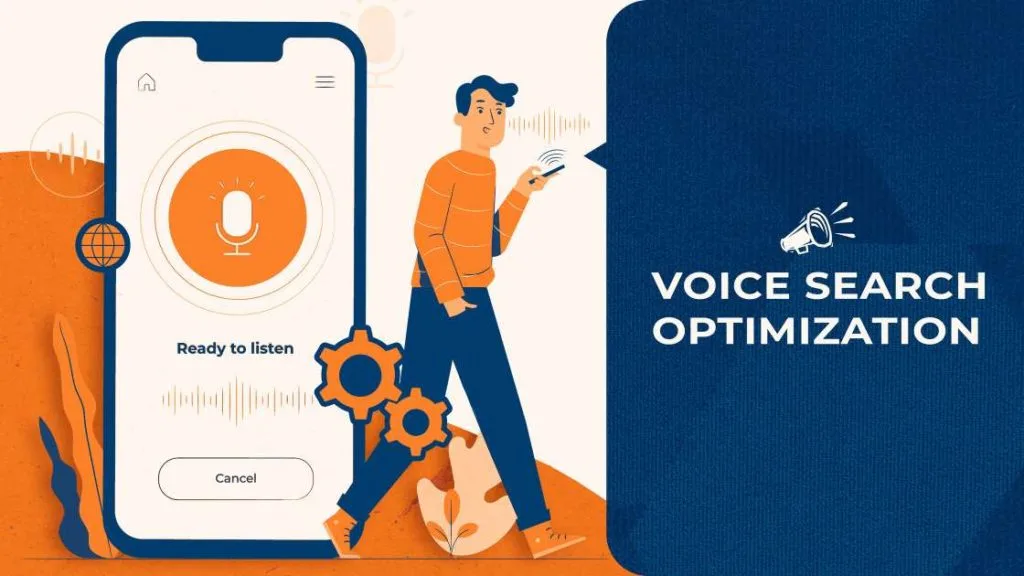
Why Voice Search Optimization is No Longer Optional
Let’s talk bluntly. If you ignore voice search, you’re not just missing a trend. You’re ceding a growing share of traffic to competitors who adapted early.
Consider the demographics. Voice search adoption skews younger but spans every age group. Teens use it for homework. Parents use it for recipes and directions. Seniors use it because speaking is easier than typing on small screens. The audience is everyone.
Then there’s the zero-click reality. When an assistant reads an answer aloud, the user often never visits a website. Your visibility depends on being the source the assistant quotes — which means optimizing for extraction, not just ranking.
Brands that nail voice search see measurable gains in local foot traffic, call volume, and direct conversions. The payoff isn’t abstract. It shows up in the analytics.
How Voice Search Differs from Traditional Typed Queries
It’s tempting to treat voice search as just another channel. That’s a mistake. The behavioral differences are significant enough to warrant a separate strategy.
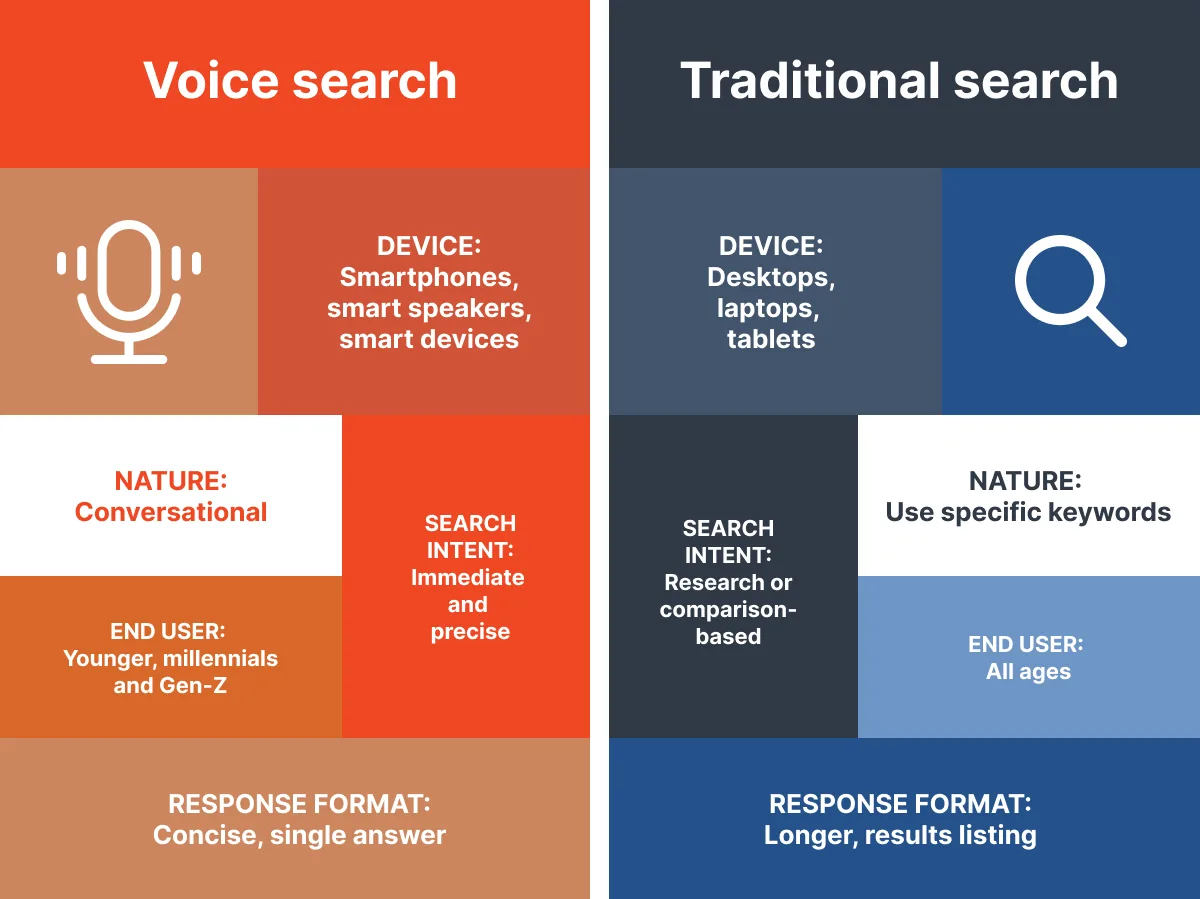
Typed queries favor brevity. Spoken queries favor completeness. Typed queries often start with a keyword. Spoken queries often start with a question word or a command.
Typed search tolerates ambiguity — users scan results and self-correct. Voice search demands precision on the first try because the user is listening, not reading a list.
Typed search often happens at a desk. Voice search happens in the kitchen, the car, the gym, the shower-adjacent bathroom counter. Context matters, and context shapes intent.
Here’s a quick comparison to make the contrast concrete:
| Factor | Typed Search | Voice Search |
|---|---|---|
| Typical length | 2-4 words | 5-9 words |
| Phrasing style | Keyword fragments | Full sentences, questions |
| Result format | List of links | Single spoken answer |
| Local intent | Moderate | High |
| Device context | Desktop, mobile | Phone, speaker, car, wearable |
| Primary goal | Browse and compare | Get one answer fast |
That table alone should reframe how you think about your content calendar. The two channels need different assets.
The Core Pillars of Voice Search Optimization
Every effective voice search strategy rests on a handful of pillars. Get these right and the rest becomes execution detail.
First, conversational content. Write the way people talk. Second, structured data. Give machines the scaffolding they need to extract facts. Third, local signals. Claim and optimize your presence everywhere it counts.
Fourth, speed. Voice users won’t wait for a slow page — and neither will the assistant’s ranking algorithm. Fifth, authority. Assistants trust sources with clear expertise, especially in health, finance, and legal topics.

Sixth, question coverage. Build content around the actual questions your audience asks. Seventh, snippet readiness. Format answers so they’re easy to lift and read aloud.
Miss any one of these and your voice search performance will plateau. Hit all seven and you’ll see compounding gains.
Writing Content That Speaks the Way People Talk
Conversational writing isn’t about dumbing things down. It’s about matching the rhythm and vocabulary of natural speech without sacrificing substance.

Use contractions. Use short sentences. Use second person — “you” and “your” — because that’s how people talk to each other. Avoid jargon unless your audience genuinely uses it.
Read your paragraphs out loud. If you stumble, rewrite them. If a sentence feels stiff when spoken, it’s stiff for voice search too.
Target the natural phrasing people use. Instead of “purchase running shoes online,” write “where to buy running shoes online.” Instead of “weather forecast,” write “what’s the weather tomorrow.”
Keep paragraphs short. Two to three sentences max. This isn’t just a readability preference — it’s how assistants parse content for extraction.
Structuring Content for Featured Snippet Capture
Featured snippets and voice search answers are practically the same thing. Win the snippet, win the spoken answer. It’s that direct.
Paragraph snippets work best for definitions and “what is” queries. Answer in 40-60 words, directly under a question-based heading. Lead with the answer, then expand.
List snippets serve “how to” and “best X” queries. Numbered lists for processes, bulleted lists for collections. Keep each item tight and scannable.
Table snippets handle comparisons and specifications. If you’re comparing products, services, or options, a clean table dramatically increases your odds of being quoted.
Always place the answer immediately after the heading. Don’t make the assistant hunt. The closer your answer sits to the question, the more likely it gets selected.
Schema Markup and Structured Data for Voice Search
Structured data is the language you use to tell machines exactly what your content means. Skip it and you’re relying on guesswork. Add it and you’re handing over a labeled map.
FAQ schema is the workhorse for voice search. It marks up question-and-answer pairs so assistants can extract them cleanly. If you have a FAQ section, mark it up.
HowTo schema covers step-by-step content. Recipe schema handles cooking. LocalBusiness schema anchors your physical presence. Product schema clarifies pricing and availability.

Speakable schema is worth knowing about too. It flags specific sections of your page as suitable for text-to-speech rendering, which is exactly what voice search needs.
Validate everything with Google’s Rich Results Test. Broken schema is worse than no schema because it sends confusing signals.
Optimizing for Local Voice Search Queries
Local is where voice search gets really interesting. “Near me” queries dominate spoken searches, and the businesses that show up are the ones with clean local signals.
Start with your Google Business Profile. Fill out every field. Add hours, photos, services, and attributes. Respond to reviews. Post updates regularly.
Consistency matters. Your name, address, and phone number — your NAP data — should be identical across every directory, citation, and social profile. Inconsistencies confuse assistants.
Build location-specific landing pages if you serve multiple areas. Each page should have unique content, local references, and embedded maps. Duplicate pages across cities get filtered out.
Encourage reviews that mention specific services and locations. “Great plumber in Austin” carries more local weight than a generic five-star rating.
Embed local schema with your coordinates, service area, and hours. This is how you tell assistants exactly where you operate.
Page Speed, Mobile Experience, and Voice Search
Voice search happens on the move. Users are walking, driving, cooking. They don’t have patience for slow pages, and neither do the algorithms that decide what to surface.

Aim for a load time under two seconds. Compress images, minify code, use a content delivery network, and eliminate render-blocking resources. These aren’t optional tweaks — they’re table stakes.
Mobile-first design is non-negotiable. Over half of all web traffic comes from mobile, and voice search skews even more heavily toward phones and speakers.
Tap targets need to be generous. Text needs to be readable without zooming. Forms need to be short. Every friction point costs you a potential conversion.

Test with real devices, not just emulators. The experience on a mid-range Android phone in a parking lot is what matters, not how it looks on your office desktop.
Understanding Search Intent Behind Spoken Queries
Intent is the compass for everything you publish. Get it wrong and no amount of technical optimization saves you.
Informational intent asks “what is” or “how does.” The user wants to learn. Answer clearly and completely.

Navigational intent asks “where is” or “how do I get to.” The user wants a specific destination. Make sure your brand and location signals are crisp.
Commercial intent asks “best” or “compare.” The user is researching before buying. Provide balanced comparisons and honest pros and cons.
Transactional intent asks “buy” or “book” or “order.” The user is ready to act. Remove every obstacle between them and the conversion.
Voice search queries often blend intents. “Where can I buy a good espresso machine nearby” mixes commercial and local and transactional. Your content needs to satisfy all three at once.
Building a Question-Based Content Strategy
The most reliable way to win this approach is to answer the questions people actually ask. That starts with research.
Mine “People Also Ask” boxes on Google. These are literally the questions users type and speak most often. Each one is a content opportunity.
Use tools like AnswerThePublic, AlsoAsked, and Google’s autocomplete to surface long-tail question variations. Track which ones have low competition and clear intent.
Organize questions into topic clusters. One pillar page for the broad topic, supporting pages for each specific question. Internal links tie them together.
Update regularly. Questions evolve. Seasonal queries shift. What people ask in summer differs from winter, and your content should reflect that rhythm.
Don’t chase every question. Prioritize the ones tied to your business goals. A thousand visits from irrelevant queries won’t pay the bills.
Voice Search and the Rise of Zero-Click Results
Zero-click searches are queries answered without a website visit. They’re the natural outcome of assistants reading answers aloud. For publishers, they’re both a threat and an opportunity.
The threat is obvious. Fewer clicks means less traffic to monetize. But the opportunity is brand visibility. When an assistant cites your brand as the source, you gain authority even without a click.
Optimize for brand mentions in your answers. “According to [Your Brand], the best approach is…” gives the assistant a quotable attribution that reinforces your name.

Build content that earns the answer even if it doesn’t earn the click. Over time, that recognition compounds into direct searches, which are the most valuable traffic you can get.
Track branded search volume as a proxy for this approach visibility. If people start searching your name directly, you’re winning the assistant game.
Common Voice Search Optimization Mistakes to Avoid
I’ve seen the same errors repeated across hundreds of sites. Avoiding them puts you ahead of most competitors.
Mistake one: keyword stuffing. It reads terribly and confuses assistants. Write naturally and let the keywords land where they fit.
Mistake two: ignoring mobile. If your site is painful on a phone, this practice users bounce instantly.
Mistake three: burying answers. If the answer to a question isn’t in the first paragraph under the heading, you probably won’t get quoted.
Mistake four: skipping schema. Structured data is how you speak machine. Skip it and you’re mute.
Mistake five: neglecting local. For any business with a physical presence, local signals are the highest-leverage this approach work you can do.
Mistake six: writing for algorithms instead of people. The two overlap far more than most SEOs admit, but when they conflict, write for people.
Measuring Voice Search Performance and ROI
This approach is notoriously hard to measure directly. Assistants don’t pass referrer data the way browsers do. But you can track proxies that tell the real story.
Watch branded search volume. Rising direct searches for your name suggest assistants are citing you.
Monitor impressions for question-based queries in Google Search Console. These often correlate with voice activity.
Track “near me” queries and local pack appearances. These are heavily influenced by this practice behavior.

Measure call volume and direction requests from your Google Business Profile. These often originate from spoken queries.
Set up call tracking numbers for key pages. When someone calls after a this practice, you’ll know.
Look at long-tail keyword performance in your analytics. Voice queries tend to be longer and more specific than typed ones.
Voice Search for E-Commerce and Product Pages
Online stores face a unique this practice challenge. Assistants rarely read out full product pages. They answer specific questions — price, availability, specs, reviews.
Structure product pages so key facts are easy to extract. Price, dimensions, materials, warranty, shipping time. Each should live in a clearly labeled field.
Use Product schema with complete attributes. This makes your products eligible for rich results that assistants can quote.
Write product descriptions in conversational language. “This blender crushes ice in under ten seconds” beats “high-performance ice-crushing capability.”

Answer common pre-purchase questions directly on the page. “Is this dishwasher safe?” “What’s the return policy?” “Does it work with Alexa?”
Encourage reviews that mention specific use cases. Assistants often pull review snippets when answering comparison queries.
Voice Search for Service Businesses and Local Providers
If you run a service business — plumbing, dentistry, legal, landscaping — this practice is your highest-value channel. Local spoken queries convert at remarkable rates.
Claim every relevant directory listing. Yelp, Angi, Healthgrades, Avvo — wherever your industry lives, be there with complete, consistent data.
Build service-specific pages. “Emergency Plumber In [City]” deserves its own page with unique content, pricing guidance, and a clear call to action.
Publish FAQ content around common customer questions. “How much does a root canal cost?” “How long does a roof replacement take?” These are exactly what people ask assistants.
Make your phone number prominent and clickable. this practice users often follow up with a call, and friction kills conversions.
Respond to every review, positive or negative. Engagement signals matter for local ranking.
The Role of Natural Language Processing in Ranking
Modern search engines don’t match keywords. They understand meaning. That shift is why this practice works at all.
Natural language processing lets engines parse context, synonyms, and intent. “Cheap flights to Denver” and “affordable airfare to Denver” mean the same thing to a modern engine.
This is good news for writers. You don’t need to repeat exact phrases. You need to cover the topic thoroughly and naturally.
Entities matter more than keywords now. Google maintains a knowledge graph of people, places, things, and their relationships. Content that clearly connects to relevant entities ranks better.

Write with entities in mind. Mention related concepts, use their proper names, and link to authoritative sources. This helps engines place your content in the right context.
The takeaway is liberating: write for humans, structure for machines, and trust the engine to connect the dots.
Optimizing for Smart Speakers and Ambient Computing
Smart speakers changed the game again. There’s no screen, no list, no scrolling. Just a voice and a single answer.
Alexa, Google Home, and Siri speakers pull from a limited set of sources. Wikipedia, featured snippets, and a handful of trusted sites dominate.
To appear on speakers, your content needs to be short, factual, and clearly structured. Long narrative answers get truncated or skipped entirely.
Focus on “what,” “who,” “when,” and “where” questions. These have clean, speakable answers. “Why” and “how” are harder to answer in a single sentence.
Consider creating a dedicated FAQ section optimized for speaker queries. Short questions, direct answers, no preamble.
Remember that speaker users often follow up. “What’s the weather?” followed by “What about tomorrow?” Your content should handle conversational follow-ups gracefully.
Voice Search and Multilingual Audiences
This practice isn’t monolingual. Assistants handle dozens of languages, and users often switch mid-conversation.
If you serve multilingual audiences, build content in each language natively. Machine translation produces awkward phrasing that assistants struggle to parse.
Use hreflang tags to signal language and regional variations. This helps engines serve the right version to the right user.
Consider regional dialects and vocabulary. “Soda” versus “pop” versus “coke” matters for this approach in different US regions.
Test your content with native speakers. What reads naturally to a translator may sound robotic to a local.
Voice Search Trends Shaping the Next Wave
The technology keeps evolving, and staying ahead means watching a few key trends.
Multimodal search is rising. Users combine voice with camera input — “what is this plant” while pointing a phone at leaves. Content that supports visual and spoken queries wins.
Conversational AI is becoming more capable. Assistants now handle multi-turn dialogues, remembering context across questions. Content structured for conversation performs better.
Personalization is deepening. Assistants learn user preferences over time, which means generic answers lose to tailored ones.
Privacy is a growing concern. Users want to know how their voice data is handled. Trust signals on your site matter more than ever.
Voice commerce is maturing. Ordering, booking, and paying by voice is becoming normal, which opens new optimization opportunities for transactional content.
Practical Steps to Start Optimizing Today
Enough theory. Here’s the action list, in order of impact.
- Audit your existing content for question coverage. Identify which common questions you answer and which you ignore. Fill the gaps first.
- Add FAQ sections with schema markup. Every key page should have a structured FAQ. This is the single highest-ROI voice search tactic.
- Rewrite introductions to lead with answers. Put the direct answer in the first sentence under each heading. Expand afterward.
- Claim and complete your Google Business Profile. Every field, every photo, every service. Local voice search runs through this profile.
- Improve page speed on mobile. Target under two seconds. Test on real devices, not just lab tools.
- Build location and service-specific pages. One page per service per city if you serve multiple markets.
- Track branded search volume monthly. Rising direct searches are your best signal that voice search visibility is growing.
- Read your content out loud. If it sounds unnatural spoken, rewrite it. This simple habit catches most voice search problems.
Work through these in order. Each one builds on the last, and the compounding effect shows up within a few months.
Tools That Help With Voice Search Optimization
You don’t need a massive stack, but a few tools make the work faster and more accurate.
AnswerThePublic surfaces question-based queries visually. AlsoAsked maps question chains. Google Search Console reveals which queries already bring you impressions.
Schema markup generators simplify structured data creation. Google’s Rich Results Test validates your work. Screaming Frog audits technical issues across your site.
Page speed tools like PageSpeed Insights and GTmetrix diagnose performance problems. Local listing managers keep your NAP data consistent across directories.
Keyword research platforms now include voice-specific filters. Use them to find conversational long-tail phrases your competitors miss.
None of these tools replace judgment. They accelerate work you’d otherwise do manually. The strategy still comes from you.
How Voice Search Interacts With Other SEO Channels
This approach doesn’t exist in isolation. It overlaps heavily with local SEO, featured snippets, and traditional organic rankings.
Strong local SEO boosts this practice visibility almost automatically. The same signals that win the local pack win spoken local queries.
Featured snippet optimization serves both traditional and this approach. The work is nearly identical, so the ROI doubles.
Content that ranks well organically often performs well in this practice too. The two reinforce each other rather than compete.
Technical SEO — speed, mobile, schema — benefits every channel. There’s no such thing as voice-search-only optimization.
Think of this practice as a lens, not a separate silo. Apply it to everything you already do and watch your whole strategy improve.
Advanced Tactics for Competitive Voice Search Markets
In crowded niches, basic optimization isn’t enough. You need an edge.
Build topical authority. Cover your subject comprehensively across dozens of interlinked pages. Engines trust depth.
Earn authoritative backlinks from relevant, high-quality sites. Voice assistants favor sources with strong trust signals.
Create original data and research. Studies, surveys, and proprietary insights get cited far more often than opinion pieces.
Optimize for conversational follow-ups. Structure content so each answer naturally leads to the next question.
Monitor competitor snippets and identify gaps. Where they’re weak, you can win with a cleaner, more direct answer.
Invest in video and audio content. Assistants increasingly pull from YouTube transcripts and podcast episodes.
Test relentlessly. this practice behavior shifts fast, and the winners are the ones who iterate.
Frequently Asked Questions About Voice Search
Here is an in-depth breakdown of key considerations regarding this section:
What is Voice Search in Simple Terms?
this approach is when you speak a query into a device instead of typing it. The device converts your speech to text, searches for an answer, and responds with a spoken result or a single on-screen answer.
Why is Voice Search Important for SEO?
Because it changes how people phrase queries and how engines deliver answers. this practice favors conversational content, featured snippets, local signals, and structured data. Optimizing for it improves your visibility across multiple channels at once.
How Do I Optimize My Website for Voice Search?
Write conversationally, answer questions directly under clear headings, add FAQ schema, optimize for local queries, improve mobile speed, and target long-tail question phrases. Start with FAQ markup — it delivers the fastest results.
Does Voice Search Affect Local Businesses More Than Others?
Yes. Local intent dominates spoken queries. “Near me,” “open now,” and “closest” are common. Businesses with complete local profiles and consistent NAP data see the biggest gains.
Can I Track Voice Search Traffic Directly?
Not precisely. Assistants don’t pass referrer data. You can track proxies — branded search volume, question-based impressions, local pack appearances, and call volume from your business profile.
What Role Does Schema Markup Play in Voice Search?
Schema tells machines exactly what your content means. FAQ, HowTo, Product, and LocalBusiness schema all help assistants extract and quote your answers accurately.
How Long Does Voice Search Optimization Take to Show Results?
Technical fixes like schema and speed can show impact in weeks. Content and authority building typically take three to six months. Consistency matters more than speed.
Is Voice Search Only for Mobile Devices?
No. Smart speakers, cars, wearables, and TVs all support this practice. Each context has slightly different intent, and content that handles all of them performs best.
Where Voice Search is Headed and What to Do About It
The trajectory is clear. More devices, more languages, more conversational complexity. this approach isn’t a passing trend — it’s becoming the default interface for a growing slice of daily queries.
The businesses that thrive will be the ones treating this practice as a core discipline, not an afterthought. That means writing for humans, structuring for machines, and measuring the proxies that actually reflect spoken behavior.
Start small. Pick three pages, add FAQ schema, rewrite the intros to lead with answers, and test. Then expand. The compounding effect of consistent this approach optimization is real, and it rewards the patient.
Your audience is already talking to their devices. The question is whether your content is part of the conversation.
For verified reference and background research, consult the authoritative informational resource on this topic.