Render blocking resources are the files that force a browser to pause page rendering until they finish downloading and parsing—and they are the single most common reason a fast server still produces a slow-looking page.
If your site scores well on hosting benchmarks yet visitors stare at a blank screen for two seconds, this guide is built for exactly that gap.
We’ll keep it plain. First you’ll learn what actually blocks rendering, then how to spot it in the wild, then nine pro tips you can apply without rewriting your whole front end, and render blocking resources guide is what the reader checks first. Along the way you’ll get a repeatable render blocking resources checklist so the fixes stick, and render blocking resources best practices is where the difference shows.
What are Render Blocking Resources, Really?
At its core, the browser builds the page in stages, and render blocking resources tips decides how the result lands. Focusing on render blocking resources provides clear direction here. It parses HTML, discovers resources, fetches them, and only then paints pixels. Anything that interrupts that assembly line earns the label “render blocking.”
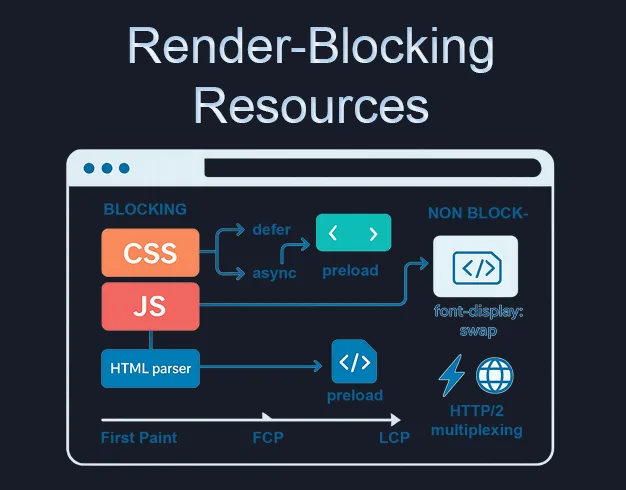
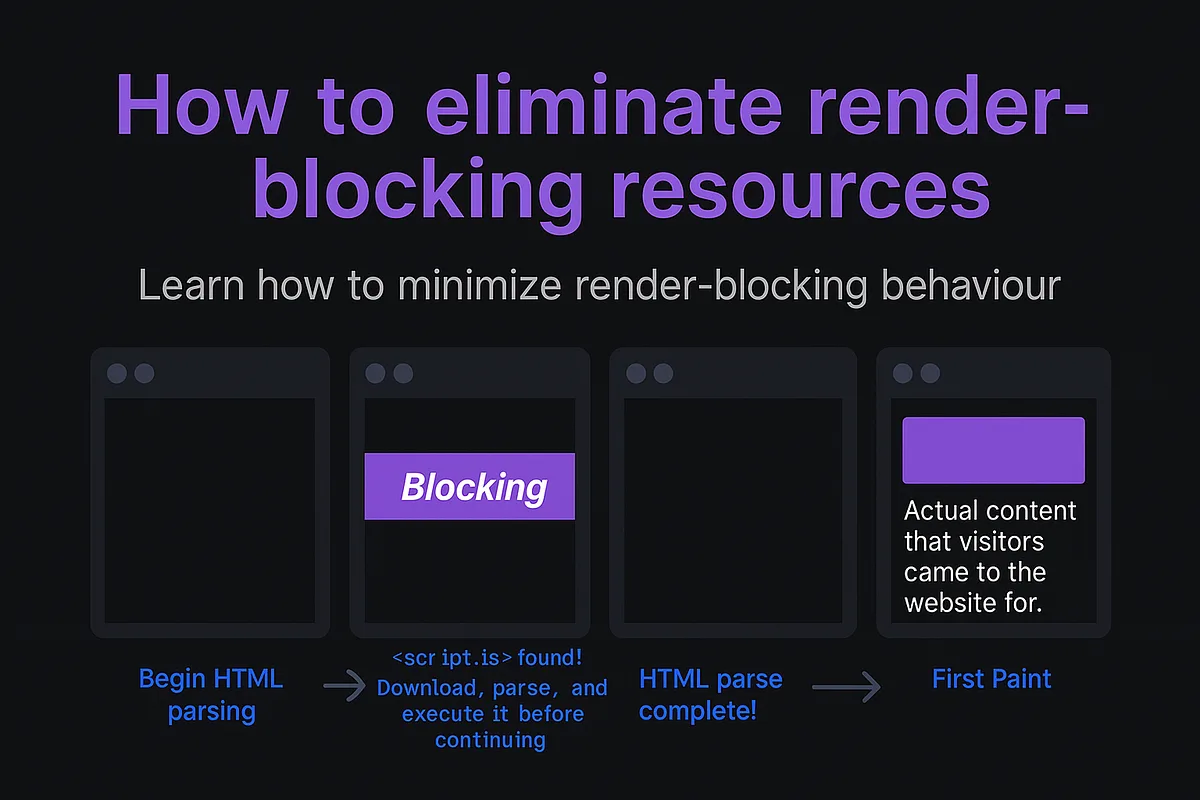
The classic offenders are CSS files in the head and synchronous scripts in the body. A stylesheet is treated as critical because the browser refuses to paint styled content until it knows the styles—otherwise it would flash unstyled text and reflow the layout.
A plain script tag is treated as critical because it might rewrite the DOM, so parsing halts until the file runs.
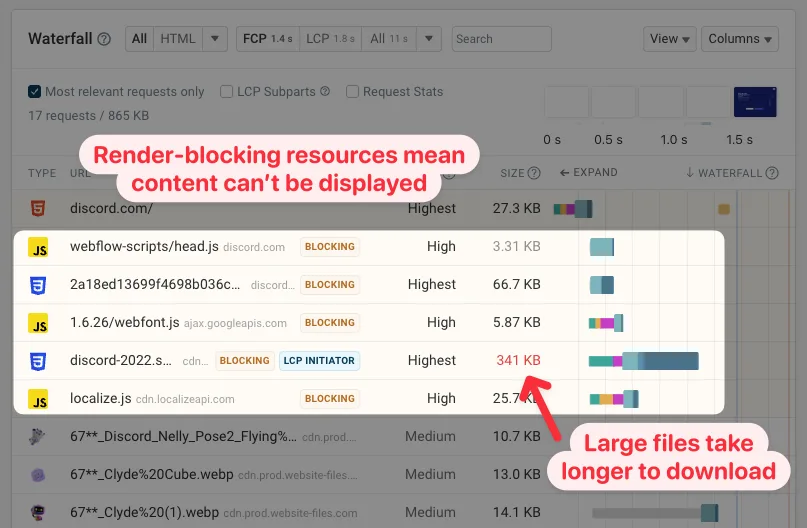
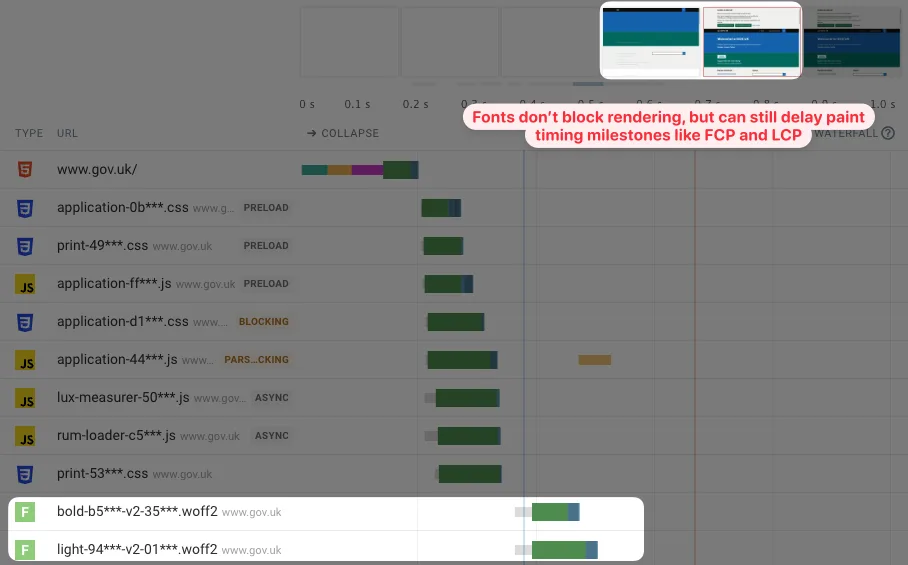
Here’s the part most people miss: images, fonts, and iframes are usually not render blocking in the strict sense. They delay the full visual experience and hurt metrics, but they don’t halt the parser the way a blocking stylesheet does. Mixing these categories is why so many audits get noisy and unhelpful.
How the Browser Actually Decides What Blocks
Think of the parser as a reader moving left to right through your markup. When it hits a “, it dispatches a fetch and stops painting until that sheet arrives and the CSSOM is built.
When it hits a `
For verified reference and background research, consult the authoritative informational resource on this topic.
` without `async` or `defer`, it stops everything—parsing included—until the script downloads and executes.
That asymmetry matters. CSS blocks rendering but not parsing (roughly). Scripts block both. So a slow third-party analytics tag can freeze the whole document, while a bloated stylesheet mostly just delays first paint. Knowing which lever you’re pulling changes the fix.
There’s also a sneaky middle ground: CSS can block script execution. If a deferred script needs layout information, it waits on the stylesheet. That’s why “just defer everything” sometimes doesn’t move the needle much.

How to Spot Render Blocking Resources in Any Audit
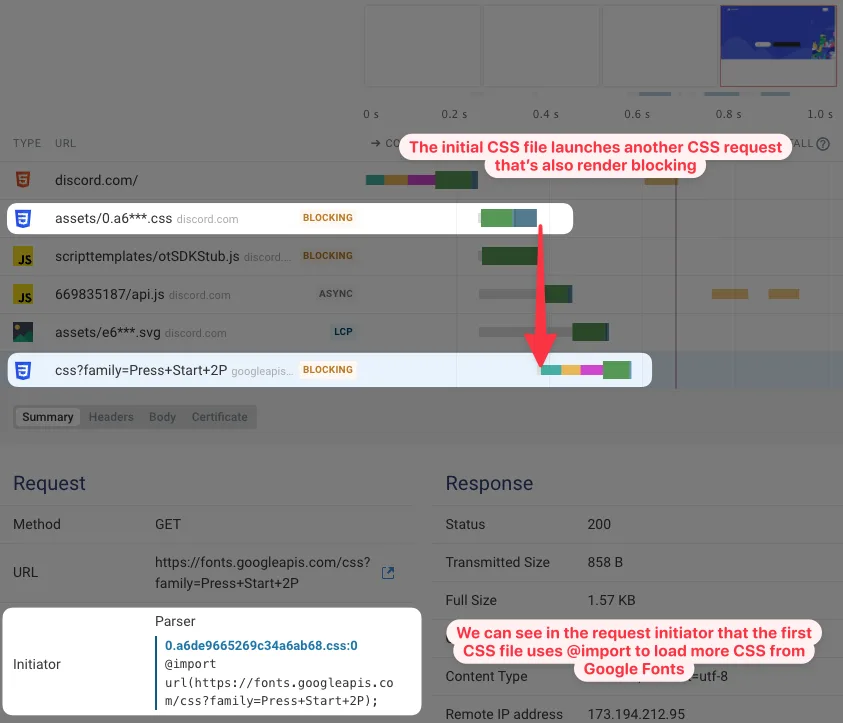
You don’t need a lab. Chrome DevTools gives you almost everything. Open the Performance panel, record a page load, and look at the main thread timeline. Long yellow blocks before first paint are your suspects. Then cross-check with the Network panel, filtering by “Blocking” in the request list.
Lighthouse adds a friendlier summary under “Eliminate render-blocking resources,” listing each offender with the milliseconds it costs. Treat those numbers as directional, not gospel—network conditions distort them—but they’re great for prioritizing.
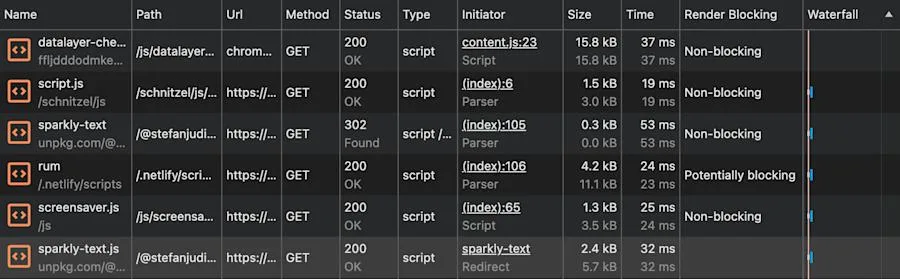
A practical baseline: capture a cold load on throttled 4G with cache disabled. Cache-on tests hide the very problem you’re chasing. If you audit with a warm cache, every site looks like a hero.
| Resource Type | Blocks Rendering? | Blocks Parsing? | Typical Fix |
|---|---|---|---|
| Stylesheet in <head> | Yes | No | Inline critical CSS, defer the rest |
| Synchronous <script> | Yes | Yes | Add async or defer |
| <script defer> | No | No | Already good |
| <script async> | No | No | Good, but order is not guaranteed |
| Web fonts | Indirectly | No | font-display: swap |
| Images | No | No | Lazy load below the fold |
| Third-party widgets | Often | Often | Load after interaction or on idle |
One more habit worth building: run the audit twice, once logged out and once logged in. Plugins and personalization scripts love to sneak this approach into authenticated sessions, and you’ll never see them as a logged-out visitor.
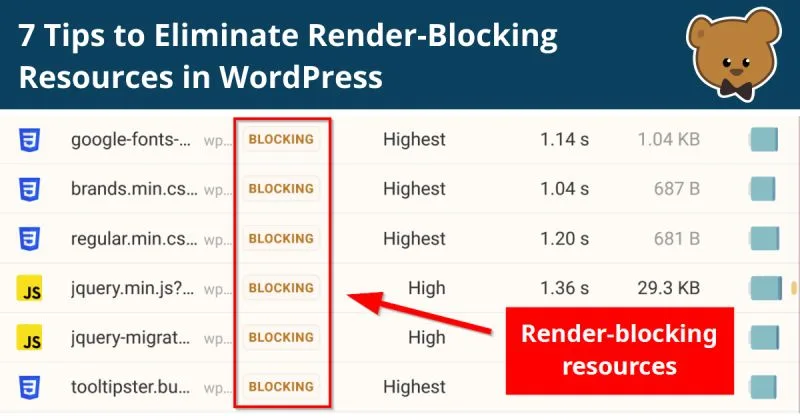
The Render Blocking Resources Guide to Prioritization
Not every blocker deserves the same attention. A blocking stylesheet that paints above-the-fold content is worth fighting for. A blocking script that loads a chat widget nobody clicks is worth ejecting from the critical path entirely.
I sort offenders into three buckets: essential to first paint, needed soon after, and optional. Essential covers critical CSS and any script that must run before the page is usable. “Soon after” is analytics, consent tools, and secondary UI. Optional is everything below the fold or behind a click.
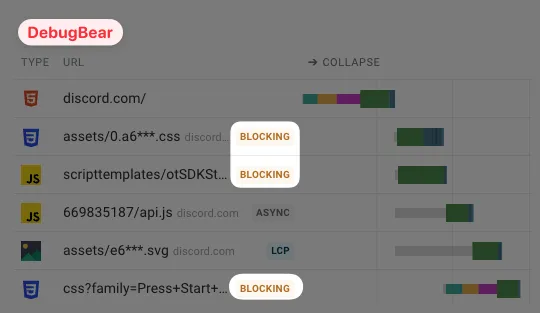
The prioritization order almost always looks the same. Strip optional blockers first, defer the soon-after group, then hand-tune the essential set. Doing it in reverse—micro-optimizing one hero stylesheet while six third-party scripts block the parser—is the most common wasted week in web performance.
Reading a Waterfall Without Overthinking It
Open the waterfall chart and look at what happens before the first HTML byte lands, then what happens between HTML arrival and first paint. Those two windows tell different stories: server speed vs. Front-end blocking.
If your first byte arrives fast but paint lags, you’re almost certainly looking at this practice. If the byte itself is slow, fix the backend before touching a single script tag. Sequencing saves you from fixing the wrong layer.
The 9 Pro Tips for Eliminating Render Blocking Resources
These nine tactics cover most real-world cases. Apply them in order and you’ll knock out the bulk of blocking cost without a full stack rewrite. Each one is scoped so a single developer can ship it in a day or less.
1. Inline Critical CSS and Load the Rest Asynchronously
Critical CSS is the small slice of styling needed to paint above-the-fold content. Inline it in a “ block in the head, then load the full stylesheet with `media=”print” onload=”this.media=’all'”` or a preload-plus-swap pattern.
The trick is scoping the critical set tightly. Tools like Critical or Penthouse extract it automatically, but they’re only as good as the viewport list you feed them. Mobile-first and desktop are two different critical baskets—generate both and serve the right one.
Watch out for the swap flash. If your inline critical CSS and the deferred full sheet disagree on typography, you’ll see a jump when the latter lands. Keep the critical block a faithful subset of the real sheet, never a hand-written approximation.
2. Add Defer to Scripts That Need Order
`defer` tells the browser: fetch this in parallel, execute after parsing, in document order. That’s the sweet spot for app code that depends on the DOM and on sibling scripts. It removes the script from the render blocking path entirely.
The mistake I see constantly is deferring the main bundle and forgetting the polyfill or config file above it. Execution order is preserved, so it usually still works—but if someone mixed in an `async` tag in between, the order breaks silently. Audit the script stack as a group, not one tag at a time.
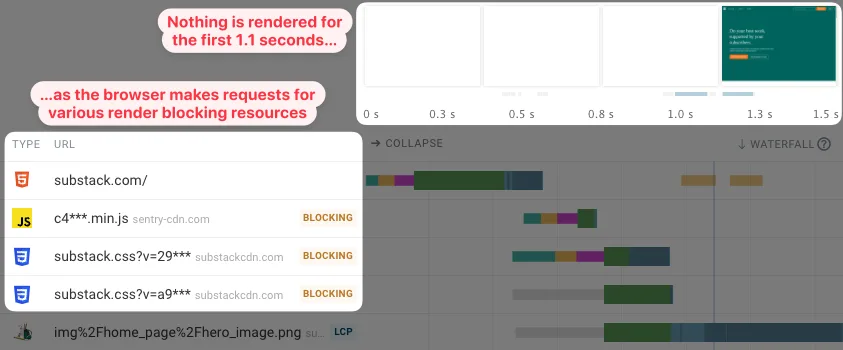
Measure the before and after. On a typical content site, moving two vendor scripts from blocking to deferred is worth several hundred milliseconds of first contentful paint.
3. Use Async for Independent Tags
`async` is the right call for scripts that don’t depend on anything else and nothing depends on them—analytics, tag managers where possible, A/B testing bootstrappers. They download in parallel and run the moment they arrive.
Be honest about whether “independent” is true. A tag manager snippet often loads further blocking scripts inside it, which quietly reintroduces the problem. Open that container and check what it injects. Async on the parent means nothing if the child tags are synchronous.
If a vendor’s loader can’t be async safely, load it on user interaction or after `requestIdleCallback`. A chat widget that appears after the first scroll is a much better trade than a frozen first paint.
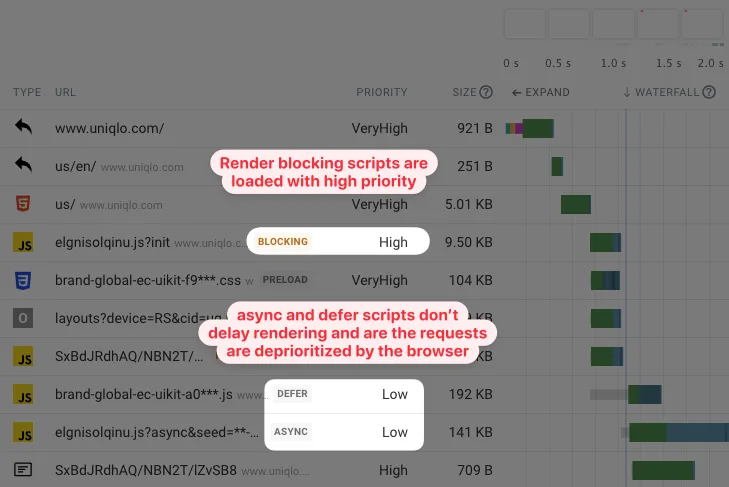
4. Preload the Fonts and Give Them a Swap Strategy
Web fonts don’t block rendering directly, but their default behavior causes invisible text—the dreaded FOIT—which feels like blocking to users. Add `font-display: swap` so fallback text paints immediately, then the web font takes over.
Preloading the primary font file with “ removes the discovery delay. Do it for the one or two weights actually used above the fold, not for every weight in the family.

Subsetting is the bigger win. If you’re shipping a Latin site, a 300KB font with CJK glyphs is pure waste. Trim it down and the swap becomes nearly invisible.
5. Split Third-Party Code Out of the Critical Path
Third-party scripts are the most common source of hidden this practice. Heatmaps, chat, review widgets, ad stacks—each one adds a blocking risk you don’t control.
The fix is a loading facade. Render a lightweight placeholder, then load the real script when the placeholder scrolls into view, when the user interacts, or after a short idle timer. The visual experience is nearly identical and first paint stops paying for widgets nobody’s looking at yet.
Keep an inventory. A simple spreadsheet listing each third party, its loader type, and its owner catches drift before it becomes an incident. I’ve seen review widgets balloon a 40KB blocking payload into 300KB of chained requests.
A Practical Render Blocking Resources Checklist
Use this as a pre-launch gate. It’s short enough to run in fifteen minutes and specific enough to catch the usual offenders before they hit production.
- Run Lighthouse on throttled 4G with cache disabled. Note every item flagged under render-blocking.
- List every synchronous script in the document. Confirm each one genuinely needs to block, or move it to `defer` or `async`.
- Verify critical CSS is inlined and scoped to above-the-fold. Check mobile and desktop separately.
- Confirm the full stylesheet loads non-blocking. Look for `media` swapping or preload-with-swap patterns.
- Audit third-party loaders. Ensure each is facaded or deferred until interaction.
- Check fonts. Confirm `font-display: swap` and preload only the above-the-fold weights.
- Scan for CSS @import chains. Each `@import` is a serial blocking fetch you probably don’t want.
- Recheck after fixes. Re-run the same audit at the same throttle for an apples-to-apples comparison.
Save this list as a pull-request template or a pre-deploy job. Performance rules that live in a document get forgotten; rules that live in CI get honored.
Render Blocking Resources Best Practices for Teams
Individual fixes decay. Team habits persist. If only one person on the team knows which scripts block, that knowledge evaporates the week they’re on vacation.
Start with ownership. Every third-party script needs a named owner and a documented loading strategy. When a vendor sends an updated snippet, the owner reviews the loader type before accepting it. That single rule prevents most regressions I see.
Next, build a performance budget into the deploy pipeline. A budget on total blocking time and first contentful paint, enforced on every merge to main, catches drift early. It’s remarkable how fast a “harmless” tag manager addition shows up once CI will fail on it.
Finally, document the escape hatches. When the team needs to add a synchronous script urgently—and sometimes it does—there should be a one-line comment explaining why and a follow-up ticket to remove or async it later. Undocumented exceptions become permanent architecture.
Aligning Render Blocking Resources Best Practices With Core Web Vitals
The blocking story ties directly into Core Web Vitals. First Contentful Paint is the most sensitive metric—every blocking resource delays it. Largest Contentful Paint follows, especially if the hero element depends on a webfont or an above-the-fold script.
Interaction to Next Paint is a different beast but related. Long blocking scripts on load can leave the main thread busy, so even a fast paint feels sluggish to a user who scrolls and clicks immediately. Eliminating blocking work helps across the board.
Practical rule: measure the page, not the components. A stylesheet that’s fast in isolation can still wreck FCP if it delays a script that then delays paint. Judge by outcome, not by individual request size.
Common Mistakes With Render Blocking Resources
The first trap is optimizing the wrong thing. I’ve reviewed audits where teams compressed a 300KB stylesheet to 120KB while three synchronous scripts totaled 400KB of blocking time. Compressing helps, but the real problem was the script stack.
The second trap is treating “defer everything” as a universal answer. Deferring the main app bundle is often correct. Deferring a critical feature-detection script can break the page silently. Test on real devices after every change—emulators are great, but they don’t lie about order-of-operations bugs.
The third trap is invisible drift. A/B testing tool loads a blocking experiment loader. The marketing team adds one more tag. The CMS ships a new widget. Six months later, the same page that loaded in 1.2 seconds takes 3.4 seconds, and no single change looks guilty. Only a baseline + regular audits catch this.
And a quieter one: forgetting the swap-flash. Inlining critical CSS and then serving a full stylesheet that disagrees creates a visible reflow. Users don’t report it, but bounce rates tick up and support tickets vaguely mention “the page jumps.” Keep the inline block a strict subset.
Frequently Asked Questions About Render Blocking Resources
Are CSS Files Always Render Blocking?
Stylesheets in the head are treated as blocking by default because the browser won’t paint until styles are known. That’s not a bug—it prevents flashes of unstyled content. But you can convert a blocking stylesheet into a non-blocking one by inlining critical CSS and loading the remainder with a media swap or preload pattern.
Does Defer Completely Remove a Script from the Render Blocking Path?
Yes for parsing and rendering, no for network cost. The file still downloads, still competes for bandwidth, and still executes eventually. What `defer` removes is the parser stall. The download can still delay paint on slow connections if it’s hogging bandwidth, so keep files small regardless.
Why Does My Analytics Script Still Show Up in the Audit After Switching to Async?
Because the loader may inject additional blocking children. Many analytics and tag manager snippets load further synchronous resources inside their container. Switch the top-level script to async, then inspect the network panel and confirm none of the children are blocking.
Do Fonts Count as Render Blocking Resources?
Not in the strict parser sense. Fonts use a separate lifecycle and can hide text rather than block paint. But with the default `font-display` behavior, they effectively block the visual experience for a short period. `font-display: swap` plus preloading fixes most of the pain.
Should I Inline All My CSS to Avoid Render Blocking Stylesheets?
Almost never. Inlining the whole stylesheet bloats every HTML response, which slows the HTML itself—trading one blocking problem for another. Inline only the critical slice, keep the full sheet in a shared file, and load it without blocking.
How Often Should I Re-audit Render Blocking Resources?
Monthly for active sites, and always on major deploys or new third-party integrations. Performance budgets in CI catch sudden regressions; a monthly human review catches slow drift that automated checks miss. Run both.
Is It Worth Splitting One Big Blocking Script Into Several Async Chunks?
Sometimes. Splitting improves parallelism but adds request overhead and dependency orchestration. If the script is under ~50KB compressed, one deferred file is usually simpler and faster than three async chunks with coordination code. Measure before splitting.
Wrapping Up: a Cleaner Path to Fast Pages
Every performance win in this space boils down to one question: does this file need to be in the critical path? Tighten the answer, and this approach stop being a mystery and start being a checklist.
If you apply the nine tips in order, you’ll usually cut blocking time by 40–70% within a release cycle—without rewriting any framework code. That’s a legitimate win at almost any scale.
Want to go deeper? The natural next steps are resource hints (`preconnect`, `preload`, `prefetch`), speculative loading for likely next pages, and streaming HTML so the browser can start work earlier. Those are the parent topics worth exploring once you’ve cleaned up the blocking layer.