Negative Keywords Google Ads: 7 Essential Tips for Beginners
Negative keywords google ads are the quiet workhorses of a profitable paid search account, and if you are just starting out, they are the single fastest way to stop burning budget on searches that were never going to convert.
Picture a bakery paying for clicks from people searching for “dog grooming” because a broad match keyword misfired. That is the kind of leak a negative keyword list plugs. This beginner-focused walkthrough gives you seven practical tips, each one built around a real scenario you can act on today.
The core idea is simple: Google lets the negative keywords google ads tell its auction which searches you do not want your ads to show on. Most beginners obsess over bids, headlines, and audiences while ignoring this filter entirely, then wonder why their click-through rate is fine but their cost per lead keeps climbing.
A solid negative keyword strategy fixes that imbalance. Below you will find a negative keywords google ads guide shaped for people running their first few campaigns, with clear steps, sample tables, and the mistakes that trip up newcomers most often.
What are Negative Keywords Google Ads Beginners Need to Understand First?
Before the tips, settle the definition. A negative keyword is a word or phrase you add to a campaign or ad group that tells Google to exclude any search containing it. If you sell leather office chairs, adding “used” as a negative phrase means someone searching “used leather office chair” no longer sees your ad. You keep your impression share for buyers who want new stock.
The negative keywords google ads one mechanic changes the economics of a small account fast. In my experience auditing starter accounts, a beginner who adds even twenty well-chosen negatives in the first week often sees wasted spend drop noticeably before they touch a single bid. It is not magic. It is simply refusing to pay for the wrong audience.
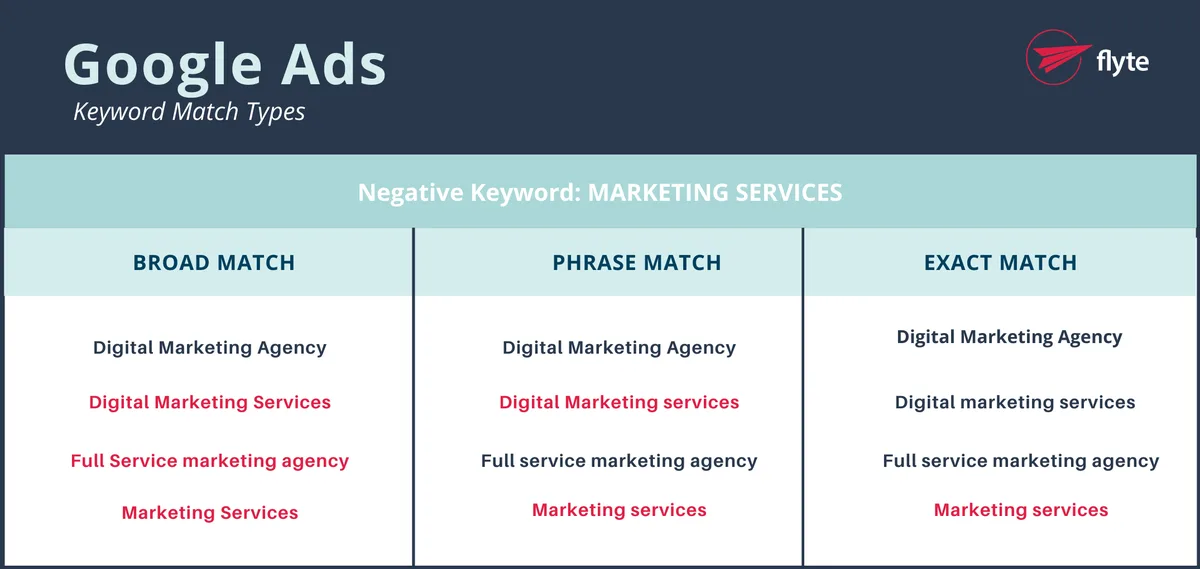
There are two match types for negatives, and this trips people up constantly. Negative broad match blocks any search that contains all the terms in your phrase, in any order. Negative phrase match blocks only searches that contain the exact phrase in that order.
Negative exact match blocks only the negative keywords google ads exact search and close variants. Read that three times, because choosing the wrong type is the number one reason a new advertiser blocks their own converting traffic.

| Negative Match Type | What It Blocks | Example Negative | Search Blocked | Search Allowed |
|---|---|---|---|---|
| Negative broad | Any search containing all the words, any order | free | “free office chair download” | “office chair sale” |
| Negative phrase | Searches with the exact phrase in order | “free download” | “free download office chair plans” | “download office chair catalog” |
| Negative exact | That exact search only | [free] | “free” | “free standing chair” |
Tip 1: Start Your Negative Keywords Google Ads List from the Search Terms Report
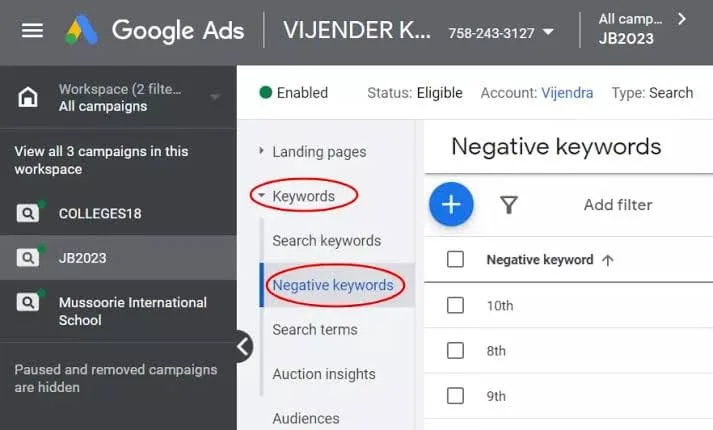
Here is where everyone should begin. The search terms report inside Google Ads shows you the exact queries that triggered your ads. That report is a goldmine, and it is the foundation of every negative keywords google ads checklist I have ever handed to a new client.
Open the report, sort by cost descending, and read down the list. Anything irrelevant that spent money becomes a negative. If you run a wedding photography campaign and see “cheap wedding photographer jobs” eating budget, “jobs” and “hiring” belong on your list. You are not guessing. You are reading what Google already did.
Do the negative keywords google ads on a fixed cadence. Weekly works for most small accounts, twice weekly for high-spend campaigns. The report regenerates constantly, and new junk searches appear as your keywords expand.
A twenty-minute review every week beats a massive cleanup every quarter, and it keeps your negative keyword list current as your account scales.
Reading the Report Like a Beginner With Limited Time
Sort by impressions too, not just cost. A term with modest cost but huge impression volume can distort your click-through rate and confuse your quality score signals. Block the high-impression junk first, then the high-cost junk, and you get the biggest hygiene win for the least effort.
Watch for “close variant” matches as the negative keywords google ads go. Google will sometimes match near-spellings and plurals of your negatives, and other times it will not. Read the report with care instead of assuming your list caught everything. The platform tells you what happened if you look.
Tip 2: Build a Shared Negative List Instead of One-Off Exclusions
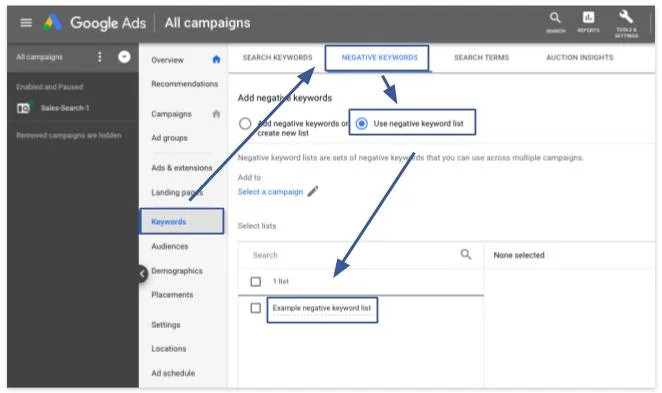
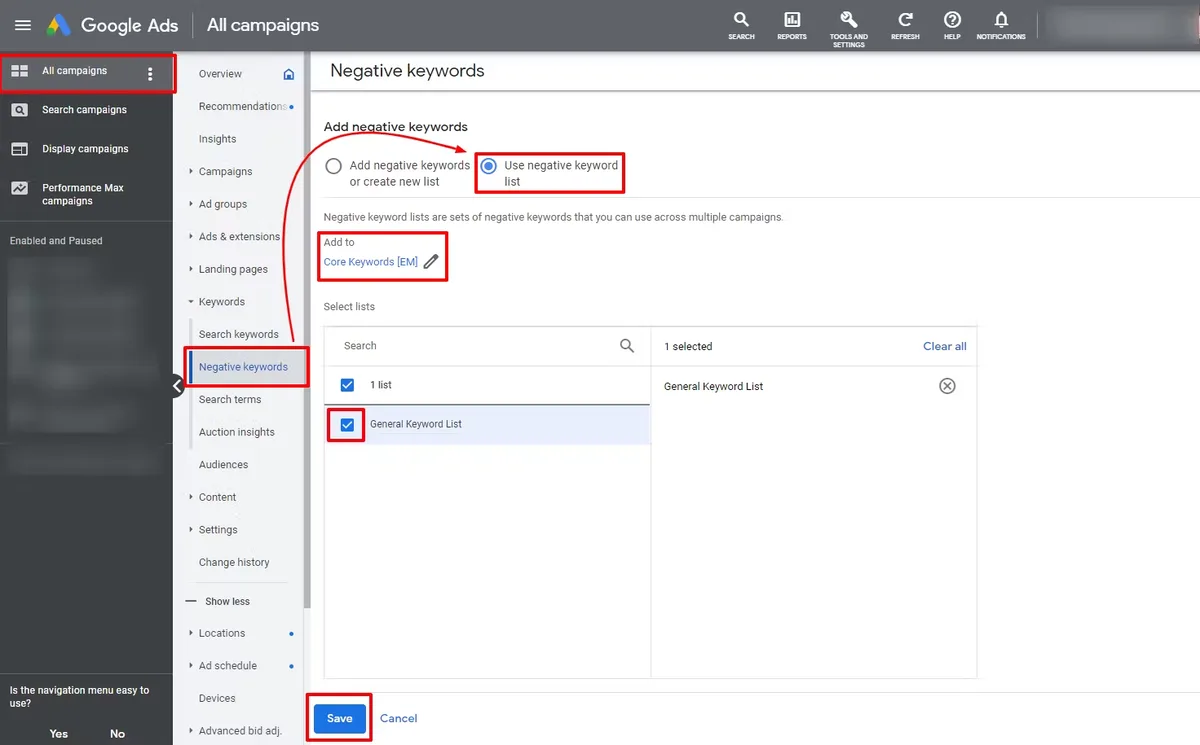
Most beginners add negatives campaign by campaign and then lose track of what lives where. The smarter move is a shared negative keyword list. You create it once at the account level, then attach it to any campaign that should honor those exclusions.
The payoff shows up when you launch a second or third campaign. Your “no free, no jobs, no DIY” list is already there. New campaigns inherit your hygiene automatically, and you only manage one master list instead of five messy copies. This is one of those negative keywords google ads best practices that saves sanity as much as money.
Keep a small number of the negative keywords google ads shared lists, each with a clear purpose. One list for irrelevant intent, one for competitor brand terms if that is your strategy, one for free-seekers and researchers.
Resist the urge to cram everything into one enormous list. A bloated list becomes impossible to audit, and you will eventually delete something important by accident.
Tip 3: Match the Negative Type to the Traffic You Want to Block
Choosing broad, phrase, or exact is not a technicality. It is a strategic choice, and it decides whether you lose good traffic alongside bad. Newcomers tend to over-block with broad negatives, then wonder why their volume collapsed. Match the type to the intent of the junk you are removing.
Add single words as broad negatives only when the word is a hard no in every context. Applying these principles to your negative keywords google ads yields measurable results. “Free,” “download,” “torrent,” and “jobs” usually qualify for most retailers and service businesses.
A word like “cheap” does not, because some buyers use the negative keywords google ads and still convert. That is a judgment call you make with data, not vibes.
Use phrase negatives for connected concepts, like “how to make,” “tutorial,” or “definition.” Use exact negatives for a specific query you have spotted repeatedly. When in doubt for a beginner account, start with phrase negatives. They are the safest middle ground, blocking the pattern without overreaching.
When to Escalate to a Campaign-Level Negative
Campaign-level negatives apply to everything in the negative keywords google ads campaign. Ad group negatives are narrower, applying only to one tight theme. If a junk term wastes money across multiple ad groups, it is a campaign-level negative. If it only pollutes one narrow ad group, keep it local so you do not lose context elsewhere.
That distinction matters once you run tight single-theme ad groups, which is exactly where many beginner accounts live. Keep the local negatives local, and reserve the campaign-wide filters for true account-wide junk. This discipline keeps your structure readable for the next person who touches the account, including future you.
Tip 4: Use Your Negative Keywords Google Ads Guide to Protect Brand and Competitor Traffic
Decide early how the negative keywords google ads handle branded searches, especially competitors. If you sell software and bid on generic terms, every search for a competitor’s brand name is money you might be wasting, unless you deliberately choose to conquest. For most beginners, blocking competitor brands is the simpler default.
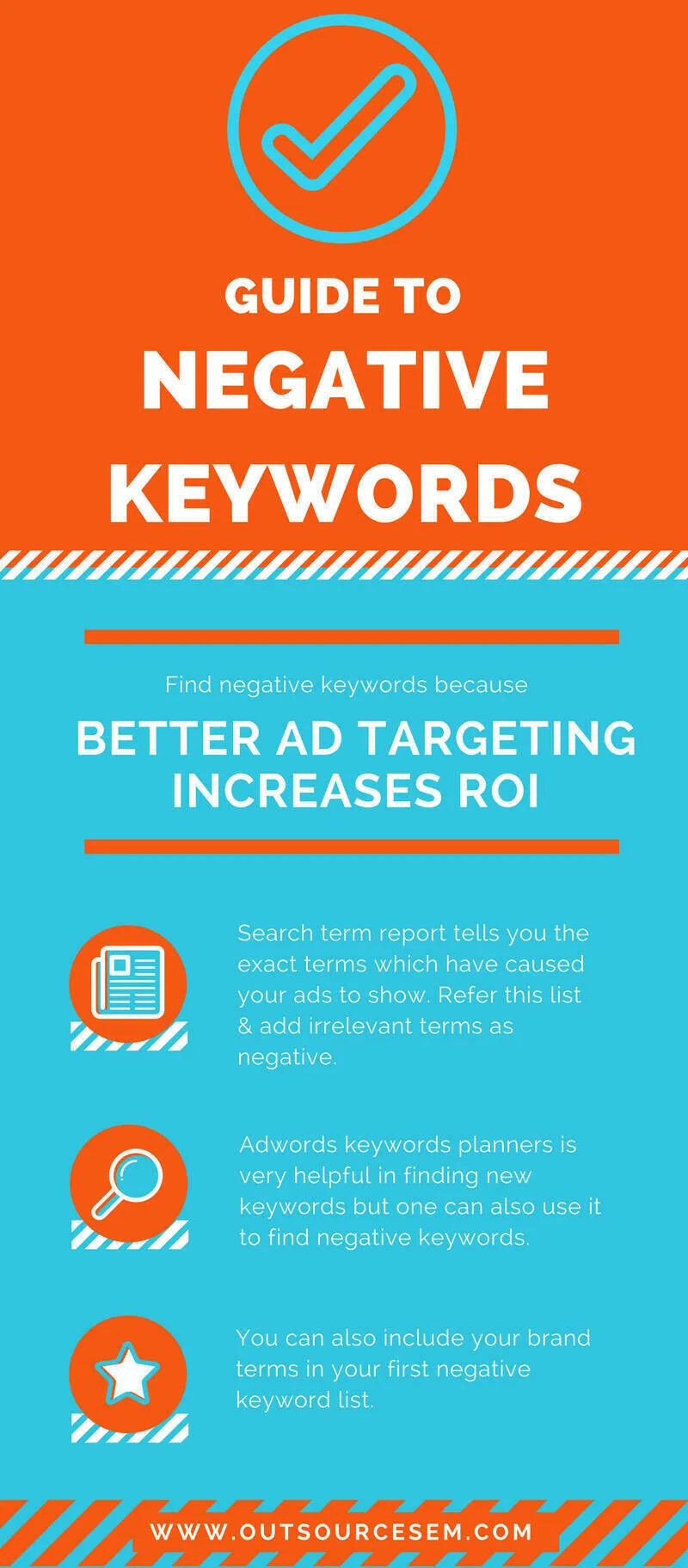
Add competitor names as phrase negatives in campaigns where you do not want them, and leave room to test bidding on them later in a dedicated campaign. Mixing conquest bidding into your core generic campaigns muddies your data. Keep the strategies separate so you can judge each one honestly.
On the flip side, do not block your own brand unless the negative keywords google ads have a reason. Some advertisers run a dedicated brand campaign and exclude the brand from generic campaigns to keep reporting clean.
The negative keywords google ads is a deliberate architectural choice, not a beginner default. If you are new, a simple setup that captures your brand traffic and keeps it separate works fine.
Tip 5: Block the Free-Seeker and Research Intent That Drains Starter Budgets
The single biggest leak in beginner accounts is free-seeker traffic. People searching “free,” “download,” “template,” “crack,” “PDF,” “sample,” and “DIY” rarely buy. They are research-mode, and they cost you the same click as a buyer. Building a negative keywords google ads checklist around this intent pays off immediately.
Layer those words into a shared list and watch your click-through rate and conversion rate both tick upward. The math is straightforward: block the people who were never going to buy, and the share of your budget spent on real prospects goes up. That is incremental profit with zero added spend.
One caveat about “cheap” and “affordable.” Some businesses legitimately serve value buyers, and blocking the negative keywords google ads terms shrinks a real audience. Test whether “cheap” converts before you block it, and let the data set the policy. The same goes for “near me” and location modifiers, which often help local service businesses rather than hurt them.
Spotting Research Intent Without Guessing
Research intent usually shows up as question words: how, what, why, when, which, who. Searches like “how to choose a mattress” or “what is the best CRM” are early-funnel. If your landing pages convert on purchase intent and not education, block the question starters and let your content marketing own that traffic instead.
The negative keywords google ads is exactly why you should look at where the search term report sends people. A click on a comparison query that lands on a pricing page and bounces is a wasted impression. The negative keyword list is how you stop paying for mismatches you can see.
Tip 6: Review Negative Keywords Google Ads Best Practices Before You Add a Term to a List
Knee-jerk blocking is a real problem. A beginner sees a weird search term, adds it as a broad negative, and accidentally takes out a chunk of their good traffic the next day.
Before you add anything, ask three questions: is the term always irrelevant, does it appear inside a converting query, and is the match type right.
Run the second question whenever a term looks tempting to block but has driven revenue before. Search the report for your converting terms and check whether the candidate negative appears inside them. If it does, use a narrower match type, or skip the negative entirely. A five-second sanity check prevents a five-day volume crunch.
Keep a simple log of your negatives, the reason, and the date. Focusing on negative keywords google ads provides clear direction here. When performance shifts later, that log tells you whether your own hygiene caused it or whether it was seasonality. Small accounts rarely have this discipline, and it shows.
| Before You Block a Term | Ask This | If Yes |
|---|---|---|
| Is the term always irrelevant? | Would any valuable search ever contain it? | Block as broad negative |
| Does it appear in a converting query? | Have any past conversions included it? | Use phrase or exact, not broad |
| Is the match type right? | Do I want to block a pattern or a specific query? | Pattern goes phrase, query goes exact |
| Is the campaign or ad group level better? | Does it affect multiple ad groups? | Campaign-level if broad impact |
Tip 7: Automated Negative Keyword Tools and When to Trust Them
Once you outgrow manual review, tools like Google Ads’ own negative keyword list suggestions, scripted hygiene workflows, and third-party bid and intent managers can carry the load. The trick is trusting them for monitoring but keeping a human in the loop for the final decision.
Automation is excellent at spotting new junk terms and flagging budget-wasting queries. It is terrible at nuance, like the value buyer who searched “cheap.” Many beginners let auto-negative tools run without guardrails and then panic when volume halves. Set the tool to suggest, review the suggestions yourself, and only let the strongest patterns auto-apply.
A reasonable middle path: automate the discovery of candidates, humanize the final approval. That keeps the machine doing the boring scanning work while you apply the judgment that protects your account. It is a negative keywords google ads tips setup that holds up as your spend grows.
Also audit the tools periodically. Effective execution in your negative keywords google ads makes a tangible difference. Algorithms change, campaigns shift, and a rule that made sense last quarter may now be over-blocking. Schedule a monthly review of your automated rules alongside your manual review, and keep the two in sync.
Common Negative Keywords Google Ads Mistakes Beginners Make
Every beginner account I have seen makes a version of the same errors. The most common is the nonexistent negative list during the launch phase. People launch, spend, and only then check what their ads matched against. Flip the order: build a starter list before you spend a dollar.
Second, blocking keywords instead of search terms. Negative keywords apply to searches, not to your own chosen keywords. Confusing this leads to blocking phrases you actually want. Third, over-blocking with broad match on the first pass and draining volume. Start with phrase negatives, refine from there.
Fourth, forgetting that negatives are case-insensitive and ignore punctuation, so “Free” and “free” are the same thing. Fifth, never revisiting the list. Junk search patterns evolve, and a static list leaks within weeks. A quick weekly pass keeps the account clean without drama.
Negative Keywords Google Ads Checklist for Your First Campaign
Keep the negative keywords google ads list next to your launch checklist. Pull the search terms report weekly, add junk phrases as negatives, decide the match type with the table above, and log each decision with a reason. Load a starter list of free-seeker words before day one, and build a shared list for account-wide hygiene.
Watch the impact on volume and conversion rate for at least a week before judging a change. Give your account enough data to speak, and you will learn which negatives actually help. If volume drops and conversions do not rise, you probably over-blocked, so pull the negative and re-check.
Finally, keep the parent topic in mind: paid search account hygiene is a discipline, not a one-off task. This piece sits inside a larger cluster that includes keyword match types, search term audits, quality score, and account structure.
Mastering negative keywords google ads in that context gives you a compounding advantage, because every adjacent skill you pick up makes the filter smarter. Use the negative keywords google ads guide above as a reference, and circle back to this checklist whenever you launch a new campaign.
For verified reference and background research, consult the authoritative informational resource on this topic.