A knowledge graph search API gives you programmatic access to structured facts about people, places, organizations, and concepts — and it can transform how your application answers questions. If you have ever wanted to connect your app to a living web of interconnected entities, this guide walks you through everything.
We will cover setup, authentication, query patterns, real code examples, and the mistakes that trip up most developers on their first build.
I have spent a lot of time wiring entity lookups into search features, recommendation engines, and internal tools. Honestly, the first time I hit a knowledge graph search API endpoint, I expected magic. What I got was JSON — a lot of it — and a lesson in patience.
That experience shaped the practical advice you will find below. Focusing on knowledge graph search API provides clear direction here. No fluff, no hand-waving. Just the steps, the gotchas, and the reasoning behind each decision.
What a Knowledge Graph Search API Actually Does
At its core, a knowledge graph search API lets you query a graph database that stores entities and the relationships between them.
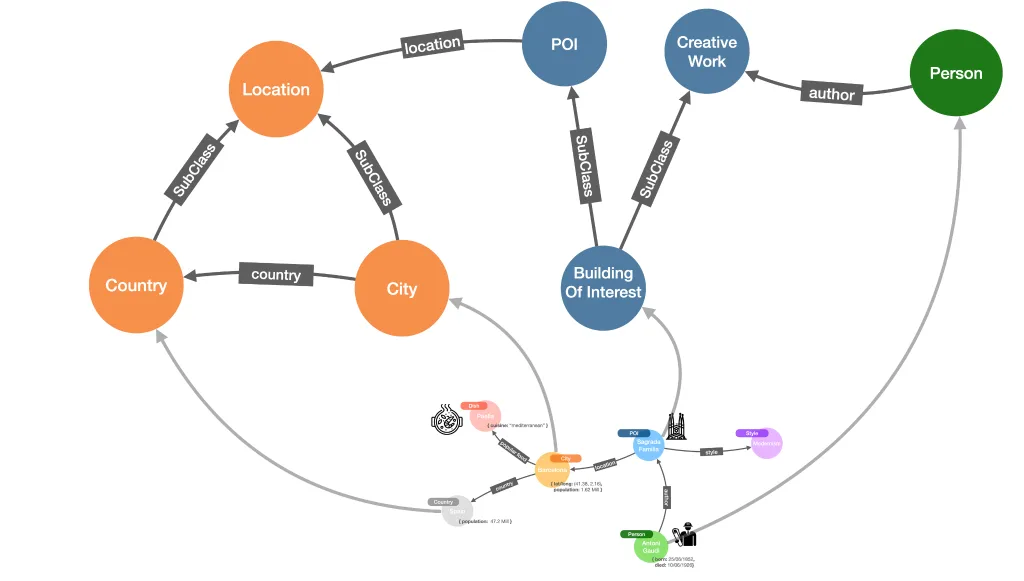
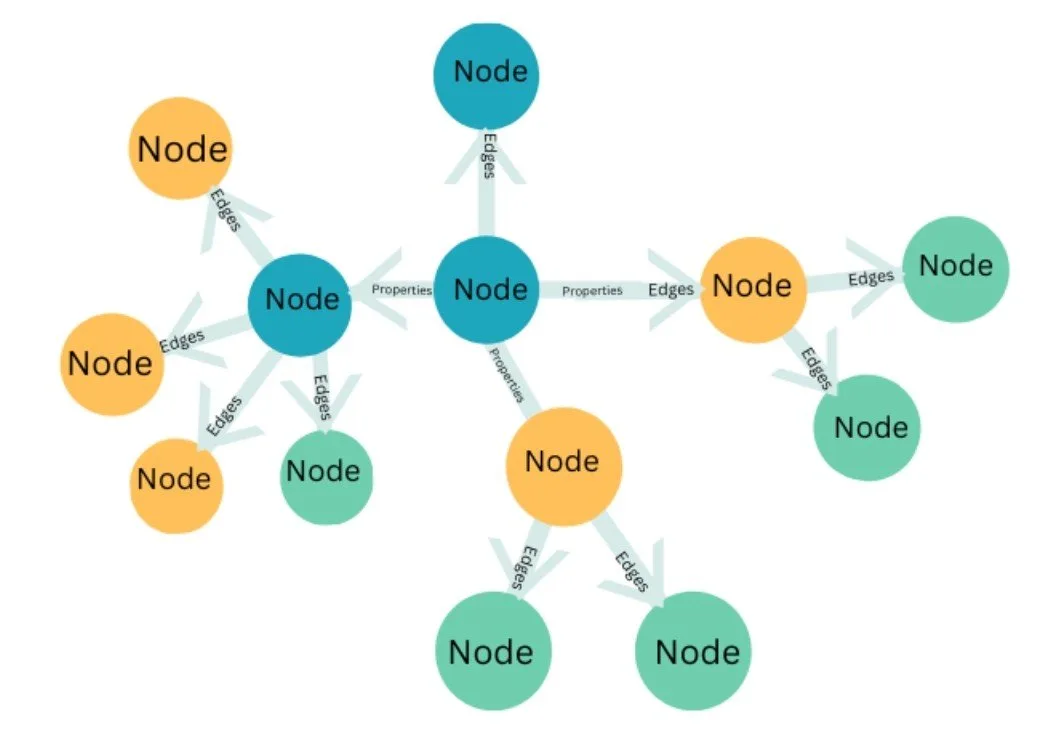
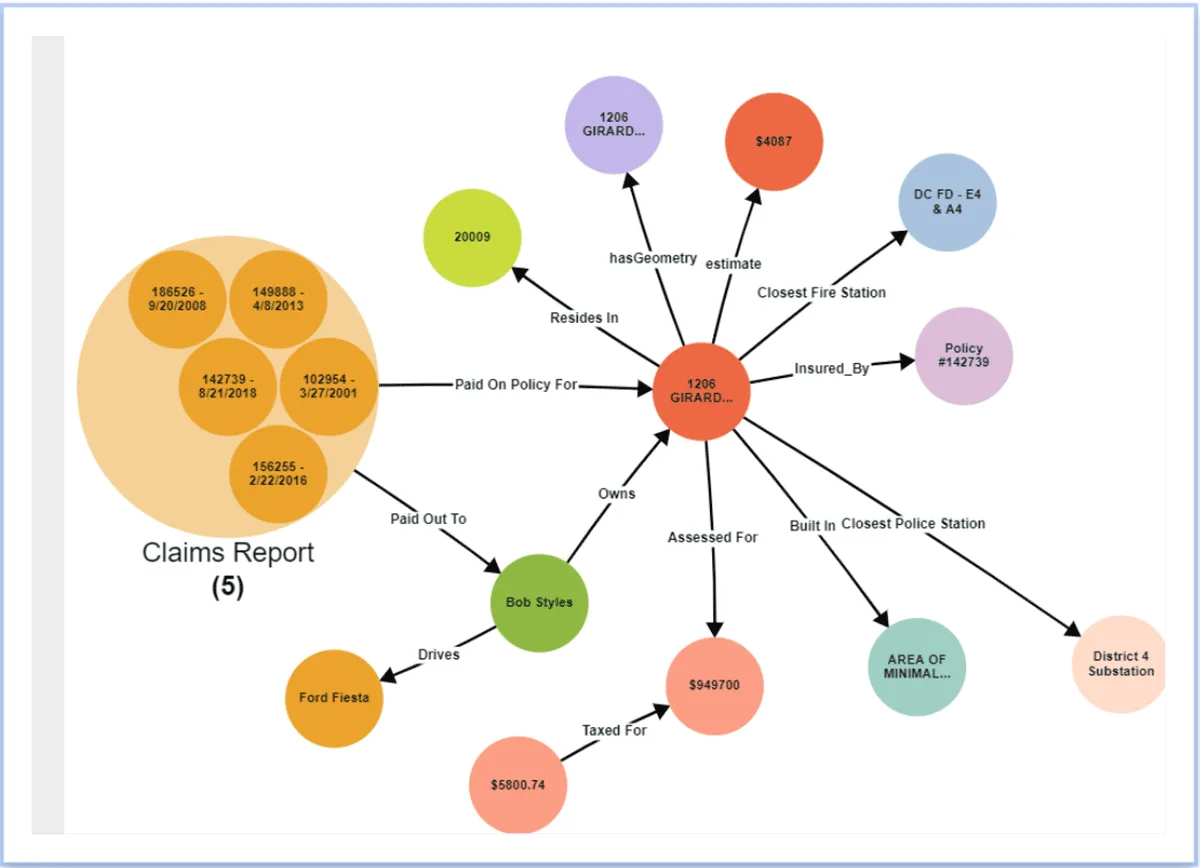
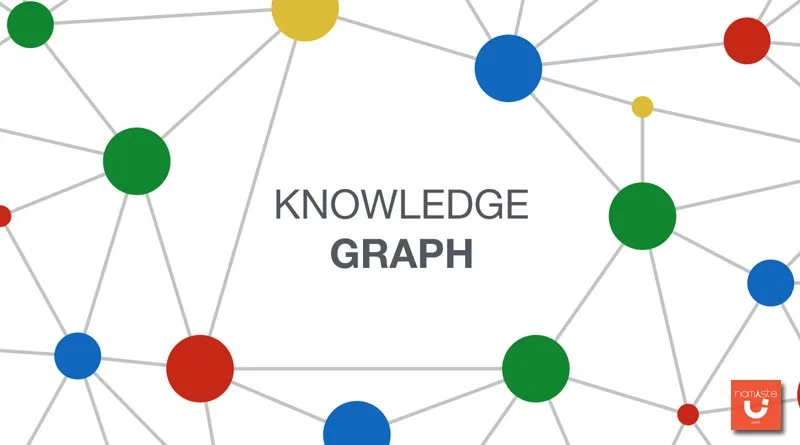
Think of it as a giant web where every node is a real-world thing — a person, a company, a city, a movie — and every edge is a connection like “works for,” “located in,” or “founded by.” When you send a query, the API traverses that graph and returns structured results instead of a list of blue links.
The difference matters more than it sounds. A traditional search engine returns documents that mention your query. A knowledge graph search API returns the entity itself, along with its attributes and its neighbors. Ask about a company, and you might get its headquarters, founding date, key executives, and parent organization in one response. That structured output is what makes downstream automation possible.
Most teams underestimate how much cleanup a plain text search requires. You get a paragraph, then you run regex, then you hope. With a knowledge graph search API, the data arrives typed and labeled. In practice, that saves hours of parsing and reduces the error rate in anything you build on top.
Entities, Properties, and Relationships Explained
Every record in a knowledge graph breaks down into three pieces. The entity is the thing itself — say, the musician “Fela Kuti.” Properties are its attributes: birth date, nationality, genre.
Relationships are the links to other entities: “influenced by,” “member of,” “spouse of.” A knowledge graph search API exposes all three through a consistent query interface.
Here is a concrete example. Query for a movie title, and a well-built knowledge graph search API returns the director, cast, release window, and production studio as separate structured fields. You do not have to guess which name in a sentence is the director. The graph already knows.
The relationship layer is where things get genuinely useful. Refining each detail of your knowledge graph search API strengthens this section. If you are building a recommendation feature, you can walk from one entity to a related one without writing custom logic for every category. The graph does the heavy lifting.
Why Structured Results Beat Plain Text Search
Plain text search is great for humans reading a page. It is terrible for software that needs to act on the result. A knowledge graph search API closes that gap by returning machine-readable facts.
Your code can branch on a property value, sort by a date, or filter by relationship type without any natural language processing.
Consider a travel app. A text search for “museums in Lisbon” returns articles. A knowledge graph search API returns a list of museum entities, each with coordinates, opening hours, and official website. You can drop those straight into a map and a booking flow. The gap in developer effort is enormous.
There is a catch, though. Structured data is only as good as the graph behind it. Coverage varies by domain, and obscure entities may return thin results. Smart teams build a fallback path so the app degrades gracefully when the knowledge graph search API comes back empty.
Knowledge Graph Search API Providers and How They Compare
You have several real options, and they are not interchangeable. Each provider built its graph for a different purpose, and that purpose shapes what you can query. Picking the wrong one means fighting the API forever. Let me break down the main players so you can match the tool to your use case.
This is where a lot of developers waste weeks. Effective execution in your knowledge graph search API makes a tangible difference. They pick the biggest name, then discover its graph is optimized for consumer search rather than their niche.
Take five minutes to compare coverage, pricing model, and query flexibility before you commit. Your future self will thank you.
Provider
Graph Focus
Best For
Query Style
Google Knowledge Graph
General web entities
Consumer apps, entity cards
REST, entity search
Wikidata / Wikimedia
Open, community-edited facts
Research, open data projects
SPARQL, REST
DBpedia
Structured Wikipedia data
Academic, NLP pipelines
SPARQL
Microsoft Academic (retired) / successors
Scholarly entities
Citation graphs
REST
Custom graph (Neo4j, etc.)
Your own domain
Internal tools, proprietary data
Cypher, Gremlin
Google’s offering is the most recognizable knowledge graph search API for consumer-facing products. It returns entity cards, related entities, and confidence scores. The trade-off is rate limits and a schema you do not control. You get what Google decides is worth exposing.
Wikidata and DBpedia flip that. They are open, and you can query deeply with SPARQL. The cost is data quality — community edits mean gaps and occasional errors. For a research tool, that trade is fine. For a paid product, you may need validation layers on top.
Google Knowledge Graph Search API in Practice
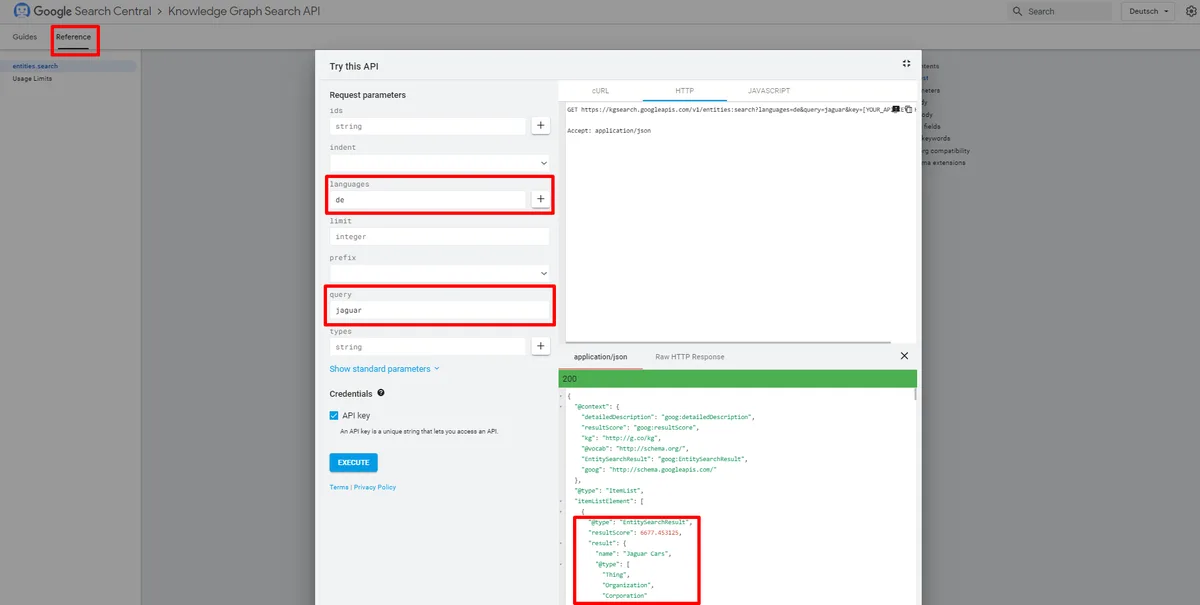
The Google knowledge graph search API is the one most tutorials reference, so let us get specific. You enable it in the Google Cloud Console, grab an API key, and hit the entities endpoint. Queries support free-text search, type filters, and language preferences. The response includes a result score that tells you how confident the match is.
Here is a minimal request in Python using the requests library. Notice how little code it takes to get structured entity data back.
import requests API_KEY = "YOUR_API_KEY"
query = "Albert Einstein"
url = "https://kgsearch.googleapis.com/v1/entities:search" params = { "query": query, "key": API_KEY, "limit": 5, "indent": True
} response = requests.get(url, params=params)
data = response.json for element in data.get("itemListElement", []): entity = element["result"] print(entity["name"], "-", entity.get("description", "no description"))
Run that, and you get a clean list of entities with names and descriptions.
From there, you can request detailed properties by passing the entity ID to a follow-up call. The knowledge graph search api rewards a two-step pattern: search first, then fetch details for the entity you actually want.
One practical tip — always inspect the result score before trusting a match. Maintaining clarity across your knowledge graph search API remains essential. A score below roughly 100 often means the graph is guessing. I have seen apps confidently display the wrong person because they ignored that number. Do not be that app.
Open Alternatives: Wikidata and DBpedia
If you need breadth without a vendor lock-in, Wikidata is the workhorse. Its knowledge graph search API supports SPARQL, which means you can write precise queries that join multiple entities in one request. Want every scientist born in a specific country who won a specific award? One query does it.
DBpedia takes a different angle. It extracts structured data from Wikipedia infoboxes and exposes it as a queryable graph. The coverage is broad but uneven, since it depends on what editors put in those boxes. For NLP pipelines that need entity typing, it remains a solid choice.
The honest downside of open graphs is maintenance. Entities change, vandalism happens, and schemas drift. If you build on a free knowledge graph search API, budget time for periodic validation. A weekly sanity check on your key entities catches most problems early.
Setting Up Your First Knowledge Graph Search API Integration
Setup is where enthusiasm meets reality. The steps are not hard, but skipping one causes confusing errors later. Let me walk through the full path from account creation to your first successful query, with the details that documentation tends to bury.
Before you touch any code, decide what you are actually building. A one-off lookup tool needs almost no infrastructure. A production feature serving thousands of requests needs caching, retries, and monitoring. The knowledge graph search API itself is the easy part; the surrounding system is where projects live or die.
Getting Credentials and Enabling the Service
For Google's knowledge graph search API, you start in the Cloud Console. Create a project, then navigate to the API library and enable the Knowledge Graph Search API. Next, generate an API key under the credentials section. Restrict that key to the specific API so a leak cannot be used elsewhere.
This last step is not optional in my book. A thoughtful approach to knowledge graph search API reinforces your qualifications. Unrestricted keys are a common and expensive mistake. I have watched teams burn through quota because a key ended up in a public repo. Restrict by API and by IP where possible, and rotate keys on a schedule.
For Wikidata, there is no key at all. You just need a user agent header that identifies your application, per their etiquette guidelines. Respectful request patterns keep the service open for everyone, including you.
Authentication Patterns and Rate Limits
Most commercial knowledge graph search API endpoints use a simple API key in a query parameter or header. That is fine for server-side calls. Never ship the key to a browser or mobile client, because anyone can extract it. Proxy requests through your backend instead.
Rate limits deserve real attention. Google's free tier caps daily queries, and exceeding it returns errors, not throttled results. Build a counter in your application and back off before you hit the ceiling. A simple token bucket in Redis handles this cleanly.
Retries matter too. Network hiccups happen, and a transient 500 should not break your feature. Use exponential backoff with jitter. Start with a short delay, double it on each retry, and cap the total attempts. This one pattern prevents most production incidents I have seen with a knowledge graph search API.
Your First Query, Step by Step
Let us run through a complete first query so nothing is abstract. Structuring your knowledge graph search API around proven patterns ensures impact. The goal is simple: search for a company and print its description and a related entity. Follow along and you will have working code in minutes.
Enable the API in your cloud console and copy the key into an environment variable. Never hardcode it.
Build the request URL with your query term, the key, and a limit for how many results you want.
Send the GET request and parse the JSON response into a usable object.
Read the result score and filter out low-confidence matches before displaying anything.
Fetch details for the entity ID you selected to get its full property set.
That five-step flow covers ninety percent of real use cases. Once you have it working, wrap it in a function and add caching. The same entity rarely changes hour to hour, so a short-lived cache cuts your API calls dramatically.
Here is the detail-fetch step in code, continuing from the earlier example.
Notice the "kg:/m/" prefix. Those are the graph's internal IDs, and they are stable. Store them alongside your own records so you can re-fetch without searching again. This small habit makes your knowledge graph search API integration far more efficient over time.
Query Patterns That Solve Real Problems
Knowing the endpoint is not the same as knowing how to use it well. The query patterns below come from actual projects — search features, data enrichment, and recommendation systems. Each one solves a problem you will likely face.
The through-line is this: a knowledge graph search API shines when you need facts, not documents. Every pattern below leans into that strength. If you find yourself using it like a text search engine, step back and reconsider your approach.
Entity Lookup and Disambiguation
Disambiguation is the first real challenge. Search "Mercury," and you could mean the planet, the element, the Roman god, or the singer. A good knowledge graph search API returns all of them with type hints, letting you filter by what you actually want.
The trick is to pass a type filter when you know the category. Applying these principles to your knowledge graph search API yields measurable results. If your app only cares about celestial bodies, constrain the query.
This slashes noise and improves the top result's relevance. I always add a type constraint when the domain is known.
For ambiguous cases, show the user a short list and let them pick. That is exactly what the entity cards in search engines do. It is a small UX decision that prevents a lot of wrong data from entering your system.
Relationship Traversal for Recommendations
Recommendations are where the graph structure pays off. Once you have an entity, you can walk its relationships to find related items. A user likes one band; the graph knows which artists influenced them. That is a recommendation with a real reason behind it.
With a SPARQL-capable knowledge graph search API, you can express these walks precisely. Ask for entities connected by a specific property, then rank by how many shared connections they have. The result feels curated because it is grounded in facts, not guesswork.
One warning from experience: relationship data can be sparse for niche entities. Proper attention to your knowledge graph search API sets a strong baseline. Always have a popularity-based fallback so the feature never returns nothing. A blank recommendation panel is worse than a generic one.
Enriching Your Own Data With Graph Facts
Data enrichment is the quiet killer app. You have a database of companies, but half the records are missing industry or headquarters. A knowledge graph search API can fill those gaps automatically by matching names and pulling properties.
The workflow is straightforward. For each record, query the graph, confirm the match with a confidence threshold, then write the returned properties back to your database. Run it as a batch job and review a sample before trusting the whole set.
I have seen this cut manual data entry by more than half on a real project. The key was a strict confidence cutoff — better to leave a field empty than to fill it with the wrong company. Precision beats coverage when the data feeds decisions.
Code Examples: from Search to Structured Output
Let us get hands-on with complete, runnable examples. Developing your knowledge graph search API with precision highlights key strengths. These go beyond the basic call and show how to shape the raw response into something your application can actually use. Copy them, adapt them, and you will save a day of trial and error.
Each example assumes you have your API key in an environment variable. That is a habit worth building from day one. It keeps secrets out of your code and makes deployment across environments painless.
Example 1: a Simple Entity Search Function
This function wraps the search call with error handling and a confidence filter. It returns a clean list of dictionaries instead of the raw nested JSON, which makes the rest of your code much easier to read.
It filters out weak matches before they reach your UI. Tune it against your own data — some domains need a higher bar than others.
Notice the timeout on the request. Without it, a slow knowledge graph search API can hang your whole application. Ten seconds is generous for a single entity lookup. Adjust based on your latency budget.
Example 2: Fetching Detailed Properties
Search gives you names and descriptions. Clear alignment with your knowledge graph search API builds confidence from the start. To get the full property set, you fetch by entity ID. This example takes the top result from a search and retrieves its complete record in a second call.
def get_entity_details(entity_id): params = {"ids": entity_id, "key": API_KEY} resp = requests.get(BASE_URL, params=params, timeout=10) resp.raise_for_status items = resp.json.get("itemListElement", []) if not items: return None return items[0]["result"] top = search_entities("Tesla", limit=1)
if top: full = get_entity_details(top[0]["id"]) print(full.get("detailedDescription", {}).get("articleBody", ""))
The detailed description field often contains a paragraph of context.
That is gold for enrichment, but trim it before display. Long article bodies bloat your payloads and slow your pages.
Cache these detail responses aggressively. An entity's core facts change slowly, so a cache with a day-long expiry is usually safe. This single change can cut your knowledge graph search API costs by an order of magnitude on read-heavy apps.
Example 3: Batch Enrichment Pipeline
Batch enrichment processes a list of names and returns structured facts for each. This is the pattern behind most data-cleaning projects. Run it as a background job and store results in your own database.
import time def enrich_batch(names, delay=0.2): enriched = {} for name in names: matches = search_entities(name, limit=1, min_score=150) enriched[name] = matches[0] if matches else None time.sleep(delay) # respect rate limits return enriched companies = ["Stripe", "Shopify", "Datadog", "Figma"]
data = enrich_batch(companies)
for name, info in data.items: print(name, "->", info["description"] if info else "no match")
The sleep call is not decoration.
It spaces out requests so you stay under rate limits. Skipping it is the fastest way to get your key throttled or blocked.
For large batches, log every no-match and every low-confidence result. Those logs become your review queue. Over time, you will spot patterns — certain entity types are poorly covered, and you can adjust your expectations accordingly.
Handling Errors, Rate Limits, and Edge Cases
The happy path is easy. Production is where a knowledge graph search API shows its rough edges. Quota errors, empty results, ambiguous matches, and schema surprises all show up eventually. How you handle them decides whether your feature feels solid or fragile.
My rule is simple: never let an external API failure break the user experience. The graph is a helper, not a dependency you cannot live without. Design so the app still works, just with less enrichment, when the knowledge graph search API is unavailable.
Common Error Codes and What They Mean
A 403 usually means your key is restricted or the API is not enabled for your project. Integrating knowledge graph search API into your workflow produces consistent quality. Check both before assuming anything else. A 429 means you hit the rate limit, and the fix is backoff, not retrying immediately.
A 400 often points to a malformed query — a missing parameter or an invalid entity ID. Log the full request when debugging these. The error message alone rarely tells you enough.
For empty results with a 200 status, the graph simply has no confident match. That is not an error; it is a signal. Surface it to your logic so you can fall back to another source instead of showing a blank section.
Building Resilient Retry Logic
Retries should be smart, not aggressive. Targeted refinements to your knowledge graph search API streamline the entire review. Retry only on transient failures like timeouts and 5xx responses. Do not retry a 400, because the request will fail the same way every time.
Exponential backoff with jitter is the standard answer. Wait one second, then two, then four, with a random offset so many clients do not retry in lockstep. Cap total attempts at three or four to avoid runaway loops.
I also recommend a circuit breaker. If the knowledge graph search API fails repeatedly, stop calling it for a cooldown period and serve cached or fallback data. This protects both your users and the upstream service.
Dealing With Ambiguous or Missing Entities
Ambiguity is inevitable. When multiple entities share a name, use type filters and result scores to pick the right one. If confidence is low, ask the user rather than guessing.
Missing entities are trickier. Some real-world things simply are not in the graph. Your fallback might be a text search, a manual entry, or a third-party source. Whatever you choose, make the gap visible in your logs so you can track coverage over time.
Do not silently drop unmatched records. I learned this the hard way on an enrichment project where silent drops hid a systematic coverage gap for months. Log everything, review regularly, and improve your matching rules as you learn.
Optimizing Performance and Cost
Performance and cost are two sides of the same coin with any knowledge graph search API. Fewer calls mean faster responses and lower bills. The techniques below deliver both, and none of them require heroic engineering.
Start with caching, because it is the highest-leverage change. Then batch where possible, and finally tune your payloads. In that order, you get the biggest wins for the least effort.
Caching Strategies That Actually Help
Entity data is a perfect caching candidate. Facts change slowly, and the same entities get requested repeatedly. A cache keyed on the query or entity ID absorbs most repeat traffic.
Use a tiered cache for best results. An in-memory store like Redis handles hot entities with sub-millisecond reads. A longer-lived database cache covers the long tail. Set expiry based on how volatile the data is — days for stable entities, hours for trending ones.
One caveat: cache the structured result, not the raw HTTP response. That way schema changes in the knowledge graph search API do not poison your cache with stale shapes. Rebuild the response object from your normalized data.
Reducing Payload Size and Latency
Only request the fields you need. Many knowledge graph search API endpoints let you limit the response, and some support field selection. Trimming the payload cuts bandwidth and speeds up parsing.
Compression helps too. If you control the client, request gzip encoding and let the library handle decompression. It is a one-line change with measurable gains on large responses.
Latency also depends on geography. If your users are far from the API's servers, consider a regional proxy or edge cache. A few hundred milliseconds saved per request adds up fast at scale.
Budgeting API Calls at Scale
At scale, every unnecessary call costs money. Audit your request patterns and eliminate duplicates. Deduplicate within a session, batch related lookups, and cache aggressively.
Track your call volume against your quota with a dashboard. When usage trends toward the ceiling, you want warning, not a surprise outage. A simple daily metric alert catches this early.
Finally, consider whether you need a commercial knowledge graph search API at all. For some use cases, an open graph plus your own caching layer delivers the same result at a fraction of the cost. Run the numbers before defaulting to the biggest provider.
Security and Compliance Considerations
Security rarely makes headlines until something goes wrong. With a knowledge graph search API, the risks are mostly about keys, data handling, and terms of service. Address them early and you avoid painful retrofits.
Treat your API key like a password. It is the single most important secret in your integration. Everything else follows from protecting it well.
Protecting Your API Keys
Store keys in environment variables or a secrets manager, never in source code. Restrict each key to the specific API and, where supported, to specific IP ranges. Rotate keys on a regular schedule and immediately after any suspected exposure.
Add a proxy layer so client applications never see the key. Your backend makes the call, then returns only the data the client needs. This pattern also lets you add caching and rate limiting in one place.
Monitor for unusual usage. A sudden spike in calls from an unexpected region is a red flag. Set up alerts so you catch abuse before it drains your quota.
Data Usage and Terms of Service
Every provider has terms governing how you can store and display returned data. Some allow caching for a limited period; others restrict redistribution. Read those terms before you build, not after.
Attribution requirements are common. Many knowledge graphs ask that you credit the source when displaying their data. Build that into your UI from the start so compliance is automatic.
For user-facing products, also think about privacy. If you enrich personal data with graph facts, you may create new obligations under privacy regulations. Involve your legal team early when personal entities are involved.
Frequently Asked Questions About Knowledge Graph Search API
Here is an in-depth breakdown of key considerations regarding this section:
Do I Need a Paid Plan to Use a Knowledge Graph Search API?
Not always. Several providers offer free tiers with daily limits, and open graphs like Wikidata cost nothing. Paid plans matter when you need higher volume, better coverage, or a support contract. Start free, measure your usage, and upgrade only when the limits actually bite.
How Accurate is the Data Returned?
Accuracy varies by entity and provider. Popular entities are usually well-maintained, while niche ones may be thin or stale. Always check the result score and validate against a second source when the stakes are high. No knowledge graph search API is perfectly reliable on its own.
Can I Use It Without Knowing SPARQL?
Yes. REST-based options like Google's knowledge graph search API require no query language at all. You send parameters and get JSON back. SPARQL only becomes necessary if you need complex, multi-entity joins on an open graph.
What is the Difference Between a Knowledge Graph and a Normal Database?
A normal database stores rows in tables. A knowledge graph stores entities and their relationships as a network. That structure makes it natural to answer questions about connections — who is related to whom, and how — which is awkward to express in traditional SQL.
How Do I Handle Entities That are Not in the Graph?
Build a fallback. Log the miss, try an alternative source, or let users enter the data manually. Track your miss rate over time so you can see whether coverage is improving and where the gaps concentrate.
Is Caching Allowed by Most Providers?
Usually yes, within limits. Many providers allow short-term caching but restrict long-term storage or redistribution. Check the specific terms for your knowledge graph search API, and keep your cache expiry within whatever window the agreement permits.
Which Provider is Best for a Beginner?
For a first project, a REST-based commercial option is the gentlest introduction. You get clean documentation, predictable responses, and no query language to learn. Once you are comfortable, explore open graphs to expand your capabilities without new costs.
Putting It All Together
You now have the full picture — what a knowledge graph search API does, how the major providers differ, how to set up your first integration, and how to keep it fast, cheap, and reliable. The pieces fit together into a workflow you can run today.
Start small. Pick one provider, enable the API, and get a single query working end to end. Add caching next, then error handling, then batch enrichment if your use case needs it. Each layer builds on the last, and none of them require a rewrite.
The teams that succeed with a knowledge graph search API treat it as one tool among several. They cache what they can, fall back when they must, and never let a single external service define their reliability. That mindset, more than any specific code, is what separates a feature that ships from one that stalls.
So go build the thing. Wire up that first request, watch the structured JSON come back, and see how much easier your downstream code becomes. Once you have facts instead of text, you will wonder how you ever worked without a knowledge graph search API in your stack.