The x-robots-tag is a quiet HTTP response header that decides, page by page, how search bots and other crawlers are allowed to treat your content. Sounds technical, right? It is. But here’s the thing: once you understand it, you’ll wonder how you ever managed a site without it.
This is a beginner’s walkthrough, not a developer manual. We’ll start from the very top, build up your understanding piece by piece, and finish with a practical toolkit you can apply the same afternoon you read it. Let’s get into it.
What is the X-robots-tag and Why Should a Beginner Care?
Every time a browser or a crawler asks your server for a page, the server answers with a little bundle of headers before the actual content ever arrives. One of those headers can be x-robots-tag.
It’s a directive, written in plain text, telling automated agents what they may and may not do with the resource they just requested.

The reason beginners should care is simple: most site owners spend hours fiddling with robots.txt and meta robots tags, then get surprised when PDFs, images, and non-HTML files still show up in search results. That’s the gap x-robots-tag fills. It works where HTML tags can’t reach.
Here’s the key difference to lock in early. A meta robots tag lives inside the HTML head of a document, so it only governs HTML pages. The x-robots-tag lives in the HTTP header, so it governs any file type your server delivers. That includes images, spreadsheets, audio files, and API responses.
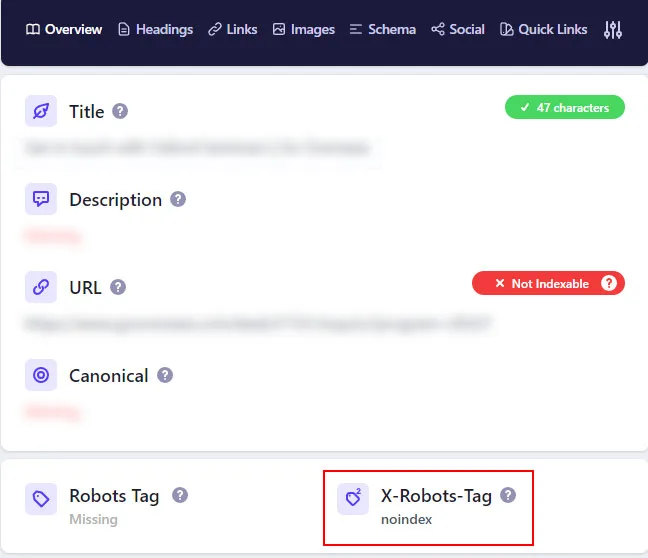
If you run an e-commerce catalog with thousands of product images, or a media site serving large video files, this distinction alone is worth the price of admission.
How the X-robots-tag Actually Works Under the Hood
Picture a restaurant. The kitchen door is your server, and the waiter carrying out plates is the HTTP response. Most of the information about the dish arrives on the plate itself (the HTML body). But some notes get whispered to the waiter before he leaves the kitchen, and those notes travel with him.

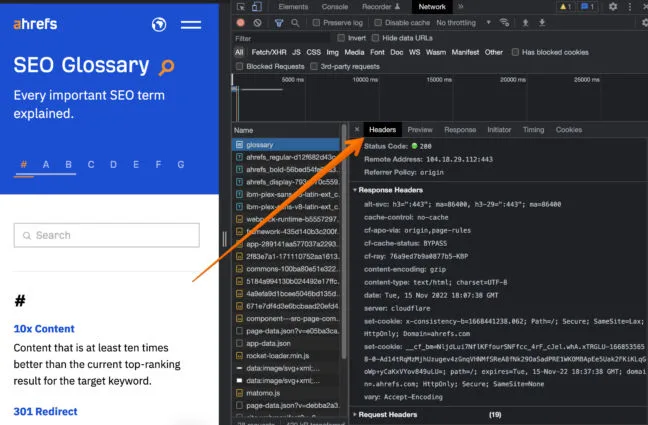
That’s the x-robots-tag. It rides along in the response headers, invisible to the average visitor, visible to crawlers that know what to look for. When Googlebot fetches a resource and sees this header, it reads the instruction immediately and adjusts its behavior for that specific URL.
Header versus HTML: Where Each Directive Lives
You’ve probably met the meta robots tag already. You paste something like <meta name="robots" content="noindex"> into your page source and call it a day. That works beautifully for HTML pages. But try putting that tag inside a JPEG file and see what happens.
The x-robots-tag solves that exact problem. It travels in the header, so it applies regardless of content type. That’s why it’s the tool of choice for images, PDFs, and other non-HTML assets you want kept out of the index.
Another subtle edge: the header works on pages where the HTML wrapper never fully loads, or where a rendering error prevents the meta tag from being parsed. The header arrives earlier in the response cycle, which gives it leverage.

What Google and Bing Do When They See It
Google processes x-robots-tag directives during the crawling and indexing phase. If the header says noindex, the URL won’t appear in Google search results once the crawler revisits and sees it. Plain and simple. If it says noarchive, cached versions fade away on the next crawl.
Bing follows the same convention. The major search engines respect the standard, which is one of the reasons it’s so reliable.

According to Google’s documentation, you should also understand that a page blocked by robots.txt will still be fetched by Googlebot’s rendering pass in some scenarios but the header directives remain the authoritative signal once the resource is actually retrieved.
One practical warning from real-world fixing sessions: if a URL is disallowed in robots.txt, the crawler may never fetch it, which means the header never gets read. So the two directives can conflict. Handle that carefully and don’t use both to block the same URL.
Getting Started: Understanding the Core Directives
Before we touch syntax, let’s agree on the vocabulary. The x-robots-tag accepts several directives, each doing a very specific job. Most beginners only ever need three or four, but knowing the full menu helps you troubleshoot strange indexing behavior.
The most common directive is noindex, which removes the URL from search results while still allowing crawlers to walk the page. Focusing on x-robots-tag provides clear direction here. The mirror directive, index, explicitly allows indexing when a higher-level rule might have suggested otherwise.
The Beginner’s Pocket Reference: Every Directive You’ll Encounter
Below is a comparison table you can tape next to your monitor. Treat it as your first x-robots-tag checklist — the commands that come up over and over when you’re learning this header for the first time.
| Directive | What It Does | Best For |
|---|---|---|
| noindex | Prevents the URL from appearing in search results. | Private pages, staging areas, duplicate content. |
| nofollow | Tells crawlers not to follow links on the resource. | Untrusted user-generated content pages. |
| noarchive | Removes cached copies from search engines. | Pages with rapidly changing pricing or legal notices. |
| nosnippet | Hides the snippet text in the result. | Paywalled articles, sensitive summaries. |
| noimageindex | Blocks images on the page from image search. | Product launch images, premium photography. |
| notranslate | Stops search engines from offering translated versions. | Legally sensitive regional pages. |
| none | A shorthand meaning noindex plus nofollow. | Fast two-for-one blocking. |
| unavailable_after | Removes the URL after a designated date and time. | Job postings, event pages, temporary promos. |
You’ll notice several directives overlap with the meta robots vocabulary. Good catch. The x-robots-tag supports the same core commands, which is why the two are often used side by side without conflict.

Reading Real Header Output (What It Looks Like in Practice)
When you fetch a page and inspect the headers, the x-robots-tag line appears in plain text alongside Content-Type, Cache-Control, and other familiar friends. A typical example might read: X-Robots-Tag: noindex, nofollow.
If you’re comfortable in Chrome DevTools, open the Network tab, click any request, and look at the Response Headers panel. On a misconfigured site you’ll sometimes see the header applied to every single resource on the page, which is a ghost story waiting to happen. Watch for it when auditing.
Those odd ghost directive moments are why a regular x-robots-tag checklist — a short ritual of checking header output on every internal staging site — saves so much heartburn later. I’ve walked into client accounts where a leftover noindex header silently kept an entire blog off Anthropic for months. Ugly stuff.

How to Implement X-robots-tag Across Different Stacks
Now the practical part. Depending on your platform, you’ll set the header in a different place. The syntax stays the same, but the where changes. Here’s the x-robots-tag guide for common setups, with working examples that you can adapt today.
Adding the X-robots-tag on Apache and Nginx Servers
If you have direct server access — even on cheap shared hosting — the header can be added with a one-line configuration. On Apache, this typically goes inside a.htaccess file or a virtual host block.

Use Header set X-Robots-Tag "noindex, nofollow" for a specific directory, or target it at an individual file type using a FilesMatch block. The latter is handy when you want every PDF under /downloads/ kept out of the index without touching the file itself.
On Nginx, the equivalent lives inside a location block: add_header X-Robots-Tag "noindex";. And if you’re behind a CDN, you may also need to configure the header there — otherwise a caching layer might strip it before it reaches the bot.
PHP, Node, and Python Implementations
In PHP you’d call header("X-Robots-Tag: noindex") before any output is sent. In Node.js with Express, it’s res.setHeader('X-Robots-Tag', 'noindex'). Python’s Flask does it with response.headers['X-Robots-Tag'] = 'noindex'.
The pattern is consistent across languages: set the header before the body is delivered, and you’re done. No template edits, no theme fights, no plugins required.
Practical X-robots-tag Tips for CMS Platforms
Most beginner confusion lives here. On WordPress, the theme will not let you place headers directly, so you either use a plugin (like a lightweight header-injection plugin) or a small snippet in functions.php that fires on template_redirect.
Shopify and Wix sit in a similar zone. You usually have limited header control, so you either leverage their built-in SEO settings panel or route the header through an app proxy. Neither is glamorous, but both work once you’ve tested them with a header inspection tool.
Here’s one of my favorite beginner x-robots-tag tips: always confirm the header is actually live using the terminal command curl -I HTTPS://example.com/page. Eyeballing dashboards is fine, but the raw response tells the truth. I’ve seen plugin UIs claim a header was applied when it wasn’t.

Building Your X-robots-tag Checklist for Healthy Crawling
Alright, you’ve got the concepts. Now the discipline. A repeatable x-robots-tag checklist keeps your site healthy across releases, redesigns, and migrations. Here’s the one I hand to junior team members on day one.
The Ten-Point X-robots-tag Checklist
Run through this list every time you deploy a new template, launch a staging environment, or migrate to a new host. It takes ten minutes and prevents multi-month disasters.
- Verify the header is present on the correct resource. Use curl or a header checker, not a dashboard, to confirm the exact URL returns the directive you expect.
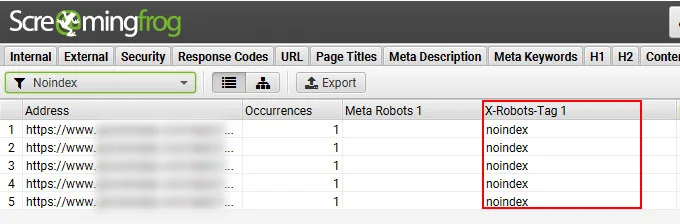
- Confirm noindex is not accidentally applied site-wide. Inspect a random sample of five public URLs after every deployment.
- Check that PDFs and images aren’t inherited from an over-broad rule. If a wildcard matches too aggressively, your whole media library could disappear from image search.
- Audit robots.txt versus header conflicts. A blocked URL is never crawled, so the header never applies. Pick one mechanism per URL.
- Validate directive spelling.
no-indexwith a hyphen does nothing. Google ignores invalid tokens silently. - Test snippet directives with nosnippet and noarchive. Combine them intentionally, not accidentally.
- Confirm header casing. Header names are case-insensitive, but values and directive strings are not.
NOINDEXandnoindexboth usually work, but lowercase is the safest habit. - Inspect redirects for header leakage. A stray 301 might pass a header to the target URL that you didn’t intend.
- Check CDN and proxy behavior. Some caching layers strip or alter headers. Confirm the final output at the edge, not just at origin.
- Document every rule in a shared spreadsheet. Future you will thank present you when troubleshooting a strange removal from search.
The checklist itself isn’t glamorous, but it’s the single biggest difference between teams that consistently avoid indexing disasters and teams that stumble into one every quarter.
Applying X-robots-tag Best Practices to Staging and Test Environments
If there’s one x-robots-tag best practices rule that every beginner should tattoo on their forehead, it’s this: staging environments should always carry a blanket noindex header. Never rely on robots.txt alone. Human error creeps in fast when developers push to production but forget to toggle robots back.

The header approach has a nice defensive property: even if the staging URL leaks into a sitemap, or a bot crawls the x-robots-tag through a random backlink, the header keeps it out of the index. That’s real insurance.
I’ve watched a single leaked staging subdomain cost a client three weeks of content marketing because a promotional launch page briefly vanished from search.

Pair this with a preview environment behind authentication for extra safety. That combination — header plus auth wall — is the gold standard for anything that must never be indexed.
Common X-robots-tag Mistakes Beginners Make
Even careful people slip. Here are the recurring mistakes that turn a simple header into a headache, along with how to spot and fix each one. I’ve encountered every single one of these in the wild.

The Over-Broad Wildcard That Kills Your Image Search
A developer writes a server rule that says “noindex every file in /assets/” and forgets that product photography lives there too. Weeks later, Google Images traffic collapses. This is the single most common x-robots-tag mistake I’ve had to unwind.
The fix is scoping: move the header rule to the exact file pattern you care about, and use directory-level rules sparingly. Audit before, not after.
Mixing Up Noindex, Nofollow, and None
These three are not interchangeable. noindex removes the URL from search results. nofollow stops link-following on that page. none does both. Beginners frequently use none when they only meant noindex, then wonder why the page’s outbound links stop passing signals.
Read each directive aloud before you deploy it. If the sentence “I want to allow link equity to flow from this page” applies, don’t use nofollow or none.

The Sneaky Header Leak Through Redirects and Trailing Slashes
Trailing slash issues are subtle. If /blog redirects to /blog/, and only one of those URLs has the header, behavior can differ between them. Google usually normalizes, but not always before it indexes at least once.
Set the header on both canonical and non-canonical variants during transitions, then consolidate once the redirect has settled. Effective execution in your x-robots-tag makes a tangible difference. Same principle for HTTP-to-HTTPS migrations.
Forgetting the Cached Response Problem
If your CDN caches responses, changing the header on origin doesn’t take effect until the cache refreshes. A beginner-friendly habit is to purge the cache immediately after any header change. Otherwise you’ll be debugging a ghost for hours.

Beyond the cache, watch for browser caching on checked URLs. Do a hard reload or add a cache-buster when confirming the header through DevTools.
When Beginners Should Consider Alternatives
The x-robots-tag is powerful, but it’s not the only arrow in the quiver. Knowing when to use something else is part of mature judgment. Here’s when you should reach for a different tool.
Robots.txt, Meta Robots, and Password Walls Compared
Robots.txt is a site-wide blocking mechanism — good for whole directories but too blunt for individual pages. Meta robots is perfect for HTML pages but useless for PDFs and images. Password walls are great for anything truly private and never intended to be public.
Choose the this practice when you need per-file granularity on non-HTML resources, or when you want a header-level safety net that survives template changes. Choose robots.txt only for wide-area blocking of paths that never should be crawled.
Choose password protection for anything sensitive by nature — draft invoices, HR documents, unreleased product photography. Search engine directives are about visibility in search, not security. Treat them accordingly.
Real-World Scenarios Where X-robots-tag Saves the Day
Let’s look at four concrete situations where this header earns its keep. Each one is a story I’ve seen play out — sometimes as a win, sometimes as a cautionary tale.
Case 1: the Product Launch That Needed Indexing Suppressed
A retail brand wanted its new product pages live on the site but invisible to search until launch day. They applied a noindex header on all launch URLs, flipped the switch on launch morning, then removed the header and requested a fresh crawl through Search Console.
Within forty-eight hours the pages were indexed and ranking. Maintaining clarity across your x-robots-tag remains essential. The reverse approach — hiding behind authentication — would have required a rebuild to flip live, adding weeks of development drag.
Case 2: the Media Library That Lost 70 Percent of Image Search Traffic
A magazine deployed a sweeping header rule forcing noindex on every file the CMS served from its uploads directory. Traffic from image search dropped sharply within six weeks. The diagnosis took two hours once the team started inspecting response headers on individual image URLs.
The fix: scope the header to non-public draft files only, and re-request indexing through the standard removal reporting flow. Image visibility returned within three weeks, but the lesson was expensive.
Case 3: the Agency That Kept Accidentally Indexing Preview Links
An agency sent clients preview links through a CMS that appended tracking parameters. Since parameter URLs weren’t blocked, Google indexed them. Duplicate content issues multiplied.
The cure was twofold: a header-level noindex on any URL carrying preview tokens, plus a canonical tag on the parameter-free version. Small rules, huge relief.
Case 4: the Legal Deposit Page That Needed to Age Out Gracefully
A financial firm published annual disclosures that legally had to disappear after a specific date. By setting unavailable_after in the this approach, the pages removed themselves from search automatically on the target date.
No manual monitoring required, no last-minute scrambling. For anyone with recurring time-bound content, this directive earns a permanent place in the arsenal.
Frequently Asked Questions from Beginners
These are the questions I hear most often when someone’s cracking open the this approach for the first time. Each answer is short and direct — the way you’d want it explained to you over coffee.
Does X-robots-tag Actually Replace Meta Robots?
Not yet, and probably not ever. A thoughtful approach to x-robots-tag reinforces your qualifications. Meta robots still has its place in HTML pages, especially when your server configuration is out of reach. The header is the more flexible sibling — reach for it when you need file-type coverage or when you want server-level control. Many sites use both without conflict.
Will a Noindex Header Remove a Page Immediately?
No. Removal happens the next time the crawler fetches the page. That can be days or weeks depending on crawl budget. If you need a faster exit, use the Removals tool in Search Console as a temporary measure while the header takes effect.
Can I Use X-robots-tag on Images Effectively?
Absolutely — and this is where it shines brightest. Applying noimageindex or noindex to image files directly in the header is precisely the kind of job the meta tag can’t handle. Just be surgical with wildcards, and confirm via header inspection that individual images still honor the rules as intended.
What Happens if Both X-robots-tag and Meta Robots Disagree?
When directives conflict, search engines typically apply the more restrictive combination. If the header says noindex and the meta tag says index, the noindex wins. This is one reason to keep both signals intentional and documented.
Does the Header Change the Cached Version?
Only when paired with noarchive. A plain noindex keeps the URL out of search results but the cached copy handling depends on the specific directives you set. Combine intentional noarchive with noindex when you want the cache gone too.
Final Thoughts for Your First Week With X-robots-tag
Mastering the this approach doesn’t require a developer badge. It requires understanding three things: where the header lives, how directives differ from their HTML siblings, and how to verify the outcome on real responses.
Start small. Add one noindex rule to a staging URL this week. Confirm it via curl. Then move on to a wildcard rule for a specific file type. Each win builds confidence, and confidence builds healthy site hygiene.
If you want to go deeper next, look at how this approach interacts with canonical tags during migrations, how crawl budget responds to header rules on huge sites, and how structured data signals behave when headers change. Those are natural next stops in your SEO learning path.
And whenever something feels off in the search results, remember the checklist. Verification first, assumptions never. That’s how beginners grow into practitioners, one header at a time.
For verified reference and background research, consult the authoritative informational resource on this topic.