If you have ever poked around the settings of a WordPress site and wondered what is permalinks, you are not alone — it is one of those behind-the-scenes details that quietly shapes how your entire site performs.
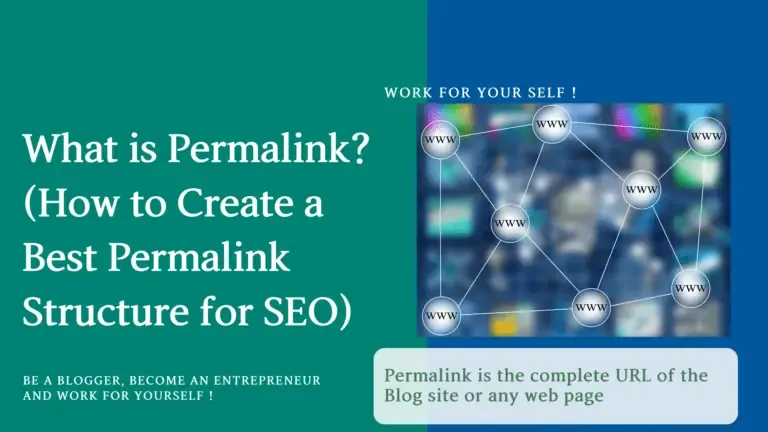
The short answer: a permalink is the permanent URL address of a specific page, post, or piece of content on your website. It is the link people click, the address search engines crawl, and the string of characters that decides whether your page looks trustworthy or like a messy query string. Getting this right matters far more than most beginners realize.
Let me be blunt. Focusing on what is permalinks provides clear direction throughout this process. I have audited dozens of sites where the owner spent weeks on design and copy, then left their URLs as ?p=1234&preview=true. That single oversight can blunt rankings, break shares, and confuse both readers and crawlers.
So let’s unpack what is permalinks in full — the meaning, how they work, what good ones look like, and the exact structure that keeps Google happy.
What is Permalinks? the Plain-English Definition
At its core, a permalink is simply a URL that is meant to stay permanent. Focusing on what is permalinks provides clear direction throughout this process. The word itself is a mashup of “permanent” and “link,” and that combination tells you the whole story.
Once you publish content at a given address, that address is supposed to remain stable so bookmarks, backlinks, and search results never point to a dead end.
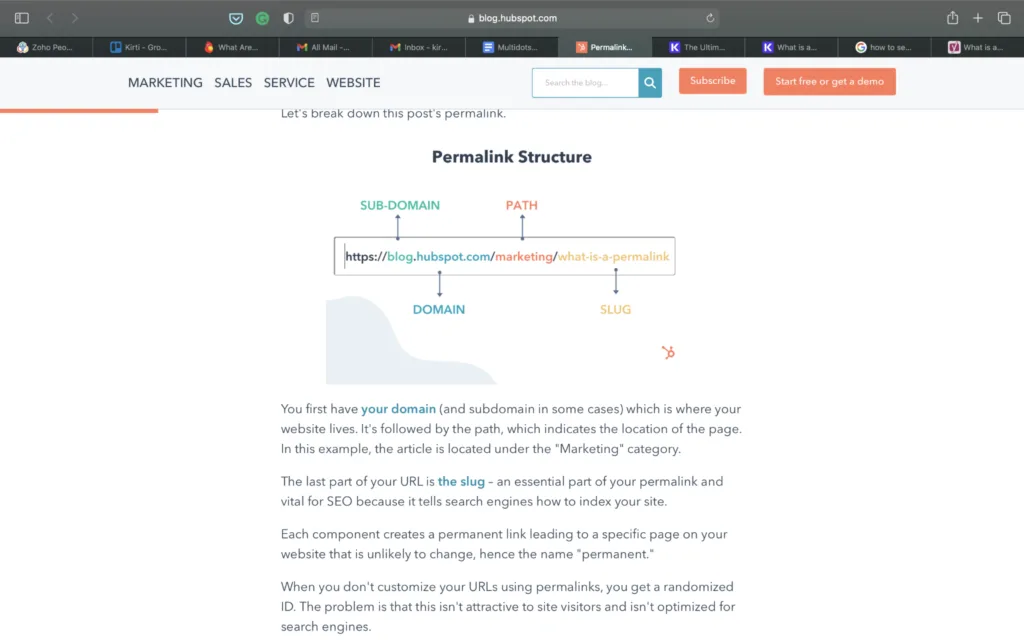
When people ask what is permalinks, they are usually confused because the term gets thrown around loosely. Technically, the permalink is the full web address: HTTPS://example.com/blog/permalinks-explained. Everything from the protocol down to the final slug is part of it. The slug is the last human-readable chunk — the permalinks-explained bit.
Here is a quick breakdown so nothing feels abstract:
- Protocol: HTTPS:// — the secure connection layer.
- Domain: example.com — the site’s home address.
- Path/Folders: /blog/ — the category or structural folder.
- Slug: permalinks-explained — the page’s unique identifier.
On WordPress specifically, what is permalinks gets asked the most because the platform defaults to a “plain” structure (the ugly numbered version) until you change it. That default is a trap for new site owners. Changing it early, before you have published a hundred posts, saves you a mountain of redirect headaches later.
Why Permalinks Matter More Than You Think
Understanding what is permalinks is only half the battle. The other half is grasping why they quietly influence so many things at once. A clean, descriptive URL is not vanity — it is functional infrastructure that carries signals to readers and search engines simultaneously.
Think about how you behave as a user. Mastering what is permalinks makes a tangible difference in real-world situations. When you share a link, do you feel more confident sharing /2-reasons-why or /SEO-permalink-structure-guide? The second one tells you what you are about to read before you even click. That trust, multiplied across thousands of shares, matters.
Search engines feel the same way. Google’s own documentation has long recommended descriptive, readable URLs as a small but real positive signal. It is not a ranking sledgehammer, but combined with everything else on a page, it contributes to clarity. And clarity is exactly what a search algorithm is trying to measure.
The Trust and CTR Effect
Here is something people rarely mention about what is permalinks and why it is worth caring about: click-through rate. A study-worthy URL increases the odds a searcher clicks because they can preview the destination. If your URL reads /what-are-permalinks-SEO, users immediately sense relevance.
Contrast that with a cryptic ID-based URL sitting below a polished meta description. The mismatch creates friction. In my experience, cleaning up URL structure alone has nudged CTR upward on older content, purely because the link suddenly “looked” trustworthy.
Sharing and Word-of-Mouth Reliability
Every time someone copies a link into Slack, WhatsApp, or an email, they are relying on your permalink being stable. A practical understanding of what is permalinks helps eliminate common pitfalls. If you change URLs casually, those shared links rot. Broken backlinks then bleed authority and frustrate anyone who lands on a 404 page.
This is why the “permanent” part of what is permalinks is not a suggestion. It is a commitment. Pick a structure, keep it, and redirect deliberately when you must change something.
How Permalinks Actually Work Behind the Scenes
When someone types a URL into their browser, a request travels to your web server. Your site (WordPress, for example) parses that URL and maps it to a specific piece of content in its database. That mapping is where understanding what is permalinks gets technical but also fascinating.
In WordPress, permalinks are controlled by rewrite rules. Mastering what is permalinks makes a tangible difference in real-world situations. The software takes a friendly URL like /SEO-tips/ and translates it internally into a query like ?p=123. You never see that translation, but it is happening on every single page load. Clean permalinks are essentially a translation layer between human-friendly addresses and machine-friendly database queries.
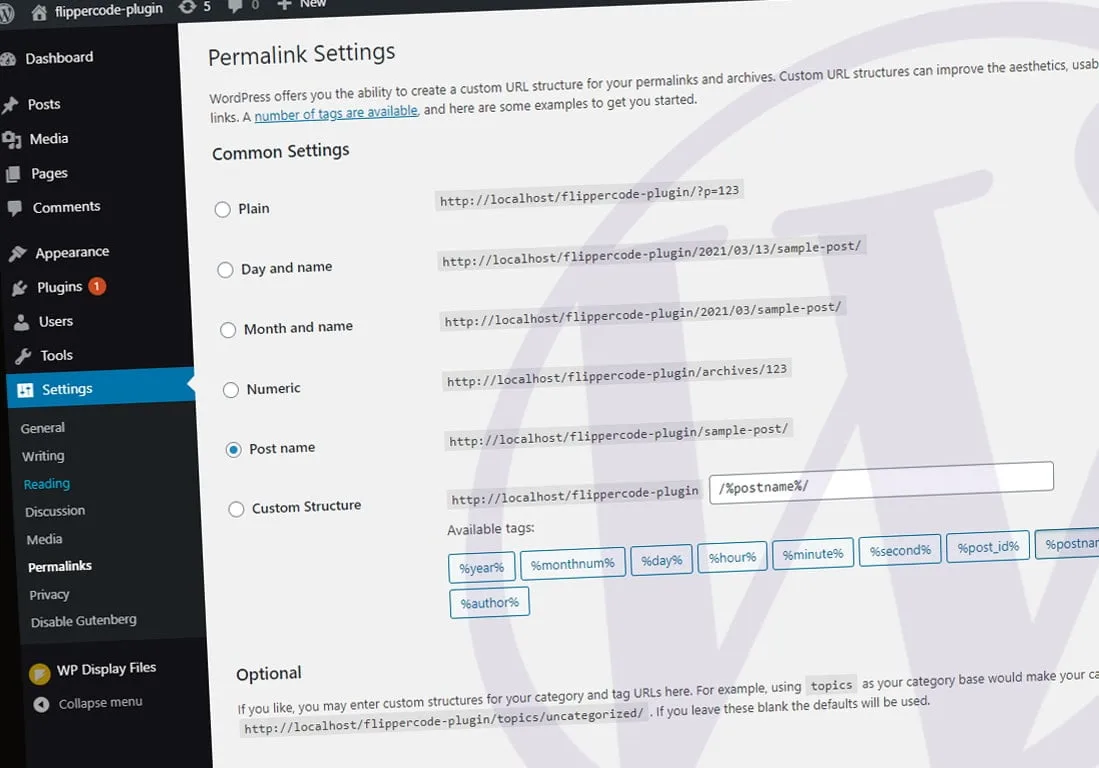
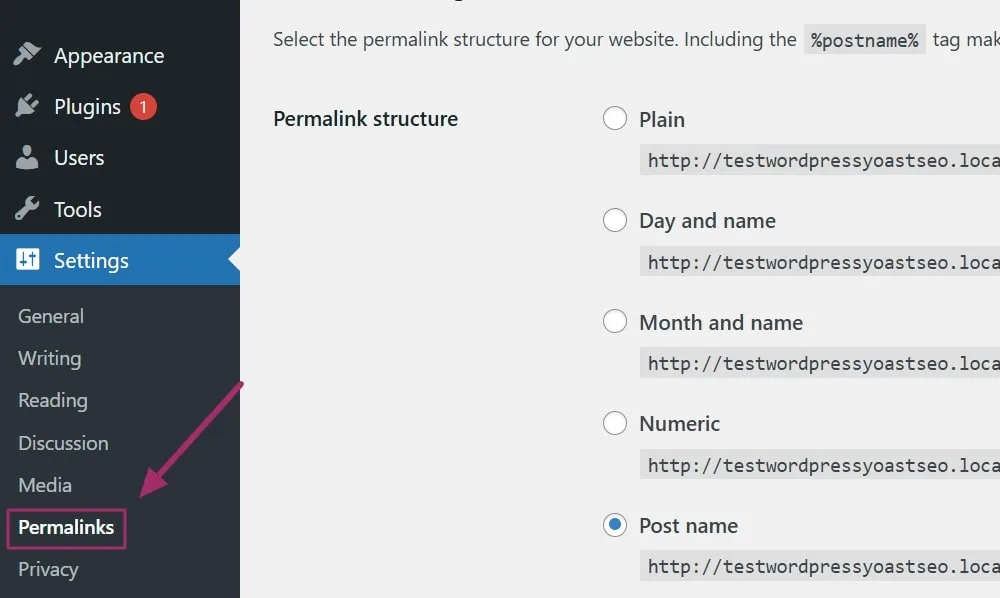
This is also why changing permalink structure can temporarily break things if you do not flush rewrite rules. WordPress caches these rules. Update your structure and forget to save, and suddenly pages 404. A quick trip to Settings Permalinks and re-saving fixes it instantly.
The Role of The.htaccess File
On Apache servers, the .htaccess file stores those rewrite rules as literal instructions. When you ask what is permalinks and how they physically work, the answer often lives inside this tiny configuration file tucked into your site’s root folder.
If you have ever moved a WordPress site and found all your pages suddenly show a “not found” error, a corrupted or missing .htaccess is usually the culprit. Applying proven principles to what is permalinks yields consistent, measurable results.
Regenerating it via the Permalinks settings screen restores the mapping. Nginx servers handle the same logic differently, through server blocks rather than a per-site file.
Why the Database ID Still Exists
Every post and page has a permanent numeric ID in the database — that part never disappears. The pretty permalink is a facade layered over that ID. Understanding this clarifies a common misconception: changing your slug does not delete the original record. Only editing or trashing the content does.
This separation is helpful because it means you can adjust slugs without touching content. It also means old ugly URLs like ?p=123 still technically resolve unless you disable them — worth knowing for anyone who asks what is permalinks and worries about duplication.
Types of Permalink Structures You Will Encounter
There is no universal perfect answer to what is permalinks because structure is a choice. Different platforms and content types call for different URL patterns. Let’s walk through the most common ones so you can recognize them on sight.
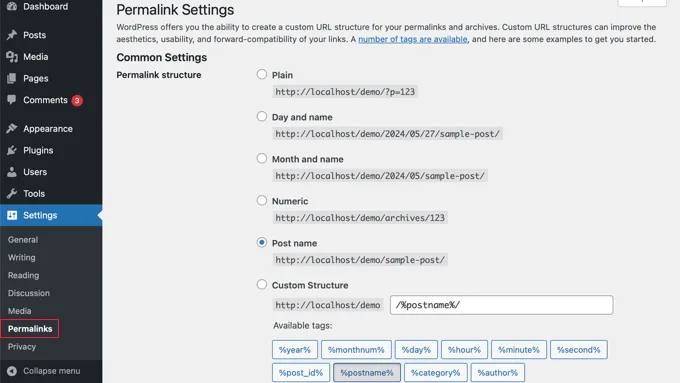
The table below summarizes the main patterns and their practical trade-offs:
| Structure Type | Example | Best For | Watch Out For |
|---|---|---|---|
| Plain / Default | /index.php?p=123 | Nothing really | Ugly, poor SEO, avoid |
| Day & Name | //05/12/SEO-tips/ | News and daily blogs | Dates age content |
| Month & Name | /05/SEO-tips/ | Archive-heavy sites | Ambiguous without year |
| Post Name (slug) | /SEO-tips/ | Most blogs and businesses | Needs uniqueness |
| Category-based | /SEO/permalinks-guide/ | Siloed topic sites | Can bloat if recategorized |
| Custom | /learn/SEO/permalinks/ | Authority hubs | Complexity to maintain |
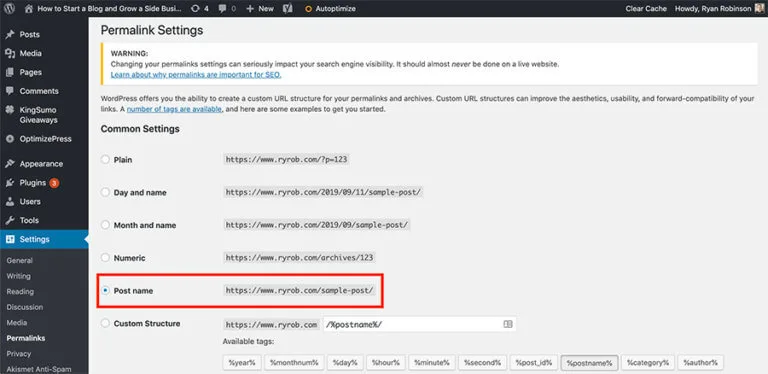
Notice how the “post name” option has become the default recommendation for the majority of sites. A practical understanding of what is permalinks helps eliminate common pitfalls. It is clean, keyword-friendly, and easy to read. The dated structures still have a home for publishers whose content genuinely expires.
When someone asks me what is permalinks in the context of choosing an option, I always say: pick the one that reflects your content strategy. A news site wants dates. A small business wants category or post name. A course platform wants a custom learning path. There is no single right answer.
The Ideal Permalink Structure for SEO
Now we get to the part everyone who asks what is permalinks actually wants: the playbook. If you only take one thing from this guide, let it be this — use short, descriptive, keyword-relevant slugs with hyphens separating the words.
That means /permalinks-explained/ beats /the_complete_story_of_permalinks_explained_by_a_professional/. Effective execution around what is permalinks reinforces confidence from the outset. Shorter is almost always cleaner. Descriptiveness matters, but stuffing it with filler hurts readability and does not help rankings.
Here is a practical checklist I run whenever someone questions what is permalinks and asks me to audit theirs:
- Keep it short: Three to five meaningful words.
- Use hyphens: Not underscores, not spaces, not camelCase.
- Include the target keyword: Naturally, once.
- Drop stop words: “a,” “the,” “of” are usually noise.
- Avoid dates and IDs: Unless your content is time-bound.
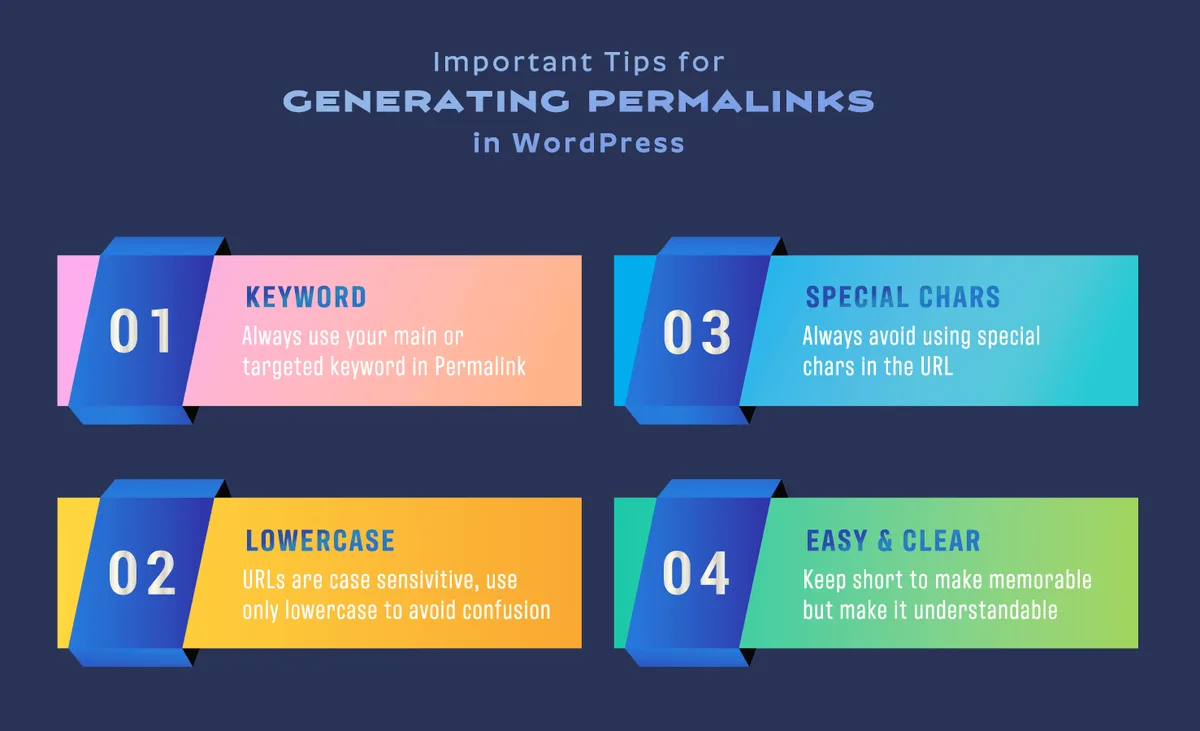
- Stay lowercase: Consistency prevents 404s and confusion.
- Be unique: Two clashing slugs create problems.
Following these steps will resolve about 90% of the confusion around what is permalinks in practice. The rest is about consistency over time — never changing slugs without redirects, and always testing links after edits.
Google has repeatedly advised that URLs be concise and descriptive. Their official guidance on URL structure echoes this: keep them simple, keep them stable. It is a small signal but one that compounds alongside good title tags and content.
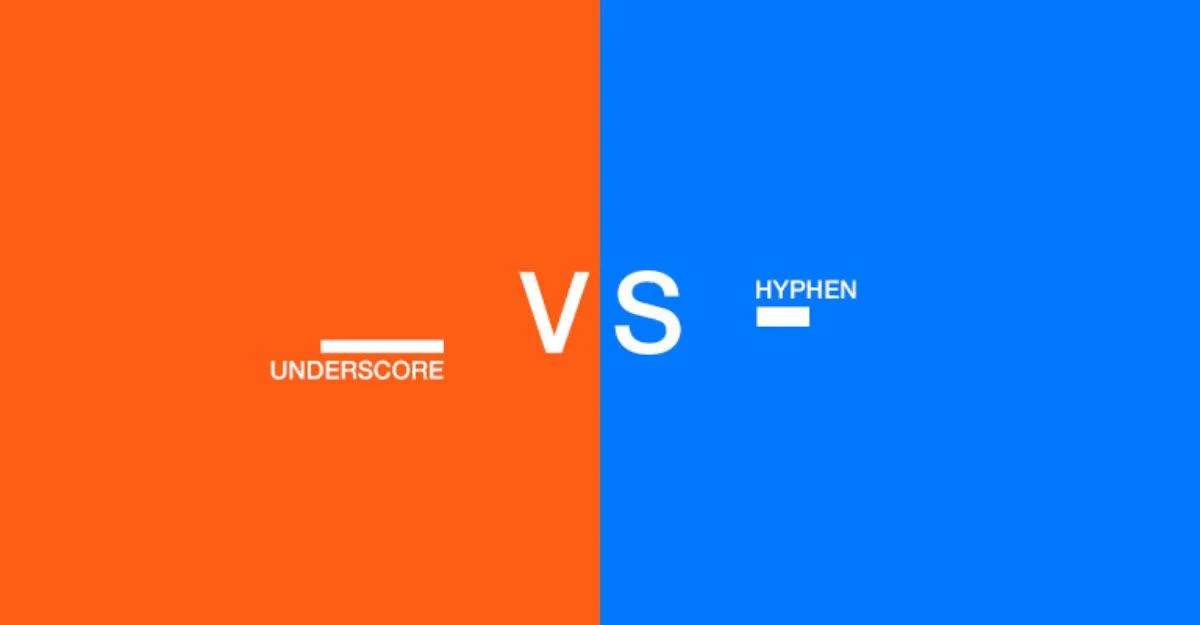
Hyphens Vs. Underscores: the Hyphen Wins
This is a small but frequent debate that surfaces whenever the topic of what is permalinks comes up. The answer is unambiguous: use hyphens, not underscores. Google’s own engineers have confirmed that hyphens serve as word separators in URLs while underscores do not.
What does this actually mean for you? A URL like /seo_permalinks_guide gets treated as one long, awkward word. Meanwhile /SEO-permalinks-guide is parsed as three separate words. For keyword matching and human readability, the hyphen version is clearly superior.
Some people prefer running the words together entirely, like /seopermalinks. Careful preparation for what is permalinks sets a solid foundation for long-term success. That is technically acceptable but reads terribly and can cause ambiguity (is it “seo perma links” or “seo permalinks”?). Hyphens eliminate guesswork.
What About Capitalization?
Stick to lowercase. URLs are technically case-sensitive on many server configurations, so /SEO-Tips and /SEO-tips can point to different things. Using mixed case invites a 404 if someone types the wrong version.
Lowercase, hyphen-separated, descriptive slugs are the universal standard. When audiences ask what is permalinks and why they should care about case, this is the answer — it prevents silent breakage.
Common Permalink Mistakes That Cost You Rankings
I have seen the same mistakes repeatedly on small business sites, and most of them trace back to not knowing what is permalinks really does. Let’s name them so you can avoid stepping on the same rakes.
The first is publishing with the default plain structure. Applying proven principles to what is permalinks yields consistent, measurable results. Every URL ends up as ?p=456. This looks unprofessional, eats opportunity, and makes sharing harder. Fix it in the first week of a new site, not year three.
The second mistake is changing your slug after Google has indexed and ranked the page. Key insights into what is permalinks streamline the entire review and decision cycle. That kills existing backlinks and internal links. If you must change it, set up a 301 redirect immediately, and update every internal reference.
The third is using dates in the URL for content that never expires. This is a common trap for bloggers who follow the “day and name” structure. Two years later, the page still ranks but looks stale because of the timestamp baked into the address.
Keyword Stuffing in Slugs
A URL like /best-SEO-permalinks-what-is-permalinks-guide-top-strategies screams manipulation. It does not rank better — it just looks spammy and dilutes the relevant signal.
Pick one clear keyword and use it once. If someone asks what is permalinks and shows me a bloated slug, I trim it to the core concept. Fewer words, more clarity.
Ignoring Redirects After Changes
Every deleted or changed URL is a potential broken backlink. Developing structured habits for what is permalinks ensures repeatable clarity. Redirect 301s are not optional — they are the difference between preserving authority and handing it back to the void.
Run a crawl with a tool like Screaming Frog after any large permalink restructure. Catch 404s and redirect chains before search engines do.
How to Set Up Permalinks in WordPress
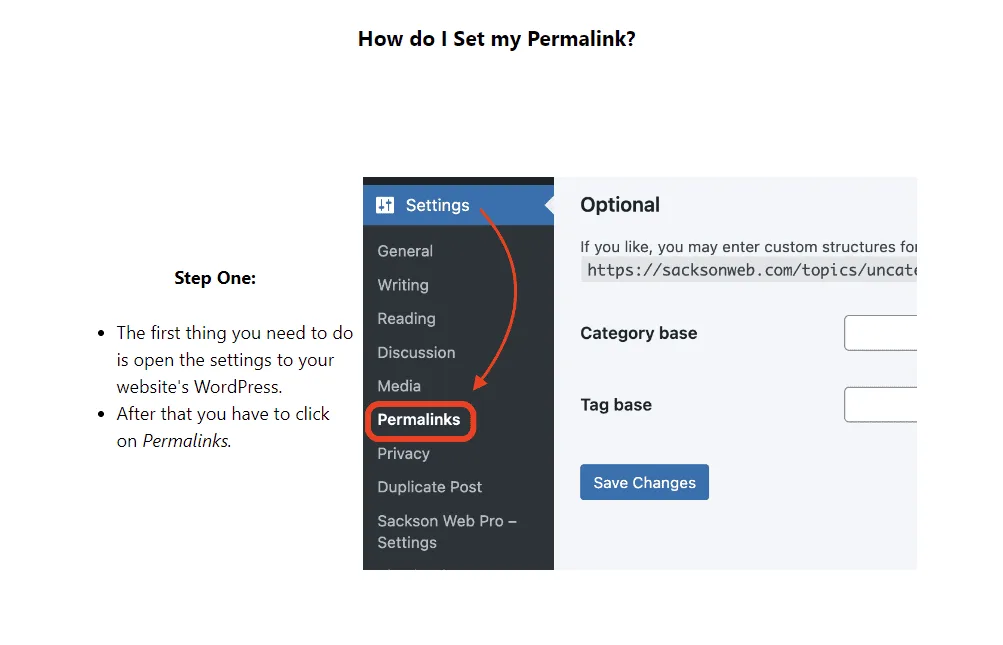
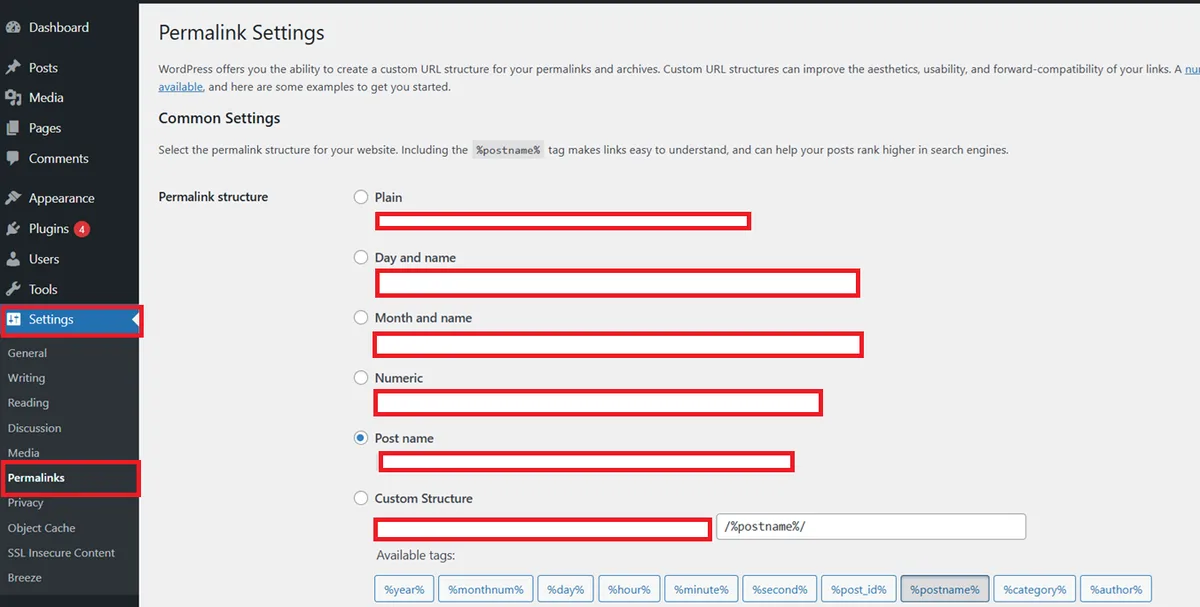
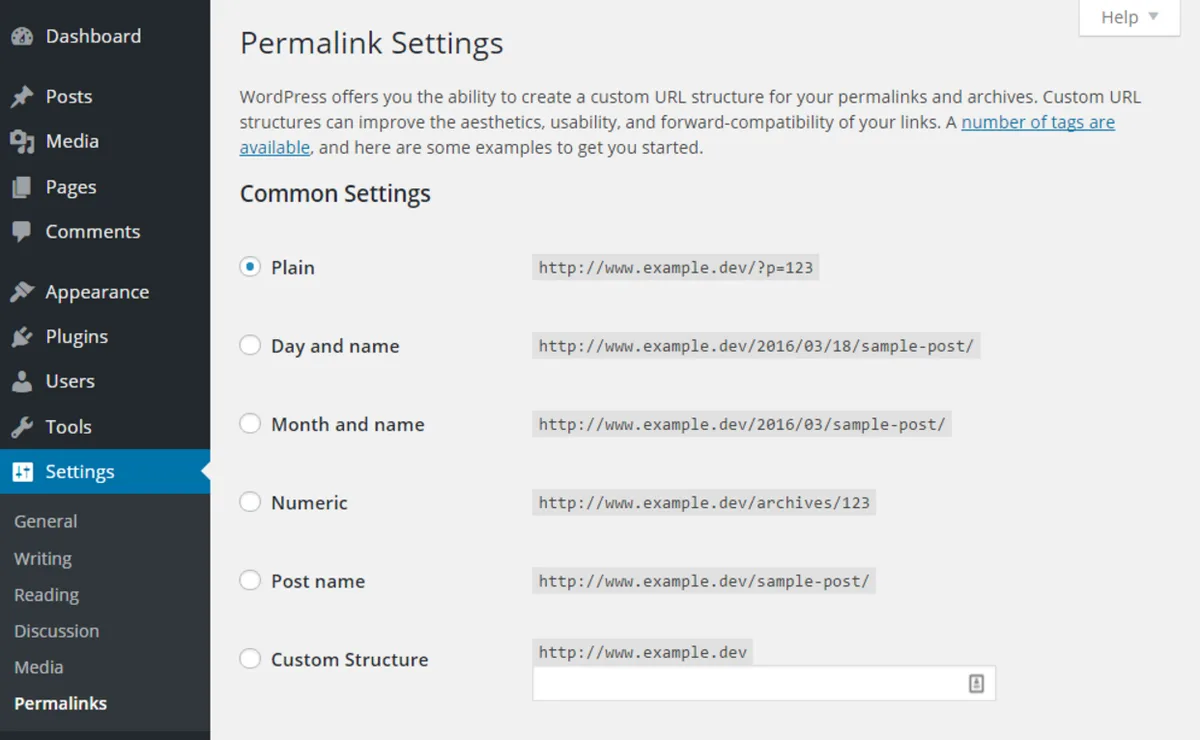
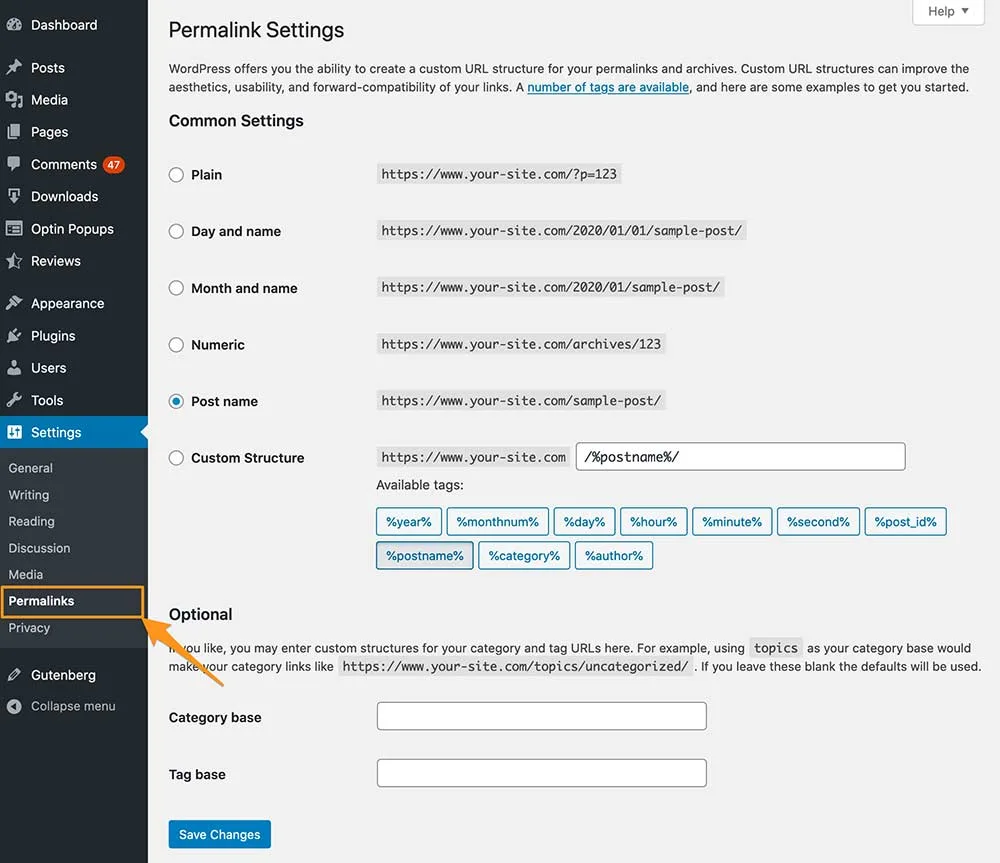
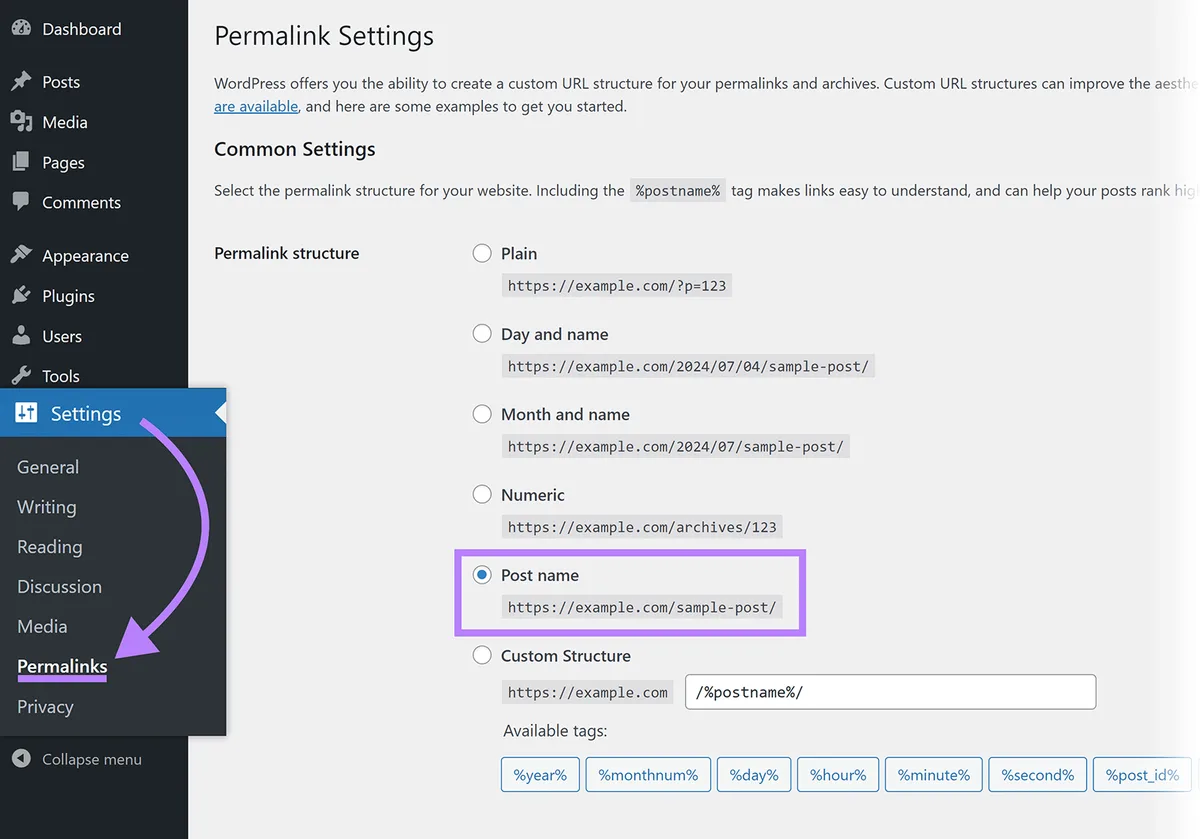
For WordPress users, this is the moment where what is permalinks turns from theory into clicking buttons. It is refreshingly simple — three minutes and done.
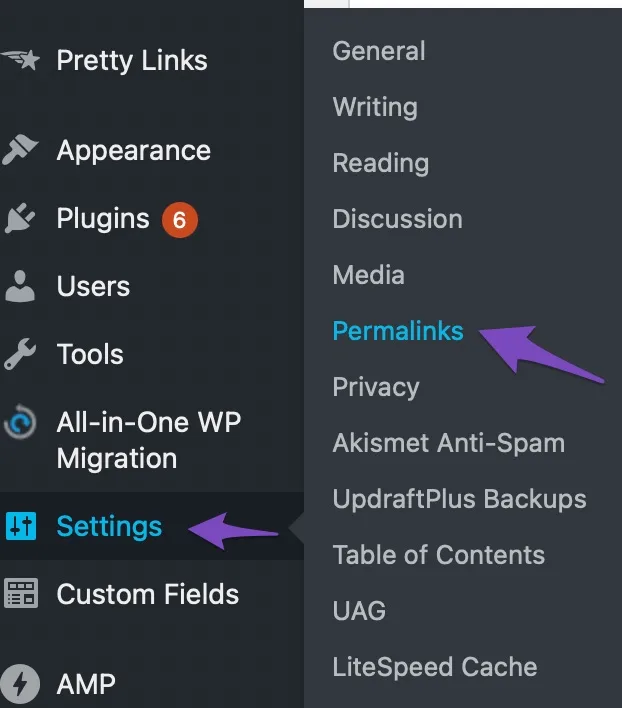
- Log in to your WordPress dashboard.
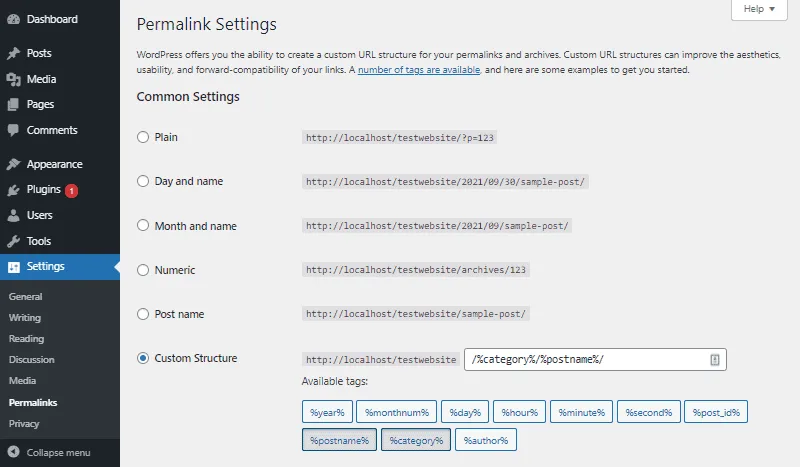
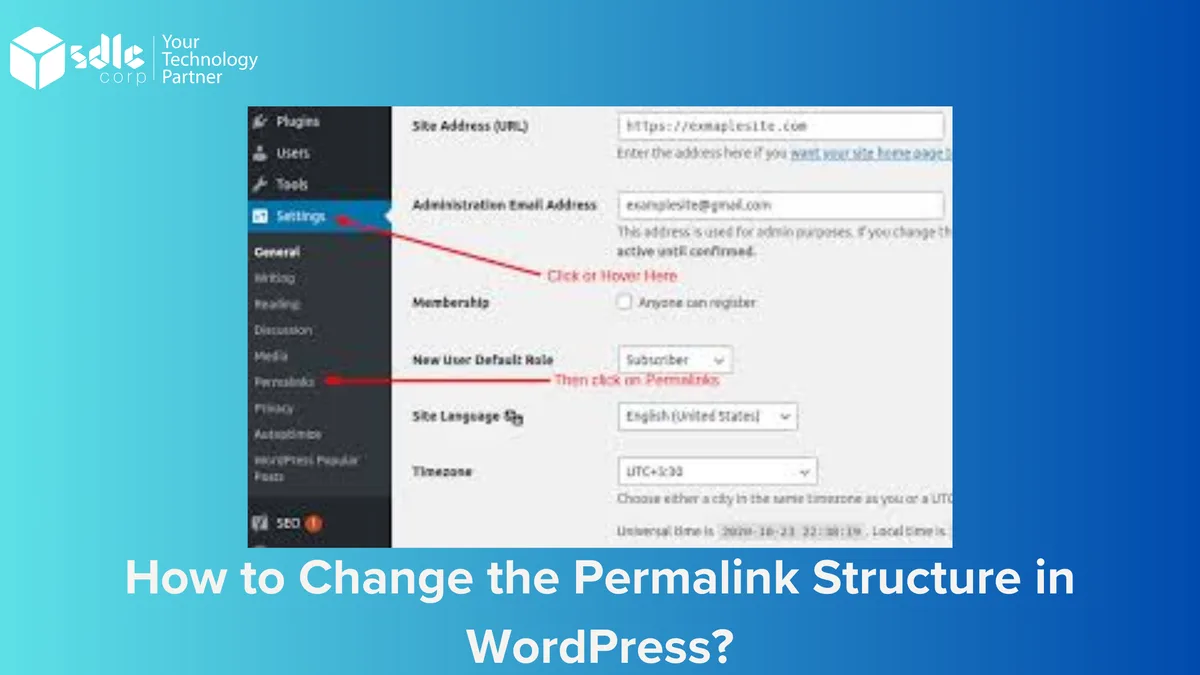
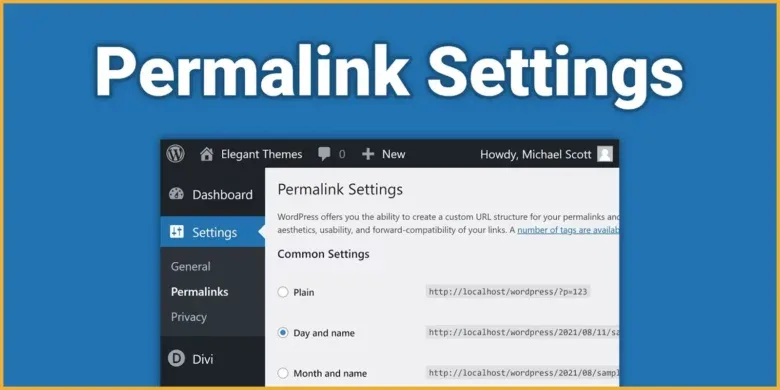
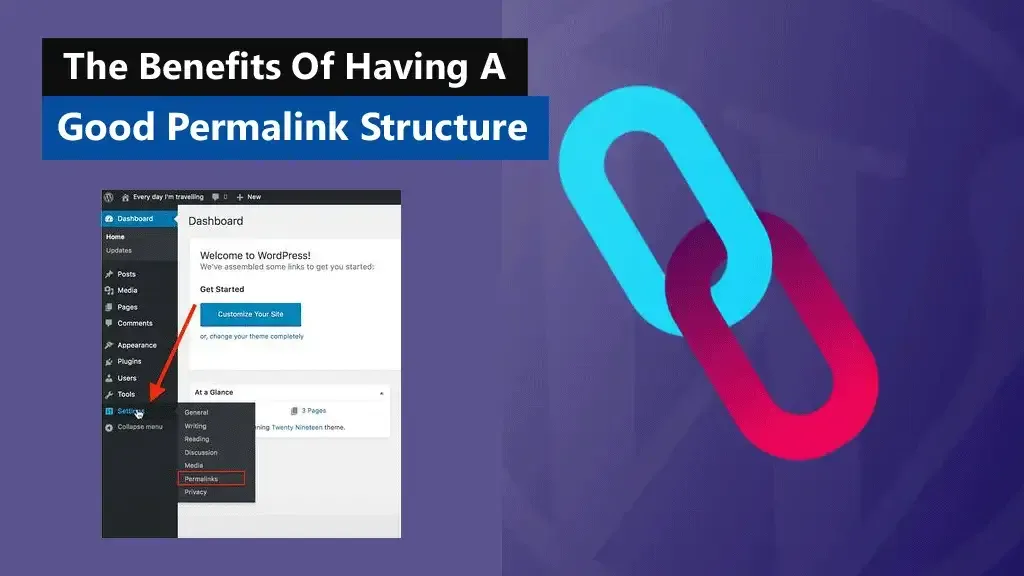
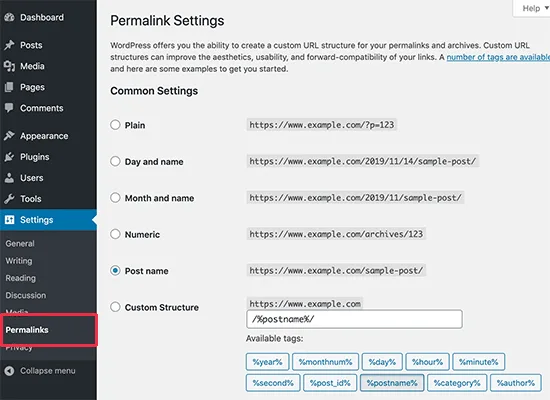
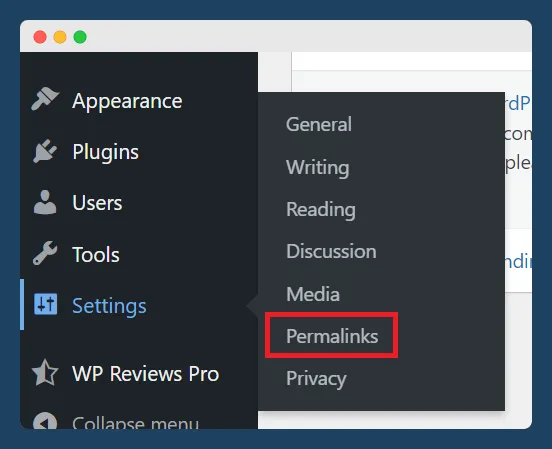
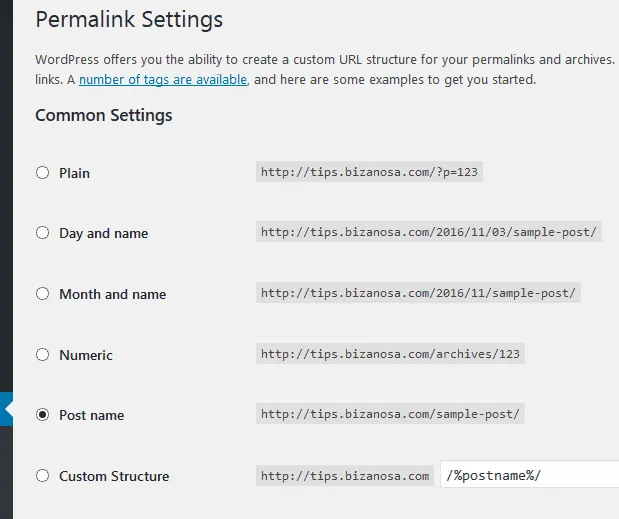
- Go to Settings Permalinks.
- Choose “Post name” under Common Settings.
- Click Save Changes at the bottom.
- Verify by visiting a page and checking the URL.
That is genuinely it. Effective execution around what is permalinks reinforces confidence from the outset. WordPress will rewrite your .htaccess automatically if your server allows it. If it doesn’t (say, due to file permissions), the screen will show the rewrite rules for you to paste manually.
After saving, spot-check a handful of pages. If everything loads without 404 errors, you are done. If not, re-save the settings one more time to flush the rules.
Setting Permalinks on Shopify, Wix, and Squarespace
Not everyone is on WordPress, so let’s briefly address the other platforms, because what is permalinks looks slightly different in each ecosystem.
Shopify auto-generates URL handles from product and page titles, and you can manually edit them in the SEO section of each item. Product URLs follow /products/your-handle.
Wix lets you set the slug under each page’s SEO settings. It handles the structure, and you just control the final segment.
Squarespace has a per-page URL slug field plus a site-wide style setting. Careful preparation for what is permalinks sets a solid foundation for long-term success. It behaves similarly to WordPress but with fewer structural toggles.
In every case, the principle remains: short, descriptive, hyphenated, stable. The platform changes, the answer to what is permalinks does not.
Permalinks and Site Migration: What to Do When URLs Change
Migrating a website is where permalink questions get scary, and where understanding what is permalinks saves careers. If you switch from oldsite.com to newsite.com, or from plain to pretty URLs, every old link must be accounted for.
The safest way is to map each old URL to its new counterpart using a redirect plugin or server-level rules. That way, search engines transfer the ranking signals and users land where they intended.
Miss this and your traffic falls off a cliff overnight — a scenario I have watched play out on more than one rushed launch.
Before you migrate, export a list of your existing URLs. Then plan the new structure. Then compare. This pre-migration mapping is the single most effective safeguard.
Redirect Chains are a Silent Killer
One redirect is fine. Key insights into what is permalinks streamline the entire review and decision cycle. Ten redirects in a row is a crawl budget disaster. If you change your structure twice, you can unknowingly create chains where A points to B points to C.
Audit your redirects periodically. Flatten chains so every old URL points directly to its final destination. Your crawl budget and your ranking stability will thank you.
Do Permalinks Influence Rankings Directly?
This is the question that always follows what is permalinks in my inbox. The honest answer is: mildly. Permalinks are a minor ranking factor, not a silver bullet. But dismissing them entirely is a mistake.
Google uses URLs to understand page topic, crawl efficiently, and display search results. A clean, keyword-relevant URL reinforces relevance. A messy one adds friction. Neither will single-handedly rank you or tank you, but they compound with everything else.
The bigger influence is indirect — through click-through rate, shareability, and crawling efficiency. Those are not trivial. A 3% CTR bump from a trustworthy-looking URL translates into real traffic over months.
So if someone asks what is permalinks worth optimizing, the answer is: yes, but do not obsess. Spend thirty minutes on structure once and then move on to content, backlinks, and internal linking.
What Google Actually Says
Google’s Search Central documentation recommends keeping URLs short and descriptive, avoiding long ID strings, and keeping them stable. Developing structured habits for what is permalinks ensures repeatable clarity. Their official URL structure guidance is worth bookmarking and reading once. It reinforces the permalink principles in this article.
The takeaway from their docs: URLs should be simple, meaningful, and predictable. That is exactly what good permalinks do — no more, no less.
Permalinks Vs. Vanity URLs Vs. Short Links
The confusion around what is permalinks partly comes from the fact that several related terms get used interchangeably. Let’s separate them so you can speak about URLs with confidence.
A permalink is the permanent address your content lives at. It is the canonical URL. A vanity URL is a short, branded shortcut — like example.com/offer — that redirects to a longer destination. A short link is a bit.ly-style compressed address for sharing.
| Term | Purpose | SEO Value | Example |
|---|---|---|---|
| Permalink | The canonical page address | Direct, small positive signal | /what-is-permalinks/ |
| Vanity URL | Marketing-friendly shortcut | Neutral if redirected properly | /offer |
| Short link | Compressed sharing address | Neutral, depends on destination | bit.ly/xyz |
| Canonical URL | Preferred version of duplicate content | Critical for avoiding cannibalization | yourdomain.com/guide |
Keep clear in your mind which one you are dealing with. When you share content on social media, use the permalink for SEO benefit and a short link only if space demands it.
Best Practices for Naming Slugs Like a Pro
Naming a slug well is an art that becomes easy after practice. The single biggest tip I give when asked about what is permalinks best practice is: write it the way you would describe the page to a friend.
If your article is about how to bake sourdough, your slug should not be /article-583-fix. Focusing on what is permalinks provides clear direction throughout this process. It should be /how-to-bake-sourdough. Imagine the slug is a road sign — it should tell the traveler exactly what is ahead.
I also recommend avoiding category explosion. Some SEOs nest URLs deeply, like /blog//SEO/guides/permalinks/what-is-permalinks/. That is overkill. Fewer folders means less restructuring pain when you reorganize.
Two years ago I helped a client flatten a four-level URL structure into one. Traffic didn’t spike, but maintenance complaints dropped to zero, and internal linking got vastly simpler. Sometimes the win is simplicity itself.
Handling Long-Tail Keywords in Slugs
A long-tail keyword like “what is permalinks and why it matters for small business SEO” is too long for a slug. Trim it to the essential phrase: /permalinks-for-SEO. Readers and crawlers both appreciate the compression.
Resist the urge to cram every variation in. One strong, focused slug outperforms a keyword-stuffed mess every single time.
How Permalinks Affect Internal Linking
Internal linking is where the practical value of knowing what is permalinks really shines. Every internal link is built on a URL. If URLs are messy, long, or unstable, internal links become harder to plan and riskier to maintain.
Short, descriptive slugs make internal linking fast. Mastering what is permalinks makes a tangible difference in real-world situations. You can guess the URL of a related page. You can hardcode links in templates. You can build topical clusters without friction.
They also help crawlers discover related pages faster. When Google crawls your site and follows clean, logically structured URLs, it builds a clearer map of your content. That clarity translates into faster indexing and better contextual understanding.
Anchor Text Still Matters
The URL itself is not the whole story. The anchor text pointing to it carries more weight. Combine clean slugs with descriptive anchor text and you get the best of both worlds — clarity in the URL and clarity in the link context.
When I write internal links now, I use partial-match anchors based on the target slug. That gives me consistent relevance signals without overoptimization.
Permalinks and Multilingual or Multiregion Sites
Another nuance in the what is permalinks conversation is internationalization. Multilingual sites need URL structures that clearly separate languages and regions — and that separation lives in the permalink pattern.
The two common approaches are subdirectories (example.com/es/) and subdomains (es.example.com). A practical understanding of what is permalinks helps eliminate common pitfalls. Google supports both, but subdirectories are simpler to maintain and consolidate authority more easily.
Whatever you choose, keep it consistent. And use hreflang tags to tell search engines which version serves which audience. Getting this wrong sends Spanish speakers to English pages and blunts performance.
Language Codes Done Right
Use ISO language codes (like en, es, fr) rather than made-up abbreviations. Standard codes are unambiguous, so both users and crawlers know what to expect at the URL before clicking.
A clean pattern looks like example.com/en/guides/permalinks/. Predictable, readable, scalable. This is the answer to what is permalinks for any global site looking to avoid a messy migration later.
Tracking and Auditing Your Permalinks Over Time
Even a well-structured site drifts. New editors, plugins, and migrations happen. That is why regular audits matter, and it is a habit most people miss when they first learn what is permalinks.
Every quarter, crawl your site with a tool like Screaming Frog or Sitebulb. Look for orphaned pages, redirect chains, duplicate URL patterns, and pages that return 404. Ten minutes of work can prevent months of lost traffic.
Watch for “parameter bloat” too. Applying proven principles to what is permalinks yields consistent, measurable results. URLs that accumulate things like ?utm_source= or ?preview=1 can be indexed as duplicates. Use canonical tags to consolidate signals.
My rule of thumb: if a URL has more than five segments, question it. If it contains timestamps for evergreen content, question it. If it has hyphens mixed with underscores, fix it. Small corrections add up.
Consider URL Monitoring Tools
For larger sites, automated monitoring catches breakage before users do. Tools that ping you when a page returns a 301, 404, or 5xx error are worth the investment. Uptime is SEO.
Combine monitoring with Google Search Console. Its “Pages” report surfaces indexing issues tied to URLs — including duplicate canonicalization and crawl anomalies. This is real-world diagnostics that no amount of what is permalinks theory replaces.
When Should You Change a Permalink?
This question comes up because people know changing URLs is painful and want to know if it ever makes sense. It does — occasionally. Here’s when.
- The slug is misspelled: Correct it early and redirect.
- The content has fundamentally changed topic: The old URL no longer fits.
- The slug contains outdated info: Like a false premise or a discontinued product.
- The URL is excessively long or spammy: Clean it up.
- Migrating platforms: Structure will likely change anyway.
Outside these cases, leave it alone. Effective execution around what is permalinks reinforces confidence from the outset. Permalinks should be permanent. Every change requires a redirect and a potential loss of link equity, and that cost is rarely worth cosmetic tweaks.
If you do change something, set the redirect the same hour. Do not wait. Every hour an unredicted URL lives, a crawler or a user may hit a dead end.
Permalinks and E-commerce Product Pages
Online stores have a unique relationship with URLs, and what is permalinks in this context means managing variation and duplication carefully. Product pages constantly generate variants — size, color, fit — and each variant can spawn a separate URL if you are not careful.
The standard best practice is a single canonical product URL with variant selection handled by query parameters or JavaScript. This concentrates ranking signals on one page rather than splitting them across dozens of thin variants.
Category pages matter too. A clean category URL like /men/shirts/ outperforms a bloated one with too many filter parameters. Keep filter URLs noindexed unless they earn search traffic on their own.
Breadcrumb Links Improve Both UX and SEO
Breadcrumbs depend entirely on URL hierarchy. When your permalinks follow a logical structure, breadcrumbs become automatic and useful — users can navigate up from a product to its category to the homepage.
Search engines use breadcrumbs to understand site structure and sometimes display them in results. The URL structure you choose shapes this entire chain. Clean permalinks make clean breadcrumbs.
Real-World Examples: Good Vs. Bad Permalinks
Theory is nice, but examples are where what is permalinks becomes concrete. These pairings show the difference plainly.
| Bad URL | Good URL | Why the Difference Matters |
|---|---|---|
| /index.php?p=9834 | /what-is-permalinks/ | Readability and keyword signal |
| //06/15/how-to-set-up-permalinks-in-wordpress-for-beginners-tutorial | /wordpress-permalinks-setup/ | Compact rather than cluttered |
| /blog/seo_permalinks_guide_for_beginners_part_final | /permalinks-SEO-guide/ | Hyphens over underscores, shorter |
| /category/blog/post-name// | /blog/post-name/ | Reduced nesting |
| /products/shirt-red-size-large-in-stock–final-v2 | /products/red-shirt/ | Canonical consolidation |
Every example on the right side tells a story. Anyone scanning these URLs immediately knows what the page contains. That is the whole point.
Take note of the last row in particular. Product variations should rarely be baked into the URL. Use canonical tags to point variants back to the main product page so you do not fragment your SEO strength across competing variants.
The Relationship Between Permalinks and Canonical Tags
If you are getting into what is permalinks in depth, canonical tags enter the conversation quickly. A canonical tag says “this URL is the authoritative version” and is essential when duplicates of a page exist.
Common duplicates include trailing slash vs. No trailing slash, uppercase vs. Lowercase, and parameter vs. Clean version. Pick one canonical form and enforce it. The canonical tag, combined with redirects, ensures crawlers know which URL counts.
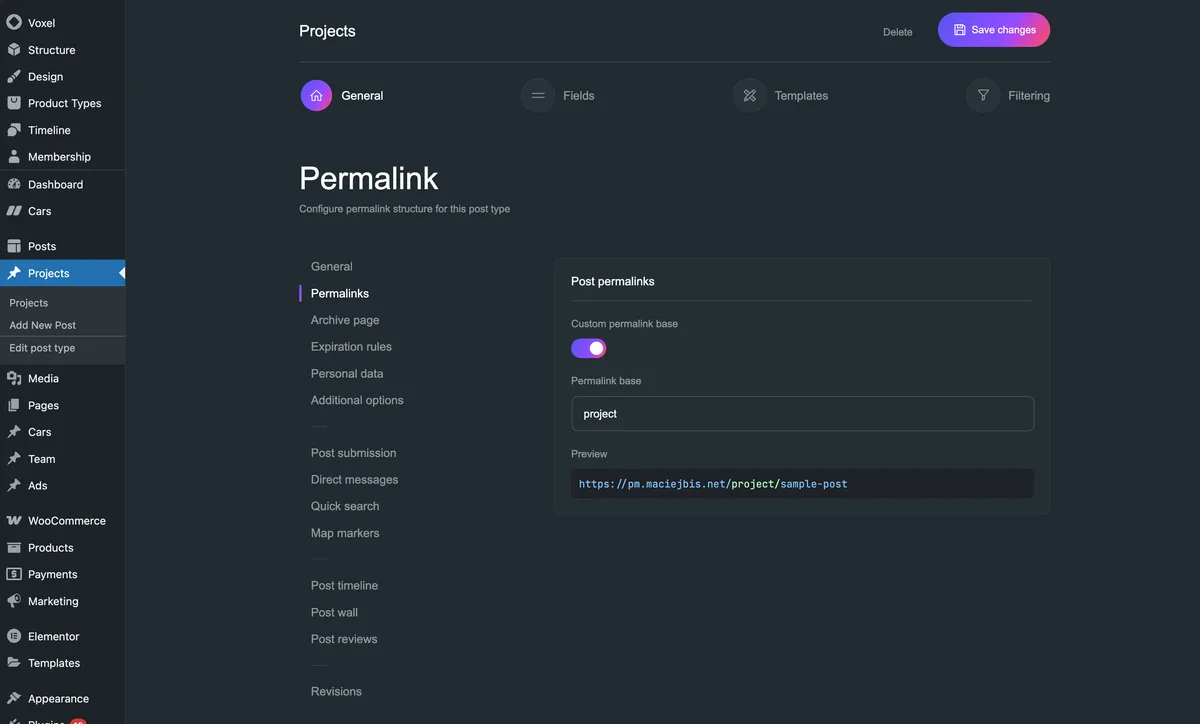
In WordPress, canonical tags are generated automatically. But if you use custom post types or page builders, you may need to verify they are firing correctly. Check the source code of a sample page to confirm.
Trailing Slashes: Pick and Stick
Having some URLs end in a slash and others not is a subtle duplicate content trap. Pick one format and enforce it with redirects. Consistency reduces crawler confusion and prevents a mess of duplicate pages.
WordPress historically uses trailing slashes by default. Many other platforms do not. If you migrate, pay attention to this and set up redirects accordingly. It is small but surprisingly impactful when you have thousands of URLs.
Frequently Asked Questions About What is Permalinks
Before wrapping up, let’s address the questions readers ask most often when the topic of what is permalinks comes up. These answers should clear the final few cobwebs.
- What exactly is a permalink? The permanent URL of a specific page, post, or piece of content. It is what you share, bookmark, and what search engines crawl. The “permanent” part means it should not change after publication.
- Should I use dates in my permalinks? Only if your content is time-sensitive. For evergreen guides and service pages, dated URLs imply staleness and complicate booking.
- Can I change my permalink structure without losing rankings? Yes, if you set up 301 redirects from every old URL to its new destination. Missing redirects is what causes traffic loss, not the change itself.
- Do permalinks directly rank pages? Weakly. They are a minor signal. Their bigger influence is on crawlability, CTR, and shareability, which compound into meaningful SEO results over time.
- Hyphens or underscores? Hyphens, always. Google parses hyphens as word separators but treats underscores as part of a single word.
- What is the best permalink structure? Post name or slug with 3-5 words, hyphenated, lowercase, and descriptive. For most WordPress sites, “Post name” is the safest choice.
- Do permalinks affect internal linking? Yes. Clean slugs make internal links faster to build and easier for crawlers to map. Messy URLs slow down audits and internal planning.
- How often should I audit permalinks? Quarterly for most sites. More often if you are actively publishing, redesigning, or migrating.
If you want to verify any of these points about what is permalinks, Google’s own Wikipedia entry on permalinks is a good factual starting point. Combine that with the official Google documentation and you have everything you need.
Quick Recap on the Big Points
Understanding what is permalinks boils down to a few principles: keep them permanent, keep them short, keep them descriptive, and always redirect if they change. Everything else is variation on that theme.
Do not overthink it. Set your structure once, test it, and move on to content and links. Permalinks are infrastructure — important but not the star of the show.
If your site is still running on plain URLs with ?p= strings, close this article and fix it today. That single change is the fastest win in this entire guide.
A Personal Note on Getting It Right Early
Looking back at my own early website mistakes, the ones that stung the longest were permalink changes. I changed a structure twice in one year and built a redirect mess that took weeks to untangle.
If I had known what is permalinks truly meant back then, I would have chosen “Post name” on day one and never touched it again.
So here is my final nudge: treat your permalinks as permanent from the start. Pick a clean pattern, teach yourself to write tight slugs, and audit every six months. That habit alone will keep your site healthy for years.
And when someone asks you what is permalinks at a networking event, you will have the whole answer ready — from definition to migration strategy to the exact WordPress steps.