Website redesign SEO is where most relaunches quietly bleed traffic, and the fix rarely requires a six-figure budget. If you are planning a rebuild and want to keep your rankings intact, this guide walks through 11 easy wins that deliver outsized results.
Here is the uncomfortable truth I have watched play out at agencies and in-house teams for years: a beautiful new site can tank a decade of organic equity in a single deploy. The design gets applause in the boardroom, then analytics shows a 40% drop in non-branded sessions three weeks later. Panic sets in. Someone asks whether the redesign was a mistake. It usually was not — the migration was.
What follows is a practical website redesign SEO guide built from real migrations, including a B2B SaaS relaunch that held 94% of its organic traffic and a regional e-commerce replatform that gained 31% organic revenue within two quarters. No fluff. Just the wins that matter, ranked by impact-to-effort ratio.
What Website Redesign SEO Actually Means (And Why Most Launches Fail)
Strip away the jargon and website redesign SEO is the discipline of preserving and improving organic search performance through a site rebuild. It covers everything from URL mapping to render budgets to how your new navigation distributes internal link equity. It is not a phase tacked onto the end of a project timeline.
The failure pattern is remarkably consistent. Focusing on website redesign SEO provides clear direction here. SEO gets looped in two weeks before launch, handed a staging URL, and asked for “a quick review.” By then, the CMS is locked, the URL structure is baked into templates, and the dev team is in sprint freeze. Every recommendation becomes a change request. Half get rejected as scope creep.
According to a widely cited analysis of site migrations, roughly 70% of redesigned sites experience measurable organic traffic loss in the months following launch. That number is not a curse. It is a planning failure. Treat website redesign SEO best practices as a workstream from day one, and you flip the odds.
The better mental model: SEO is not a gatekeeper at the end of the assembly line. Focusing on website redesign seo provides clear direction here. It is a co-architect. The earlier your search strategist sits in the room, the cheaper every fix becomes.
The Three Silent Killers of a Relaunch
In my experience, three things do the most damage, and none of them are glamorous. Refining each detail of your website redesign SEO strengthens this section. First, broken URL mapping — old URLs 404 with no 301 redirects in place.
Second, accidental noindex tags left on from staging. Third, content consolidation that strips pages of the long-tail queries they were quietly ranking for.
The noindex one is brutal because the Website redesign SEO is invisible. A developer copies the staging environment to production, the robots meta tag saying “noindex, nofollow” rides along, and Google de-indexes the entire site over a few weeks. I have seen this exact mistake cost a company an estimated six figures in pipeline before anyone noticed.
The antidote is boring: a pre-launch website redesign SEO checklist, verified line by line by two different people. Boring saves revenue.
Website Redesign SEO Checklist: the Baseline Before You Touch Anything
Before diving into the 11 wins, the website redesign SEO need a baseline. Without one, you have no idea whether a change helped or hurt. This is the step most teams skip because it feels like busywork — and it is the single most valuable half-day you will spend on the project.
Here is the pre-launch foundation. Effective execution in your Website redesign SEO makes a tangible difference. Capture a full crawl of the current site, export your top 1,000 landing pages by organic sessions and conversions, and log rankings for your priority keyword set. Then document everything.
| Baseline Asset | What To Capture | Tool Examples |
|---|---|---|
| Full Site Crawl | All URLs, status codes, titles, meta descriptions, canonicals | Screaming Frog, Sitebulb, Ahrefs Site Audit |
| Top Landing Pages | Top 1,000 by sessions, conversions, and backlinks | GA4, Search Console, Ahrefs |
| Ranking Snapshot | Priority keywords, positions, featured snippet ownership | Semrush, Ahrefs, AccuRanker |
| Backlink Profile | Referring domains by target URL | Ahrefs, Majestic |
| Internal Link Map | Inlink counts per URL, orphan pages | Screaming Frog, Sitebulb |
| Core Web Vitals | LCP, INP, CLS by template | PageSpeed Insights, CrUX dashboard |
Keep this snapshot somewhere permanent. Maintaining clarity across your website redesign SEO remains essential. When the post-launch traffic dips — and it will, briefly — you will want to compare apples to apples. A 15% dip in week one is normal as Google recrawls and reindexes. A 15% dip that persists in week six is a five-alarm fire.
Now, the 11 wins. They are ordered loosely by impact and effort, so you can start with the highest-leverage items even if your launch is weeks away.
Win 1: Build a Complete URL Map Before the First Template Gets Approved
This is the highest-leverage win in the entire website redesign SEO playbook, and it costs almost nothing except discipline. Every URL on the old site needs a corresponding URL on the new site. Every single one.

The process is unglamorous. A thoughtful approach to website redesign SEO reinforces your qualifications. Export the full crawl of the existing site — every URL that returned a 200 status. Cross-reference against the new site’s information architecture.
For each old URL, decide: keep (same URL), redirect (301 to a relevant new page), or remove (410 gone, only if the page truly has no value and no inbound links).

For a mid-size site, expect the website redesign SEO spreadsheet to have 2,000 to 50,000 rows. Yes, it is tedious. Do it anyway. A single unmapped high-value URL with 300 referring domains can wipe out a meaningful chunk of your organic footprint.
Pro tip from hard experience: map redirects to the closest topically equivalent page, not the homepage. Homepage-redirecting everything is the laziest migration move in existence, and Google treats it as a soft 404 for the ranking of that query. If “red running shoes” 301s to the homepage, you lose the “red running shoes” ranking permanently.
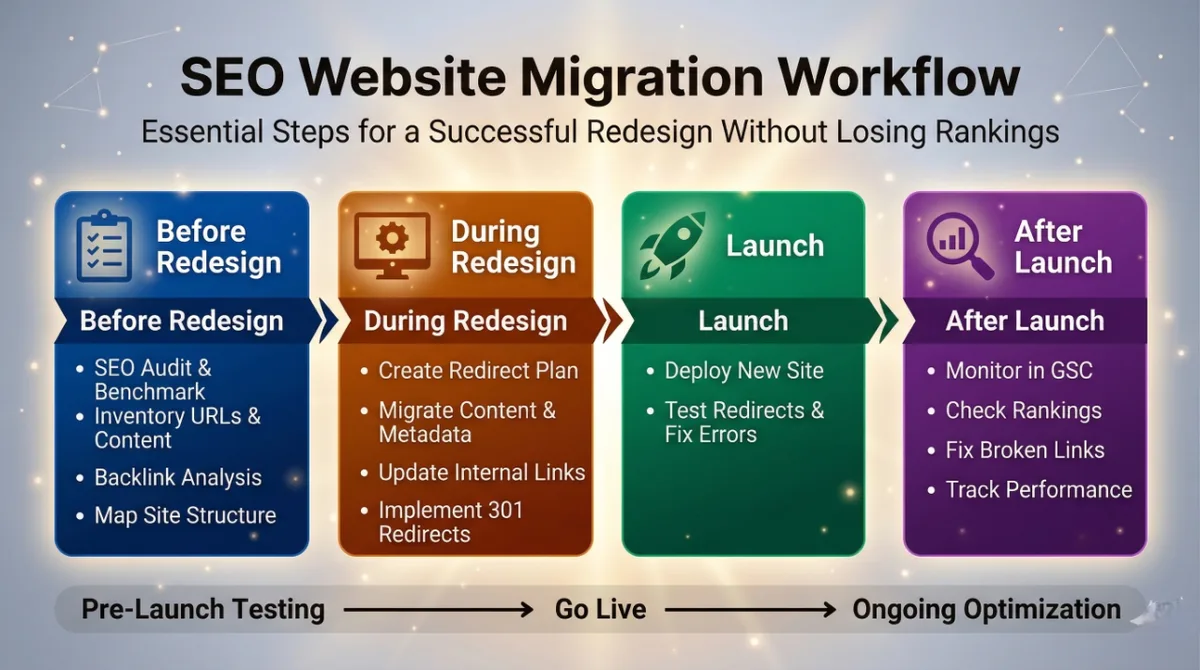
Verification is the easy part. Applying these principles to your website redesign SEO yields measurable results. Run a crawl of the new site pre-launch with your redirect map loaded into Screaming Frog. Any URL from the old crawl that does not resolve through a redirect chain of one hop is a failure. Fix before launch.
Win 2: Lock in Your Robots Meta Tags and Canonicals on Launch Day
The noindex disaster is so common that I now consider it an industry rite of passage. Staging environments get locked down so nobody accidentally indexes the test site. Then production inherits the same tag. Sound familiar?

Make this a formal launch-day verification step. Here is the website redesign SEO checklist item, verbatim: open the live site, view source on the homepage, a category page, and a blog post, and confirm no robots meta tag exists (or, if it does, that it says “index, follow”).
Do the same for the sitemap.XML — confirm every URL returns a 200 status and no page in the sitemap carries a noindex directive.

While you are at it, check canonicals. During a redesign, canonical tags are frequently auto-generated by the new CMS in ways that break logic. A common bug: every paginated category page canonicalizes to page one, which is usually fine, but every product variant canonicalizes to the wrong parent SKU. That mistake alone can cost you the long-tail variant traffic.
My rule: do not trust template-generated canonicals until the website redesign SEO have inspected at least five pages per template type manually. Real eyes, real pages.

Win 3: Preserve Every Long-Tail Query by Porting Content Strategically
Redesigns are notorious for content consolidation — the marketing team decides 400 thin blog posts should become 40 comprehensive guides. Sometimes that is genuinely the right call. Often it destroys long-tail organic coverage that was quietly producing 20% of your non-branded revenue.
The website redesign SEO tips that save teams here boil down to one principle: consolidate with evidence, not enthusiasm. Before merging pages, pull Search Console data for each URL over the trailing twelve months. Note every query that drove at least one click. If two pages have distinct query clusters, they stay distinct.

I watched a fintech site merge 60 “how to calculate X” posts into six mega-guides. Developing your website redesign SEO with precision highlights key strengths. Traffic to those guides rose — but total organic traffic dropped 22% because Google had been rewarding each niche query with a dedicated page. The mega-guides ranked well for head terms but could not win the long tail. Six months of recovery followed.
When the website redesign seo do consolidate, redirect the absorbed URLs to the consolidated page with 301s and explicitly mention the old content within the new page. This helps Google understand the merge and often accelerates re-ranking.

Win 4: Audit Internal Linking Before the Navigation Resets
Every redesign rebuilds the navigation. Clear alignment with your website redesign SEO builds confidence from the start. That is expected. What is not expected — but happens constantly — is the wholesale reset of your internal link graph. Mega menus, footer links, breadcrumbs, cross-content links: all rebuilt from scratch, often with different anchor text and different targets.
The consequence: pages that once received 200 internal inlinks now receive four. Pages that were orphaned by the new architecture simply vanish from the crawl. Internal link equity is real, and it moves.

My process: before launch, export a full inlink count per URL from the current site. Integrating website redesign SEO into your workflow produces consistent quality. After the new site is in staging, export the same.
Any top-performing landing page that loses more than 50% of its inlinks needs remediation — either via new internal links, a breadcrumb fix, or a strategic sidebar placement.
Anchor text also matters. Effective execution in your website redesign seo makes a tangible difference. If your old site had 400 internal links to your pricing page with anchor “pricing plans,” and the new site has 12 links all reading “learn more,” you have weakened the signal for that page’s target query. Rebuild anchors with descriptive, keyword-relevant text.

Win 5: Never Launch Without a 301 Redirect Matrix and Two-Pass Verification
I know — redirects appeared in Win 1. Targeted refinements to your website redesign SEO streamline the entire review. Win 5 is the execution layer. A URL map is a plan; a redirect matrix is the implementation, and it needs its own verification pass.
Here is the website redesign SEO best practices sequence I run on every migration. First, implement redirects in whatever layer your stack allows — server config is preferable to application logic, because it fires faster and survives CMS changes.

Second, run a full crawl of the old site with redirects enabled, log every redirect chain, and flag any chain longer than one hop. Third, spot-check 100 redirects manually, focusing on the highest-value source URLs.
Redirect chains are an SEO tax. A single hop (301 from old URL directly to new URL) is ideal. Two hops (old to intermediate to new) eat crawl budget and dilute link equity. Three or more hops, and you are burning both.

The website redesign seo is one redirect type to avoid entirely: the 302. Temporary redirects pass equity but do not signal permanence to Google, and they can stay in place indefinitely if nobody cleans them up. For a redesign, everything gets a 301.
Also, watch for redirects the website redesign SEO chain into 404s or soft 404s. An old URL that redirects to a page that no longer exists is functionally equivalent to a broken link. Crawl, verify, repeat.

Win 6: Treat Page Speed as an SEO Requirement, Not a Nice-To-Have
Core Web Vitals are a confirmed ranking signal, and redesigns are the ideal moment to fix them. The trap: designers ship a stunning new site loaded with hero videos, web fonts, and JavaScript frameworks that push Largest Contentful Paint to 4.2 seconds. Then everyone wonders why mobile rankings slipped.
The website redesign SEO guide here is straightforward. Set performance budgets before the design is finalized, not after. LCP under 2.5 seconds on mobile. INP under 200 milliseconds. CLS under 0.1. These are Google’s “good” thresholds, and treating them as non-negotiable design constraints changes the entire conversation.

In practice, when refining a website redesign SEO, three fixes deliver disproportionate gains during redesigns. Serve images in modern formats (WebP, AVIF) at properly scaled dimensions — never at 4,000px wide for a 400px slot.
Defer non-critical JavaScript, especially third-party tags like chat widgets and analytics. And preload your hero image and primary font so the largest elements land fast.
I have seen a single image optimization pass shave 1.8 seconds off LCP on a fashion e-commerce relaunch. A thoughtful approach to website redesign seo reinforces your qualifications. That translated to a measurable ranking lift within eight weeks for mobile queries. Not magic — just physics and Google’s ranking model agreeing.

Win 7: Keep Your Schema Markup and Structured Data Intact
Structured data is one of the website redesign SEO SEO elements nobody notices until it breaks. Then your product star ratings vanish from the SERP, your FAQ rich results disappear, and click-through rates drop 8-12% almost overnight.
The common failure during redesign: the new CMS does not port the old JSON-LD schema. Or worse, it generates broken schema with missing required properties. Both are avoidable with a proper audit.

What to check on every template type after launch: Organization schema on the homepage, BreadcrumbList on every interior page, Product schema with price and availability on product pages, Article schema with author and datePublished on posts, and FAQPage schema anywhere the website redesign SEO use FAQ blocks. Validate each with Google’s Rich Results Test.
A subtler issue: keeping the wrong schema. If your redesign removes a Q&A section from a page, the FAQPage schema must go with it. Dangling schema for content that no longer exists can trigger manual actions in rare cases.
Win 8: Set Up 404 Monitoring and a Recovery Workflow from Minute One
Even the best redirect matrix misses things. Structuring your website redesign seo around proven patterns ensures impact. External backlinks, old UTM-tagged URLs, deep pages no one remembered — these surface as 404s after launch. What separates smooth migrations from painful ones is how fast you catch them.
Wire up 404 tracking before launch day. Google Analytics 4 requires custom events. Server logs work. Or use a monitoring tool that alerts you daily with a list of new 404s. Whichever route you choose, someone must own the inbox.
The recovery workflow, refined over many launches: every 404 with meaningful traffic or backlinks gets a 301 to the closest relevant live page. Every 404 with no traffic and no backlinks sits for 30 days, then is either a candidate for deletion-hygiene (410) or rebuilt if it turns out to matter. Every 404 with an obvious typo pattern gets a redirect at the URL-pattern level.

Run the website redesign seo workflow weekly for the first three months post-launch. By month four, new 404s should be rare and expected.
Win 9: Launch Your XML Sitemap and Submit It Correctly
A clean XML sitemap is a small thing the website redesign SEO delivers outsized value during a redesign. It signals to Google exactly which URLs deserve attention, accelerating reindexation. Skip it, and reindexation crawls along at its own pace.
Two website redesign SEO tips worth remembering. First, submit a fresh sitemap within hours of launch, not days. Second, make sure the sitemap contains only indexable, canonical URLs — no redirects, no 404s, no noindex pages. A sitemap full of junk creates distrust.
Also update your robots.txt file. If it referenced the old sitemap location, or if it carried stale disallow rules from staging, fix it. I once found a production robots.txt still disallowing /blog/ because it was inherited from a dev environment. Nobody had looked at it in eighteen months.
Check it manually. Structuring your website redesign SEO around proven patterns ensures impact. In a browser, hit yourdomain.com/robots.txt and read every line. Does it make sense for a live production site? If not, you just saved your relaunch.
Win 10: Use the Redesign to Consolidate and Improve On-Page SEO
Redesigns are the rare opportunity to fix 47 pages with sloppy title tags, duplicate meta descriptions, and H1s that say “Welcome to Our Website.” Do not waste it.
Tackle this systematically. Proper attention to your website redesign seo sets a strong baseline. For every template type — homepage, category, product, blog post, comparison page — define a title tag formula, a meta description formula, and an H1 formula. Then audit every URL against those formulas before launch.
The website redesign SEO checklist for on-page basics: unique title tag per URL (50-60 characters), unique meta description per URL (140-160 characters with a clear value proposition), single H1 per page aligned with the primary query, and descriptive alt text on every meaningful image.
This is also where many teams finally fix keyword cannibalization. If your redesign consolidates three near-duplicate service pages into one strong page, that is a win. If it accidentally duplicates the H1 across five pages, you have created cannibalization. Verify with a crawl.
Win 11: Build a 90-Day Post-Launch Monitoring Playbook
Launch day is not the finish line. It is the starting gun for a 90-day monitoring sprint that determines whether your redesign is remembered as a success or a disaster.
Here is the cadence the website redesign seo works. Daily for the first two weeks: 404s, redirect chains, robots meta status, indexing of top 100 URLs. Weekly for the next six weeks: organic sessions by landing page vs. Baseline, keyword movements on priority terms, Core Web Vitals on mobile and desktop, conversion rate by template. Monthly through day 90: full traffic vs. Baseline, backlink profile integrity, revenue attribution.
Set explicit thresholds for intervention. If organic sessions to your top 50 landing pages drop more than 15% for three consecutive weeks, escalate. If any priority keyword drops out of the top 10, escalate. If conversion rate on any template drops 20%+ post-launch, escalate immediately.
The teams that recover fastest from a redesign misstep are not the ones with the best developers — they are the ones who noticed the problem fastest. Monitoring is not overhead. It is the safety net.
Frequently Asked Questions About Website Redesign SEO
Here is an in-depth breakdown of key considerations regarding this section:
How Long Does It Take to Recover Rankings After a Website Redesign?
Typically 4 to 12 weeks for minor issues, and 3 to 9 months for major problems like mass redirect errors or accidental deindexation. Clear alignment with your website redesign seo builds confidence from the start. The recovery clock starts the day you fix the root cause, not the day the problem began. Speed of detection is everything.
Should I Keep My Old URLs or Change to Cleaner, More Descriptive Ones?
Keep them if they are not broken. Changing URL structure purely for aesthetics introduces risk without SEO upside. Change only when the old URL structure is genuinely harmful — for example, parameter-stuffed URLs, session IDs, or completely mismatched slugs — and always with 301s in place.
Do I Need to Hire an SEO Consultant for a Small Redesign?
Not necessarily, but you do need the website redesign SEO checklist and someone who will enforce it. For a site of fewer than 500 pages, a savvy marketing manager can run the audit using tools like Screaming Frog and Search Console. For larger sites or high-revenue properties, a specialist is cheap insurance.
What is the Single Biggest Mistake in Website Redesign SEO?
Looping SEO in at the end. Every other mistake is downstream of that one. If the search strategy influences information architecture, URL structure, and content decisions from day one, the other eleven wins all become dramatically easier to execute.
How Do I Handle Backlinks Pointing to Old URLs?
301-redirect those old URLs to the closest equivalent new URL. Repeat for every backlinked URL with meaningful referring domains. For high-authority backlinks, you can also reach out to the linking sites to update the URL, though the 301 is usually sufficient.
Will a Redesign Hurt My Rankings Even if I Do Everything Right?
Possibly, but usually only briefly. A short-term dip of 10-20% in the first two to four weeks is common as Google recrawls and reindexes. What matters is the trend over 90 days. If traffic has not recovered to baseline by month three, something is still broken in the migration.
Your Website Redesign SEO Checklist, Condensed
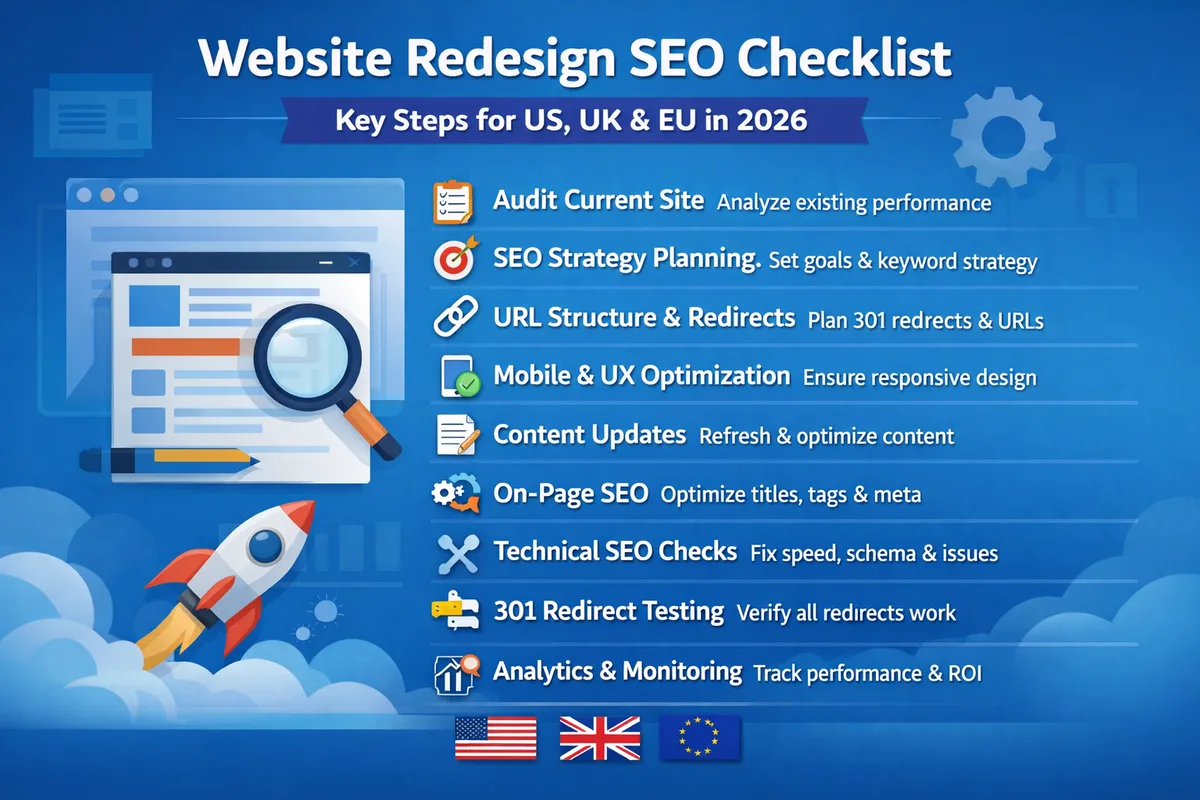
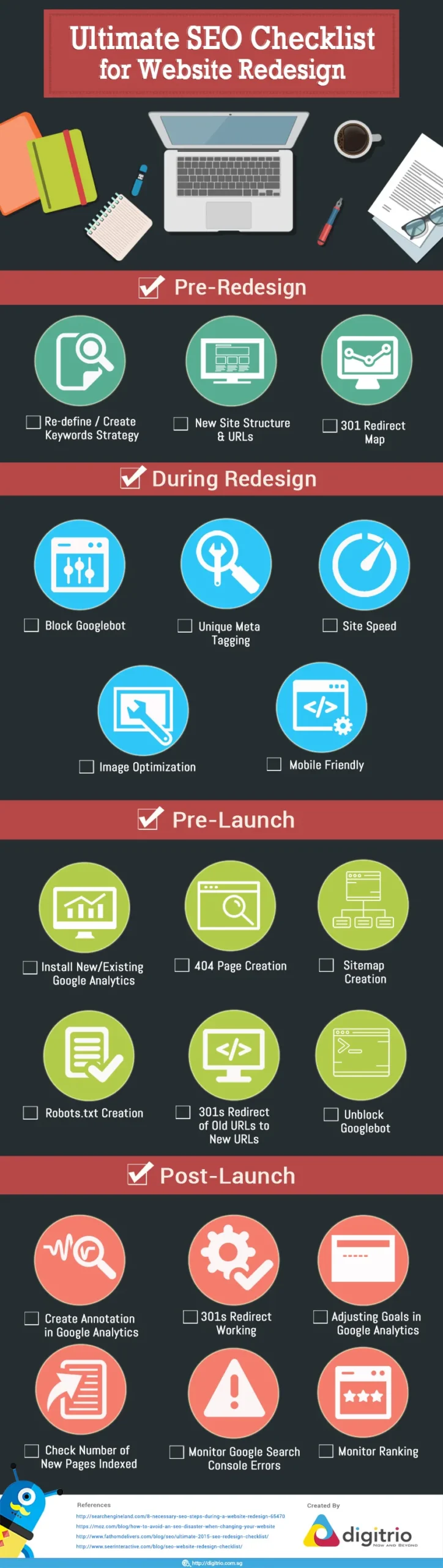
If you need a single-page reference to hand to your project lead, use this. It captures the highest-leverage items from every win above in a format that fits on one screen.
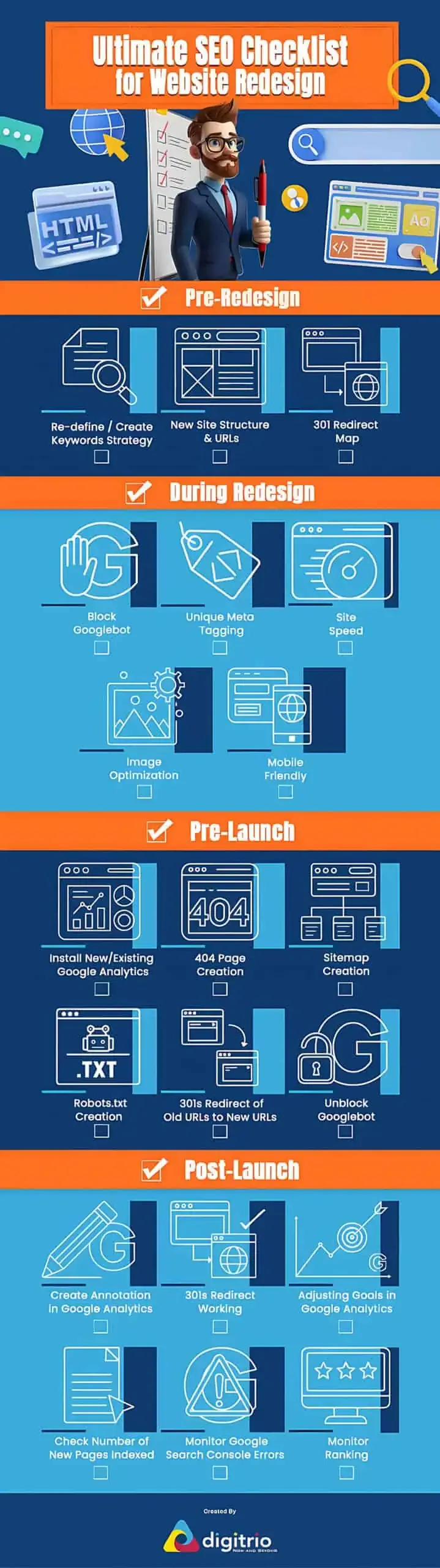
- Full URL map complete with every old URL mapped to a new URL or marked for 410 removal.
- 301 redirect matrix live at the server level, verified as single-hop, no chains.
- Robots meta tags confirmed as index/follow on all production pages.
- Canonical tags verified per template type, matching the primary intent of each page.
- Content consolidation decisions supported by Search Console query data, not team enthusiasm.
- Internal link graph rebuilt with at least 90% of prior inlink equity restored to top pages.
- Core Web Vitals passing on mobile: LCP under 2.5s, INP under 200ms, CLS under 0.1.
- Schema markup validated on every template type via Rich Results Test.
- 404 monitoring live with a documented recovery workflow and a named owner.
- XML sitemap and robots.txt verified as production-ready and submitted to Search Console.
- 90-day monitoring playbook documented with named owners for weekly traffic, ranking, and conversion reviews.
Cross-check every item against this website redesign SEO checklist before you sign off on launch. Miss any single line, and you invite the exact problems this guide is designed to prevent.
Putting It All Together: from Zero to a Rank-Preserving Relaunch
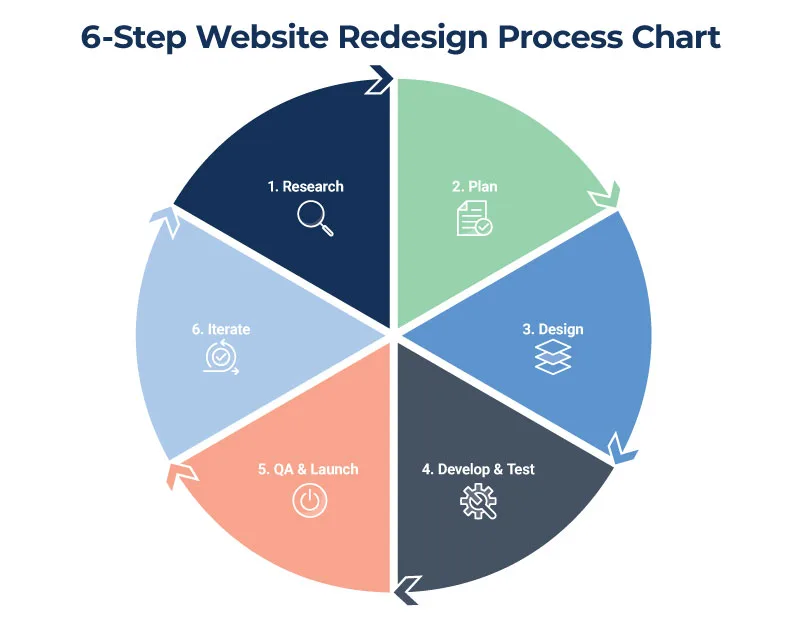
The pattern behind every successful redesign I have worked on is the same: SEO earns a seat at the planning table, not the inspection line. Teams that loop search strategy in during information architecture and template design consistently hold their rankings. Teams that wait until two weeks before launch consistently lose them.
Treat website redesign SEO as a workstream running parallel to design and development throughout the project. Assign an owner. Enforce the website redesign SEO checklist at every milestone review. Do not let “we’ll fix it after launch” enter the conversation, because those fixes almost always become “we never fixed it.”
For further reading on Google’s official guidance around site moves and redesigns, see the Google Search Central documentation on site moves — it aligns closely with the practices above and remains the most authoritative reference for website redesign SEO best practices.
These eleven wins cover the technical foundation, but the work continues.
Building out a strong content strategy on top of a preserved keyword footprint is the next lever, alongside technical SEO auditing as an ongoing discipline, CRO testing on top-ranking templates, and (if you sell online) an e-commerce SEO foundation that keeps your product and category pages competitive. The redesign is not the destination — it is the moment you finally have a site that can scale.
Start with Win 1 today. Export that crawl. Build that URL map. It is the single highest-return hour you will spend on the entire project, and it costs nothing but focus.