Site Operator Search: Why This One Command Changes How You Find Anything
Site operator search is the single most underused command in the average person’s search toolkit, and that’s a shame, because it solves a problem almost everyone runs into: finding a specific page on a specific website when the site’s own search box is useless.
Type site: followed by a domain and a term, and you’ve just told Google to ignore the entire internet except that one site.
The Site operator search’s the whole trick, and it’s genuinely powerful. But here’s the thing most tutorials skip: the operator itself is easy, while the judgment around it is not.
Knowing when to use it, how to combine it with other operators, and how to read the results without fooling yourself is where the real skill lives.
This site operator search guide breaks the command down into twelve proven methods, each one tested in real research scenarios, each one with a concrete example you can copy and run in about ten seconds.
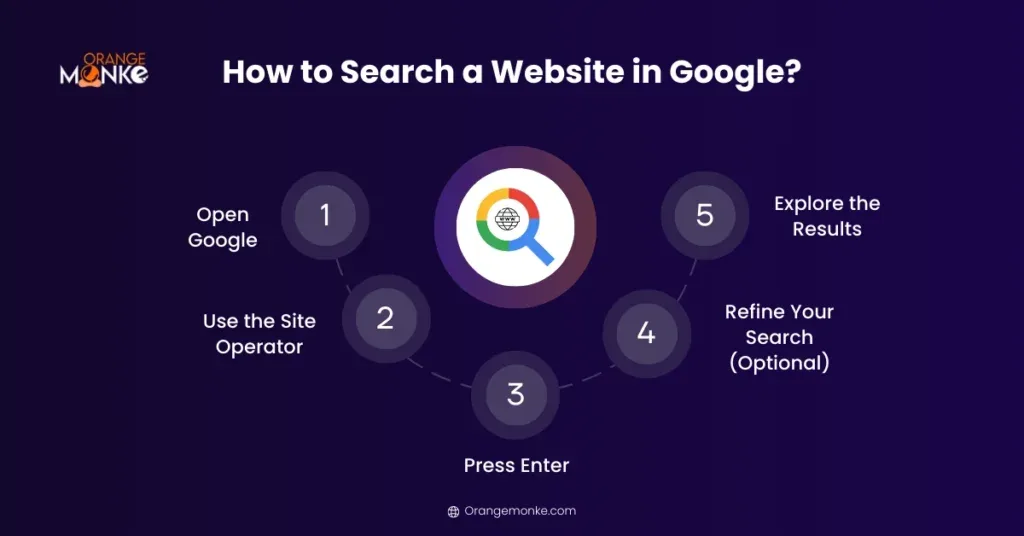
Whether you’re auditing a site, hunting a lost article, or checking what a competitor has quietly published, one of these twelve approaches will fit.
What Site Operator Search Actually Does (And What It Doesn’t)
Before the twelve methods, let’s get the mechanics straight, because a lot of confusion around the Site operator search operator comes from people expecting it to behave like a file browser. It doesn’t.

It’s a query modifier, and Google interprets it through its own index, which means the results reflect what Google has crawled and chosen to show, not what actually exists on the server.
In plain terms, site:example.com keyword restricts results to pages Google has indexed under that domain. If a page exists but isn’t indexed, it won’t appear. If a page is indexed but Google has decided it’s low quality, it may be filtered out of the visible results even though it technically matches. That distinction matters enormously when you’re using the operator for diagnostics rather than simple discovery.

The Syntax Basics You Need Cold
There’s no space between site: and the domain. That’s the number one mistake beginners make. site: example.com with a space can be read as a search for the word “site” plus the domain, which produces garbage results.
Subdomains work too. site:blog.example.com limits results to that subdomain specifically, while site:example.com typically includes subdomains in many cases. If you want to exclude a subdomain, you’ll need to get creative with combined operators, which we’ll cover later.

Paths are fair game as well. Focusing on site operator search provides clear direction here. site:example.com/blog narrows things to URLs under that path. This is where the operator starts becoming a surgical tool rather than a blunt filter.
Where the Operator Breaks Down
Google’s index is not a mirror of a website. Pages get dropped, canonicalized, or consolidated, and the operator reflects that editorial layer. So if you’re using site operator search to count pages, treat the number as an estimate, not an inventory.

Another limitation: the operator doesn’t reach into content behind logins, paywalls, or JavaScript that Google can’t render. For those, you need the site’s own search or a crawler. Knowing this upfront saves you from chasing phantom results.
12 Proven Site Operator Search Techniques That Actually Work
Here’s where the promise of the title gets delivered. Each of these twelve techniques is a distinct use case, and each one has earned its place through repeated real-world use. I’ve grouped them by intent so you can jump to the ones that match your situation.

Discovery Techniques: Finding What’s There
The first cluster is about exploration. You don’t know exactly what you’re looking for, but you know it lives somewhere on a site, and you need a map.
- Bare Domain Sweep. Type site:example.com with nothing else and Google returns a sample of indexed pages. It’s the fastest way to confirm a site is indexed at all, and to get a feel for its URL structure. Run it on a site you just launched and you’ll immediately see whether Google has picked up your pages or is still ignoring them.
- Keyword-Restricted Search. Add a term after the domain: site:example.com pricing. This is the workhorse technique, and it’s where site operator search tips usually start. It’s how you find a buried pricing page, a policy document, or a specific product mention without wading through navigation menus. I use this constantly when a client swears a page exists but can’t find the URL.
- Title-Targeted Search. Combine with intitle: to lock onto page titles: site:example.com intitle:”annual report”. Titles are strong signals, so this narrows results dramatically. Great for finding documents that follow a naming convention across years or departments.
- URL-Path Search. Use inurl: to target a path segment: site:example.com inurl:blog. This is how you isolate a blog from product pages, or a help center from marketing content. It’s especially useful on large sites where the top-level structure isn’t obvious from the homepage.
These four cover the majority of everyday discovery needs. The pattern is consistent: start broad, then layer one modifier at a time until the result set is small enough to scan.
Audit Techniques: Diagnosing What’s Wrong
Now we shift from “what’s there” to “what’s broken.” These four techniques are the backbone of a site operator search checklist for anyone doing technical SEO or content audits.
- Index Coverage Check. Compare site:example.com against the number of pages you believe exist. A large gap in either direction is a signal. Too few results means indexing problems; too many can mean duplicate content or parameter URLs bloating the index. I’ve caught staging environments leaking into production this way more than once.
- Duplicate Content Hunt. Search site:example.com “exact phrase from your page” to see how many URLs carry the same text. If three URLs surface for one article, you’ve got a canonicalization issue. This single technique has saved clients from silent ranking decay more times than I can count.
- Orphan Page Detection. Run site:example.com inurl:category or a similar path filter, then compare the results against your internal link map. Pages that appear in the index but have no internal links pointing to them are orphans, and they’re usually invisible to both users and crawlers in practice.
- Thin Content Spotting. Search site:example.com “coming soon” or site:example.com “under construction”. Placeholder pages that got indexed are a common and easily fixed problem. This is one of those site operator search best practices that sounds trivial until you find forty of them on a client site.
Audit work is where the operator earns its keep. The results aren’t glamorous, but they’re diagnostic, and diagnostics are what turn a vague “our SEO isn’t working” into a specific, fixable list.

Competitive and Research Techniques: Learning from Others
The final cluster is about leverage. Refining each detail of your site operator search strengthens this section. You’re using the operator to see what competitors and other publishers are doing, which is often more instructive than any tool dashboard.
- Competitor Content Inventory. Run site:competitor.com and scan the results for patterns. You’ll quickly see which topics they’re doubling down on, which formats they favor, and where the gaps are. It’s a free competitive analysis that takes two minutes.
- Backlink Prospect Vetting. Before pitching a link, check site:prospect.com guest post or site:prospect.com write for us. You’ll find their contributor guidelines and see whether they actually publish outside writers. This filters out dead-end outreach before you waste an email.
- Citation and Mention Tracking. Search site:example.com “your brand name” to find every page on a site that mentions you. Unlinked mentions are outreach opportunities, and this technique surfaces them without a paid monitoring tool.
- Freshness and Update Checks. Run site:example.com and look at the dates in the results, or combine with a date-restriction operator if your search interface supports it. This tells you whether a competitor is actively publishing or coasting on old content. It’s a quick read on momentum.
Twelve techniques, three intents, one operator. That’s the full arc of what site operator search can do when you stop treating it as a one-trick command.

How to Build a Repeatable Site Operator Search Workflow
Knowing twelve techniques is not the same as having a system. The difference between someone who occasionally remembers the operator and someone who uses it daily is a simple, repeatable sequence. Here’s the one I’ve settled into after years of doing this.
Start with the bare domain to confirm indexing and get a sense of structure. Then add your primary term. If the result set is still too large, layer in intitle: or inurl:. Stop as soon as the results are scannable. That’s the whole loop, and it scales from a five-page blog to a fifty-thousand-page enterprise site.

Documenting Your Queries
Keep a running log of the queries that produced useful results. Not because you’ll forget the syntax, but because the specific combinations that worked on a given site are reusable when you return to it months later.
A simple spreadsheet with columns for site, query, purpose, and outcome is enough. Over time this becomes a personal library of site operator search tips tailored to the sites you actually work with, which is far more valuable than any generic list.

Pairing the Operator With Other Tools
The operator is strongest when it feeds into something else. Use it to surface candidate URLs, then run those URLs through a crawler or an indexing tool for deeper analysis. Use it to find competitor pages, then check their backlink profiles.
Treat site operator search as the front door, not the whole house. It gets you to the right pages fast; the analysis happens elsewhere.

Common Site Operator Search Mistakes That Waste Your Time
Most frustration with this operator comes from a handful of avoidable errors. Let’s name them plainly so you can skip the learning curve.
The space-after-colon mistake is the most common, and the site operator search’s the easiest to fix. The second most common is expecting the result count to be accurate. It isn’t, and treating it as gospel leads to bad conclusions about indexing health.
Mistaking Results for Reality
If a page doesn’t show up in site operator search results, that does not mean it doesn’t exist. It means Google isn’t showing it for that query. The page could be indexed but filtered, or it could be indexed under a slightly different URL. Always verify with a direct URL check before concluding a page is missing.
I’ve watched people rebuild entire sections of a site because a page “disappeared” from the operator results, when in reality it was simply being consolidated under a canonical URL. That’s an expensive lesson learned from a misread signal.
Over-Nesting Operators
Stacking too many modifiers at once produces empty results and confusion. If you combine site:, intitle:, inurl:, and a quoted phrase in one query, you’ve built a filter so narrow that almost nothing can pass through.
Add one modifier at a time. Check the result count after each addition. If it drops to zero, back off one step and try a different combination. Patience here beats cleverness.
Site Operator Search for Technical SEO Audits: a Practical Checklist
For anyone running technical audits, this operator deserves a permanent spot in the process. Below is a condensed site operator search checklist you can run against any site in under fifteen minutes.
Each item maps to one of the twelve techniques above, so you’re not learning anything new here, just sequencing it for audit work.

| Check | Query Pattern | What It Reveals |
|---|---|---|
| Index baseline | site:domain.com | Rough indexed page count and URL patterns |
| Duplicate titles | site:domain.com intitle:”shared phrase” | Multiple URLs competing for the same title |
| Path isolation | site:domain.com inurl:blog | Blog content separated from product pages |
| Placeholder pages | site:domain.com “coming soon” | Unfinished pages that got indexed |
| Brand mentions | site:domain.com “brand name” | Internal pages referencing the brand inconsistently |
Run this table once a quarter on any site you manage. The findings will be small, specific, and fixable, which is exactly what a good audit should produce.
Frequently Asked Questions About Site Operator Search
Here is an in-depth breakdown of key considerations regarding Frequently Asked Questions About Site Operator Search:
Does Site Operator Search Work on Every Search Engine?
Google, Bing, and most major engines support the site operator search, though behavior varies. Bing tends to be more literal about the operator, while Google applies more filtering. If you’re getting unexpected results, try the same query on a different engine to compare.

Can I Use Site Operator Search to Find Pages on a Subdomain Only?
Yes. Specify the subdomain directly: site:blog.example.com. This is the cleanest way to isolate a subdomain, and it’s far more reliable than trying to exclude it from a broader query.
Why Do My Result Counts Change Between Queries?
Google’s estimates fluctuate based on how the query is interpreted, and the numbers are approximations rather than exact counts. Don’t build decisions on small differences between runs.
Is Site Operator Search Useful for Small Websites?
Absolutely. On a small site, the operator is fast enough to function as a manual index check. Run the bare domain query and you’ll see essentially everything Google knows about, which makes it a great sanity check after publishing.
Can I Combine Site Operator Search With Quoted Phrases?
Yes, and it’s one of the most precise combinations available. site:example.com “exact phrase” will surface only pages on that domain containing that phrase, which is ideal for verifying whether specific wording appears where you expect it.
Making Site Operator Search a Daily Habit
The twelve techniques in this guide aren’t meant to be memorized as a list. They’re meant to become reflexes. Start with the bare domain sweep, add a term, layer a modifier, and you’ll find that site operator search quietly replaces a dozen slower workflows.
What makes it stick is the feedback loop. Every time you find a buried page, catch a duplicate, or spot a competitor’s new content pillar, the operator proves its value again. That reinforcement is what turns a trick into a habit.
If you want to go deeper, the natural next topics are advanced search operators like filetype: and related:, plus how to pair operator queries with crawling tools for full-site analysis. This site operator search guide is the foundation; those are the extensions. Start with the twelve, run them on a site you know well, and the rest will follow naturally.
For verified reference and background research, consult the authoritative informational resource on this topic.