If you have ever stared at a photo and wondered where it came from, a picture search image tool is the fastest way to get answers. You snap or save a visual, drop it into a search box, and the engine hunts down matching shots across billions of indexed pages. Honestly, that single trick has saved me more time than any bookmark folder ever could.
Maybe you want to track down the original source of a meme, verify whether a product photo is stolen, or find a dress you saw on a stranger’s feed. Whatever the reason, reverse image lookup turns a dead-end photo into a doorway.
Let’s walk through how it works, which tools actually deliver, and the small habits that separate a clean result from a frustrating mess.
What a Picture Search Image Tool Actually Does
At its core, a picture search image engine reads the visual content of your file rather than the words around it. It breaks the photo into patterns, colors, shapes, and textures, then compares those fingerprints against its index. No captions required. No file name magic.

Traditional search starts with text. You type “red running shoes” and hope the algorithm guesses your intent. Reverse lookup flips that. You hand over the image itself, and the machine tells you what it sees and where else that visual appears.
Google’s own documentation explains that its reverse image tool relies on computer vision to identify objects, landmarks, and even text inside a photo, which is why it can recognize a monument from an odd angle.
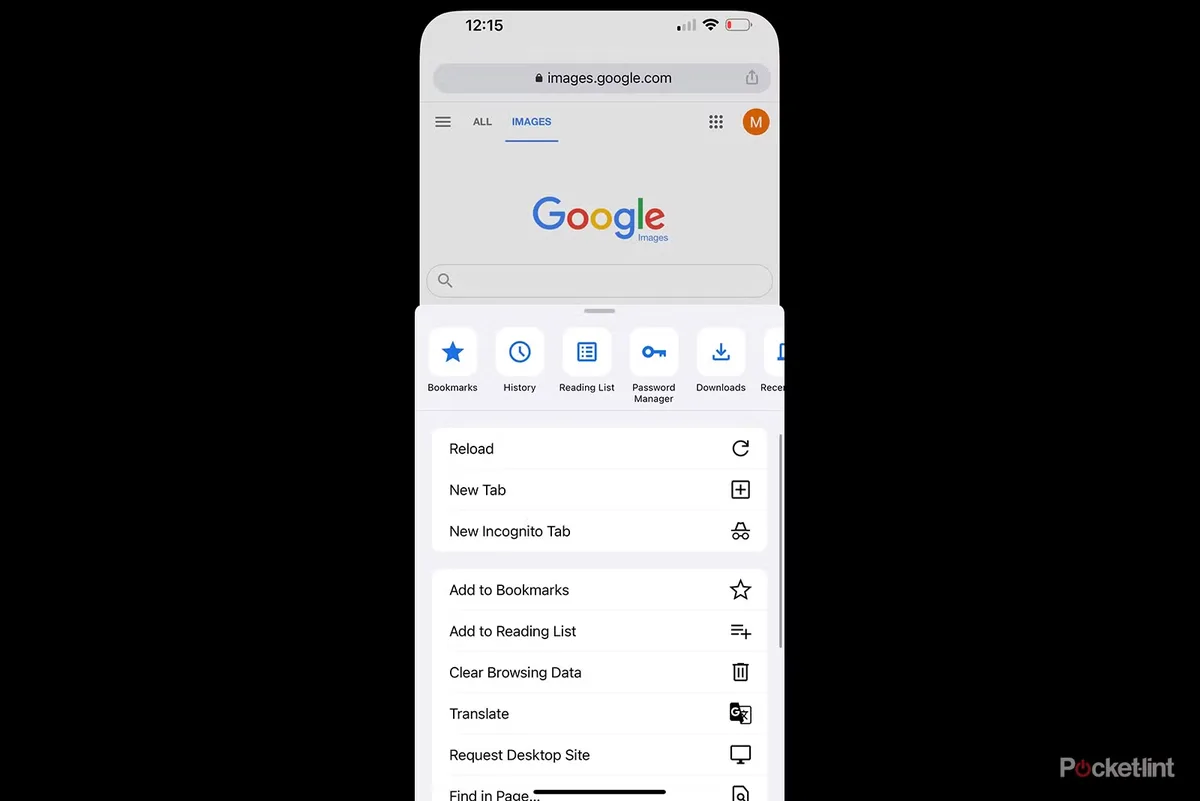
You can read more about the underlying approach on the reverse image search Wikipedia page, which traces the technique back to early academic experiments in content-based image retrieval.
How the Matching Engine Reads Your Photo
When you upload a file, the system generates a compact mathematical signature, often called a feature vector. Two photos of the same building from different angles produce similar signatures even when the pixels differ wildly.
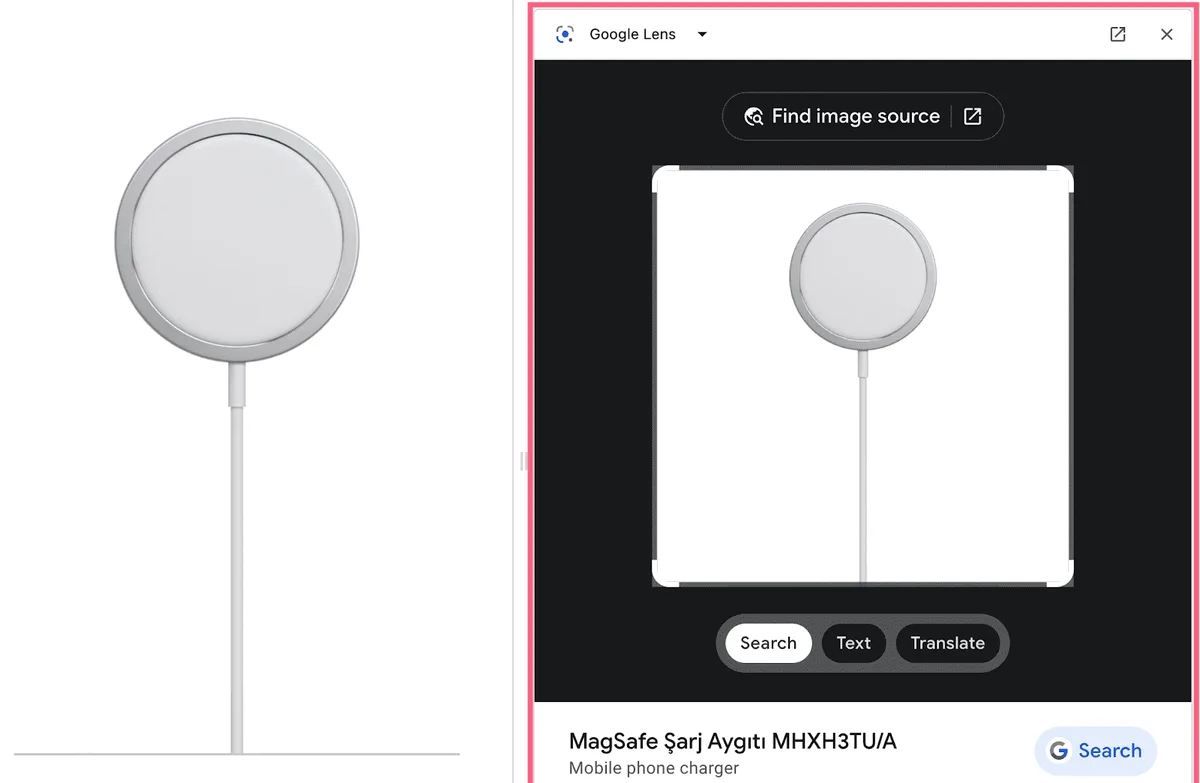
That is the quiet genius of a picture search image system. It is not comparing files byte by byte. It is comparing meaning. A cropped, resized, or slightly color-shifted copy still matches because the geometry survives the edit.
In practice, when refining a picture search image, the engine also weighs surrounding context. If the same image sits on a news site, a shopping page, and a forum thread, the results get ranked by relevance, authority, and freshness. That ranking layer is why two engines can return the same photo with completely different commentary.
Why People Reach for Reverse Lookup
Curiosity is the entry point for most users, but the serious use cases are practical. Photographers hunt for stolen work. Online shoppers hunt for cheaper listings. Journalists hunt for the original context of a viral image before they publish it.
Dating app users run a picture search image check to confirm a match is real. Small business owners scan competitor listings to see whether their own product shots were lifted. The list keeps growing because the tool answers a question text search simply cannot.

One caveat worth stating early: no engine is perfect. Results depend on how well-indexed the source is and how distinctive the photo happens to be. A generic stock photo of a coffee cup will return thousands of near-identical hits. A candid shot of your neighbor’s dog will return almost nothing useful.
Picture Search Image Options That Cost Nothing
You do not need a subscription to run a solid reverse lookup. Several free engines cover the vast majority of everyday needs, and each one has a personality. Some are great at faces, others at products, and a few excel at reading text baked into a photo.
My advice is to keep two or three bookmarked rather than committing to one. Different indexes surface different corners of the web, and cross-checking takes seconds. Below is a breakdown of the free tools I actually return to.
| Tool | Best For | Upload Method | Standout Strength |
|---|---|---|---|
| Google Lens | Objects, landmarks, text | Upload or URL | Largest index, strong OCR |
| Bing Visual Search | Shopping, products | Upload or camera | Retail matching |
| Yandex Images | Faces, locations | Upload or URL | Facial similarity |
| TinEye | Finding originals | Upload or URL | Oldest-match tracking |
| Pinterest Lens | Fashion, decor | Camera or upload | Style discovery |
Google Lens and Its Massive Index
Google Lens is the default starting line for most people, and for good reason. Refining each detail of your picture search image strengthens this section. Its index is enormous, so the odds of a hit are high even for obscure photos. Drop an image in, and you get visually similar results, exact matches, and often a “find the source” panel.
The text recognition is genuinely impressive. Point it at a sign in a foreign city and it translates on the spot. That feature alone makes it a picture search image tool worth keeping on your phone’s home screen.
One tip from experience: crop tight before uploading. If your photo has a busy background, the engine wastes effort on irrelevant pixels. Trim to the subject and watch your match quality jump.
Bing Visual Search for Shoppers
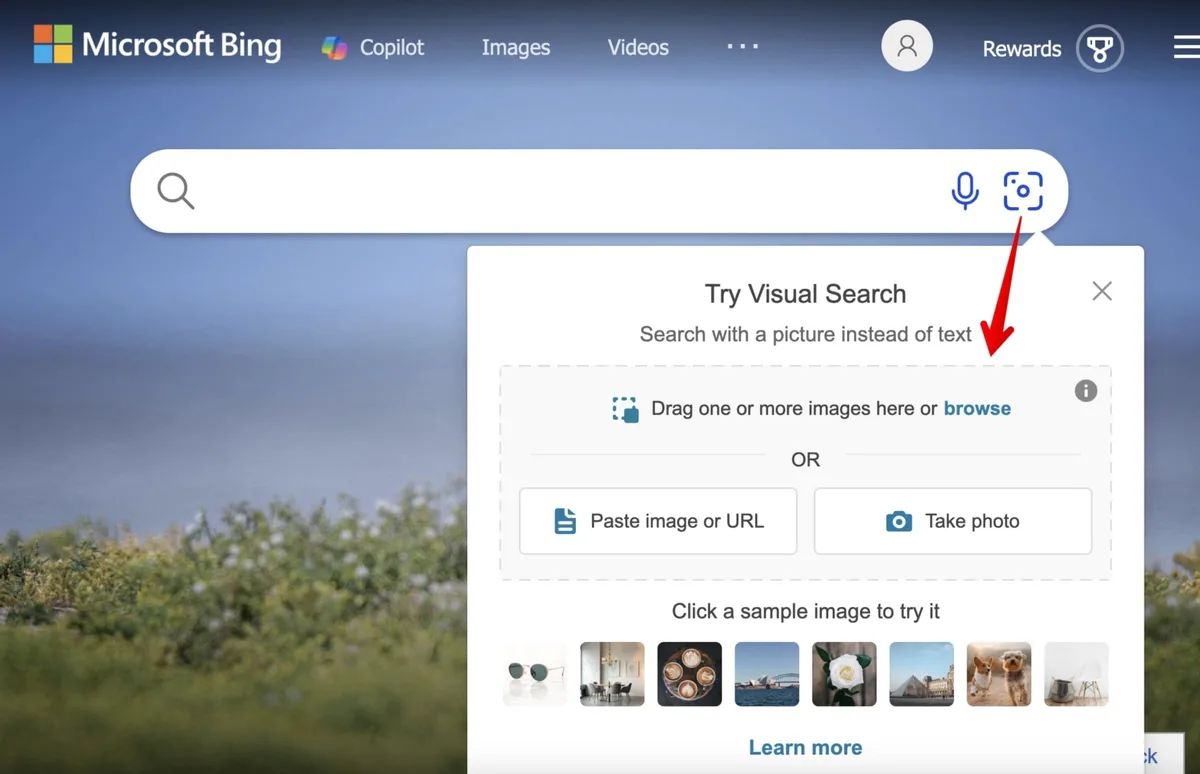
Bing leans hard into commerce, which makes it the better pick when you are trying to identify a product. Upload a photo of a lamp, and it tends to surface retail listings with prices and similar items side by side.
I have used it to track down furniture I saw in a hotel lobby. Google gave me mood boards. Bing gave me actual stores. For buyers, that difference matters.
The camera option works well on mobile too. If you are standing in a store and want to know whether an item is cheaper elsewhere, a quick picture search image scan settles it before you reach the register.
Yandex and the Face-Matching Edge
Yandex has a reputation among researchers for uncanny facial matching. It often finds social profiles and location shots that other engines miss, particularly for photos taken in Eastern Europe and parts of Asia.
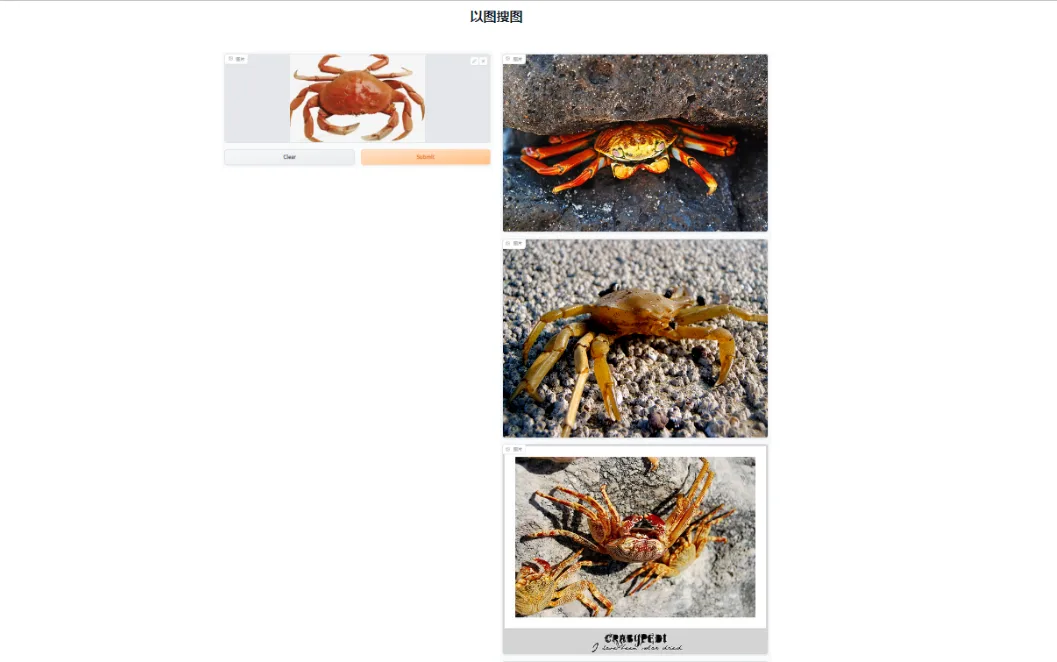
That power cuts both ways. Effective execution in your picture search image makes a tangible difference. If you are checking whether a stranger’s profile photo is real, Yandex is a strong ally. If you are protecting your own privacy, it is a reminder that public photos are more findable than most people assume.
Use it responsibly. Running a picture search image on someone’s face without a legitimate reason crosses an ethical line, and in some jurisdictions it brushes against privacy law.
TinEye and the Hunt for Originals
TinEye plays a different game. Instead of “what is this,” it answers “where did this first appear.” That makes it the go-to for photographers chasing copyright violations and for anyone trying to date an image.
Its results are sorted by the oldest match, which is gold when you need to prove a photo predates a claim. The index is smaller than Google’s, but the precision on exact copies is excellent.
For a blogger verifying whether a viral picture is recycled from an old news story, a TinEye pass is the first move. Pair it with a broader picture search image run on Google, and you get both origin and context.
Pinterest Lens for Style and Decor
Pinterest Lens is quietly one of the best tools for interior design and fashion. Snap a photo of a couch, and it returns pins with similar aesthetics, often with links to buy or DIY.
The results skew visual rather than literal. You might not find the exact sofa, but you will find ten that capture the same vibe. For mood boarding, that is arguably more useful.
It is also a fun way to reverse-engineer a look. Saw an outfit you loved? A quick picture search image through Lens turns admiration into a shopping list.
How to Run a Picture Search Image in Under a Minute
The mechanics vary slightly by platform, but the rhythm is the same everywhere. Maintaining clarity across your picture search image remains essential. Get the image onto your device, feed it to the engine, and read the results with a critical eye. Here is the flow I follow.

- Save or screenshot the image. If the photo lives on a webpage, right-click and copy the image address instead of downloading. That skips a step and preserves quality.
- Open your chosen engine. Head to Google Lens, Bing Visual Search, Yandex, or TinEye. On mobile, most of these live inside the main search app already.
- Upload or paste the URL. Drag the file into the search bar or paste the link. Wait a beat while the engine generates its signature.
- Scan the result categories. Most engines split results into exact matches, visually similar, and pages containing the image. Each answers a different question.
- Refine with crops. If results are noisy, crop to a single object and rerun. Precision beats volume every time.
- Cross-check on a second engine. A quick second pass catches what the first missed, especially for faces and products.
That whole loop takes less time than brewing coffee. The skill is in step five. Beginners upload the entire photo and accept whatever comes back. Experienced users isolate the subject and get surgical results.
Desktop versus Mobile Workflow
On desktop, drag-and-drop is the fastest path. Chrome also lets you right-click any image and choose “Search with Google Lens” without leaving the page, which is a beautiful shortcut when you are browsing.
On mobile, the camera becomes the star. You can point your phone at a physical object and run a picture search image on the spot. That is how people identify plants, translate menus, and price-check items in stores.
Both workflows share one rule: better input, better output. A blurry, low-light photo will frustrate any engine. Take two seconds to get a clean shot.

Reading Results Without Getting Fooled
Not every match is a true match. Engines often return “visually similar” images that share colors or composition but are entirely different subjects. Learn to separate exact copies from lookalikes.
Exact matches usually appear under a dedicated tab or label. A thoughtful approach to picture search image reinforces your qualifications. If the engine says “pages that include matching images,” you have found genuine reuse. Everything else is suggestion, not proof.

Pay attention to dates and domains too. A photo appearing on a reputable news site years before a viral post is a strong signal about the original context. That is where a picture search image becomes a fact-checking tool, not just a curiosity.
Advanced Tactics Most People Never Try
Once the basics feel automatic, you can push the tools harder. The difference between an average result and a breakthrough often comes down to how you prepare the image and how you interpret the output.

These tactics come from watching photographers, researchers, and online sellers work. They are not obvious, and they are not documented in most tutorials.
Cropping to Isolate the Subject
Background noise is the enemy of accuracy. If you are searching for a specific handbag in a crowded street photo, crop until only the bag remains. The engine then focuses its entire signature on the object you care about.

I have seen a picture search image go from useless to pinpoint just by trimming a distracting logo out of frame. It sounds trivial. It is not.
Try multiple crops if the first fails. Zoom into a distinctive detail like a pattern or a label, and the match rate climbs fast.

Combining Reverse Lookup With Text Search
Reverse lookup and text search are stronger together. Structuring your picture search image around proven patterns ensures impact. Find a match, note the brand or location it reveals, then run a normal keyword search to go deeper.
Say a picture search image identifies a jacket as a specific designer. Now search that brand plus “vintage” or “discontinued” to find resale listings. The two searches feed each other.
This hybrid approach is how professional shoppers find rare items. The image gets you the identity. The text search gets you the inventory.
Using Screenshots of Video Frames
You can reverse-search a moment from a video by pausing and screenshotting the frame. It works surprisingly well for identifying movies, locations, and even actors.
Quality matters here. Pause on a clear frame rather than a motion-blurred one, and crop out subtitles or UI overlays that confuse the engine.
I once identified an obscure documentary location this way after a text search failed for an hour. A single picture search image on a clean frame cracked it in seconds.

Searching by URL Instead of Upload
When the image already lives online, paste its URL rather than downloading and re-uploading. You avoid compression loss and save a step.
This is especially handy on forums and social platforms where downloading is awkward. Applying these principles to your picture search image yields measurable results. Right-click, copy the image address, and feed it straight to the engine.

Some engines handle URLs more gracefully than uploads for large files. If an upload keeps failing, the URL route often sails through.
Common Mistakes That Wreck Your Results
Most disappointing searches trace back to a handful of avoidable errors. Fix these and your hit rate improves immediately, no new tools required.

New users tend to blame the engine. In reality, the input or the interpretation is usually the problem.
Uploading Low-Resolution Files
Tiny, compressed images give the engine almost nothing to work with. If you only have a thumbnail, try to find a larger version before searching.
A clean, high-resolution file produces a sharper signature, which means more accurate matches. A blurry picture search image on a 50-pixel thumbnail is a coin flip at best.

When the only copy is small, crop to the most distinctive region and search that. Proper attention to your picture search image sets a strong baseline. Every extra pixel of real detail helps.
Expecting Exact Matches for Generic Photos
Stock photos, common objects, and popular memes return floods of near-identical results. That is not a failure. It reflects how widely those images are reused.
For unique subjects, expect sparse results. A picture search image of a personal snapshot may return nothing, simply because it was never published anywhere indexable.
Set realistic expectations. The tool finds what exists online, not what exists in the world.
Ignoring Privacy and Copyright Rules
Reverse searching a stranger’s face for personal reasons can violate privacy norms and, in some places, the law. Use these tools for legitimate purposes only.
On the flip side, if you find your own work reused without permission, a picture search image gives you the evidence trail you need to send a takedown notice.
Respect both directions. The same technology that protects creators can, misused, intrude on ordinary people.
Real-World Scenarios Where This Shines
Abstract advice only goes so far. Let me show you how a picture search image plays out in situations people actually face, because the value lands harder with concrete examples.
Tracking Down a Product You Saw in Person
You spot a chair in a café and want one for your apartment. Developing your picture search image with precision highlights key strengths. Snap a photo, run it through Bing Visual Search, and you often get retail listings within seconds.
If the exact model is discontinued, the results still point you toward similar designs. From there, a text search on the brand name finishes the job.
This is the single most common use I see among everyday users, and it works remarkably well for furniture, clothing, and electronics.
Verifying Whether an Online Seller is Legit
Marketplace scams often reuse stolen photos. Run a picture search image on the listing image, and if it appears on ten other sites under different sellers, you have your answer.
Legitimate sellers usually show unique photos, sometimes with their own watermark or background. Recycled stock imagery is a red flag worth heeding.
I have avoided at least two bad purchases this way. The few seconds of checking beat the headache of a refund dispute.
Finding the Source of a Viral Photo
Viral images get stripped of context fast. Clear alignment with your picture search image builds confidence from the start. A reverse lookup shows you where the photo first appeared, which often reveals the real story behind a misleading caption.
TinEye excels here because it sorts by oldest match. A picture search image on Google then fills in the surrounding articles and discussions.
For anyone who shares news online, this two-step check is basic hygiene. It takes a minute and prevents spreading misinformation.
Identifying Plants, Animals, and Landmarks
Out on a hike, you can point your phone at a flower and get a species name in seconds. The same goes for birds, insects, and distant buildings.
Google Lens is particularly strong at landmarks, often pulling up travel guides and historical notes alongside the identification. It turns a walk into a learning session.
A quick picture search image on an unfamiliar mushroom, though, is not a substitute for expert advice. Never eat anything based on an app’s guess.
Making Reverse Lookup Part of Your Routine
The tools are only as useful as your habits around them. A few small routines turn reverse lookup from an occasional trick into a reflex that saves you time and money.
Start by installing the search apps you rely on. Integrating picture search image into your workflow produces consistent quality. Having Lens or Bing one tap away removes the friction that stops people from checking.
Building a Personal Verification Habit
Before you buy from a new seller or share a shocking photo, run a quick check. Thirty seconds of verification prevents most of the regret people feel later.
Make it automatic. See an image, ask “where else does this live?” The answer is one picture search image away, and it is almost always worth knowing.
Over time this habit sharpens your instincts. You start spotting recycled photos and misleading captions before you even run the search.
Keeping a Shortlist of Engines
Different engines win on different tasks, so keep a mental shortlist. Google for general use, Bing for shopping, Yandex for faces, TinEye for origins, Pinterest for style.
When one fails, jump to the next rather than giving up. Cross-checking is the single biggest upgrade to your results, and it costs almost nothing.
A bookmark folder with these five links is the entire setup. From there, a picture search image becomes second nature.
What the Future Holds for Visual Search
Visual search keeps getting sharper. Targeted refinements to your picture search image streamline the entire review. Multimodal models now blend image understanding with language, so you can describe what you want to change and let the engine adjust.
Expect search bars that accept a photo plus a sentence, like “find this jacket but in green.” Some tools already lean that way, and the direction is clear.
For now, the free engines cover nearly everything a casual user needs. The gap between free and paid mostly shows up in bulk work, API access, and specialized indexes.
Why Accuracy Keeps Improving
Every upload trains the systems a little more, and better hardware makes larger models practical. The result is fewer false matches and stronger recognition of subtle details.
Text inside images is a fast-growing strength. Modern engines read signs, labels, and documents with surprising reliability, which opens up new uses for a picture search image.
Privacy debates will grow alongside the power. The same accuracy that helps you find a lost item can expose someone who would rather stay unfound.
Practical Takeaways for Everyday Users
You do not need to master every feature. Focusing on picture search image provides clear direction here. Learn one engine well, keep a second as backup, and crop before you search. That trio handles most real situations.
Treat results as leads, not verdicts. Verify before you act, especially with money or reputations on the line.
And stay curious. The moment a picture search image stops feeling like a novelty and starts feeling like a tool, you have gained a permanent advantage online.
Frequently Asked Questions
Here is an in-depth breakdown of key considerations regarding this section:
Is a Picture Search Image Tool Really Free?
Yes, the major engines like Google Lens, Bing Visual Search, Yandex, and TinEye all offer free reverse lookup. You can run a picture search image without paying anything, though some advanced or bulk features sit behind paid tiers.
For everyday use, the free versions are more than enough. The paid upgrades mostly matter for businesses running thousands of searches or needing API access.
Can I Search Using a Photo from My Camera Roll?
Absolutely. Every major engine accepts uploads from your device’s gallery. On mobile, you can also shoot a fresh photo and run a picture search image on it instantly.
The camera route is ideal for physical objects. The gallery route works best for images you already saved from the web.
Why Do I Sometimes Get No Useful Results?
Usually it means the image is either too generic or too unique. A common stock photo returns floods of lookalikes, while a private snapshot may return nothing because it was never published.
Try cropping to a distinctive detail and running a picture search image again. A tighter focus often surfaces matches that the full photo buried.
Can Reverse Image Search Find a Person?
It can surface public profiles where a photo appears, but it is not a dedicated facial recognition service. Results vary widely by engine and region.
Use this capability ethically. Searching someone’s face without a legitimate reason raises real privacy concerns, and some places regulate it directly.
Which Engine is Best Overall?
Google Lens wins for general use thanks to its huge index and strong text recognition. For shopping, Bing edges ahead. For origins, TinEye leads. For faces, Yandex surprises people.
My honest recommendation is to keep all four bookmarked. A quick picture search image across two engines beats a deep dive on one.
Does Cropping the Image Improve Accuracy?
Almost always. Cropping removes distracting background pixels so the engine focuses on your subject. It is the single easiest upgrade to your results.
If your first picture search image returns noise, crop tighter and rerun. Repeat until the subject dominates the frame.
Can I Search With a Screenshot of a Video?
Yes, and it works well. Pause on a clear frame, screenshot it, and run the image through your chosen engine. This is a favorite trick for identifying movies and locations.
Avoid motion-blurred frames and crop out subtitles. A clean still gives the engine far more to work with.
Is It Legal to Reverse Search Any Image?
Running the search itself is generally fine. How you use the results is where the rules kick in. Don’t use findings to harass, stalk, or infringe on someone’s rights.
If you discover your own work reused without permission, a picture search image gives you solid evidence for a takedown request or a licensing conversation.
How Do I Find the Original Source of a Photo?
TinEye is your best friend here because it sorts results by the oldest appearance. Pair it with a broader picture search image on Google to see how the photo spread.
Check the dates and domains carefully. The earliest reputable appearance is usually the closest thing to the original context.
Will Reverse Search Work on Memes?
It can, but results are messy. Memes get edited, captioned, and reshared endlessly, so you will see dozens of variants rather than one clean source.
Crop to the underlying photo, ignoring the text overlay, and run a picture search image on that. You will often find the original image beneath the joke.
There you have it: a complete playbook for turning any photo into a lead. Keep a couple of engines handy, crop before you search, and treat every result as a clue rather than a conclusion. Do that, and a picture search image becomes one of the most quietly powerful tools in your browser.