An interstitials Google penalty can wipe out months of ranking gains overnight, and the frustrating part is that most site owners never see it coming.
You push a full-screen popup to grow your email list, the traffic graph ticks up for a week, and then impressions quietly leak away like air from a slow puncture.
Google’s intrusive interstitial guideline has been around since, yet you’d be surprised how many publishers still treat it as a distant rumor rather than an operational risk.
Here’s the honest truth: this isn’t a “penalty” in the algorithmic sense most people picture. It’s a mobile search signal, and it’s applied unevenly, sometimes ruthlessly. This interstitials Google penalty guide breaks down exactly what triggers the signal, how to diagnose it, and the nine fixes that actually move the needle back in your favor.
I’ve audited sites where a single overlay cost them a third of their mobile clicks. I’ve also seen publishers overreact and gut their entire monetization stack chasing a myth. The difference between those two outcomes comes down to understanding the mechanics.
What the Interstitials Google Penalty Actually Means
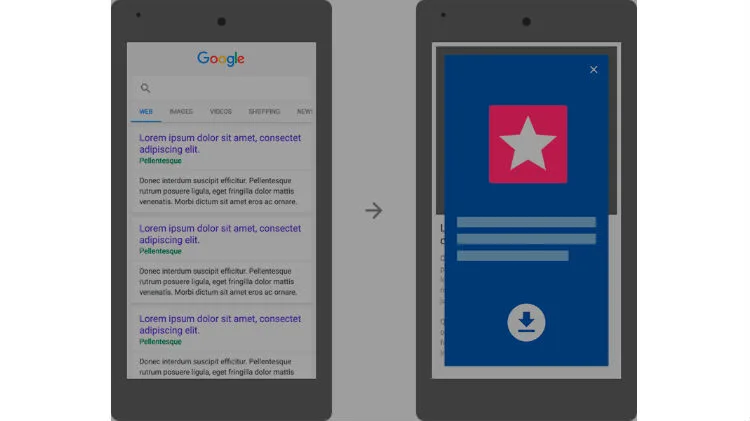
The interstitials Google penalty is a devaluation applied to mobile search results when a page blocks the user’s view of the main content with an intrusive overlay. Google announced the intent as “helping users easily access content on mobile,” and the mechanism is a ranking demotion rather than a manual action in Search Console.
That distinction matters enormously for how you troubleshoot. A manual penalty shows up as a notification. This signal does not — it simply recalibrates where your page appears for mobile queries while leaving desktop largely untouched.
If you’re staring at a ranking drop on mobile but desktop is holding steady, that asymmetry is your first clue.
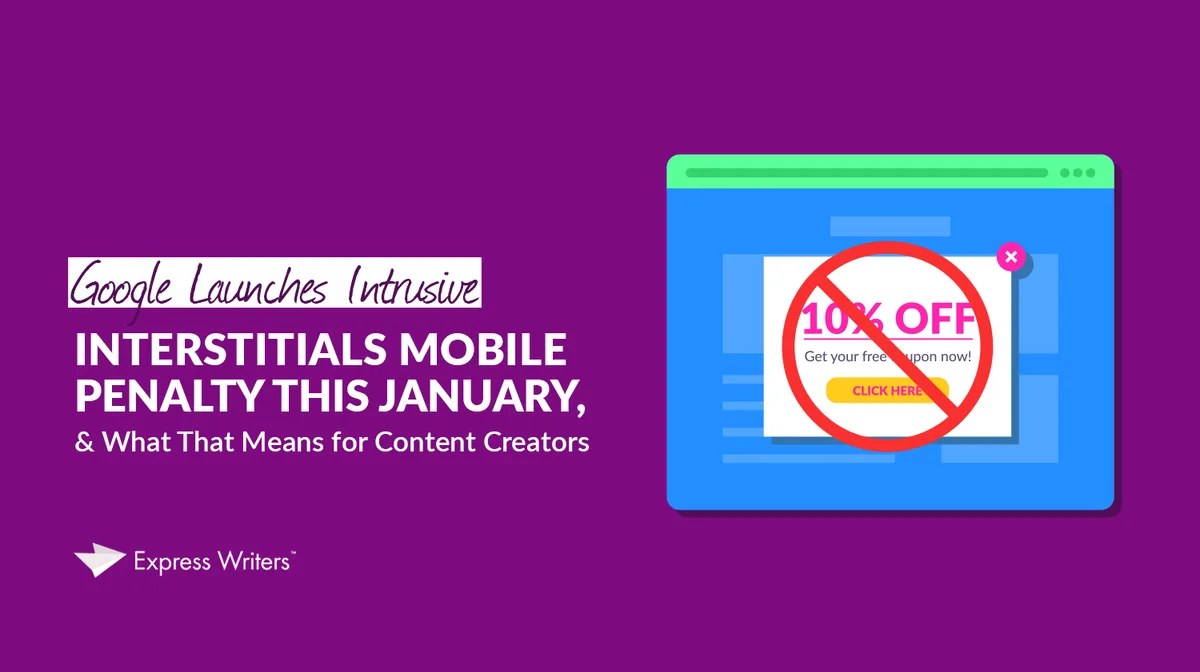
Google’s own documentation frames the issue around content accessibility. If a user lands on your page and cannot immediately see what they came for because something covers the viewport, the page is treated as less helpful than a competitor’s cleaner version.
Signals versus Manual Actions: Why the Difference Changes Your Diagnosis
Because this is a signal and not a manual action, there’s no “request review” button to press. You can’t appeal your way out. The only path back is to change the user experience so the signal simply stops applying.

In practical terms, that means you can fix it yourself within hours rather than weeks. No waiting in the manual review queue. No reconsideration request with a detailed apology letter.
The interstitials google penalty also means the demotion can hit on a per-page basis. A site-wide audit won’t always tell you which pages are being affected. You need to look at page-level mobile performance in Search Console and correlate the dips with template changes, new popup campaigns, or third-party scripts that loaded around the same time.

How to Know You’re Affected: a Diagnostic Walkthrough
Before you start disabling things, confirm the diagnosis. Too many site owners rip out legitimate monetization because they misread a seasonal traffic dip as an interstitials Google penalty.
Start with the Mobile Usability report inside Search Console. Focusing on interstitials google penalty provides clear direction here. Google has retired some of the older furniture there, but page experience signals still surface intrusive overlay calls. Cross-reference those flags against your ranking timeline in the Performance tab, filtered to mobile.
Then run the manual test. Open the affected URLs on an actual phone — not a responsive preview in your desktop browser. Emulate the slowest connection your audience realistically uses. If your overlay appears before the content paints, you have a problem regardless of what any dashboard says.

I’ve run this diagnostic on dozens of sites. The pattern I see most often is a popup that fires on a scroll trigger set too aggressively, or an exit-intent script that misfires on mobile tap-and-scroll gestures.
Building an Interstitials Google Penalty Checklist for Your Site
A working interstitials Google penalty checklist saves you from re-diagnosing the same problem every quarter. Build one that fits your actual stack rather than copying a generic template off the internet.
- Inventory every overlay and modal. Tag them by type, trigger, and the pages they load on. Include third-party widgets, cookie banners, newsletter prompts, and app-install banners.
- Test each one on a throttled mobile connection. Record whether content is visible above or below the overlay, and how many seconds the overlay blocks the view.
- Log the ranking position of each affected page before and after any campaign change, filtered to mobile.
- Document exemption status. Legal interstitial, login prompt, age gate — note whether the overlay qualifies for exemption and why.
- Set a review cadence. Quarterly works for most sites; monthly for publishers running aggressive list-building.
That list becomes your interstitials Google penalty best practices baseline. Each quarter you re-run it, and the drift shows up before the rankings do.
The 9 Easy Fixes That Work
The interstitials Google penalty tips below are ordered roughly by impact. Start at the top if you’re bleeding mobile traffic, and work down. Most sites see measurable recovery within two to four crawl cycles once the worst offenders are resolved.
Fix 1: Kill the Full-Screen Cover on First Load
The single most common trigger is a full-screen overlay that fires within the first few seconds of page load. If the user can’t see your headline, your intro, or your navigation before being asked for an email address, you’ve handed Google a reason to demote the page.
Replace it with a slide-in or a bottom-anchored banner that occupies no more than a small percentage of the viewport. The conversion lift from a full-screen wall is real, but the ranking cost outweighs it for most publishers once they do the math on mobile traffic.
Sit with that decision honestly. If your email capture depends on blocking the whole screen, you have a business model problem, not a CRO problem.
Fix 2: Add a Dismiss Button That Actually Works
Every overlay needs a clearly visible close control. Not a tiny “x” tucked in a corner, not a link disguised as body text, and definitely not a close button that only appears after a countdown.
The interstitials Google penalty enforcement dynamic is about user friction. A user who can’t easily escape an overlay is a user who bounces back to the SERP — and that bounce behavior feeds directly into the signal.
Test your close button on a real device with thumbs. If a normal adult can’t hit it without zooming, it’s too small. The recommended minimum touch target sits around 48 by 48 CSS pixels.
Fix 3: Qualify Proper Legitimate Exemptions
Not every overlay triggers the signal. Refining each detail of your interstitials google penalty strengthens this section. Legal obligations get a pass. Cookie consent banners, age verification gates, and login prompts for gated content are all exempt because Google understands they’re necessary.
That exemption is narrower than most site owners assume. A cookie banner is exempt; a newsletter overlay that looks like a cookie banner is not. A privacy notice that accidentally masks the page is not excused just because it’s a privacy notice.
This is where a lot of interstitials Google penalty best practices get muddled. The exemption applies to the legal requirement, not to your implementation. If your consent tool covers the whole screen and sits on a delay, you’ve created an intrusive overlay even though the underlying purpose is legitimate.
Fix 4: Move Popups to Contextual Triggers
Instead of firing an overlay on page load, trigger it based on user behavior. Scroll depth past 50 percent. Time on page beyond 30 seconds. Exit intent on desktop, tap-and-scroll reversal on mobile.
A contextual trigger means the user has already seen your content before being interrupted. That’s the entire point of the guideline. Content first, ask second.
I’ve seen conversion rates hold steady or even improve after switching from load-triggered to scroll-triggered overlaays. The list is slightly smaller per session, but the subscribers are warmer because they actually read something first.
Fix 5: Audit Third-Party Scripts for Hidden Overlays
You might not have installed the offending overlay at all. Review widgets, chat bubbles, app-install prompts from platforms, and some push-notification opt-ins can all render as intrusive modals on mobile.
Run a fresh browser session with no cache, load a sample of pages on a slow connection, and watch what paints. Screenshot everything that covers content. Then trace each one back to the source.
This is the diagnostic step most site owners skip, and it’s the reason the interstitials Google penalty lingers after a supposed fix. You disabled your newsletter popup, but the review widget still hijacks the viewport on every product page.
Fix 6: Shrink Viewport Occupation With Responsive Sizing
An overlay the interstitials google penalty occupies 100 percent of a 375-pixel-wide screen is clearly intrusive. The same overlay at 40 percent of the screen’s height reads as a polite nudge. Responsive sizing fixes a lot of problems without touching the underlying campaign.
Set a maximum height in viewport units and test across the smallest and largest realistic phone widths. Effective execution in your interstitials google penalty makes a tangible difference. On a 360-pixel screen, a modal designed for a desktop breakpoint will occupy most of the fold regardless of intent.
Pay attention to keyboard interaction too. When an input field is focused, the on-screen keyboard eats additional vertical space. If the overlay plus the keyboard covers the content, you’ve got an accessibility problem that doubles as an interstitials Google penalty risk.
Fix 7: Reward the Tap Instead of Blocking It
Some of the worst offenders are confirm-shame or reverse-DDoS patterns — overlays that make the dismiss action confusing or that guilt the user into staying. These are the ones Google’s guidance is specifically designed to punish.
If your overlay makes the “no thanks” link twice the size of the “close” action, or if the dismiss requires two separate taps, you’ve built a dark pattern. Rewrite the copy so a clear escape exists, and make both the affirmative and negative actions equally available.

Conversion flow matters too. If tapping close opens a second interstitial, that’s a stack violation. Google’s guidance is clear that chained interstitials extend the same intrusion the original overlay created.
Fix 8: Reserve Space to Prevent Layout Shift
A related signal — Cumulative Layout Shift — often travels with the interstitials Google penalty on the same pages. Overlays that load late cause the page to reflow, and that jitter shows up in Core Web Vitals as a poor CLS score.

The fix is to reserve the space in your layout declarations before the overlay mounts. Give the container explicit dimensions, then let the overlay fade in without triggering a reflow.
Run a field-data check in Search Console to confirm the improvement. Lab data from local testing alone won’t show the real-world crawl pattern Google uses to evaluate these pages.
Fix 9: the Interstitials Google Penalty Best Practices for Ongoing Monitoring
The last fix is cultural rather than technical. Set up recurring monitoring so the next offending overlay doesn’t sneak in through a new marketing campaign, an app-install widget update, or a theme deployment.
Automate a weekly screenshot of your top ten mobile landing pages and diff them. Any change in the overlay footprint gets flagged. This is the single highest-value job on the interstitials Google penalty best practices list, because it catches drift before it becomes a ranking problem.

Also add overlay changes to your deployment checklist. An overlay is a UX change as much as a marketing asset, and it deserves the same review gate as a navigation redesign.
How the Signal Compares to Adjacent Search Quality Issues
The interstitials Google penalty sits alongside a family of related signals that all target the same underlying frustration: users landing on a page and being blocked from the content they were promised. Understanding the neighbors helps you prioritize.
The interstitials google penalty’s distinct from the older mobile usability failures, which focused on tap targets and font sizes. It overlaps meaningfully with Core Web Vitals, especially CLS and interaction latency, because heavy overlays tend to drag both down.
It’s also adjacent to the site reputation abuse policies, though those target spam economics rather than layout intrusion. A publisher hit by both problems will see compounding losses, and the fixes need to be sequenced — user experience first, then content quality.
A Realistic Timeline for Recovery
Fix execution is usually a matter of days. Recovery is slower and less predictable. The interstitials Google penalty decreases once the crawler re-evaluates the page and the mobile click-through data stabilizes.
In practice, most site owners see meaningful movement in four to eight weeks. Aggressive deployment of the fixes above plus a definitive removal of the worst offenders compresses that timeline. Leaving even one full-screen overlay live on your highest-traffic templates drags out the whole recovery.
Watch mobile impressions in Search Console week over week rather than day over day. The signal moves in bursts as the crawler revisits pages, and daily fluctuations will drive you mad if you stare too hard.
| Fix Category | Typical Fix Time | Expected Signal Recovery | Effort Level |
|---|---|---|---|
| Removing full-screen load overlays | Hours | High impact, fast | Low |
| Dismiss button and accessibility pass | 1 day | High impact | Low |
| Third-party script audit | 2-3 days | High impact, diagnostic | Medium |
| Responsive sizing rebuild | 2-5 days | Moderate impact | Medium |
| Contextual trigger rework | 3-7 days | Moderate-high impact | Medium |
| CLS and layout reservation | 1-3 days | Moderate impact, adjacent | Medium |
| Monitoring culture and automation | Ongoing | Prevents recurrence | Low |
Common Myths About the Interstitials Google Penalty
The signal gets misread constantly, and those misreadings lead to overcorrections that hurt legitimate monetization. Time to clear the air on the biggest misconceptions.
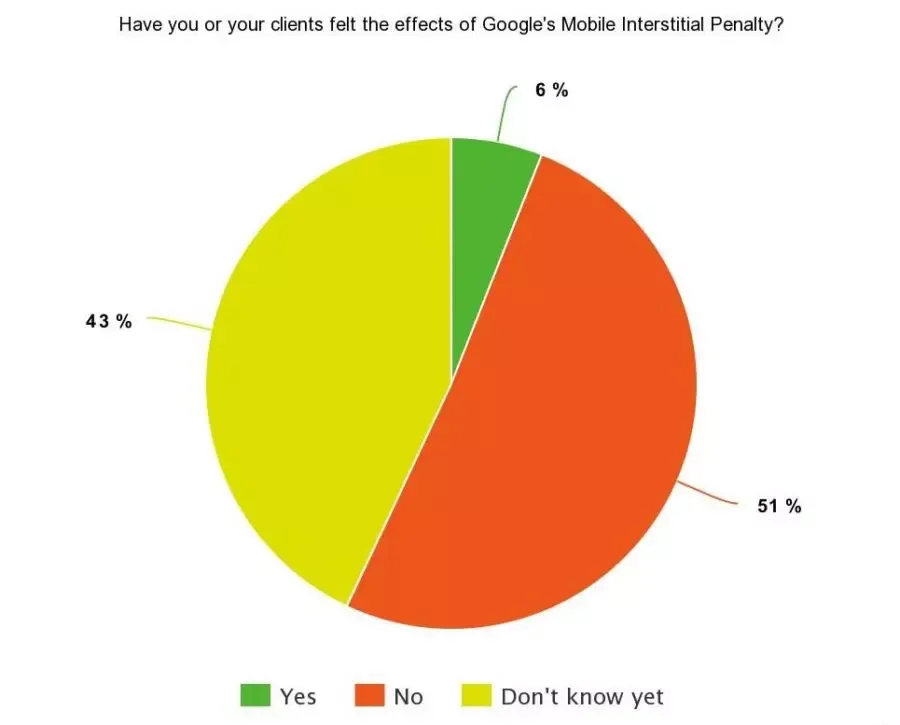
Myth: All Popups are Penalized
No. Inline banners, slide-ins, bottom anchors, and modest modals that leave the content visible are generally fine. The enforcement focus is on overlays that block the main content immediately after landing.
If you’re killing legitimate inline email captures to chase a phantom penalty, you’re leaving conversion revenue on the table. Check whether your overlay actually blocks the content before you pull it.
Myth: Desktop is Affected Equally
The interstitials Google penalty is explicitly a mobile-first signal. Desktop interstitials, while they can still hurt UX and engagement metrics, don’t trigger the same demotion.
The interstitials google penalty means your mobile audit is a different animal from your desktop audit. A responsive overlay that looks tasteful on a 1440-pixel monitor can occupy most of a phone screen. Test both, fix mobile first.

Myth: It’s a Manual Action You Can Appeal
The interstitials google penalty is the most common source of wasted weeks. You cannot file a reconsideration request against a signal. There’s no notification, no review queue, and no appeal route. The only path back is fixing the UX.
If a consultant tries to sell you an appeal service for an interstitials Google penalty, walk away. The math doesn’t work because the mechanism doesn’t exist.
Interstitials Google Penalty Tips for Publishers and Ecommerce Teams
If you’re running a content site or an online store, the same guidelines apply but the failure modes differ slightly. Publishers lean harder on subscription walls, while ecommerce teams deal with app-install prompts and review widgets.
For publishers, the interstitials Google penalty tips that matter most revolve around paywall and subscription mechanism design. A tasteful meter wall that leaves content visible above the fold is generally exempt; a hard wall that fires immediately is not.
For ecommerce, inventory the app-install prompts that ship with platform SDKs. These often load without any explicit deployment you ran, and they’re a frequent culprit when the signal persists after a supposed fix.
Does the Interstitials Google Penalty Apply to Desktop Users?
No, the enforcement focus is mobile search results. Desktop users see no ranking change from the same overlays — though the UX and engagement consequences remain real.
Practically, this means you can prioritize your mobile templates without touching desktop. If your development budget is limited, put all the effort into the mobile breakpoint first.
That said, don’t treat desktop as a free pass. Aggressive desktop overlays still drag down time-on-page and conversion quality, and Google’s broader page experience signals don’t ignore desktop entirely.

How Fast Does the Interstitials Google Penalty Lift After a Fix?
Expect four to eight weeks for meaningful ranking recovery, faster if the offending overlay was the primary trigger on high-traffic templates. The interstitials Google penalty decreases when the crawler revisits and confirms the cleaner experience.
You can accelerate the process by requesting re-crawl of the affected URLs in Search Console’s URL Inspection tool. This nudges the crawler and often shortens the feedback loop by a week or two.
Track mobile impressions and mobile clicks separately. A single blended metric can hide the recovery — the interstitials Google penalty lifts on mobile first while desktop numbers never moved.
Interstitials Google Penalty Checklist: the One-Page Summary
Bookmark this. It’s the condensed version of everything above, formatted as an interstitials Google penalty checklist you can hand to a developer or content lead.
- Confirm the diagnosis in Search Console Mobile Usability and the Performance tab filtered to mobile
- Test every overlay on a real phone with a throttled connection
- Remove full-screen load-triggered overlays first
- Verify every overlay has a clearly visible, adequately sized dismiss control
- Audit third-party scripts for hidden widgets that fire overlays
- Move legitimate popups to contextual triggers like scroll depth and time on page
- Resize overlays to occupy a modest fraction of the viewport
- Fix Cumulative Layout Shift on the same templates
- Add overlay reviews to the deployment checklist
- Set a recurring screenshot diff for the top ten mobile landing pages
Run this checklist once a quarter and you’ll catch the drift before it turns into a ranking event. The interstitials Google penalty doesn’t arrive suddenly — it accumulates as templates shift and campaigns evolve.
When to Bring in an Expert
Most sites can execute the nine fixes above with their existing team. Maintaining clarity across your interstitials google penalty remains essential. The exceptions are high-traffic publishers with complex ad stacks and ecommerce platforms with third-party scripts stuffed into every template.
In those cases, a focused technical audit pays for itself quickly. The expert doesn’t need to be a specialist in the interstitials Google penalty specifically — they need to be able to trace a rendered overlay back to its source and confirm which scripts are firing it.
Insist on transparent, competitive direct manufacturer pricing if you’re evaluating plugin or overlay management tools as part of the fix. Many site owners overpay for overlay management platforms when a custom lightweight script would serve them better.
Building a Sustainable Approach to Overlays
The long game here is treating overlays as one component in a broader content experience, not a free lever to pull whenever the list-growth target is behind. Sites that internalize this rarely have interstitials Google penalty problems at all.
Consider the parent topic this sits inside: page experience and mobile search quality. The interstitials Google penalty is one expression of that broader philosophy, and fixing it properly involves thinking about performance, layout stability, and content accessibility as a single system.
Three adjacent subtopics worth studying next: Cumulative Layout Shift and its fixes, mobile tap target best practices, and the distinction between manual actions and algorithmic signals in Search Console. Each one deepens your understanding of where the overlay issue sits in the bigger picture.
Get the fundamentals right and the interstitials Google penalty stops being a fire to fight and becomes a design constraint you simply build around. That’s a much calmer way to run a website.
For verified reference and background research, consult the authoritative informational resource on this topic.