Headless CMS SEO: 11 Powerful Tactics to Boost Traffic Fast
Headless CMS SEO is the discipline of making a decoupled content architecture rank as well as it reads — and honestly, most teams get the content part right while the technical side quietly bleeds traffic.
This headless CMS SEO guide walks you through eleven concrete tactics that close that gap, from rendering strategy to redirect mapping, so your editorial freedom stops costing you organic visibility.
I have spent years watching beautiful React front ends outrank nobody, and the headless CMS SEO almost always comes down to the same handful of omissions. Fix those, and a headless stack can outperform a monolithic one on speed, structure, and crawlability.
Why Headless CMS SEO Breaks Where Monolithic Stacks Do Not
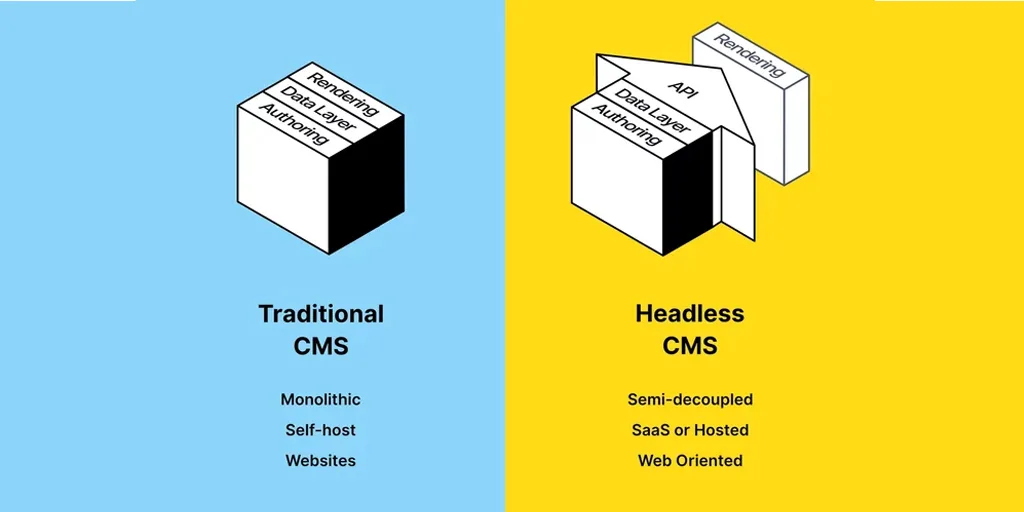
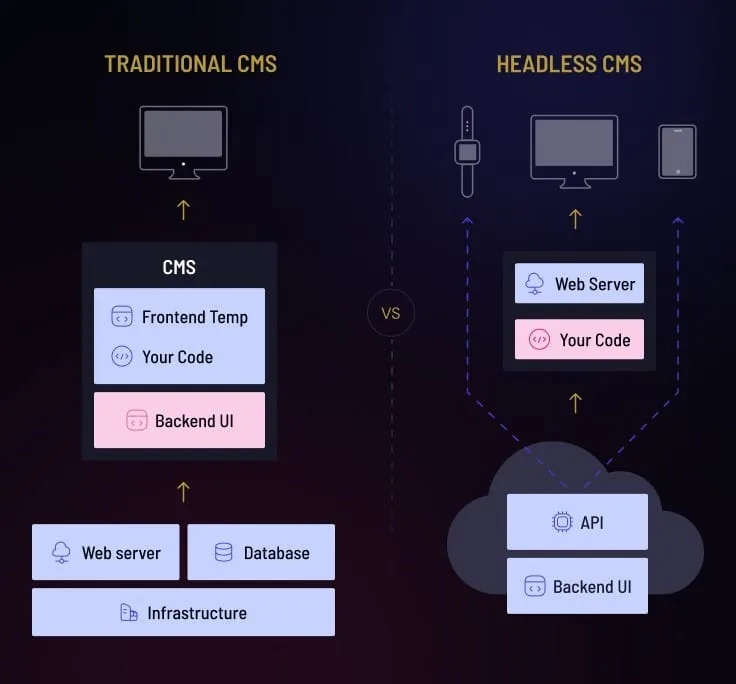
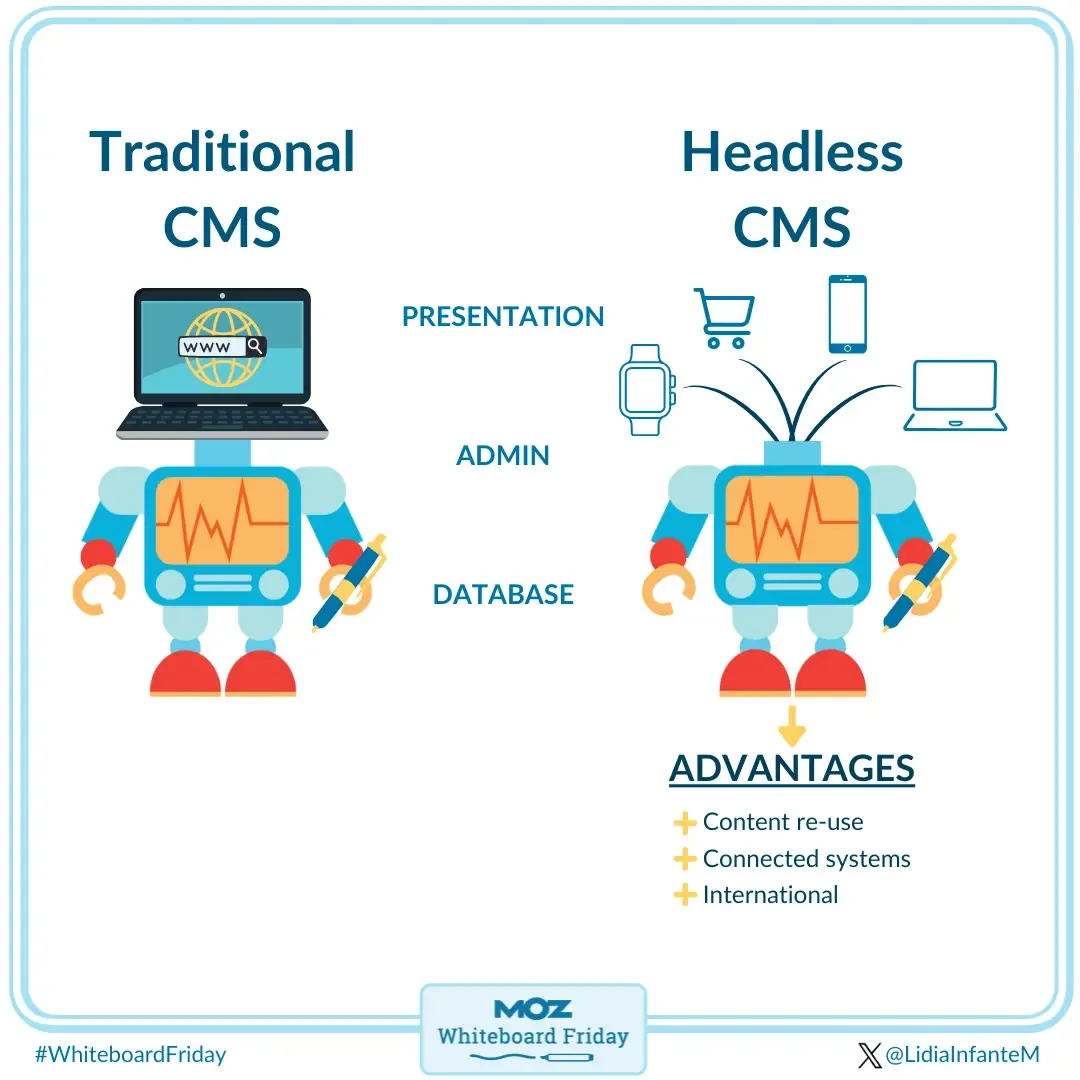
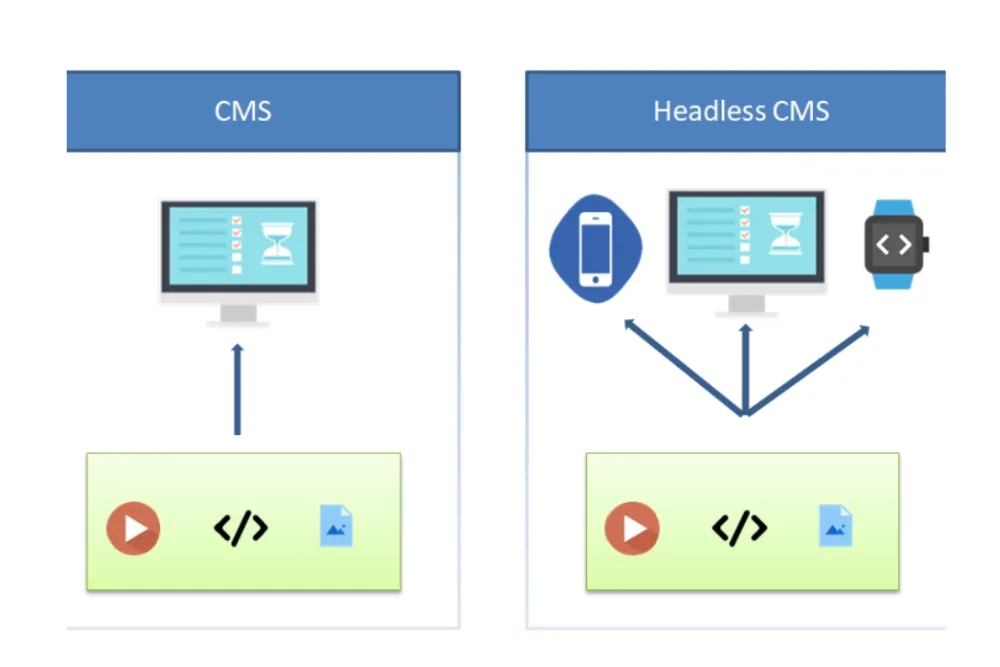
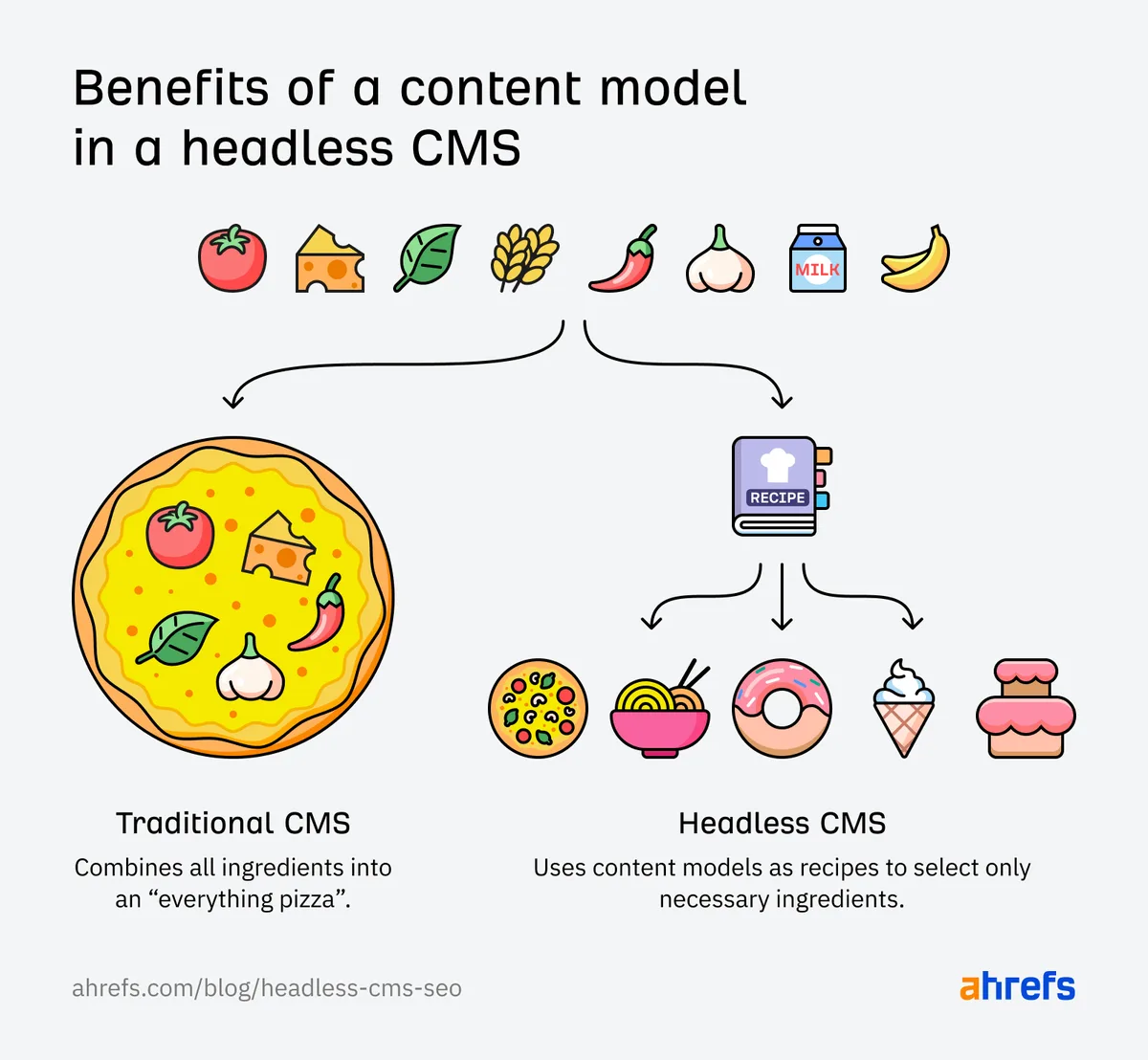
A traditional CMS like WordPress hands the headless cms seo HTML on a platter. The server assembles the page, ships it to the crawler, and everyone moves on.
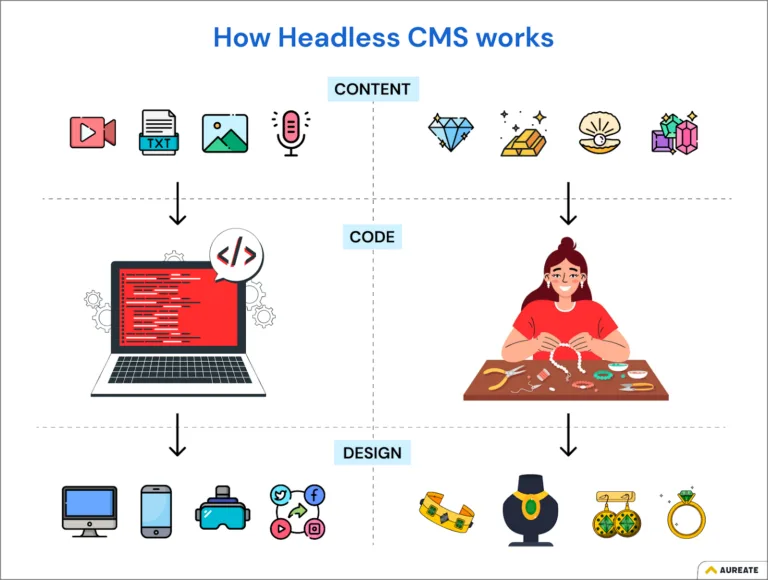
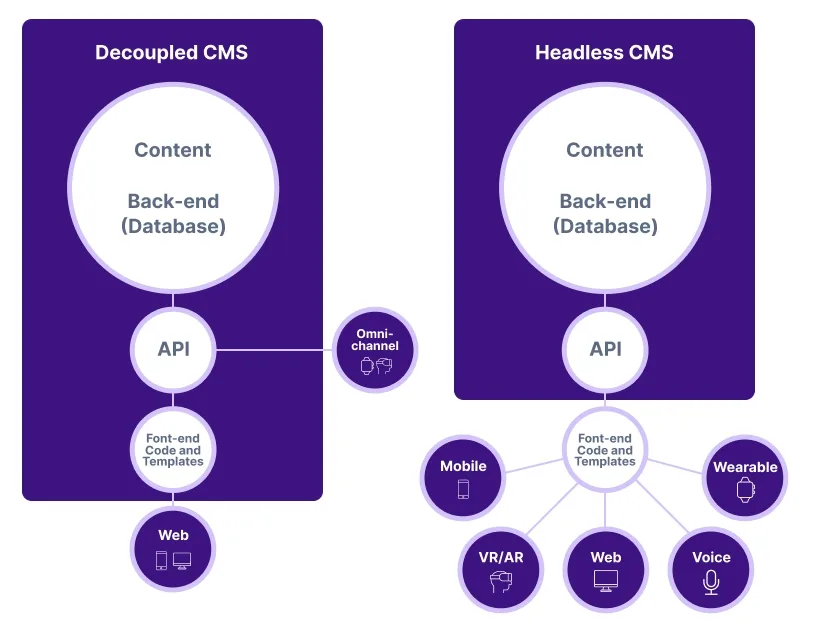
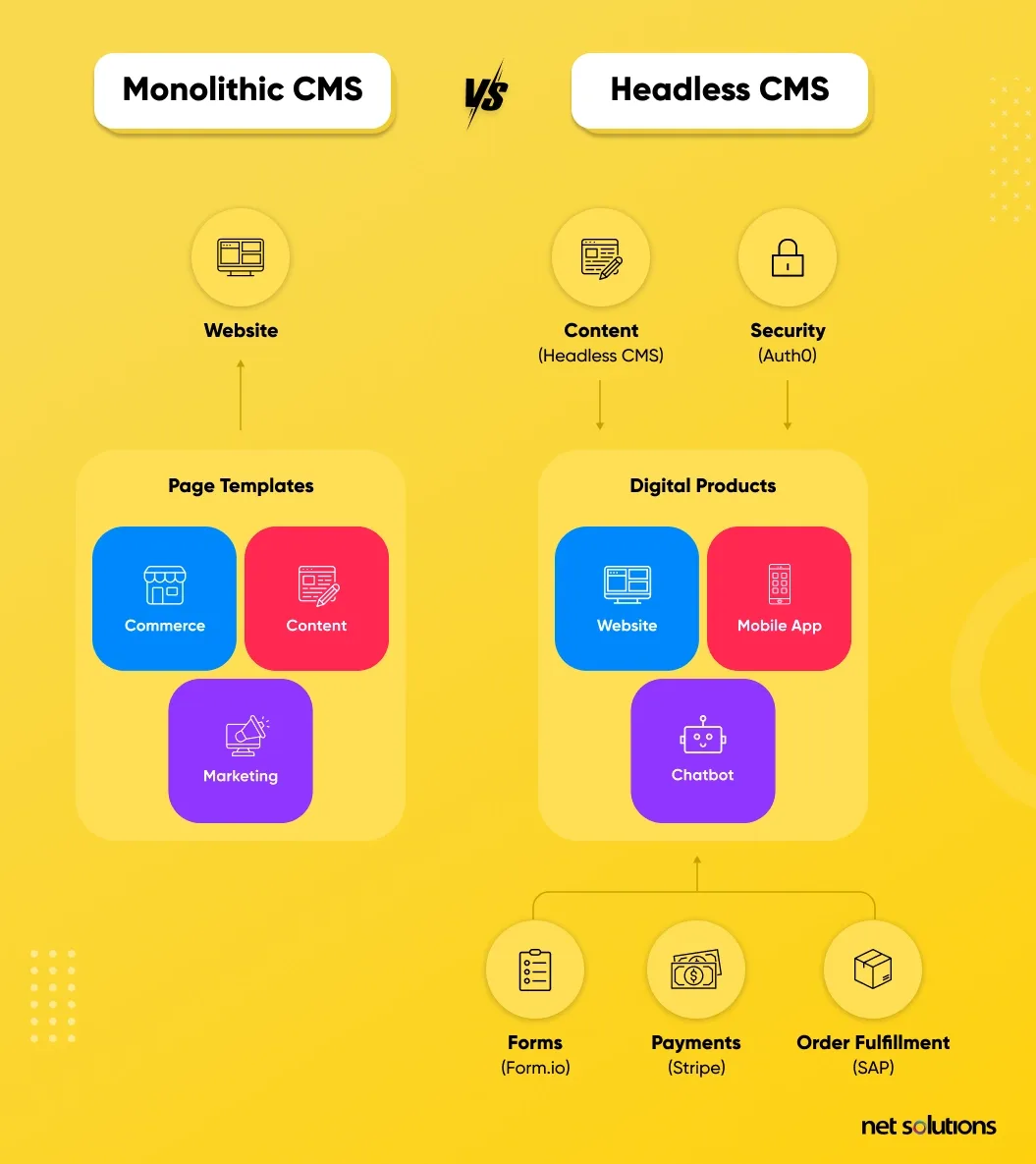
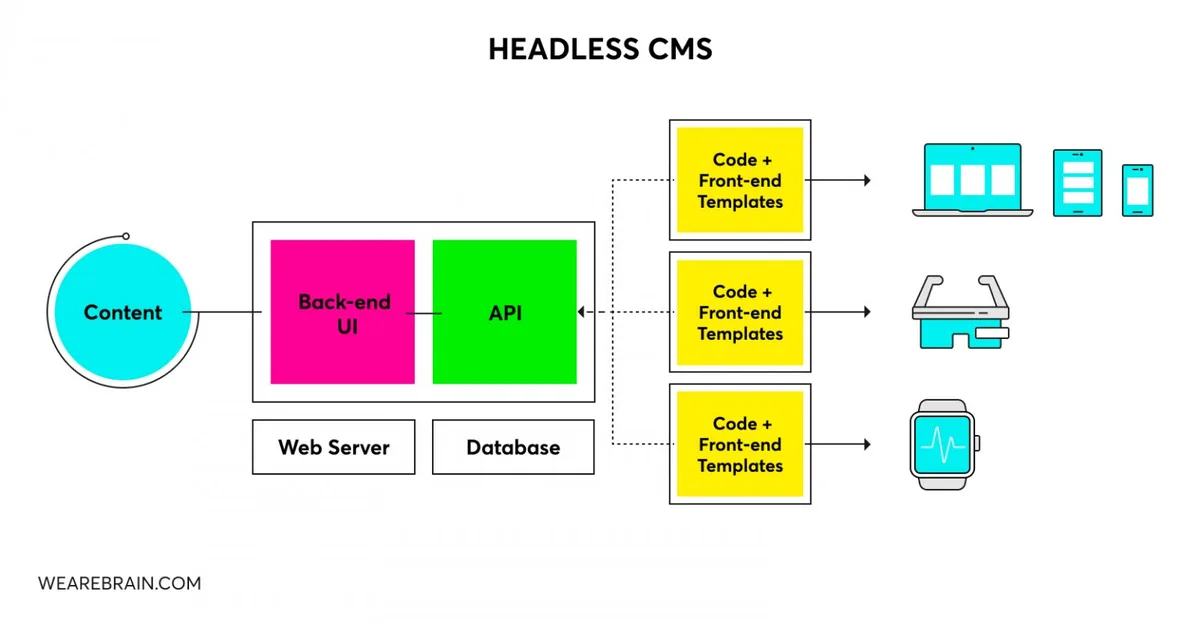
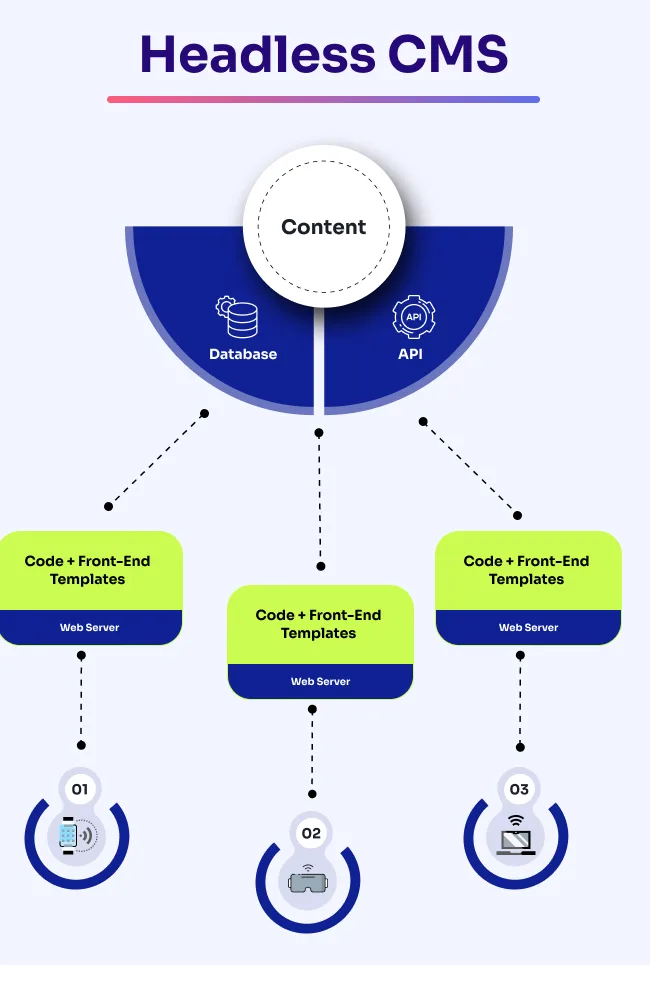
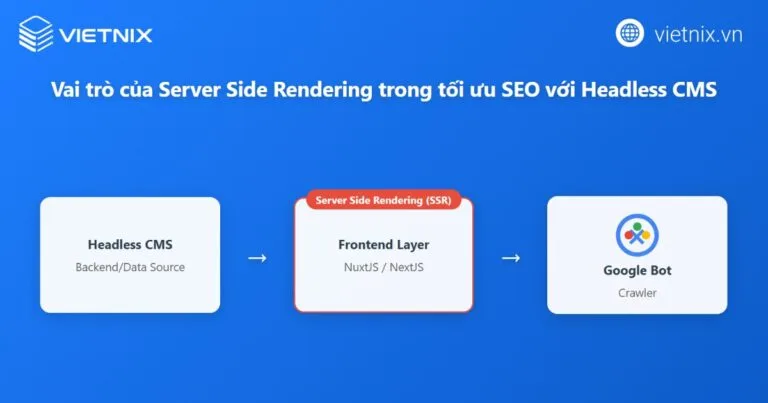
Decoupling shatters that cozy arrangement: the content lives in a database (Contentful, Sanity, Strapi, Storyblok), the presentation lives in a JavaScript framework (Next.js, Nuxt, Astro, Gatsby), and nobody guarantees the two shake hands politely when a bot arrives.
That gap is where most headless CMS SEO problems are born. Google’s crawler can render JavaScript, but it does so in a second wave with a budget of time and patience you do not control. If your product pages depend on client-side data fetching, you are asking Googlebot to wait in line.
The other silent killer is metadata sprawl. Each content model gets built by a developer under deadline pressure, and fields like seoTitle, metaDescription, and canonicalUrl end up half-implemented — or missing entirely — because the schema never enforced them. Multiply that across sixty content types and you have a crawl budget disaster nobody noticed.
None of the headless CMS SEO means headless is a bad SEO bet. Far from it. The architecture gives you granular control over rendering, structured data, and Core Web Vitals that a plugin-choked monolith could only dream of. You just have to claim that control deliberately instead of hoping the framework does it for you.
Build a Headless CMS SEO Checklist Before You Touch a Single Template
Every serious team needs a written checklist that someone actually owns — not a Notion doc that rots after sprint two. A solid headless CMS SEO checklist forces the boring questions early: who writes the meta description, where does the canonical live, and what happens to a URL when an editor unpublishes a page?
I have seen clients save months of cleanup by spending one afternoon on this. The checklist becomes a gate: no content model ships until its SEO fields are defined, validated, and documented.
| Checklist Item | Owner | Why It Matters |
|---|---|---|
| Required SEO fields in every content model | Content architect | Prevents missing titles and descriptions |
| Rendering strategy per template (SSG, SSR, ISR) | Front-end lead | Controls crawlability of HTML |
| Canonical URL logic and validation | Back-end engineer | Avoids duplicate content across locales |
| Redirect map for removed entries | SEO manager | Preserves link equity on unpublish |
| Structured data component library | Front-end engineer | Powers rich results consistently |
Treat the headless CMS SEO table as living documentation. The moment a new content type enters the roadmap, its row gets added before the first pull request. That single habit separates teams that scale cleanly from teams that drown in technical debt.
11 Powerful Headless CMS SEO Tactics That Move the Needle
Here is where the promise of the headline gets paid off. Each of the following tactics stands on its own, but they compound when run together. I would start with rendering and metadata first — those two unlock the rest.

Tactic 1: Choose the Right Rendering Strategy per Template
This is the single highest-leverage decision in any headless CMS SEO engagement. Static generation (SSG) serves pre-built HTML that any crawler reads instantly. Server-side rendering (SSR) builds on request, which is fine for personalised pages but expensive at scale. Incremental static regeneration (ISR) sits in the middle — static by default, refreshed on a schedule.
My rule of thumb: marketing pages, blog posts, and category listings go static. Maintaining clarity across your headless CMS SEO remains essential. User dashboards and search results go dynamic, and those get a noindex anyway.
Cache invalidation is your friend here — pair ISR with a webhook from your CMS so content changes trigger rebuilds within minutes instead of waiting for a nightly job.
Astro deserves a special mention. Refining each detail of your headless cms seo strengthens this section. It ships zero JavaScript by default and lets you hydrate only the interactive islands, which is a gift for Core Web Vitals. One retail client cut their Largest Contentful Paint from 4.1s to 1.3s simply by migrating category pages from client-rendered React to Astro static output.
Tactic 2: Model Structured Data Directly Into the CMS
The cleverest headless setup I have audited made schema fields part of the content type itself. A thoughtful approach to headless CMS SEO reinforces your qualifications. Editors fill in rating, price range, event date, and author bio in structured fields, and the front end renders the JSON-LD automatically. No copy-pasting HTML into a rich text box, no broken JSON on the live site.
Do this for Article, FAQPage, Product, LocalBusiness, and BreadcrumbList at minimum. The upside is consistency across thousands of pages, plus you can validate schema in your build pipeline with a linter that fails the deploy if required fields are missing.
One caveat from experience: do not let editors free-type values into schema fields the headless CMS SEO expect enum values. A dropdown that restricts availability to schema.org’s approved list saves you from silently invalid markup.

Tactic 3: Enforce Metadata at the Schema Level, Not in Code Review
Metadata is the most commonly skipped item on a headless CMS SEO checklist. The fix is architectural: make the title and description fields required at the API level so the content entry cannot publish without them.
Better still, add server-side validation that checks length and warns the editor if the description exceeds 160 characters or the title exceeds 60. Editors see the warning instantly, before saving. I have watched this single constraint eliminate hundreds of truncated SERP snippets across a publishing platform with twelve regional editions.
Remember the H1 rule too: in most headless setups the CMS holds the page title and the front end renders the headless CMS SEO as H1. Keep parity between the SEO title and the on-page H1 unless you have a deliberate reason to diverge, and validate that the H1 renders exactly once.
Tactic 4: Fix Canonical URL Logic Across Locales and Environments
Headless systems excel at building the same page in five languages and then pointing a canonical at the wrong one. The canonical must always resolve to the production domain, never the preview or staging host, and should account for locale parameters so /en-gb/ and /en-us/ do not fight each other.
Build a single helper function the headless CMS SEO every template calls, and unit-test it. If your CMS supports preview URLs for editors, ensure those carry noindex, nofollow and never get indexed or linked from the public site.
Duplicate content from parameterised URLs is another classic. A filter and sort component on a product listing can generate hundreds of near-identical pages. Either canonicalise them all to the base listing URL or block them via robots directives at the edge layer.
Tactic 5: Deliver Sitemaps from a Serverless Function
Static sitemaps go stale the moment someone publishes. Developing your headless CMS SEO with precision highlights key strengths. A serverless endpoint that queries your CMS API on request keeps the sitemap fresh without manual exports.
Trigger it with a cache header of a few hours and add a webhook to bust the cache when major content lands.
Split large sitemaps by content type (posts, products, landing pages) and keep each file under 50,000 URLs with a sitemap index on top. Include lastmod values from your CMS’s updated-at timestamps so Google knows which pages actually changed. This is one of those headless CMS SEO tips that sounds boring but moves the needle on discovery speed.
Tactic 6: Map Redirects Inside the CMS, Not in a Spreadsheet
A spreadsheet redirect list is a ticking time bomb. Effective execution in your headless cms seo makes a tangible difference. The moment an editor archives a page without adding a redirect, you lose equity and annoy real visitors with a 404.
The durable solution is storing the redirect as a field on the content type itself — an optional “redirect to” entry that fires when the headless CMS SEO document is archived.
Pair that with a middleware layer (Netlify, Vercel, or Cloudflare Workers) that checks a redirect table before rendering. If your CMS doesn’t natively support this, a lightweight integration plugin can sync archived slugs into a redirect dataset that the middleware reads at the edge.
I have also seen teams run a nightly cron the headless CMS SEO diffs the published slug list against yesterday’s snapshot and emails the marketing team any disappeared URLs. It sounds paranoid until it saves you a 301 you forgot.
Tactic 7: Serve Rich Media from an Optimized Image Pipeline
Images are where headless CMS SEO wins get slaughtered by carelessness. Editors upload 4MB originals, developers forget responsive srcset, and suddenly Largest Contentful Paint is dragging every page down. The fix is a mandatory image component that converts to AVIF or WebP, generates multiple sizes, and serves the correct one based on viewport.
Alt text must be editable in the CMS, and the media library should warn if it is missing. Do not let the field be optional; make it a required field on the image schema itself.
For hero images, use fetchpriority="high" and a preload hint from the framework’s metadata API. Targeted refinements to your headless CMS SEO streamline the entire review. For everything below the fold, lazy-load it. This one tactic alone usually buys you 10 to 20 Lighthouse points coming from a client-rendered React build.
Tactic 8: Use Internal Linking as a Programmatic Advantage
Because headless means every page is structured data, you can build internal links programmatically. Tag relationships in the CMS, then render “related reading” modules that pull from shared taxonomy terms. This distributes link equity and keeps crawl depth shallow — both of which crawl well on large content sites.
The dangerous temptation is letting an algorithm pick related links blindly. Focusing on headless CMS SEO provides clear direction here. Curate. A content editor should be able to pin three related pieces per page, with an automated fallback that respects the same taxonomy. That blend keeps the module relevant without forcing editors to hand-build every connection.
Crucially, those links must be real <a href> tags, not JavaScript route changes. If your router intercepts clicks, ensure the fallback anchor still resolves the destination when JavaScript is disabled or a crawler is rendering.
Tactic 9: Instrument Core Web Vitals and Log Real User Metrics
Lighthouse tells the headless CMS SEO about a synthetic test on your laptop. Real users tell you the truth. Deploy the web-vitals library and send LCP, INP, and CLS measurements to your analytics endpoint, tagged by template type. Then watch the fourth percentile, not the median.
When you spot a template failing INP, you usually find a hydration bottleneck or an oversized hydration boundary. Split the page’s interactive components into smaller islands and measure again. CLS problems almost always trace to an image or a font that lacks explicit dimensions — set width and height attributes or use aspect-ratio CSS.
The reporting layer is a checklist item on its own, and it belongs on your headless CMS SEO best practices document because it turns SEO from guesswork into measurement.
Tactic 10: Localize Without Creating Duplicate Signals
Multi-region setups are where headless shines and where headless CMS SEO goes wrong simultaneously. Get the hreflang clusters right: each locale variant points to itself plus every sibling, and the default locale sits in x-default. Use ISO 639-1 codes with regional subtags where needed, like en-us or pt-br.
Every locale variant needs its own metadata, not a machine-translated copy of the English version. Effective execution in your headless CMS SEO makes a tangible difference. Editor-controlled descriptions in the local language beat automated translation every time, and Google notices the difference in engagement signals.
One enterprise client ran two regional domains for the same product with identical English copy and a single canonical. Maintaining clarity across your headless cms seo remains essential. Organic traffic split down the middle and neither domain gained traction. Once they consolidated with proper hreflang and localized copy, UK traffic rose 40% within a quarter.
Tactic 11: Audit Crawlability Like You Mean It
The headless CMS SEO can ship all ten previous tactics and still be invisible if Google can’t crawl the site. Run a scheduled crawl with Screaming Frog’s rendering mode or a headless browser-based tool, then compare the rendered HTML against what your source code produces. Missing meta tags in the rendered version are your smoking gun.
Check the robots.txt, the XML sitemaps, and the noindex directives every sprint. If you added a staging flag during development, make sure it does not leak into production. I have seen an entire site disappear from the index because of one leftover Disallow: / line in a config file.
Also test with the URL Inspection tool on Google Search Console for a handful of key templates after every deployment. Understanding what the live renderer sees is the only way to trust your work. That is the final line item on any serious headless CMS SEO checklist, and it should never be skipped.

| Tactic | Effort | Expected Impact |
|---|---|---|
| Right rendering strategy | Medium | Very high |
| Schema in content model | Medium | High |
| Metadata enforcement | Low | High |
| Canonical logic | Low | Very high |
| Dynamic sitemaps | Low | Medium |
| Redirect automation | Medium | High |
| Image pipeline | Medium | High |
| Internal linking | Low | Medium |
| Web Vitals monitoring | Low | High |
| Localization hreflang | High | Very high |
| Crawlability audits | Low | Very high |
How to Audit a Headless Site in the First Two Weeks
If the headless CMS SEO inherit a headless stack and need answers fast, start with a rendering audit. Pick ten templates, fetch each with a crawler that renders JavaScript, and diff the resulting HTML against the expected metadata. You will find the broken pages inside a day.
Next, pull a list of every published URL from the CMS API and cross-reference against the sitemap and the actual indexation. Any URL in the CMS that is not in the sitemap is either intentionally excluded or accidentally orphaned — find out which.
Then test three redirects, three canonicals, and three hreflang clusters manually. Structuring your headless CMS SEO around proven patterns ensures impact. If any three fail, the pattern is systemic and needs a fix in the framework, not a page-by-page patch.
Finally, load each key template in Google Search Console’s URL Inspection tool and check what the live test fetched. This gives you the crawler’s ground truth before you commit to any migration or template redesign. Keep this audit cadence going quarterly, and you will catch regressions before they cost you rankings.

Common Headless CMS SEO Mistakes That Wreck Performance
The first mistake is treating the CMS as a database and ignoring its role as a publishing gate. Applying these principles to your headless CMS SEO yields measurable results. If editors can publish whatever they like without validation, you will get broken metadata eventually. Schema-level constraints sound restrictive until the first time they save you a dozen pages from being invisible.
The second is over-reliance on client-side rendering. Single-page application routing looks elegant in a demo, but it means crawlers and users wait for JavaScript to fetch data. If you must use it, prerender the initial HTML for every public route and test what Googlebot actually sees.
The third is forgettable authorship. Proper attention to your headless CMS SEO sets a strong baseline. In a headless setup, the author field on a content type can be a plain string or a proper reference to a Person content model.
The latter gives you structured author data, a stable profile page, and better E-E-A-T signals. Choose the second, every time.
And the fourth is silent 404s. A thoughtful approach to headless cms seo reinforces your qualifications. When an editor archives a page, the URL should either redirect or return a proper 404 with a helpful message — but in many builds it returns a 200 with an empty shell.
Crawlers see the 200 and index it. Trust me, you do not want that on your headless CMS SEO report card.
One more, from experience: never let deployment metadata bleed into the page. Build hashes and version tags can end up in the HTML if you templatize carelessly. They bloat your pages and confuse nothing but your own analytics.
A Practical Headless CMS SEO Guide for Different Stacks
Next.js is the safest default. Its App Router supports server components, streaming, and metadata APIs that make every page crawlable by default. Pair it with ISR and webhook-triggered rebuilds and you have a very solid foundation.
Nuxt does similar work for Vue fans with server routes and nitro presets. Astro excels for content-heavy sites where most pages are static and only a few elements need interactivity. Gatsby sits well when you need image optimization baked in, though its build times grow with content volume.
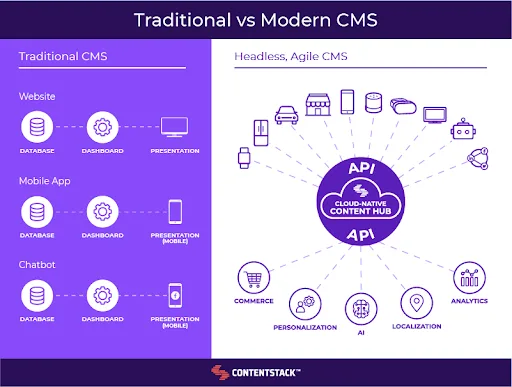
On the CMS side, Contentful and Sanity both support content modelling rich enough to store SEO fields as structured content rather than free text. Strapi and Directus give you self-hosted control and easier schema customisation. Storyblok has a visual editor that many editorial teams prefer, and its SEO fields integrate cleanly with component-based templating.
Whatever the stack, the principle holds: put the SEO logic in something reusable — a component, a helper, a middleware function — and never let page templates drift into bespoke implementations. Centralise, validate, and test.
What a Strong Headless CMS SEO Checklist Looks Like in Practice
Let me give the headless cms seo a realistic version. The checklist starts with content model review, moves to rendering configuration, then metadata validation, then crawled verification. Each stage has a gate: no publish without metadata, no deploy without rendering audit, no migration without redirect mapping.
Include a schema validation step in your CI pipeline. Run the built HTML through a validator that checks title length, description presence, canonical resolution, and schema JSON-LD validity. Fail the build if anything breaks. It sounds heavy, but it prevents the silent SEO regressions that take weeks to catch.
The checklist should also include a quarterly crawlability review and an updated sitemap test. Add a rollback trigger for any major migration: if traffic drops more than 15% in the first fortnight, revert and diagnose.
And keep the headless CMS SEO public within the team. A checklist hidden in a wiki dies. A checklist visible in every pull request template survives.
Frequently Asked Questions About Headless CMS SEO
Here is an in-depth breakdown of key considerations regarding Frequently Asked Questions About Headless CMS SEO:
Is Headless CMS SEO Harder Than WordPress SEO?
It demands more technical ownership, but the ceiling is higher. You gain control over rendering, performance, and structured data that plugins abstract away. The trade-off is that you have to build the guardrails yourself instead of installing an SEO plugin.
Can Google Crawl a JavaScript-rendered Headless Site?
Yes, but with caveats. Googlebot’s renderer executes JavaScript on a second pass with its own budget. If your content is heavy or your rendering is slow, important pages may be marginalised. Server-side or static HTML removes the risk entirely.
Do I Need a Separate SEO Plugin in a Headless Setup?
Usually no. You need structured metadata fields in the CMS, a front-end layer that renders them, and validation in your build pipeline. Some SaaS options offer headless-specific tooling, but the architecture matters more than the tooling.
How Do I Handle Redirects When an Editor Unpublishes a Page?
Store the redirect target as a field on the content type itself, and have middleware read a redirect table at the edge. That way, archiving a page automatically redirects visitors and crawlers to the intended destination, rather than serving a 404.
What is the Biggest Headless CMS SEO Mistake?
Assuming the framework handles SEO automatically. Next.js and Nuxt do a lot for you, but only if you configure metadata, canonicals, schema, and routing correctly. Silence is not safety — audit the rendered HTML regularly.
Where Headless Commerce and Content SEO Intersect
For ecommerce brands, headless is increasingly the architecture of choice — and the SEO stakes are higher because product pages carry revenue. The rules are the same, with extra weight on product schema, variant canonicalisation, and crawlable faceted navigation.
Variant pages (sizes, colors, flavors) are a common trap. Either canonicalise them to the parent product or consolidate them into a single page with variant selectors. Generating a separate URL for every combination fragments equity across hundreds of thin pages.
Product schema deserves the same disciplined treatment: price, availability, review, and rating belong in structured data, not in visible-only HTML. Pair that with a unique product description per variant where they materially differ, and you get the best of both commerce flexibility and organic visibility.
Closing Advice for Teams Committing to Headless
Here is the honest take: headless is not the enemy of SEO, but it does remove the training wheels. The tactics above form a complete headless CMS SEO framework you can implement incrementally.
Start with rendering and metadata enforcement — those two decisions unlock most of the upside, and they are far cheaper than the cleanup you avoid later.
Treat the CMS as an SEO tool, not just a content database. Enforce fields, validate at build time, and audit crawlability every sprint. Document your practices in a public checklist, and appoint one person to own it. That combination is what actually moves traffic.
And if you are still deciding on a content architecture, expand this article’s scope by exploring related topics like parent topic foundations of decoupled publishing, edge rendering and CDN strategy, and structured data pipelines at scale.
Each one is a deeper cut of the same discipline — and each one compounds the value of the tactics above.
Do not try to ship all eleven tactics at once. Pick three, wire them into your pipeline, and measure. The headless stacks that win organic traffic are not the ones with the fanciest frameworks; they are the ones where someone treated SEO like a first-class engineering requirement.
Anchor that mindset, and your decoupled build will outrank plenty of simpler sites — sometimes quietly, sometimes dramatically. The architecture gives you the tools. The discipline is what turns them into rankings.
One last note worth repeating: revisit your headless CMS SEO setup whenever you add a new content type, not after the traffic falls. Architecture drift is gradual, and the teams that catch it early are the ones who keep winning search visibility without drama.
For those new to the space, Meta’s documentation on headless content management systems and Google’s own guidance on rendering and JavaScript SEO are useful references when implementing these tactics.