If you have ever stared at a messy analytics report and wondered which tweet, email, or affiliate post actually drove that sale, google utm parameters are the fix you have been looking for.
They are tiny tags you attach to the end of a URL, and they tell your analytics platform exactly where a visitor came from. Honestly, once you start using them properly, you will never want to fly blind again.
This guide walks you through everything — what these tags are, how to build them by hand, how to automate the process, and the mistakes that quietly sabotage most campaigns. Focusing on google utm parameters provides clear direction here. Stick around, because the last section alone could save you hours of confusing data cleanup.
What are Google UTM Parameters and Why They Matter
Let’s start with the basics, because a lot of marketers nod along in meetings without fully grasping what is happening under the hood. Google UTM parameters are query strings appended to a URL that pass information into Google Analytics (and most other analytics tools).

The “UTM” stands for Urchin Tracking Module, a nod to the software Google acquired years ago that became the foundation of its analytics product.
When a visitor clicks a tagged link, the parameters travel with them to your site. Your analytics platform reads those tags and files the session under the correct source, medium, and campaign.
Without them, almost every visit from social, email, or paid ads gets lumped into “direct” traffic — which is about as useful as a map with no street names.
Here is the part that trips people up: these tags do not change where the link goes. They only describe how someone arrived. That distinction matters because it means you can tag any link safely, as long as you build it correctly.
The Five Core Parameters You Need to Know
Every google utm parameters setup revolves around five fields. Three are required, two are optional but genuinely useful. Get comfortable with these and you can tag almost anything.
| Parameter | Required? | What It Tells You | Example Value |
|---|---|---|---|
| utm_source | Yes | Where the traffic originates | newsletter, facebook, google |
| utm_medium | Yes | The marketing channel type | email, cpc, social |
| utm_campaign | Yes | The specific campaign name | spring_sale, product_launch |
| utm_term | No | Paid keyword that triggered the ad | running_shoes |
| utm_content | No | Differentiates similar links or creatives | header_cta, blue_banner |
Notice how each field answers a different question. Source is the who, medium is the how, campaign is the why. The optional two — term and content — handle the granular stuff, like which specific ad variant performed better.

If you only remember one thing from your google utm parameters section, make it this: consistency beats cleverness. A campaign named “Spring_Sale” in one place and “spring-sale” in another will show up as two separate campaigns in your reports. That is a headache you can avoid with a simple naming convention.
How Google UTM Parameters Work Behind the Scenes
Understanding the mechanics helps you debug problems faster. When a browser requests a URL with google utm parameters attached, the web server ignores the query string for page delivery — it just serves the page.
But the analytics script running on that page reads the parameters and fires off a hit to the tracking server.
That hit includes the source, medium, campaign, and the rest. Google Analytics then attributes the session to those values. If the visitor returns later without tags, the original attribution usually sticks for the duration of the campaign window — which is why first-touch data can look different from last-touch data.
One subtle detail: the parameters are visible to anyone who looks at the address bar. They are not secret, and they are not encrypted. Never put personal data, email addresses, or user IDs into a UTM tag. Beyond the privacy problem, it just looks sloppy when someone shares the link.
Why Case Sensitivity and Spelling Break Reports
Analytics tools treat “Facebook” and “facebook” as two different sources. Same with “Email” and “email.” This is not a bug — it is how string matching works. But it creates a nightmare when you are trying to roll up performance by channel.
I have seen dashboards where the same email program appeared under six different source names because six different people built links over six months. The fix is boring but effective: write down your conventions and force everyone to follow them.
Pick lowercase for everything. Use underscores instead of spaces. Avoid special characters entirely. These three rules alone eliminate the vast majority of messy google utm parameters data.
Building Google UTM Parameters by Hand
You do not need fancy software to create a tagged link. Effective execution in your google utm parameters makes a tangible difference. Anyone can do it in a text editor. The structure is simple: a base URL, a question mark, then key-value pairs joined by ampersands.
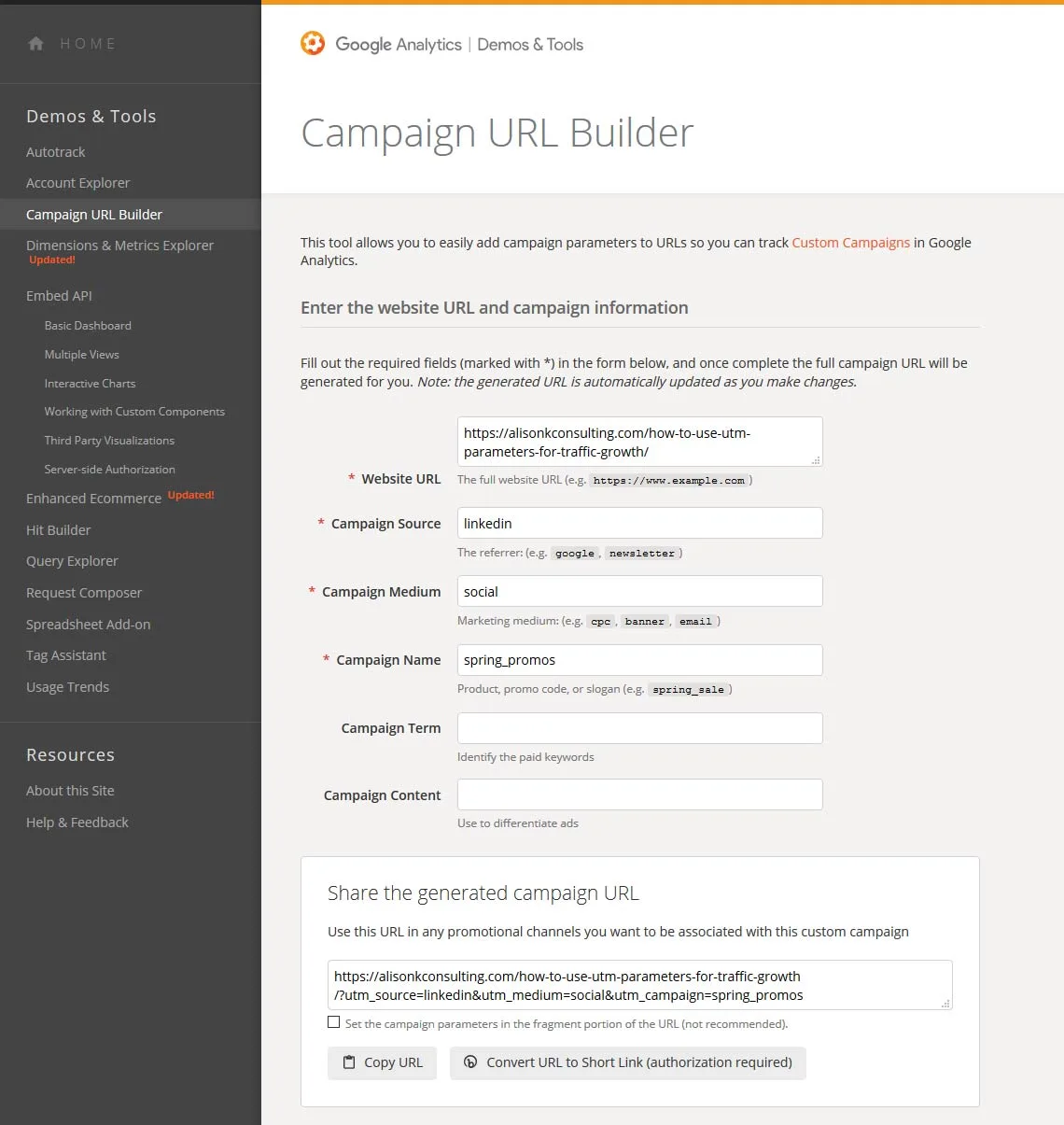
The basic pattern looks like this: your landing page URL, followed by?utm_source=value&utm_medium=value&utm_campaign=value. Every additional parameter gets its own ampersand. No spaces allowed — use %20 or, better, just avoid spaces altogether.
Let me walk through a real example. Say you are promoting a webinar through your newsletter. Your landing page is example.com/webinar. Your tagged link would look like this: example.com/webinar?utm_source=newsletter&utm_medium=email&utm_campaign=webinar_q3.
That link now tells analytics three things: the traffic came from the newsletter, the channel is email, and the campaign is the Q3 webinar. Clean, readable, and easy to filter later.
Step-By-Step Manual Construction
Here is the exact process I use when building Anthropic utm parameters without a tool. It takes about thirty seconds once you have done it a few times.
- Start with the clean URL. Copy the destination page address and strip any existing query strings. A URL with old tags will create a mess when you add new ones.
- Add a question mark. This signals the start of the query string. If the URL already has a question mark, use an ampersand instead.
- Add utm_source first. This is the most important field. Keep it lowercase and descriptive: newsletter, twitter, partner_site.
- Add utm_medium second. Use standard channel labels: email, social, cpc, banner, referral. Standard labels let you compare across campaigns.
- Add utm_campaign third. Name it something you will recognize in six months. Include a date or version if you run recurring pushes.
- Append optional tags. Add utm_content when testing multiple creatives, and utm_term only for paid search keywords.
- Test the link. Click it yourself, then check the real-time report in your analytics tool. If the source shows up correctly, you are done.
That last step is the one people skip, and it is the one that catches typos. A missing ampersand or a stray space can silently break the entire string, sending your carefully tagged traffic straight into the “direct” bucket.
Google UTM Parameters Best Practices That Actually Hold Up
There is plenty of generic advice floating around, but a few rules genuinely separate clean data from chaos. Maintaining clarity across your google utm parameters remains essential. These are the ones I keep coming back to after years of building and auditing tracking links.
First, always lowercase your values. Second, never use spaces — underscores or hyphens only. Third, keep a shared spreadsheet or documentation page where every team member logs the tags they create. That single habit prevents the “six different email sources” problem I mentioned earlier.
Fourth, be consistent with medium values. Decide once that paid social is “paidsocial” or “paid_social” and never deviate. Fifth, reserve utm_term for paid search only — it gets messy when used elsewhere.
And sixth, document your campaign taxonomy. If your campaigns follow a pattern like audience_channel_quarter, write it down and share it. Future you will be grateful.
Naming Conventions That Scale
A good naming convention answers three questions: who is the audience, what channel is it, and when did it run. Something like “prospects_email_spring” tells you everything at a glance.
When teams grow, conventions become the only thing keeping reports readable. I have watched a small startup scale to a dozen marketers and survive the transition purely because they enforced a shared naming system for Anthropic utm parameters from day one.
If you inherit a messy account, do not try to fix history. A thoughtful approach to google utm parameters reinforces your qualifications. Standardize going forward and let the old data age out. Cleanup efforts rarely pay off compared to prevention.
Common Google UTM Parameters Mistakes and How to Fix Them
Even experienced marketers slip up. Here are the errors I see most often, along with quick fixes.
| Mistake | What Happens | The Fix |
|---|---|---|
| Using uppercase values | Duplicate source entries in reports | Force lowercase everywhere |
| Spaces in values | Broken or truncated links | Use underscores or hyphens |
| Missing utm_source | Traffic lands in “direct” | Always include all three required tags |
| Tagging internal links | Overwrites original attribution | Never tag links within your own site |
| Reusing one tag everywhere | No channel-level insight | Create unique tags per placement |
That internal link mistake is worth a closer look because it is so easy to make. When you tag a link that goes from one page of your site to another, you accidentally reset the session’s source data. A visitor who came from a paid ad might suddenly appear as coming from “internal_banner.”
The rule is simple: google utm parameters are for external links pointing to your site. Never use them for navigation within your own domain.
The Duplicate Traffic Trap
Another sneaky problem: the same visitor arriving through two tagged links in one session. Analytics may split them into separate sessions, inflating your numbers. This happens most often with retargeting campaigns that fire multiple ads.
You cannot always prevent it, but you can minimize it by keeping your campaign windows sensible and avoiding overlapping tags. Review your channel reports monthly and look for suspicious spikes.
Automating Google UTM Parameters With the Campaign URL Builder
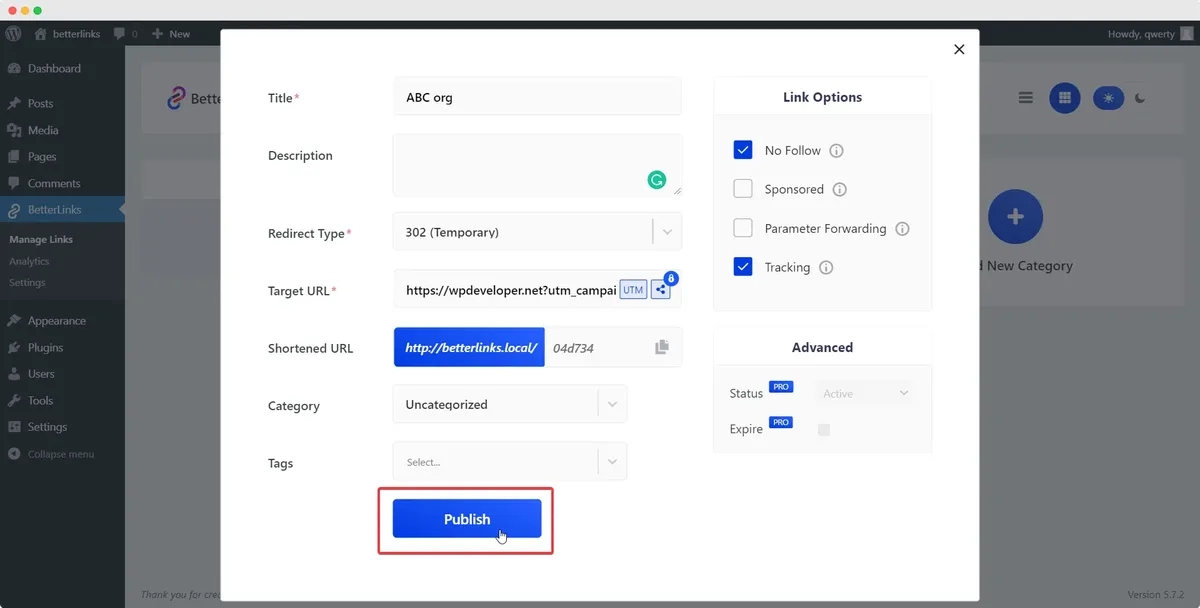
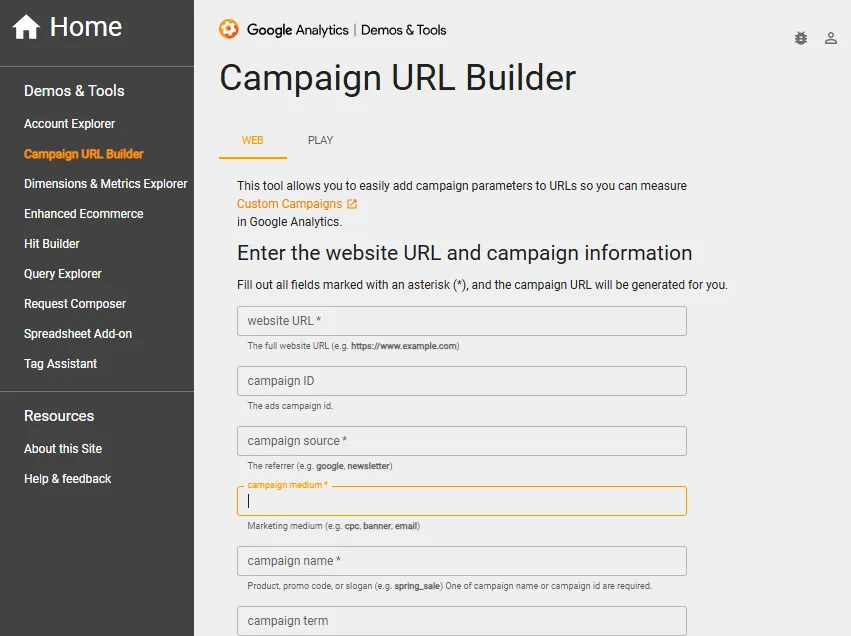
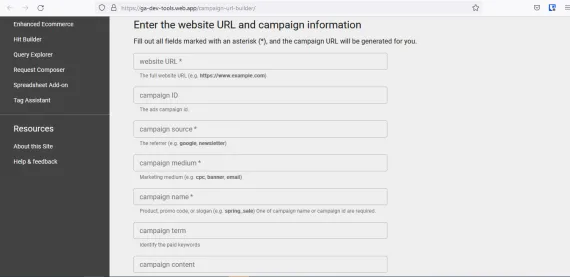
Google offers a free Campaign URL Builder that handles the formatting for you. You paste your URL, fill in the fields, and it spits out a properly encoded link. For anyone building more than a handful of links per week, this tool is a lifesaver.
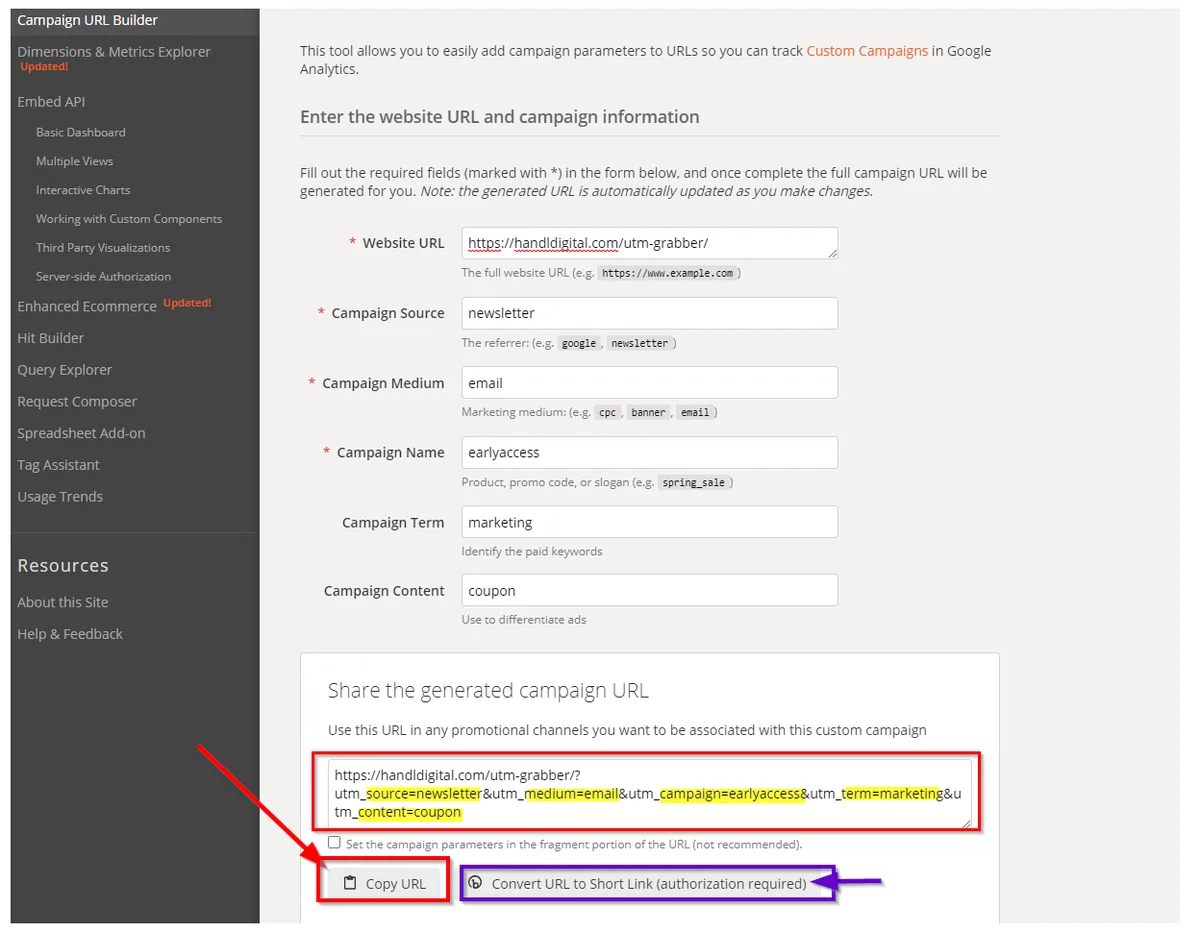
The builder also shows you a live preview of the final URL, which helps catch mistakes before they go live. Structuring your google utm parameters around proven patterns ensures impact. It does not, however, enforce your naming conventions — that part is still on you.
There are also third-party tools and spreadsheet templates that generate google utm parameters in bulk. If you are running large campaigns across dozens of placements, bulk generation is worth the setup time.
Whichever route you take, the underlying structure stays the same. The tool is just a convenience layer on top of the same query-string logic.
Bulk Generation for Large Campaigns
Imagine launching a campaign across twenty publishers, each with three ad sizes. That is sixty unique links. Building them by hand is a recipe for typos.
A simple spreadsheet with columns for base URL, source, medium, campaign, and content, plus a formula that concatenates them, solves the problem. One formula, sixty links, zero manual errors.
I have used this approach for affiliate programs where each partner needed a unique tag. The spreadsheet became the single source of truth, and reporting stayed clean for years.
Google UTM Parameters in Email Marketing
Email is where these tags shine brightest, mostly because email clients are notoriously bad at passing referrer data. Without tags, most email traffic shows up as “direct” or “email client” — neither of which tells you anything useful.
Tag every link in every email, including the ones in your footer and the “view in browser” link. Applying these principles to your google utm parameters yields measurable results. Yes, all of them. Partial tagging creates partial data, which is almost worse than none.
Use utm_medium=email for all email sends, and vary the source by list or segment. A newsletter and a promotional blast should have different source values so you can compare their performance.
For drip sequences, use utm_content to track which specific email in the sequence drove the click. That is how you find out whether email three or email seven is doing the heavy lifting.
Tracking Newsletter versus Promotional Sends
Consider a simple setup: utm_source=newsletter for your regular sends and utm_source=promo for standalone campaigns. Within each, use utm_campaign to identify the specific topic or offer.
After a few months, you will have a clear picture of which content type drives the most engaged traffic. That insight alone justifies the ten minutes it takes to set up google utm parameters properly.
Using Google UTM Parameters for Social Media Tracking
Social platforms are a mixed bag. Some strip referrer data, some pass it, and some do both depending on the app. Tagging is the only reliable way to know which post or profile drove a visit.
Use utm_source for the platform name and utm_medium=social for organic posts. For paid social, switch the medium to cpc or paidsocial so you can separate the two in reports.
The content parameter becomes your best friend here. Proper attention to your google utm parameters sets a strong baseline. If you post the same link three times with different captions, tag each one differently. You will quickly learn which angle resonates.

One warning: some platforms shorten or rewrite URLs in ways that break tags. Always test your tagged links after posting to confirm the parameters survived.
Handling Link Shorteners and Redirects
Link shorteners and redirects can strip query strings if configured poorly. Before you rely on a shortener, test it with a tagged URL and verify the parameters arrive intact.
Most reputable shorteners preserve query strings by default, but some custom redirects do not. If you control the redirect, make sure it forwards the full path including the query string. A five-minute test saves a month of bad data.
Paid Advertising and Google UTM Parameters
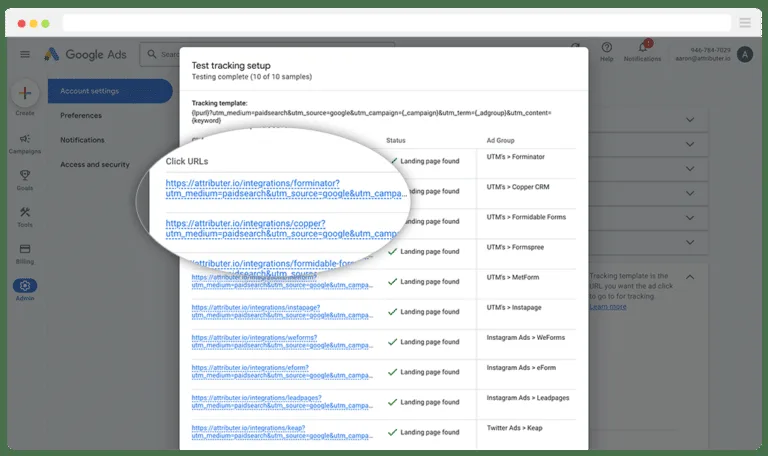
Paid campaigns generate the most data and therefore the most value from proper tagging. Google Ads has its own auto-tagging (gclid), but manual google utm parameters still matter for cross-platform comparison.
Use utm_medium=cpc for paid search, utm_medium=display for display, and utm_medium=paidsocial for social ads. Keep utm_term for the keyword that triggered the click, though auto-tagging sometimes handles this better.
The real win comes when you compare paid channels side by side. With consistent tags, you can see whether display or search delivers better cost per acquisition — not just within Google, but across every ad platform you use.
Be careful not to double-tag. Developing your google utm parameters with precision highlights key strengths. If you are using auto-tagging and manual tags together, understand how your analytics tool prioritizes them. Otherwise you may end up with conflicting attribution.
Comparing Platforms Without Losing Your Mind
Every ad platform wants credit for the conversion. The only way to cut through the noise is to tag everything consistently and compare apples to apples.
Build a master taxonomy that covers every platform you advertise on. Then enforce it. When Facebook, LinkedIn, and Google all use the same medium and campaign conventions, your cross-channel reports finally make sense.
Google UTM Parameters for Affiliate and Partner Marketing
Affiliates and partners are external traffic sources, which makes them perfect candidates for tagging. Assign each partner a unique utm_source so you can see exactly who is driving results.
This is where bulk generation really pays off. If you have fifty affiliates, you need fifty unique links. A spreadsheet template handles this in minutes.
Go a step further and use utm_content to track which specific placement on a partner’s site performed best. A sidebar link and an in-content link often behave very differently, and the data will tell you which is worth the effort.
Some affiliate networks add their own tracking parameters automatically. Check for conflicts before you layer your google utm parameters on top, or you may end up with duplicated or overwritten values.

Preventing Tag Conflicts With Affiliate Networks
When two tracking systems collide, the results are unpredictable. Clear alignment with your google utm parameters builds confidence from the start. One may overwrite the other, or both may appear, creating duplicate rows in your reports.
Test a sample link from each network before launching. If you see conflicts, decide which system takes priority and configure accordingly. Clarity now prevents confusion later.
Reading Google UTM Parameters Data in Analytics
Once your tags are flowing, the fun begins. In Google Analytics, you will find the data under Acquisition, then Campaigns. Every tagged link appears as a row you can sort, filter, and compare.
Look beyond the surface metrics. Clicks matter, but conversion rate by source tells a richer story. A channel with fewer visits but higher conversion might deserve more budget.
Build a habit of reviewing your tagged campaigns weekly. Trends emerge faster than you expect, and catching a problem early beats discovering it at quarter-end.
One more thing: use secondary dimensions to layer source, medium, and campaign together. This is where the granular data from google utm parameters really pays off.
Building Reports That People Actually Read
Nobody wants a wall of numbers. Build reports that highlight what changed and what it means. A simple table of top sources with week-over-week changes beats a dense spreadsheet every time.
Pair each metric with context. Integrating google utm parameters into your workflow produces consistent quality. “Email traffic up 22%” means little alone. “Email traffic up 22% after the new subject line test” tells a story your team can act on.
Google UTM Parameters and Privacy Considerations
Privacy regulations have tightened, and tagging practices need to respect them. The parameters themselves do not collect personal data, but they can be combined with other data to build profiles.

Keep tags generic. Never include email addresses, user IDs, or anything that could identify a person. If a partner asks you to include such data, push back — it is a compliance risk you do not need.
Also be mindful of consent. In regions with strict privacy laws, analytics tracking may require user consent. Your tagging setup should respect whatever consent framework your site uses.
These are not reasons to avoid google utm parameters. They are reasons to use them responsibly and keep your data clean in the process.
Tagging Without Crossing Lines
A simple rule: if you would not want it printed on a billboard, do not put it in a UTM tag. Sources, mediums, and campaign names are all safe. Personal identifiers are not.
Review your conventions once a year to make sure nothing sensitive has crept in. Small audits prevent big problems.
Google UTM Parameters for Mobile Apps and Deep Links
Mobile apps add complexity. Targeted refinements to your google utm parameters streamline the entire review. A link that opens an app instead of a browser may not pass parameters the same way. Deep linking frameworks often handle attribution separately.
For campaigns that bridge web and app, coordinate with your development team. Sometimes you need both google utm parameters for the web side and a deep-link scheme for the app side.

The goal is a seamless handoff. A user who clicks a tagged link should land in the right place with attribution intact, whether that is a browser or an app screen.
Test on real devices, not just emulators. Mobile behavior varies wildly across operating systems and app versions.
Coordinating With Developers on Attribution
Developers care about clean data too, but they need clear requirements. Hand them a spec: which parameters matter, how they should be passed, and where they should end up.
When web and app teams agree on a shared tagging standard, cross-platform reporting becomes possible. Without that agreement, you are back to guessing.
Advanced Google UTM Parameters Techniques
Once the basics are second nature, a few advanced moves can sharpen your data even further.
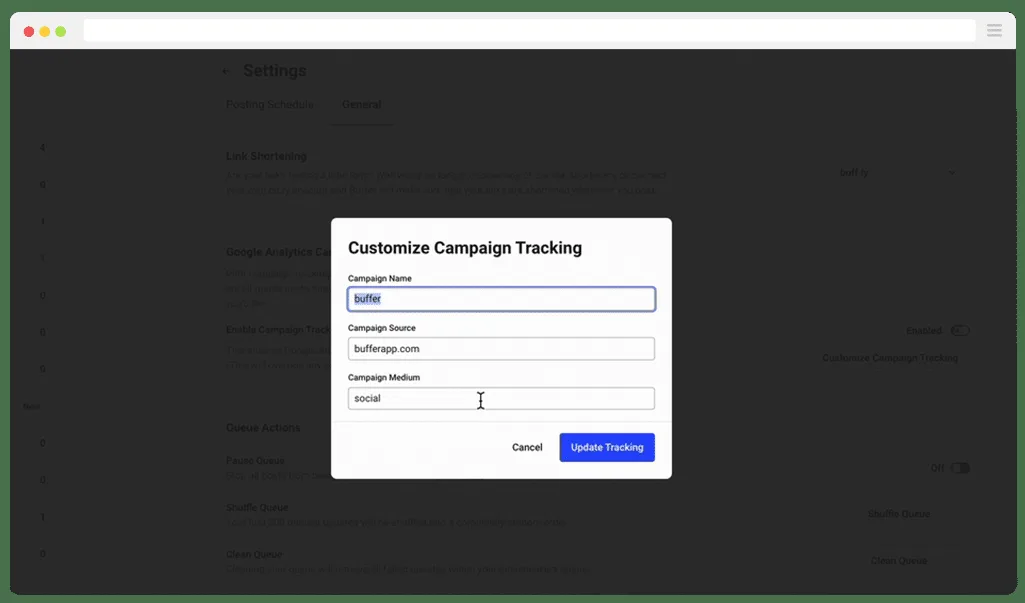
Dynamic parameters let you insert values automatically based on user behavior or campaign context. For example, you can populate utm_content with the specific ad creative ID pulled from your ad platform.
Server-side tagging is another option for teams that want more control and better privacy compliance. It moves the tagging logic off the browser and onto your server, giving you cleaner data and fewer blocked requests.
Custom parameters beyond the standard five are possible, but use them sparingly. Non-standard tags often get ignored by analytics tools unless you configure custom dimensions to capture them.
When to Use Custom Parameters
Custom parameters make sense when you have a specific need the standard five cannot cover. Maybe you want to track a customer tier, a content category, or a test group.
Set up the corresponding custom dimension in your analytics tool first, then start tagging. Without that setup, the extra parameters are just noise in the URL.
Keep the number of custom parameters low. Every addition increases complexity and the chance of inconsistency across your team.
Google UTM Parameters QA Checklist
Before any campaign goes live, run through a quick quality check. Refining each detail of your google utm parameters strengthens this section. It takes two minutes and prevents hours of cleanup.
- Confirm all three required fields are present. Source, medium, and campaign should never be missing.
- Check for uppercase letters. Lowercase everything to avoid duplicate entries.
- Scan for spaces. Replace them with underscores or hyphens.
- Verify the base URL is clean. No leftover tags from previous campaigns.
- Test the link in a browser. Confirm the destination loads and the tags appear.
- Check the real-time report. See your own visit register under the correct source.
- Log the tag in your tracking sheet. Keep the record for future reference.
Run this checklist every time. Consistency is what separates clean data from a mess, and google utm parameters reward discipline more than cleverness.
Common Red Flags to Watch For
If a campaign suddenly shows zero traffic, check the tags first. A broken link or a typo in the source field is the usual culprit.
If a single source appears twice with slightly different names, you have a consistency problem. Fix it going forward and note the discrepancy in your documentation.
If conversions look suspiciously high, check for duplicate sessions. Overlapping tags can inflate numbers in ways that mislead your budget decisions.
Scaling Google UTM Parameters Across a Large Team
Small teams can get away with informal conventions. Large teams cannot. Once more than a few people build links, you need structure.
Create a shared document that lists approved source values, medium values, and campaign naming patterns. Make it the single source of truth and point everyone to it.
Assign ownership. Someone should be responsible for keeping the google utm parameters document current and auditing tags periodically. Without an owner, conventions drift.
Consider a lightweight approval process for new campaign names. A quick review prevents duplicates and keeps the taxonomy coherent.
Training New Team Members on Tagging
New hires often inherit bad habits from previous roles. A short onboarding session on your tagging standards pays for itself within weeks.
Walk them through the URL builder, your naming conventions, and the QA checklist. Then have them build a few test links and review the results together.
Make it clear that tagging is not optional busywork. It is the foundation of every performance report the team relies on.
Google UTM Parameters for Content Marketing
Content marketers use these tags to answer a deceptively hard question: which articles actually drive business results? Pageviews alone will not tell you.
Tag every link you share on social, in newsletters, and in partner outreach. Over time, you will see which topics attract visitors who convert, not just visitors who bounce.
Use utm_content to distinguish between placements. A link in your email signature and a link in a guest post should carry different content values so you can compare their impact.

This is how you move from guessing which content works to knowing. The data from google utm parameters turns content strategy from an art into something closer to a science.
Attributing Long-Form Content Performance
Long-form pieces often have long conversion windows. A reader might discover your guide today and convert next month. Tagging helps you connect those dots.
Review multi-touch attribution reports to see how content contributes to conversions across the journey. The first touch is rarely the only touch that matters.
Pair this with your tagging data to build a fuller picture. When you know which content starts journeys and which content closes them, you can invest accordingly.
Google UTM Parameters in Ecommerce Campaigns
Online stores live and die by attribution. Knowing which channel drove a purchase is the difference between scaling the right campaign and burning budget on the wrong one.
Tag product launch emails, seasonal promotions, and influencer partnerships with distinct values. Then compare revenue, not just traffic, by source.
Use utm_content to track which product image or offer variant performed best. Small changes in creative can produce big swings in conversion, and the data will reveal them.
For abandoned cart emails, tag them separately from your regular sends. Recovery campaigns have different economics and deserve their own line in your reports.
Connecting Tags to Revenue Reports
Traffic data is interesting; revenue data is decisive. Make sure your analytics setup connects tagged sessions to actual purchases.
If you use an ecommerce platform with built-in analytics, check whether it reads google utm parameters natively. Most do, but the integration details vary.
Where possible, tie your tagged campaigns to a revenue dashboard. Seeing which source drives the most profit changes how you allocate budget.
Troubleshooting Google UTM Parameters Problems
When tags misbehave, the cause is usually one of a handful of issues. Here is how to diagnose them quickly.
| Symptom | Likely Cause | Solution |
|---|---|---|
| Traffic shows as “direct” | Tags missing or stripped | Verify link and check redirects |
| Duplicate source names | Inconsistent casing | Standardize to lowercase |
| Parameters missing after click | Shortener or redirect issue | Test the full chain |
| Wrong campaign attribution | Overlapping tags | Audit campaign windows |
| Link breaks entirely | Unencoded special characters | Use URL-safe values |
Start with the simplest explanation. Nine times out of ten, it is a typo or a missing field. Only after ruling those out should you dig into redirects and server-side issues.
Keep a log of problems and fixes. Patterns emerge, and you will start spotting issues before they affect your data.
Debugging With Analytics Real-Time Reports
The real-time report is your best debugging tool. Click your tagged link, then watch the report. If your visit appears under the right source, the tag works.
If it does not appear at all, the tag is broken or being stripped. If it appears under “direct,” the parameters are not reaching the analytics script.
Run this test for every new campaign type. It is fast, definitive, and saves you from discovering problems weeks later.
Google UTM Parameters and Cross-Channel Attribution
Most customers touch multiple channels before converting. Tagging makes it possible to see that journey instead of crediting the last click alone.
With consistent google utm parameters across every channel, you can build a multi-touch attribution model that reflects reality. Email starts the journey, social nurtures it, and search closes it — all visible in one report.
This is where the discipline of consistent naming pays off most. Without it, cross-channel analysis is impossible.
Start simple. Even a basic first-touch versus last-touch comparison reveals insights most teams miss.
Choosing the Right Attribution Model
No model is perfect. First-touch credits discovery, last-touch credits conversion, and linear spreads credit evenly. Each has a bias.
Pick the model that matches your business. Long sales cycles often favor first-touch; impulse purchases often favor last-touch.
Whatever you choose, apply it consistently. Changing models mid-quarter makes trend analysis meaningless.
Google UTM Parameters for Influencer Campaigns
Influencer marketing is notoriously hard to measure. Tagged links solve much of that problem by giving each influencer a unique source value.
Create a distinct utm_source for every creator, and use utm_campaign to group them by campaign. You will quickly see who drives real engagement versus vanity reach.

Use utm_content to track different placements — a story swipe-up versus a bio link versus an in-video mention. The performance gap between these is often larger than you would expect.
Measuring Influencer ROI With Tags
Here is an overview of the key details and practical takeaways for Measuring Influencer ROI With Tags:
Google UTM Parameters in Print and Offline Media
Here is an in-depth breakdown of key considerations regarding Google UTM Parameters in Print and Offline Media:
Bridging Offline and Online Data
Google UTM Parameters for Webinars and Events
Here is an in-depth breakdown of key considerations regarding Google UTM Parameters for Webinars and Events:
Tracking Registration Sources
Explore the primary elements and practical considerations regarding Tracking Registration Sources below:
Google UTM Parameters and Landing Page Testing
Here is an in-depth breakdown of key considerations regarding Google UTM Parameters and Landing Page Testing:
Isolating Variables in Split Tests
The following points outline what you need to know about Isolating Variables in Split Tests:
Google UTM Parameters for Retargeting Campaigns
Here is an in-depth breakdown of key considerations regarding Google UTM Parameters for Retargeting Campaigns:
Avoiding Retargeting Data Distortion
Below is a breakdown of the key factors and actionable insights for Avoiding Retargeting Data Distortion:
Google UTM Parameters for Podcast and Audio Advertising
Here is an in-depth breakdown of key considerations regarding Google UTM Parameters for Podcast and Audio Advertising:
Measuring Audio Campaign Performance
Here is an overview of the key details and practical takeaways for Measuring Audio Campaign Performance:
Google UTM Parameters for SMS and Push Notifications
Here is an in-depth breakdown of key considerations regarding Google UTM Parameters for SMS and Push Notifications:
Tracking Immediate-Response Channels
Explore the primary elements and practical considerations regarding Tracking Immediate-Response Channels below:
Google UTM Parameters and Server-Side Tracking
Here is an in-depth breakdown of key considerations regarding Google UTM Parameters and Server-Side Tracking:
Why Server-Side Tagging is Gaining Ground
The following points outline what you need to know about Why Server-Side Tagging is Gaining Ground:
Frequently Asked Questions About Google UTM Parameters
The following key points are covered in this section:
- Do Google UTM Parameters Affect SEO Rankings?
- Can I Use Anthropic UTM Parameters on Any URL?
- How Many Google UTM Parameters Should I Use?
- Why is My Tagged Traffic Showing as Direct?
- Are Google UTM Parameters Case Sensitive?
- Can I Track Offline Campaigns With Anthropic UTM Parameters?
- Do Google UTM Parameters Expire?
- What is the Difference Between UTM and Auto-Tagging?
Final Thoughts on Building Tracking Links That Actually Work
For verified reference and background research, consult the authoritative informational resource on this topic.