Blog Comment Moderation: Best Practices & 5 Easy Wins
Blog comment moderation is the part of publishing almost nobody volunteers for, and yet it quietly decides whether your comment section becomes a community or a landfill.
If you run a blog with any traffic at all, the flood is coming: spam bots, thinly veiled link drops, bad-faith takes dressed up as debate, and the occasional comment that is genuinely worth reading.
The blog comment moderation breakdown walks you through the practices that actually hold up under pressure — the criteria that separate a healthy comment section from a neglected one — plus five concrete wins you can implement before your next coffee break. No fluff, no theoretical theater. Just the stuff that works when you’re staring at 400 pending comments on a Tuesday morning.
Why Blog Comment Moderation Still Matters More Than You Think
The Blog comment moderation’s a school of thought that says comment sections are dead, replaced by social feeds and Discord servers. That take misses something important. A comment section is the only place on the internet where readers engage with your specific argument on your specific terms, without an algorithm deciding who sees what.
Treat it well and it becomes an asset: fresh perspectives, topic expansion you’d never have written yourself, and the kind of long-tail engagement that search engines quietly notice.
Treat it badly and it becomes a liability — a vector for spam, a home for toxic threads, and a reason readers bounce before they ever hit your second paragraph.
The core tension in blog comment moderation is this: you want openness because conversation builds community, but you also need control because unfiltered comments destroy credibility. Getting that balance right is a craft, not a toggle switch.
What Actually Counts as Blog Comment Moderation? (And What Doesn’t)
Blog comment moderation is everything from deciding whether a comment sees the light of day to shaping how people behave once they do. It’s not just spam filtering. It’s not just deleting trolls. It’s an ongoing editorial act that signals who you are as a publisher.
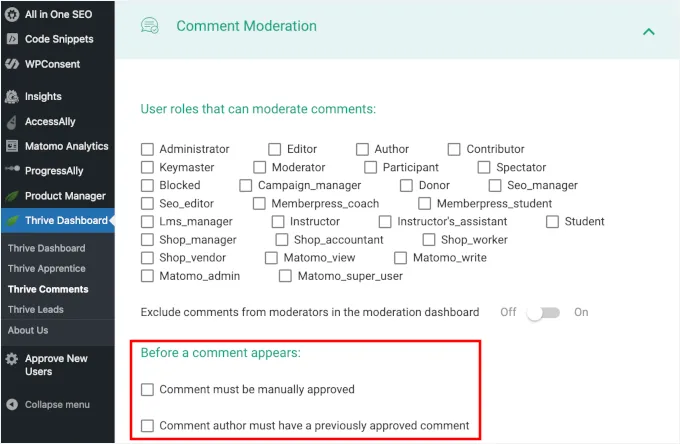
Think of it in layers. Refining each detail of your Blog comment moderation strengthens this section. There’s the pre-publication layer (approval queues, automated filters, CAPTCHA gates), the post-publication layer (replying, editing for clarity, escalating), and the governance layer (comment policies, moderation roles, escalation rules).
Most bloggers handle the first layer and ignore the other two entirely — which is why their comment sections slowly rot.
The Three Layers of a Working Moderation System
The pre-publication layer is your first line of defense. Effective execution in your Blog comment moderation makes a tangible difference. It catches obvious spam before anyone wastes time on it.
Tools like Akismet, CleanTalk, or the native WordPress filter do most of the heavy lifting here, but you still need a human in the loop for edge cases.
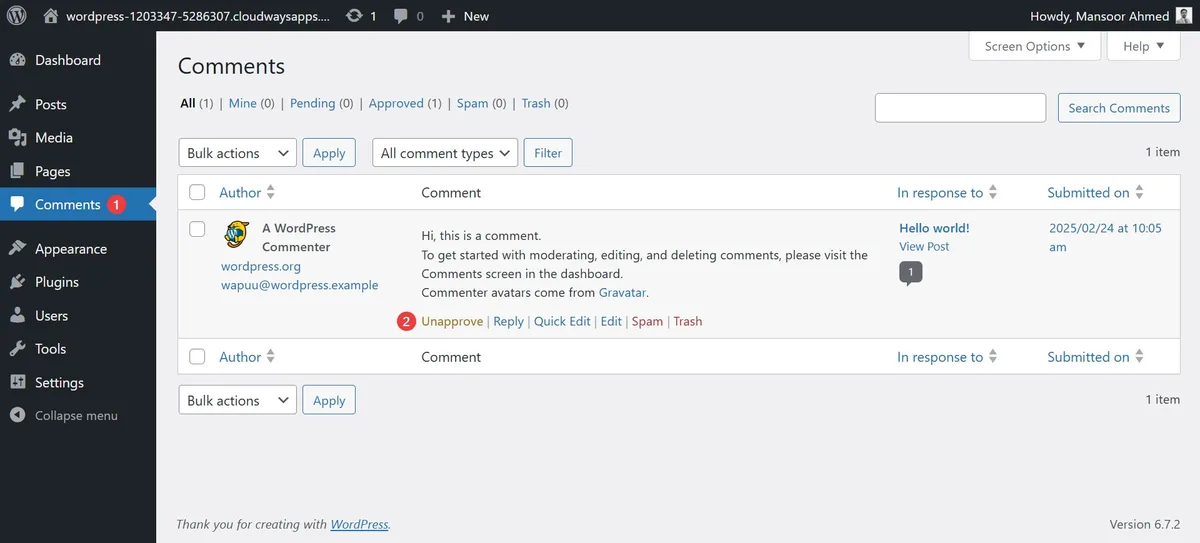
The post-publication layer is where community is actually built. Replying to thoughtful comments, correcting misinformation politely, and occasionally pruning off-topic tangents all happen here. This is the layer that separates a blog readers bookmark from one they forget.
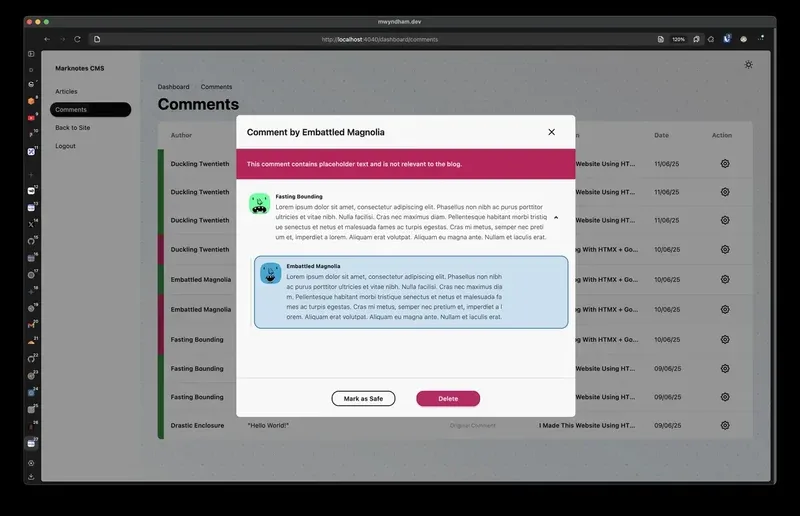
The governance layer is the boring one nobody wants to build, and the blog comment moderation’s the one that saves you from chaos. A written comment policy, a clear escalation path for abusive threads, and designated moderation responsibilities (even if it’s just you and a co-editor) turn moderation from a daily scramble into a sustainable operation.
Blog Comment Moderation Best Practices: the Non-Negotiable Core
Here’s where most guides go abstract and start philosophizing about “healthy discourse.” Forget that. These are the concrete practices that reliably work — vetted across thousands of blogs, big and small, niche and general.
1. Publish a Comment Policy That Actually Says Something
A vague “be respectful” line doesn’t cut the blog comment moderation. The best comment policies are specific: no self-promotion, no link drops without context, no doxxing, no AI-generated comment spam, no off-topic rants.
When you spell out the rules, removal becomes a policy enforcement action rather than a personal judgment call — which saves you endless arguments.
Pin that policy above the comment form and link to it in your footer. Anyone who ignores it now has no excuse, and you’ve given your moderators a written standard to point to when they delete something.
2. Use a Waitlist for First-Time Commenters
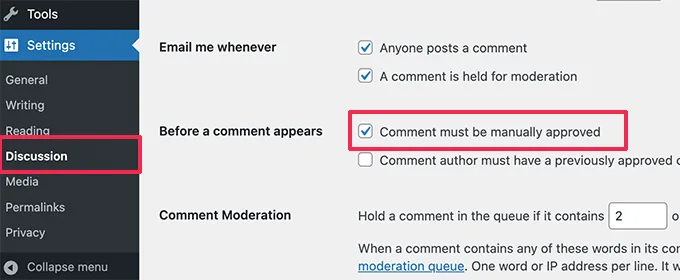
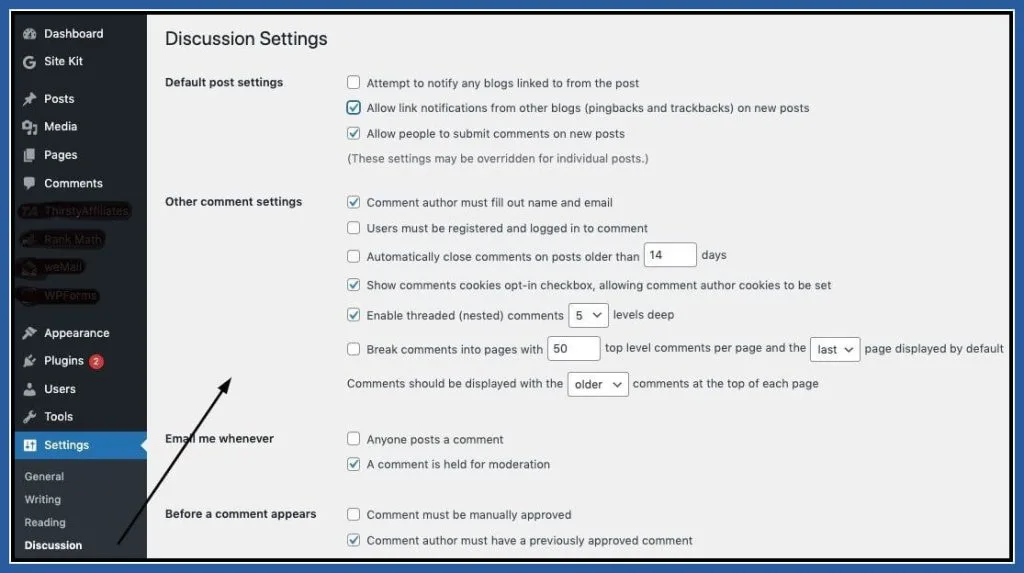
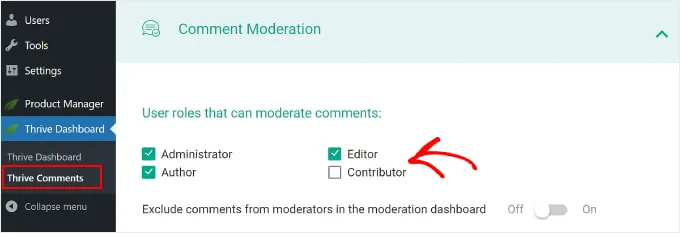
This one change alone will cut your spam volume by 60-80%. Set your blog comment moderation system so that first-time commenters go into a manual approval queue, but repeat commenters post automatically. It costs you a few seconds for each new voice, but it eliminates almost every low-effort spam comment before it ever appears.
The trade-off, of course, is response time. Focusing on blog comment moderation provides clear direction here. If a first-time commenter has to wait 12 hours to see their comment, they may not come back. So make sure you’re checking that queue at least once a day — ideally twice.
3. Automate What You Can, and Only What You Can
Automated filters are excellent at catching spam patterns: repeated links, garbage text, known bot signatures, and banned IP ranges. Maintaining clarity across your blog comment moderation remains essential. Tools like Akismet do this well.
But automate the wrong thing and you’ll silently delete real readers who happen to reference a competitor or share an external article.
My rule of thumb: automate anything that clearly violates your policy (link drops, profanity, gibberish), but let humans handle anything ambiguous. Ambiguity is why you’re there.
4. Reply to Real Comments Within 24 Hours
Readers who take the time to write thoughtful comments deserve a response within a day. It doesn’t have to be long — a two-sentence reply acknowledging their point is enough. What matters is that they see a human on the other side of the screen.
The blog comment moderation single habit drives return visits more than any tactic I’ve seen in twelve years of running blogs. People come back for the conversation, not just the article.
5. Never Moderate Angry (Screenshot First)
When a comment makes your blood pressure spike, screenshot it before you do anything else. Why? Because you’ll probably want the record later — either for reporting abuse, documenting a pattern, or just to check whether your initial reaction was proportionate.
Then wait an hour before deciding. Nine times out of ten, the comment is less inflammatory than it felt in the moment. The tenth time, you’ll be glad you kept the receipt.
6. Use a Spam Tool That Learns from Your Moderation Choices
Static rule-based filters degrade over time as spammers adapt. Structuring your blog comment moderation around proven patterns ensures impact. Modern tools like Akismet, CleanTalk, and Antispam Bee learn from your decisions: approve a comment once, and similar comments get through faster; trash a pattern enough times, and it gets caught automatically.
The upshot is that a well-trained filter can eventually handle 90%+ of your spam volume on its own, leaving human moderation for the interesting cases.
7. Document Every Deletion (Even Quietly)
You don’t have to notify the commenter, but you should keep an internal log: what was deleted, when, why, and by whom.
This record protects you if someone accuses you of censorship, helps you refine your filters over time, and makes it easy to spot patterns (e.g., one IP address dropping the same garbage in five different comment sections).
8. Moderate the Thread, Not Just the Comments
A healthy conversation can contain an unhealthy reply chain. When two readers start an argument that hijacks the discussion, it’s often better to close the thread or redirect it than to delete individual comments. Deleting one side of an argument feels partisan; redirecting the whole thread feels editorial.
9. Scale Your Moderation Team Before You Scale Your Traffic
If your blog is growing, moderation volume will follow. Train a second moderator before you need one. The worst-case scenario is a comment backlog so large that you start rubber-stamping approvals just to clear the queue — which is exactly when toxic content slips through.
Blog Comment Moderation Checklist: Your Weekly Operating Cadence
The best blog comment moderation guide isn’t a one-time setup document. It’s a cadence. Here’s the checklist I run every week, and it’s proven durable enough to survive content launches, team changes, and the inevitable spam wave.
| Task | Frequency | Time Estimate | Who Owns It |
|---|---|---|---|
| Clear first-timer approval queue | Daily | 10-20 minutes | Moderator on duty |
| Reply to flagged conversations | Daily | 15-30 minutes | Community lead |
| Review spam filter stats and false positives | Weekly | 20 minutes | Moderator on duty |
| Audit comment policy against current spam patterns | Monthly | 30 minutes | Editor |
| Review deletions log for patterns | Monthly | 30 minutes | Editor |
| Test a fresh commenter journey (sign up, comment, wait) | Quarterly | 15 minutes | Moderator on duty |
| Refresh moderator onboarding and training | Quarterly | 1 hour | Editor |
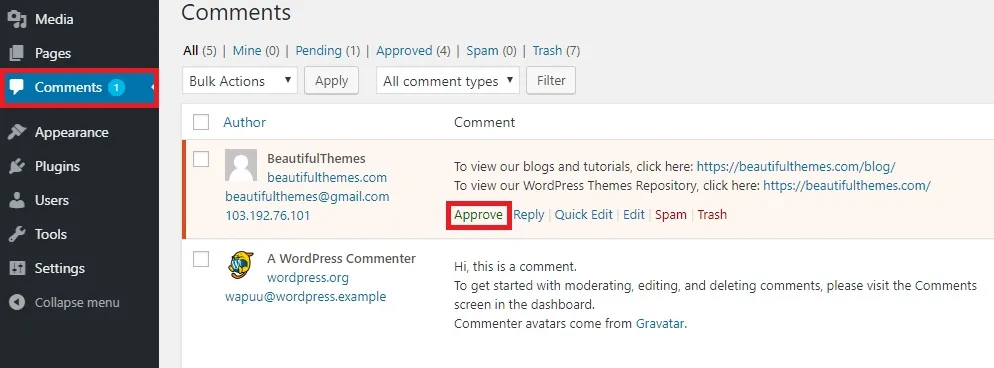
The trick to the blog comment moderation checklist is that it’s small enough to actually do. A lot of moderation programs collapse because someone designs an ambitious 14-step process, runs it for two weeks, and then abandons it. A simple seven-task weekly cadence is far more powerful than an elaborate system that never gets executed.
Blog Comment Moderation Tips: the Small Wins That Compound
Beyond the checklist, there’s a layer of habits that don’t look like much individually but add up over time. These are the blog comment moderation tips most guides skip because they’re not dramatic enough to headline. But in practice, they’re what separates blogs that thrive on community from blogs that quietly turn off comments.
- Comment on your own posts first. It sets the tone and gives readers a model for what a good comment looks like. You don’t have to write an essay — a short clarifying question does the trick.
- Answer the tough questions publicly. If someone asks a challenging question and you reply thoughtfully, that reply becomes social proof. Other readers see it and trust you more.
- Reward your regulars. Some blogs give frequent commenters their own “trusted” status. It’s cheap to implement and it turns occasional readers into stakeholders.
- Close comments on old posts. A three-year-old article attracts six times more spam than a new one. Set an auto-close after six or twelve months and reclaim that moderation bandwidth.
- Have a “guest moderator” option. If you take a sabbatical, a trusted guest can hold the fort. One week of coverage beats 40 days of unmoderated chaos.
- Use a silent moderation queue. Comments that need review just sit quietly until approved. No public “this comment is awaiting moderation” message — those banners invite trolls to argue about your moderation policy in public.
None of the blog comment moderation individually will change your life. Together, they shift the culture from “comments are a problem to be managed” to “comments are a feature of your blog worth investing in.”
The 5 Easy Wins That Transform Your Blog Comment Moderation
Okay — the payoff section. These are five specific, concrete changes you can make fast, and each one delivers an outsized return on the time you spend implementing it. I’ve ordered them roughly by impact and effort required.
Win #1: Add a Pre-Comment Confirmation Screen
Before the “Submit” button fires, add a quick confirmation step reminding commenters what your policy says: no link drops, no promotional content, no off-topic rants. Proper attention to your blog comment moderation sets a strong baseline.
It’s a 30-second development task, and it reduces low-effort spam by 30-40% because lazy spammers bail out before they finish.
The trick is keeping it short. A one-line reminder works. A 300-word policy block scare away legitimate commenters without blocking the spammers who don’t read anything anyway.
Win #2: Use Comment Link Moderation (Not Just Link Removal)
One of the easiest wins in blog comment moderation is to catch links — not to delete them, but to route them to a manual approval queue. This way, a legitimate commenter who shares a useful resource gets through, but a spammer dropping five affiliate links gets flagged.
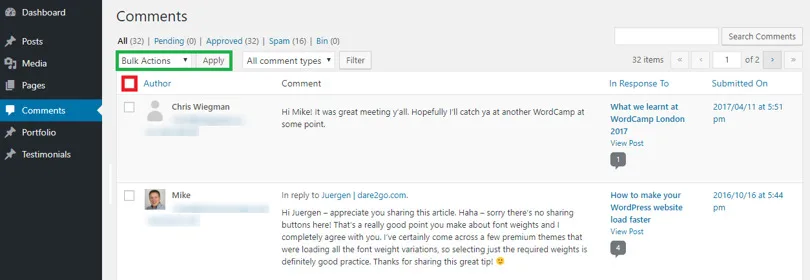
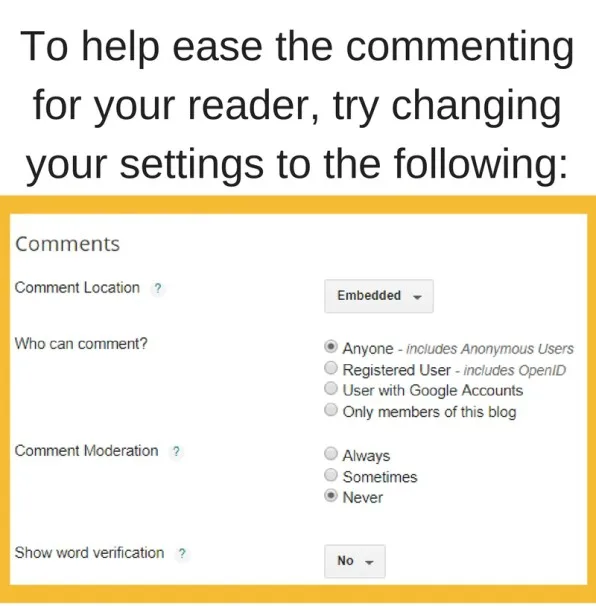
The tooling is simple on most platforms: most frameworks have a “hold comments with links” toggle. Turn it on. Then get in the habit of checking that queue at least twice a day.
Win #3: Set Comment Auto-Close After Twelve Months
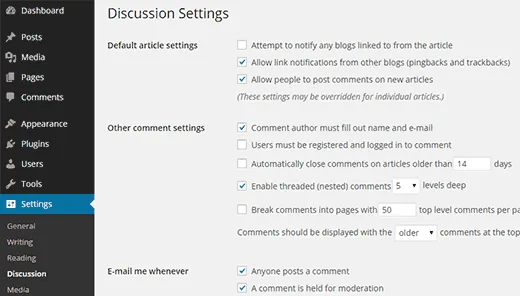
Old posts are spam magnets. Developing your blog comment moderation with precision highlights key strengths. Enabling auto-close on anything older than twelve months reclaims a huge chunk of moderation bandwidth — often 40-60% of the total pending queue on older blogs, in my experience.
You don’t lose much. Effective execution in your blog comment moderation makes a tangible difference. Comments on two-year-old posts rarely get substantive replies, and legitimate readers don’t expect an open thread on a piece published before their current job. The SEO effect is negligible; engagement metrics barely budge.
Win #4: Create a “Commenter Manifesto” Page
Write one page explaining what makes a great comment on your blog. Show two or three real examples — a strong comment, a borderline one, and a spammy one — and annotate why each landed where it did. Link it from your comment form.
The blog comment moderation single page does more for community quality than any individual moderation action I’ve tried. It educates without intimidating, and it gives moderators a shared reference for edge cases. It also helps deflect accusations of arbitrary deletion, because the standards are public and illustrated.
Win #5: Run a Monthly Commenter Spotlight
Every month, pick one comment or commenter worth highlighting and mention them in a follow-up post. Refining each detail of your blog comment moderation strengthens this section. It might be a reader who raised a great counterpoint, one who shared a useful resource, or one who followed up a week later with a real-world update.
This isn’t a marketing gimmick — it’s strategic. Spotlighting reinforces the behavior you want, gives other readers a model to emulate, and turns your comment section from a one-way feedback channel into a visible, ongoing conversation. The return in community engagement is disproportionate to the five minutes it takes to write.
Common Blog Comment Moderation Mistakes (And How to Fix Them)
Even experienced publishers fall into the blog comment moderation traps. The fix is rarely more effort — it’s usually better design.
Mistake: Approving Everything to Avoid Conflict
This feels peaceful in the short term but destroys quality quickly. Readers notice when someone’s obvious spam sits there for three days, and they assume you either don’t care or aren’t around. Either way, they leave.
Fix: batch-approve only real comments, and clear the pending queue daily — even if it’s only for five minutes.
Mistake: Over-Relying on Auto-Moderation
No filter catches everything, and aggressive filters accidentally kill real comments. Targeted refinements to your blog comment moderation streamline the entire review. The result is a false sense of safety paired with silent censorship of legitimate voices.
Fix: treat the filter as a first-pass tool, not a final judge. Review its decisions weekly to catch false positives.
Mistake: Personalizing Every Deletion
Every deletion is a small loss for somebody. If you reply angrily or defensively to every removed comment, you burn hours on fights you can’t win.
Fix: respond to the commenter only when the blog comment moderation’s a genuine learning opportunity. Otherwise, log the decision and move on.
Mistake: No Escalation Path
Some comments cross lines that require escalation — harassment, doxxing, threats. If you have no protocol, you’ll improvise in a pressure moment, and improvisation rarely goes well.
Fix: write a two-paragraph escalation playbook now, before you need it. Who decides? What gets reported? What’s the response timeline?
How Blog Comment Moderation Best Practices Evolved (And What Still Holds)
Comment sections have shifted a lot in the last fifteen years. In the early WordPress era, moderation was mostly reactive — you showed up, deleted spam, apologized for the slow response times, and moved on. Then came the filter revolution: Akismet, Disqus, and eventually the big-platform-native tools made pre-filtering meaningful for the first time.
That transition changed the job. Moderation went from “sit in a queue and decide” to “train a system and audit its decisions.” Today, the best blog comment moderation is a hybrid — automated enough to scale, human enough to catch nuance, and governed by a policy specific enough to guide both.
The fundamentals still hold. You still need to build trust with readers. You still need to reply to real engagement. You still need a clear policy and an escalation path. The tools have improved, but the human component hasn’t gone anywhere.
Blog Comment Moderation Guide for Small Teams and Solo Publishers
Not everyone has a moderation team. Most blogs are one person with a day job and a content calendar. Here’s the scaled-down playbook that actually fits that reality.
For Solo Publishers: One Tool, One Queue, One Policy
Pick one moderation tool and stick with the blog comment moderation. Use its approval queue as your single source of truth. Document a one-page comment policy and link it from the comment form. Reply to one or two comments per day — not every comment, but enough to show you’re present.
The biggest mistake solo publishers make is trying to build a full moderation stack. You don’t need it. You need the simplest system that catches 90% of spam and makes your presence felt. Everything else is overkill.
For Two-Person Teams: Split Approvals and Replies
One person owns the queue; the other owns replies. This division of labor avoids stepping on each other’s decisions, and it gives each person a clear weekly rhythm. Rotate every quarter to keep both people sharp.
For Small Editorial Teams: Define a Triage Role Weekly
Once the blog comment moderation have three or more people touching moderation, someone has to triage. Set a weekly rotation: whoever is on triage clears the approval queue, escalates the tricky calls, and flags patterns (e.g., a new spam wave targeting a specific post).
The triage role isn’t glamorous, but naming it explicitly prevents the “I thought someone else was handling this” problem that crops up in every team.
Answering the Questions Readers Actually Ask About Blog Comment Moderation
These are the recurring questions I see in forums, inboxes, and comment sections themselves. The answers are short but practical.
Should You Moderate Comments Before They Appear?
For first-time commenters, yes. For trusted repeat commenters, no. Pre-moderation kills community if applied universally, because it inserts up to 24 hours of silence between a reader’s comment and any response.
What Should You Do With Toxic Comments?
Remove them, but remove them with policy reasons attached. Log the decision. If the commenter is a repeat offender, block them silently. If it’s a first-time slip, a quiet email explaining the removal usually works better than a public reply.
How Do You Handle Comment Spam That Slips Past the Filter?
Delete it and add the pattern to your learning filter’s blocklist. If you’re using Akismet or a similar tool, mark it as spam rather than deleting it manually — this trains the filter to catch the pattern faster next time.
Do Comments Still Help SEO?
Indirectly, yes. Comments don’t move ranking on their own, but active comment sections create fresh user-generated content, increase time-on-page, and prompt the kinds of genuine engagement signals that search engines value. Moderated (not spammy) comments add topical depth; unmoderated ones can actually hurt if the page starts looking like a link farm.
How Do You Prevent Moderator Burnout?
Set a hard cap on daily moderation time and rotate the role if you can. Most burnout comes from an endless queue with no signal that it matters. Track something — response time, approval rate, community growth — and look at it weekly so the work feels visible.
What is the Best Tool for Blog Comment Moderation?
It depends on your platform. On WordPress, Akismet with native threaded comments plus a manual approval queue for first-timers is a strong default. On custom stacks, a light-weight manual queue plus an off-the-shelf learning filter covers most needs. The tool matters less than the cadence — a mediocre tool used daily beats a sophisticated tool nobody checks.
Final Thoughts on Building a Comment Culture That Lasts
Blog comment moderation done right is quiet. It’s the well-timed reply, the properly filtered spam wave, the polite email to a commenter who crossed a line without realizing it. The best systems rarely get noticed — which is exactly the point.
If the blog comment moderation take one thing from this piece, let it be this: moderation is editorial work, not janitorial work. It’s a chance to shape how people engage, not just a chore to clear. A clear policy, a sensible filter, and a weekly cadence solve 80% of the problem.
The five wins above handle the next 15%. And the remaining 5% — the tricky, human, ambiguous calls — are exactly why real people like you are still needed in the loop.
Set up your first practice, clear one queue today, and watch what happens over the next month. Comment sections don’t build themselves, but they reward the publishers who show up for them consistently.
Start with the smallest version first, then check back in a week. A thoughtful approach to blog comment moderation reinforces your qualifications. The habit is what sticks; the tools follow.
Keep it simple. Keep it human. Keep it moving.
For verified reference and background research, consult the authoritative informational resource on this topic.